
TabbitTabbit

Verdict-first review

Comet Browser Review

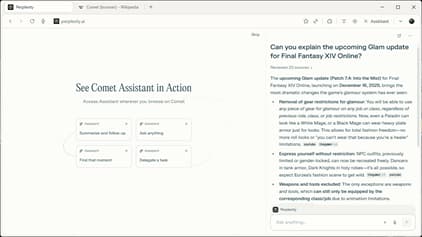
Comet is Perplexity’s bet on an AI-native browser: a conversational agent that can shop, search, and summarize while you browse. After reviewing public coverage, first-hand reports, and store feedback in 2025–2026, the concept is compelling—but desktop maturity, password management, and bookmark migration are still catching up.

Editorial verdict

A novel AI-agent browser for quick tasks—check platform fit and data comfort before committing

Reviewers consistently praise Comet’s agent-led search and shopping flows, its lightweight feel, and the Perplexity search backbone. The caveats are practical: no built-in password manager, limited bookmark migration, an Android-first/mobile-heavy rollout, and AI actions that still need human checkpoints.

Agent novelty & Perplexity searchStrong
Cross-platform desktop maturityMixed / maturing
Security, privacy & migration toolingWatch & verify

Jump to proof sections

How we read a browser review

Comet Browser review rubric: signals we actually test

Good reviews separate “demo delight” from daily reliability. Use this checklist while you run Comet on a real work sprint—not a 10-minute tour.

SignalWhat we look forComet read in 2026
Agent usefulnessCan the browser actually complete multi-step tasks (shop, search, compare) without brittle failures?Strong for quick search-to-memo and shopping-style flows; treat purchase/account actions as human-in-the-loop.
Platform & form factorIs the desktop experience on par with mobile, and does it cover both macOS and Windows?Android app is live and polished; desktop rollout has been more limited and staggered—verify official download pages.
Security & privacy postureIs page context handled transparently, and are sensitive actions clearly gated?Perplexity’s data handling is generally trusted, but an AI that can click on your behalf raises policy questions—read disclosures.
Migration frictionCan you bring passwords, bookmarks, and extensions from Chrome/Edge/Safari?Store reviews and early reports flag missing password manager and incomplete bookmark import as real blockers.
Pricing realismDoes the free tier cover daily AI usage, or will you hit a paywall mid-week?Freemium with paid expansion is expected; model your query volume before standardizing a workflow.

Balanced scorecard

Comet Browser pros, cons, and bottom line

Pros reviewers agree on

  • AI agent woven into browsing, not just a sidebar—good at search, summaries, and shopping-style tasks.
  • Perplexity search backbone gives fast, citation-friendly answers.
  • Lightweight and snappy for focused work, often faster than Chrome in early tests.
  • Clean, minimal interface that keeps the page front and center.
  • Strong mobile / Android execution if your workflow is phone-first.

Tradeoffs to plan for

  • No built-in password manager and limited bookmark migration, according to Play Store and early reviews.
  • Desktop availability (macOS / Windows) has been staged and narrower than mobile.
  • AI actions that touch accounts or carts need careful approval policies.
  • Single-vendor AI stack: less flexibility if you want to compare GPT, Claude, Gemini side by side.
  • As a newer browser, extension and enterprise-policy support trails Chrome/Edge.

Bottom line: Comet Browser is worth a look if you want an AI agent that shops and searches for you, especially on mobile. If your main computer is a Mac or PC, or if you need password management, multi-model choice, and guarded cross-site automations, test Tabbit on macOS & Windows before you settle.

Fit cards

Who should standardize on Comet Browser?

Strong fit

You live on mobile and want an AI shopping/research assistant

You want quick answers, shopping help, and search summaries on Android, and you are comfortable with a young browser.

Try Tabbit too

You work on desktop and need multi-model + guarded agents

You need macOS and Windows parity, multi-model lanes, and explicit checkpoints before AI touches sensitive flows.

Hybrid

Use Comet for quick mobile lookups, Tabbit for desktop delivery

Many users keep a lightweight AI browser for on-the-go search and Tabbit for research sprints that need execution and control.

From review to workflow

Where Tabbit meets the Comet Browser review reader

Tabbit is an AI-native browser for parallel human + agent browsing: keep evidence open while assistants propose summaries, deltas, and next clicks—with explicit approvals.

Download Tabbit free on macOS and Windows if your Comet Browser review homework surfaced “great agent idea, but I need a mature desktop experience and safer automations.”

  • Native macOS and Windows clients with vertical tabs and smart workspaces.
  • Multi-model choice: GPT, Claude, Gemini, DeepSeek, Kimi, Qwen, GLM, MiniMax, and more.
  • Agent Mode runs in isolated tab groups, with checkpoints before actions touch accounts or carts.
  • Knowledge-base bookmarks that stay searchable even if the original page goes offline.

FAQ

Comet Browser review FAQs

Comet is an AI-native browser from Perplexity built around an agent that can search, shop, and summarize while you browse. It is positioned as a new kind of web client where conversation and action happen together.

Done with this Comet Browser review? Try Tabbit free

Keep the AI-agent idea you liked—add mature desktop clients, multi-model lanes, and human checkpoints when work gets serious.