
SAFETY CHECK · EVIDENCE LEDGER · AUGUST 2026

Is Vivaldi Browser Safe?

Generally, Vivaldi is a legitimate mainstream browser with a Chromium security foundation, phishing and malware warnings, and a published privacy model. That is a bounded answer—not a promise of perfect security, privacy or anonymity. Your version, extensions and settings still matter.

THE SHORT VERDICT

Safe enough for ordinary browsing when downloaded from Vivaldi and kept current. Read the privacy trade-offs and tune the parts you control before treating it as a fit.

Security baseline: documentedPrivacy: boundedSetup: user-controlled
Real Tabbit Browser window showing an article beside an AI summary sidebar, used to explain Tabbit’s productivity focus rather than Vivaldi security
03 · SETUP

Your choices change the result

THREE LENSES

“Safe” is three questions, not one

Security protects against malicious software and sites. Privacy limits collection and tracking. Configuration decides which protections are active. Mixing them produces confident but misleading browser advice.

01

01 · SECURITY

A credible Chromium baseline

Vivaldi documents an Extended Stable Chromium channel, relevant security patches and Google Safe Browsing checks for known phishing and malware sites. Keep the browser current; no browser catches every new threat.

02

02 · PRIVACY

Privacy with a documented boundary

The policy says browsing history, typed searches and downloads stay in the client profile, while daily installation metadata and optional feature requests still exist. Private windows do not make you anonymous to sites or your ISP.

03

03 · SETUP

Your choices change the result

Tracker/ad blocking has selectable levels, Safe Browsing and search suggestions involve separate services, and extensions bring their own code and permissions. A stock install and a hardened profile are not the same product experience.

THE EVIDENCE LEDGER

What the documents support—and what they do not

This is an evidence summary, not a score. “Documented” means the claim appears in a first-party document we checked; it does not mean the protection is universal or independently verified here.

SignalWhat is documentedPractical meaningRead as
Chromium & updatesVivaldi says its Extended Stable channel gets feature updates every 8 weeks; relevant security patches can arrive off-schedule.A Chromium version number that looks older is not, by itself, proof of an unpatched browser. Updates still need to be installed.First-party claim
Phishing & malwareVivaldi says desktop and Android use Google Safe Browsing to check known suspected phishing and malware sites.Warnings add a useful layer; they cannot predict every newly compromised or malicious site.First-party claim
Tracker & ad blockingThe help page describes no blocking, block trackers, and block trackers plus ads, with per-site exceptions and editable lists.Do not assume a blocker level from the product name. Check the setting and the list sources that your profile actually uses.First-party docs
Sync encryptionVivaldi says sync entries are encrypted in the browser with an encryption password that is not sent to Vivaldi; sync metadata is still stored.The password is important. Save the backup key, and remember that encryption does not make a lost password recoverable.Policy + help
Privacy telemetryThe browser policy describes a unique installation ID sent every 24 hours with version, CPU architecture, screen resolution and approximate location after IP truncation.“Does not sell browsing history” and “collects no metadata” are different statements. Read the scope of the collection.First-party policy
ExtensionsVivaldi supports Chromium extensions; third-party extensions run under their own developer code, permissions and privacy policy.An extension can widen the trust boundary even when the browser itself is kept updated and carefully configured.Documented risk

PRIMARY SOURCES

Read the source before trusting the headline

The two screenshots below were captured from Vivaldi’s public pages with ChromeX on August 30, 2026. They are shown as evidence of what Vivaldi documents—not as an independent security audit.

Vivaldi Help Security FAQ page showing questions about phishing, tracker tests and Chromium updates

OFFICIAL · SECURITY FAQ

Updates, Safe Browsing and tracker-test context

Vivaldi describes its Chromium channel, patch timing, Google Safe Browsing integration and list-based tracker blocking. The page also explains why some privacy tests may not measure its chosen blocking approach.

Vivaldi Browser Help · Security FAQ
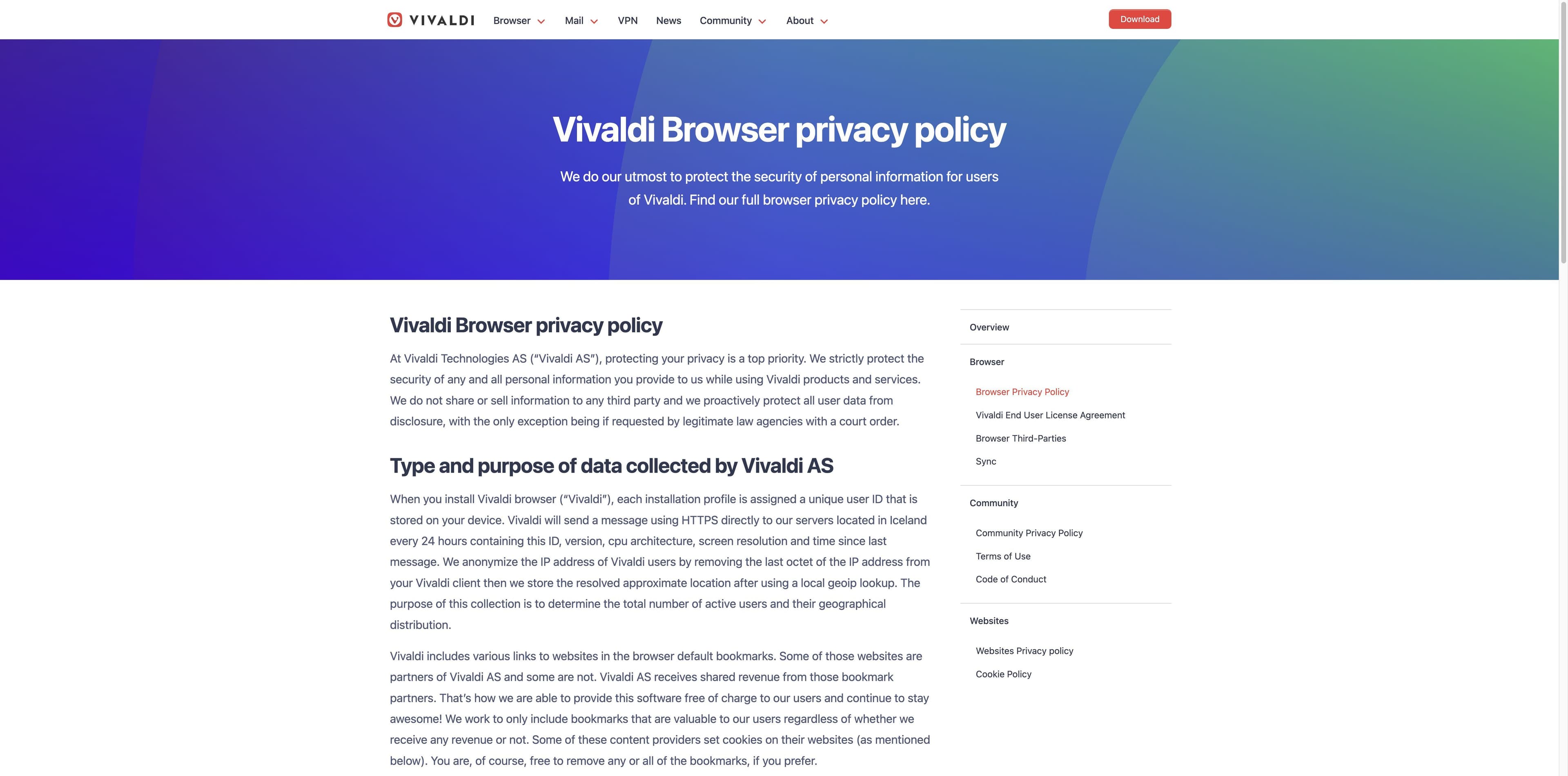
Vivaldi Browser privacy policy page showing the section on installation IDs, HTTPS messages and approximate location

OFFICIAL · PRIVACY POLICY

A privacy promise with a measurable scope

The policy says Vivaldi does not access your client history, typed searches or downloads, while also documenting a daily HTTPS message with installation metadata and optional crash-log sharing.

Vivaldi Browser privacy policy

OFFICIAL · SYNC POLICY

Encrypted content is not the same as zero metadata

Vivaldi’s sync documentation says the browser encrypts entries before upload with a user-held key. Its sync privacy policy also describes integrity metadata and is dated July 13, 2018—check the current policy when your threat model is strict.

Vivaldi Sync privacy policy

Source links open in a new tab. Last-checked dates belong to this page’s research pass, not to Vivaldi’s policies.

THE LIMITS

What Vivaldi cannot promise

A browser is one layer in a larger system. These boundaries are why a “yes” answer should never become an absolute guarantee.

01

Not an anonymity network

Private windows do not hide your traffic from an ISP, the destination site, an employer network or a party that can observe your connection.

02

Warnings are not a crystal ball

Safe Browsing relies on known or reported threats. A clean warning state is not proof that a page, download or account is trustworthy.

03

Extensions are a new trust decision

Review permissions, update cadence, publisher reputation and the extension’s own privacy policy. Remove extensions you no longer need.

04

Your account security still matters

Use unique passwords and multi-factor authentication for important services. A browser cannot undo a reused password or a convincing social-engineering message.

Where Tabbit fits instead

Where Tabbit fits instead

Tabbit is an AI-native productivity browser for reading, comparing and acting across web context. Its value is a visible workspace for summaries, research and agent tasks—not a claim to replace Vivaldi’s security model or an anonymity tool.

Tabbit Browser Agent mode operating a Google Sheets task with the requested data and execution steps visible in the sidebar

FIVE-MINUTE SETUP

If you choose Vivaldi, make the choice deliberate

These checks reduce avoidable risk without pretending that one setting can solve every threat model.

  1. 01

    1 · Get the real build

    Download from Vivaldi’s official site or a trusted app store, then check the About page and install updates promptly.

  2. 02

    2 · Choose a blocking level

    Open Privacy and Security settings. Decide whether you want no blocking, tracker blocking, or tracker-and-ad blocking; add exceptions only when you understand the trade-off.

  3. 03

    3 · Review network features

    Decide whether Safe Browsing, search suggestions, autofill and crash reporting fit your threat model. Read what each feature sends before enabling it.

  4. 04

    4 · Audit the extensions

    Keep the smallest useful set. Check permissions, publisher, last update and privacy policy; test sensitive sites in a clean profile when needed.

  5. 05

    5 · Treat sync like a key vault

    Use a distinct, strong encryption password, save the backup encryption key safely and remove remote data when you no longer need the service.

This is general information, not a guarantee or a substitute for your organization’s security policy.

A DIFFERENT JOB

Vivaldi and Tabbit are not interchangeable claims

The comparison below describes the product focus visible in the sources and interfaces we checked. It does not rank either browser’s security, privacy or safety.

DimensionVivaldiTabbit
Core jobMake a highly configurable browser with built-in toolsTurn open web context into research, summaries and visible actions
Privacy storyPublished policy, tracker/ad controls and private windowsProductivity workflow with explicit context sharing; not an anonymity network
AI contextNot the central focus of the reviewed evidencePages, groups, screenshots and files can be brought into a task
AutomationNo native agent layer described in the reviewed sourcesAgent Mode shows task steps and asks for the context needed to act
Best fitPeople who want to shape tabs, panels, tools and settingsPeople who want an AI partner for web-heavy knowledge work
Security claim hereDocumented protections still have limitsNo comparative safety claim is made

FAQ

Is Vivaldi Browser Safe? Common follow-ups

Is Vivaldi safe to download?

Use Vivaldi’s official download page or a trusted app store, verify that the installer is genuine, and install updates. No download source can make a browser immune to every later site or extension risk.

Does being based on Chromium make Vivaldi safe?

Chromium gives Vivaldi a mature security foundation, but it is not a safety certificate. Vivaldi documents its own Extended Stable release process and security patches; keep the Vivaldi build current.

Does Vivaldi collect my browsing history?

Vivaldi’s browser policy says visited URLs, typed searches and downloads stay in your client profile and are not accessible to Vivaldi. The same policy documents daily installation metadata, so “not browsing history” is narrower than “no data.”

Is Vivaldi Sync end-to-end encrypted?

Vivaldi says sync entries are encrypted in the browser with an encryption password that is not sent to Vivaldi. Sync still has metadata and account risks; use a unique encryption password and save the backup key.

Does Vivaldi block ads and trackers by default?

The official help page documents three selectable levels—no blocking, block trackers, or block trackers and ads—and per-site exceptions. Check your own settings rather than assuming a level from the browser name.

Can Vivaldi extensions make browsing less safe?

Yes. An extension adds third-party code and permissions. Review what it can read or change, whether it is maintained, and how its developer handles data; remove it if the benefit is not worth the access.

Does a Vivaldi private window hide me from my ISP?

No. A private window mainly limits local history and related storage. Your ISP, network operator and the sites you visit can still observe parts of the connection.

Is Tabbit safer than Vivaldi?

This page does not make that claim. Vivaldi is a configurable Chromium browser; Tabbit is an AI-native productivity browser. Choose based on the work and threat model you actually need to address.

FOR THE NEXT TASK

Need a browser that helps you finish the work?

If your decision is less about switching security models and more about reading, comparing and acting across many pages, try Tabbit’s AI-native workflow on macOS or Windows.

A productivity invitation—not a promise that Tabbit is safer or more private than Vivaldi.

© 2026 Tabbit Browser. The AI-native browser that understands your context.
