01 / UPDATE01
Install or update GX
Use Opera’s current GX download channel for your platform. AI availability is tied to a supported build and may not arrive on every platform at the same time.
OPERA GX AI / FIELD NOTE 01
Opera GX’s AI story centers on an assistant surface called Opera AI or Aria in Opera materials. It can help with questions, page or content context and selected generation workflows—but it is not automatically a browser agent that completes every web task.
The short answer
Look for Aria / Opera AI in the current GX sidebar or AI command surface when your build offers it. Exact labels, sign-in or consent steps, features and regions can change, so verify the live help page before relying on a specific path.
02 / FIND THE SURFACE
There is no single shortcut or universal icon I could verify across every Opera GX release. Use this practical check, then let the current consent and help surfaces settle the details.
Use Opera’s current GX download channel for your platform. AI availability is tied to a supported build and may not arrive on every platform at the same time.
Look for an Aria or Opera AI entry in the visible GX sidebar or current command/search surface. If it is absent, do not assume a hidden shortcut will unlock it.
Ask a bounded question or explicitly provide the page, text or image the workflow supports. Read the answer as generated assistance, then verify important claims.
03 / WHAT THE VERBS MEAN
The strongest answer to “what can Opera GX AI do?” is a set of qualified verbs. Opera’s naming and feature surfaces have changed over time; these statements stay close to what the reviewed materials actually show.
Aria is presented as an in-browser assistant for questions and content help. Generated answers can be incomplete or wrong, so use them as a starting point rather than a source of record.
Where the current workflow exposes page, chat or other supplied content, the assistant can respond in that context. Do not inflate this into guaranteed access to every tab or every private field.
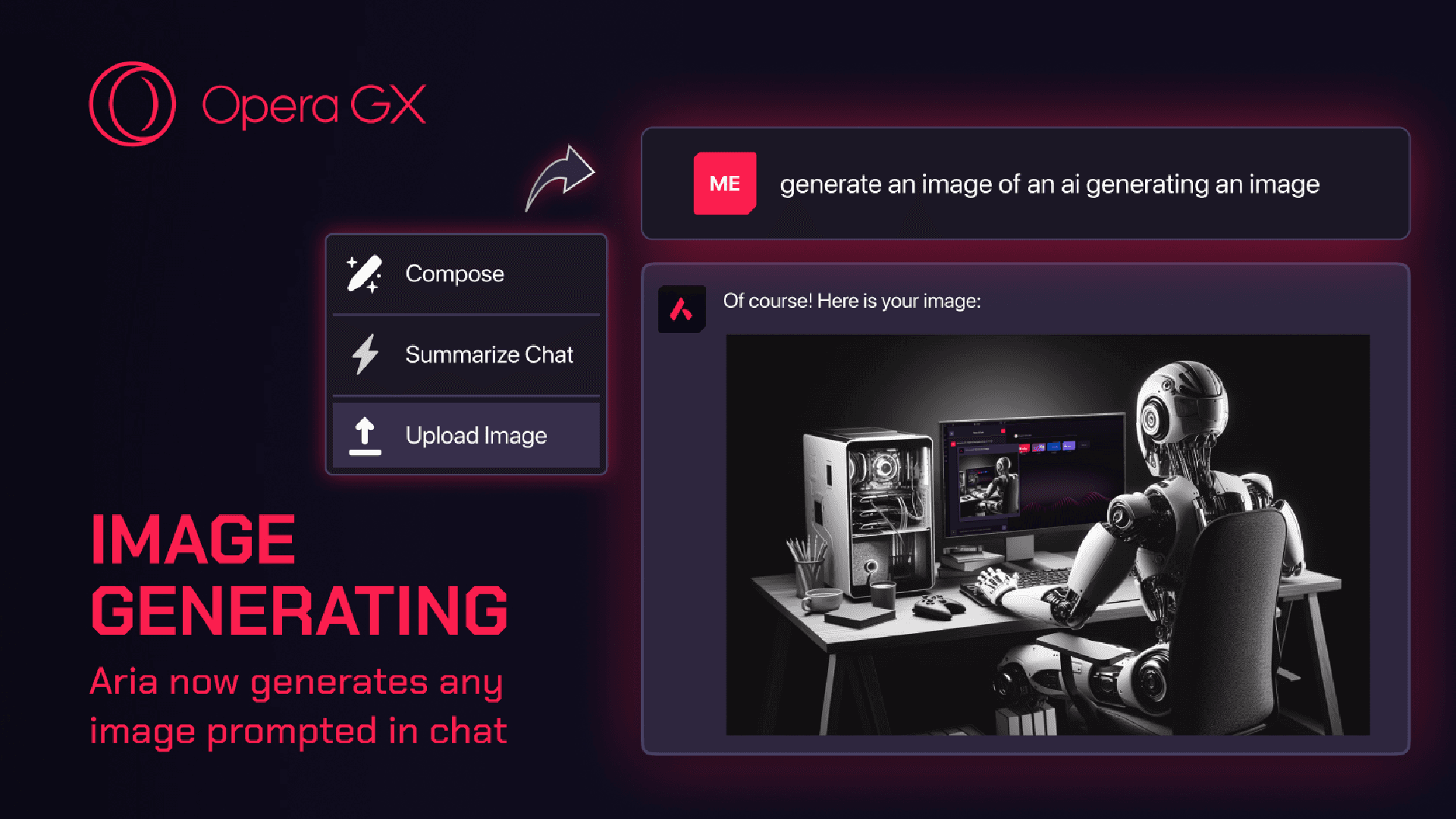
TechRadar’s 2024 coverage visibly demonstrates an Aria chat generating an image. Controls and availability can change by build or region; no model or free-quota claim is needed to use the finding.
Opera’s GX AI page copy advertises content generation and tab management, while later GX coverage mentions AI translation and tab grouping. Treat these as feature-specific, rollout-dependent tools—not proof of a general browser agent.
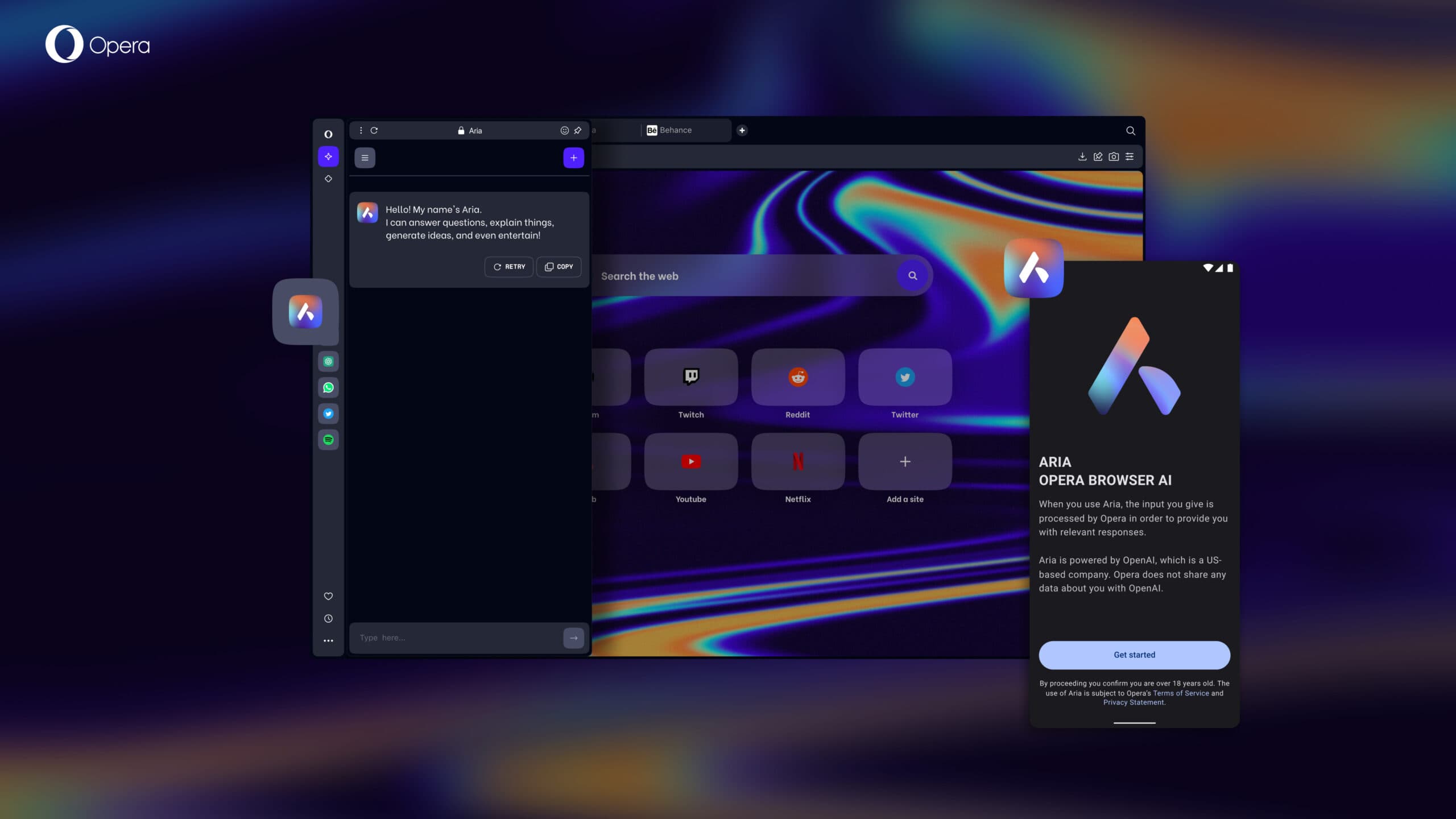
The image-generation and sidebar visuals are independent reporting evidence. They demonstrate a real Aria surface at the time of coverage, not a promise that every current GX build looks identical.
04 / THE SMALL PRINT THAT MATTERS
A useful AI-browser explanation includes the conditions around the button: who can see it, what context it receives and what it should not be trusted to do.
You prefer an assistant surface inside a gaming-oriented browser rather than opening a separate chatbot tab.
You can name the question, page or image you want help with and are willing to check the answer before acting on it.
You are comfortable checking the current build, region, account and consent state instead of expecting one universal UI.
The reviewed sources do not establish a current model identity, permanent free allowance or identical limits for every user.
Only the context exposed by the current workflow should be treated as available. Keep passwords, tokens and sensitive documents out of prompts.
An assistant answer is not evidence of reliable multi-site form filling, checkout, spreadsheet edits or other end-to-end browser execution.
05 / TASK MATRIX
Opera GX AI and Tabbit overlap around help in a browser, but they optimize for different jobs. This is a task-level comparison, not a claim that one replaces the other.
| Your need | Opera GX AI / Aria | Tabbit Browser | Best next move |
|---|---|---|---|
| Understand one page01 | Ask for an answer or summary when the current workflow exposes the page or content. | Keep the source visible beside a sidebar summary with a core message and key takeaways. | Choose Tabbit when attached context and a quick source check matter. |
| Explore a question across sources02 | Prompt-based help is possible; no reviewed source verifies a universal Deep Research trail. | Deep Research shows the source workspace and execution steps together. | Choose Tabbit for a visible research trail. |
| Generate an image or idea03 | Independent coverage visibly demonstrates image generation in an Aria chat; rollout can vary. | This page’s product evidence focuses on web context, research and execution rather than image generation. | Use the tool whose current surface matches the creative job. |
| Complete a multi-step site task04 | No universal autonomous form-filling or multi-site workflow was verified. | Agent mode can operate sites such as Google Sheets with steps visible for review. | Choose Tabbit when the next step is browser execution. |
| Keep a gaming setup close05 | GX is the specialized gaming browser, with setup controls and gaming-oriented surfaces around the assistant. | Tabbit is an AI-native work browser, not a gaming browser replacement. | Choose GX for gaming identity; choose Tabbit for web work. |
The comparison deliberately avoids model names, quotas and data-policy claims that were not verified for the current release.
06 / WHEN THE NEXT STEP IS WORK
Tabbit is an AI-native browser for research, context and execution. It does not replace Opera GX’s gaming setup; it gives you a different path when the work is to understand sources, keep evidence attached or move a web task forward.

UNDERSTAND
01A side panel keeps the page visible while it surfaces the core message and key takeaways. The context stays attached instead of disappearing into a copied prompt.

RESEARCH
02Deep Research puts search results and execution steps together, so you can inspect what the browser is investigating while the source trail remains legible.

ACT
03Agent mode can operate a site such as Google Sheets, with the instruction and execution steps visible as the workflow progresses. Review the result before you ship it.
07 / PRIVACY & VERIFICATION
The Aria launch-era visual includes a consent panel and an Opera/OpenAI processing explanation. That is useful history, not a substitute for the current policy shown in your build.
Check the current browser AI FAQ, privacy statement and in-product consent copy for the account, provider and processing details that apply to you today.
Keep passwords, API keys, payment details, private customer data and confidential documents out of prompts unless you have an approved, understood workflow for them.
A fluent answer, summary or generated image is not proof of accuracy, ownership or suitability. Review facts, citations, permissions and the result before publishing or acting.
Read the current source
08 / QUICK ANSWERS
It is Opera’s AI assistant surface inside the GX browser, referred to as Opera AI or Aria in Opera materials. It can help with questions, supported page or supplied content context and selected generation workflows. Availability and exact UI can vary by build, platform and region.
Update or install GX from Opera’s current channel, then look for an Aria or Opera AI entry in the sidebar or current AI command surface. I could not verify one universal shortcut or icon across releases, so use the live Opera AI FAQ and the consent screen for your installation.
It may help with a page or content when that context is exposed by the current workflow. Do not assume it can see every tab or private field, and check the summary against the source before relying on it.
TechRadar’s 2024 coverage shows an Aria chat generating an image, so image generation is a documented capability in that coverage. The current control, availability and limits can differ by release or region; this page makes no model or quota promise.
The requirement can depend on the current rollout, platform, region, service and consent flow. Because the official page was region-restricted during research, check the live Opera documentation and the prompt shown in your own GX build instead of assuming a universal requirement.
Not on the evidence reviewed here. Opera AI is described as an assistant and generation surface; no universal multi-site form-filling workflow was verified. Tabbit separately offers sidebar summaries, Deep Research and Agent workflows for web work.
This page does not promise a fixed free quota or model identity because those details were not verified for the current release. Read the current product and consent documentation for the build you use.
09 / PICK THE WORKFLOW
Keep Opera GX for the gaming setup it is built around. Reach for Tabbit when you need the page summarized in place, a research trail you can inspect or an agent workflow that moves the browser task forward.
AI-native browser · sidebar context · Deep Research · Agent workflows