CONTROL
Keep the browser in bounds
GX Control, Hot Tabs Killer and GX Cleaner manage the browser’s own footprint.
- CPU / RAM / network limits
- Find heavy tabs
- Clear browser clutter
OPERA GX / FIELD GUIDE 01
Opera GX is a gaming-oriented browser whose feature set is easier to understand as a control room: some tools manage browser resources, some change the look and sound, some surface gaming content, and others handle privacy or everyday continuity.
02 / THE FOUR JOBS
A feature name is not a benefit by itself. This quick taxonomy separates resource controls from visual customization, content discovery, communication and privacy surfaces.
GX Control, Hot Tabs Killer and GX Cleaner manage the browser’s own footprint.
Mods turn the browser into part of a gaming setup through themes, sounds and visual effects.
GX Corner brings releases, news, deals and free-game information into one destination.
Blocking, VPN and session tools are privacy conveniences, not a promise of perfect anonymity.
03 / THE FEATURE MAP
Use the lanes below as a decision guide. Availability can change by build, operating system, account and region, so treat the map as a practical orientation—not a performance benchmark.
CONTROL / 01
These tools give the browser a budget and help you find the tabs that are spending it.
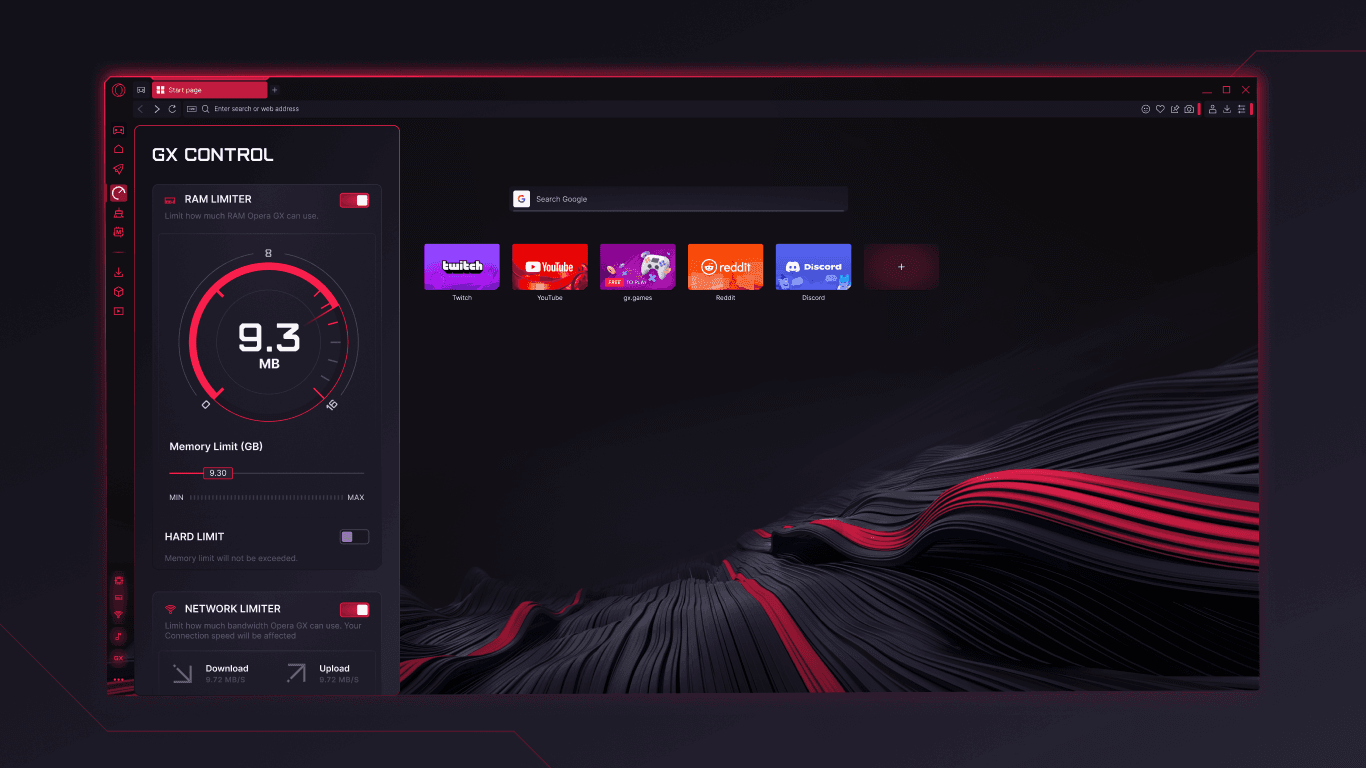
Set CPU, RAM and network limits for Opera GX. It can make browser usage more predictable beside a game; it cannot guarantee higher FPS, lower ping or faster hardware.
Spot tabs that are consuming significant resources and close them quickly. It is a cleanup decision, not an automatic speed boost.
Clear selected old files and browser clutter from one place. What it removes and when to use it depend on the browser build and your choices.
IDENTITY / 02
Customization is a first-class feature: the browser can look and sound like part of the same setup as your games.
Install or explore Mods that change themes, wallpapers, sounds, shaders, splash screens and icons. Community quality and resource impact vary.
Choose the visual treatment, background and effects that fit your setup. A stronger visual layer may be less comfortable for quiet reading.
GAMING / 03
These surfaces keep the browser close to the gaming loop: see what is coming, stay in touch and keep media visible.
Browse gaming news, release calendars, deals and free-game information. Content and offers can vary by time and region.
Open supported social and messaging services from the sidebar. Accounts, permissions and service availability still belong to each provider.
Float video over other work and play music from supported services without another full tab. These are convenience tools, not streaming guarantees.
PRIVACY / 04
Opera GX includes several privacy-oriented controls, each with a narrower job than the word “private” might suggest.
Reduce common ads and trackers through built-in blocking controls. Some sites may need an exception, and no blocker catches every script.
Use the built-in VPN surface and protection against known cryptomining patterns. Check the provider’s terms and your region before treating this as an anonymity solution.
Hide the current browsing session quickly when you need a clean screen. It does not erase every trace or replace account and device security.
CONTINUITY / 05
Flow, organization and Opera AI help the browser travel with your day, but they are different kinds of assistance.
Share links and files across supported devices through the Flow experience. Pairing, sign-in and current support depend on the release.
Keep projects and related tabs visually grouped so a crowded session is easier to scan.
Use Opera’s built-in AI assistant for answers and browsing help. Check generated answers; assistance is not the same as a supervised agent completing a multi-site workflow.
Feature names and descriptions checked against the Opera GX Microsoft Store listing. Functions, labels and availability can change by release, platform and region.
04 / SEE THE SURFACES
The first view is about control; the second is about discovery. They are official Microsoft Store listing assets, shown as Opera GX evidence—not Tabbit product UI.
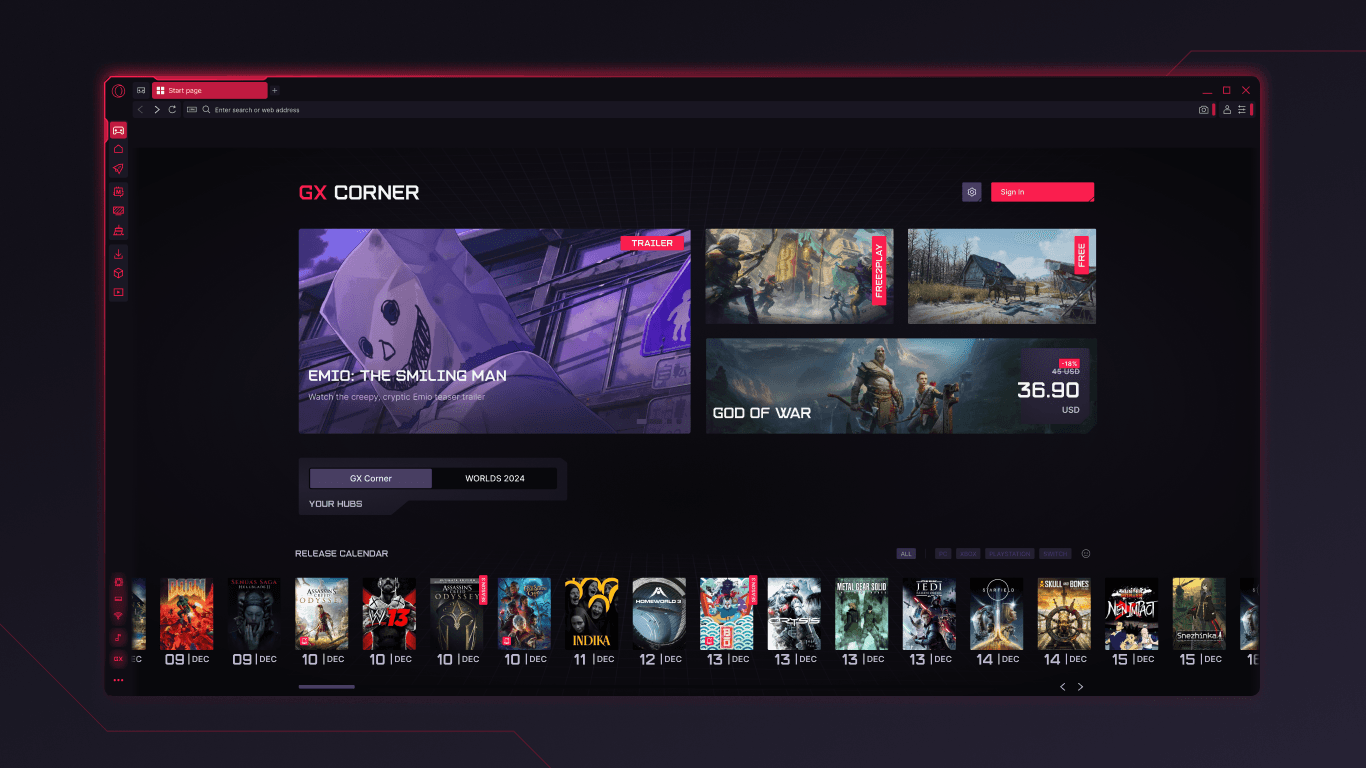
Read the panels literally: GX Control exposes browser limits, while GX Corner is a gaming content surface. Neither screenshot is proof of faster games or universal offer availability.
05 / THE HONEST EDGE
The right choice depends on what you want the browser to do and what you expect it to guarantee.
GX Control, Hot Tabs Killer and GX Cleaner can manage Opera GX activity. They do not control the game engine, GPU, route to a server or every process on the machine.
Blocking, VPN, cryptomining protection and Panic Button each cover a specific surface. None should be read as perfect anonymity or complete tracking removal.
Sidebar services, AI, games, deals and Flow may depend on the current desktop/mobile build, account, provider and country.
Opera GX has desktop and mobile variants, but feature parity is not automatic. Confirm the current official download or store listing for your device.
06 / WHEN THE NEXT TAB IS WORK
Tabbit is an AI-native browser for context, research and supervised execution. It is not a gaming browser and does not replace Opera GX’s setup-focused identity. Try it when the work is to understand sources, investigate a question or move a web task forward.

UNDERSTAND
01Keep the page visible while a side panel surfaces the core message and key takeaways. The context stays attached instead of disappearing into a copied prompt.

RESEARCH
02Deep Research puts search results and execution steps together, so you can see what the browser is investigating while the source trail remains legible.

ACT
03Agent Mode can operate a web app such as Google Sheets with the instruction and steps visible. Review the result before you rely on it or share it.
07 / QUICK ANSWERS
The core feature groups are GX Control, Hot Tabs Killer and GX Cleaner for browser resource management; GX Corner for gaming discovery; Mods for themes and effects; sidebar services for communication; privacy tools such as ad and tracker blocking, VPN and Panic Button; plus Flow, organization tools and Opera AI.
It can limit CPU, RAM and network use by the browser, which may make browser consumption more predictable beside a game. It cannot guarantee higher FPS, lower ping or better hardware performance because those depend on the game, device and network too.
Hot Tabs Killer helps identify resource-heavy tabs so you can close them. GX Cleaner clears selected browser clutter. Both are management tools, not universal speed-up switches.
GX Corner is Opera GX’s gaming discovery area, bringing together news, release calendars, deals and free-game information. Content and offers can change by time and region.
Mods are customizable packages that can change the browser’s theme, wallpaper, sounds, shaders, splash screen and icons. Community Mods vary in quality and may affect the visual or resource experience.
The current Microsoft Store listing describes sidebar access for Discord, Twitch and other messengers, plus a free VPN, ad/tracker controls and Opera AI. Accounts, permissions, supported releases and regional availability still apply.
Choose Opera GX when gaming content, resource controls and a strongly customized setup are the priority. Try Tabbit when the priority is AI-assisted reading, research or a supervised agent moving a multi-step web task forward.
NEXT / YOUR BROWSING DAY
If the next task is to read, compare, summarize or update a web app, try Tabbit and keep the context in the browser while the work moves forward.
Free desktop download · platform-aware flow · Opera GX official source is linked above