FIELD GUIDE · GAMING BROWSER

Opera GX gaming browser, decoded.

Opera GX is built around control: cap what the browser can use, keep heavy tabs visible, and keep games, streams, and community tools close. Here is what those controls can—and cannot—change.

See the control room
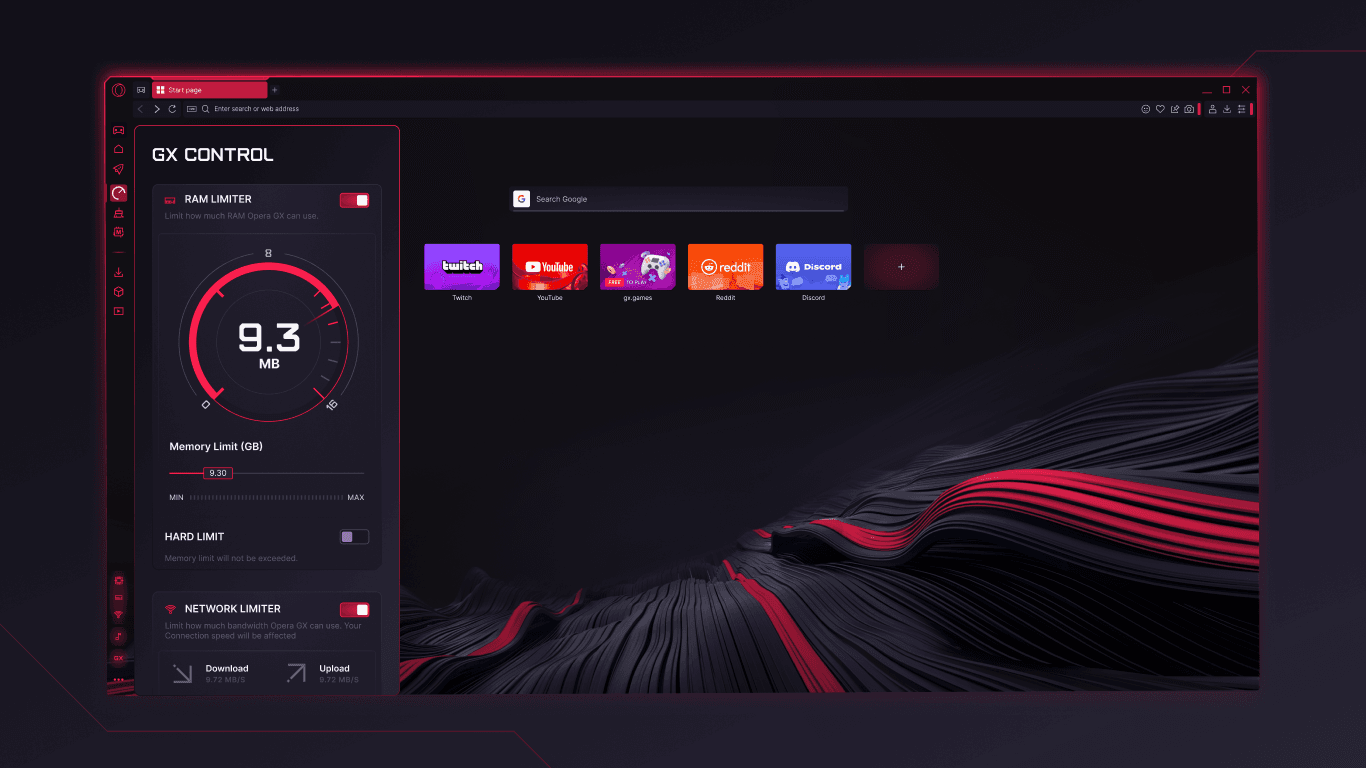
Opera GX start page with the GX Control panel showing RAM and network limitersGX CONTROL
Evidence: Opera GX Microsoft Store listing · official product screenshots

resource dials

CPU · RAM · network

browser promise

control, not magic

THE SHORT VERDICT

Choose GX for the setup around your game.

GX fits players and streamers who want a dark, highly configurable workspace with visible resource controls. It is not a universal FPS booster or a shortcut to lower ping; your game, hardware, network route, and open tabs still decide those outcomes.

01 · CONTROL ROOM

The useful part is the dashboard—not the hype.

Opera GX gives the browser its own set of dials. Think of them as ceilings and cleanup tools for the browser process, not switches wired into your game engine.

01SET CEILINGS

GX Control

Set CPU and RAM limits for Opera GX while a game or stream is running. A visible ceiling makes it easier to decide how much browser work can stay open beside the game.

A ceiling does not prove higher FPS, lower ping, or lower total system usage on every machine.
02FIND HEAVY TABS

Hot Tabs Killer

See which tabs are using the most CPU or memory, then close the ones you no longer need. It turns “why is my browser busy?” into an actionable list.

It helps you close tabs; it does not optimize the game or silently fix a driver, thermal, or network problem.

03BROWSER BANDWIDTH

Network Limiter

Set upload and download limits for the browser so a stream, sync, or background page is easier to keep in check while you play.

It limits browser traffic. It does not reroute game servers or guarantee lower latency and ping.

02 · PLAY + STREAM

A gaming browser is mostly about what surrounds the match.

The advantage is less “the browser makes the game faster” and more “the browser gets out of the way while keeping the useful side channels close.”

01DISCORD · TWITCH

Keep the squad in reach

The sidebar can keep Discord servers, DMs, and Twitch status beside the page. Fewer app switches can make a stream setup feel calmer, while still leaving permissions and notifications to your settings.

02VIDEO POP-OUT / PIP

Watch without alt-tabbing

Video Pop-Out turns a supported video into a floating window. It is handy for a guide, tournament, or chat while the main tab stays on the task at hand; it is not a performance feature.

03SPLIT SCREEN · TAB ISLANDS

Keep the tab jungle legible

Split Screen, Workspaces, and Tab Islands organize game wikis, patch notes, streams, and chat. They reduce hunting across windows, but each open page can still consume resources.

03 · CORNER + MODS

The identity layer is the reason many people choose GX.

GX is not only a limiter panel. Its strongest distinction is a browser that treats gaming content and customization as part of the workspace.

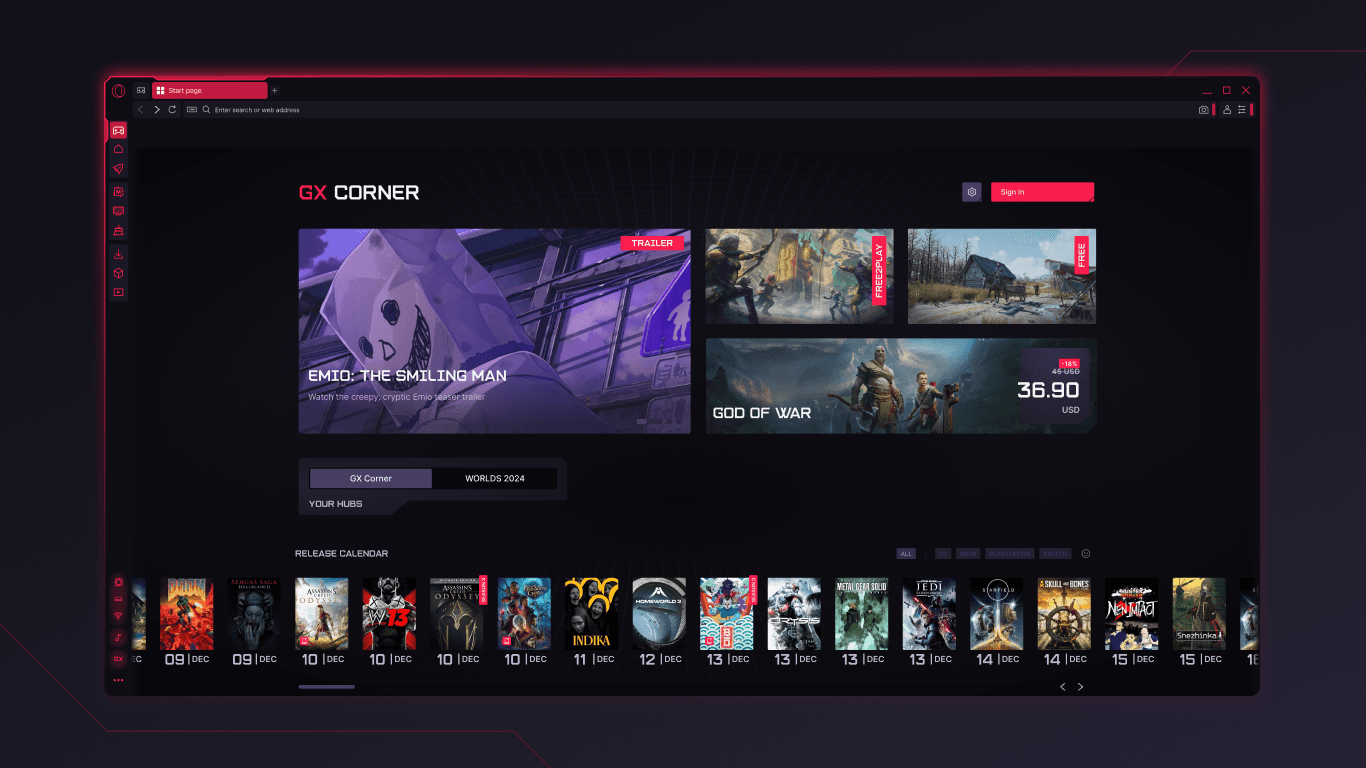
Opera GX GX Corner page with game news, free and discounted games, and a release calendarGX CORNER
Evidence: Opera GX Microsoft Store listing · official product screenshots
01DISCOVER

GX Corner

A home for free games, release calendars, gaming news, and deals. It is a discovery layer that keeps you current; it is not evidence of a faster browser engine.

02CUSTOMIZE

GX Mods

Themes, sounds, wallpapers, shaders, splash screens, and icons can make the browser feel like part of your setup. Community creations are a creative layer, not a privacy or latency guarantee.

03TUNE THE SPACE

Sidebar + privacy tools

Ad and tracker blocking, an optional VPN, a music player, and integrated services add convenience. Review the current build, permissions, and policy before treating any one tool as a complete privacy solution.

Product evidence: Microsoft Store listing · availability can vary by version, platform, and region

04 · CHOOSE WITH YOUR EYES OPEN

Use the checklist, then test your own setup.

The right gaming browser depends on which problem you are solving. Start with the job, then verify the result on your hardware and connection.

If your need is…GX gives you…Still check…
01Keep browser RAM from expanding beside a gameA user-set RAM ceiling in GX ControlActual game FPS, stutter, and total system memory
02Find the tab making the laptop work hardA Hot Tabs Killer view of heavy tabsWhether the page, extension, or driver is the real cause
03Stop a stream or sync eating browser bandwidthA browser upload/download limiterGame latency, Wi-Fi quality, and the server route
04Keep releases, deals, themes, and chat nearbyGX Corner, GX Mods, and sidebar servicesNotifications, permissions, and your tolerance for visual noise

Performance note: no browser setting can honestly promise automatic FPS gains or lower ping for every game and network. Measure before and after on the same scene.

05 · THE TABBIT LANE

Use Tabbit for the work before and after the session.

Opera GX is a gaming browser. Tabbit is an AI-native browser for the context work around gaming: reading guides, comparing patch notes, collecting hardware research, and executing repetitive web tasks.

Tabbit side panel summarizing a long article beside the original page01

Summarize the guide

Keep a long walkthrough or tournament article open and ask for the key steps in the side panel—without losing the source page.

Tabbit Deep Research showing a multi-step web research workflow02

Research the patch

Ask Tabbit to read several tabs and connect patch notes, build guides, and hardware references into a concise research thread.

Tabbit Agent working in a browser spreadsheet while its execution steps stay visible03

Run the admin chore

When the task is a web form, table, or repetitive setup, Tabbit Agent can work across pages and leave you with a result to review.

Tabbit is not a gaming optimizer. It is the browser to open when context work—not frame rate—is the bottleneck.

FAQ · BEFORE YOU INSTALL

The questions that matter more than a neon skin.

01Is Opera GX a gaming browser?+

Yes. Opera GX is a Chromium-based browser positioned for gamers, streamers, and people who want gaming content, customization, and browser resource controls in one workspace.

02Does GX Control increase FPS or lower ping?+

Not as a guaranteed outcome. GX Control can cap the browser’s CPU, RAM, and network use. FPS and ping also depend on the game, hardware, drivers, background processes, Wi-Fi, and server route.

03What does Hot Tabs Killer do?+

It helps identify tabs that are using significant CPU or memory so you can close them. It is a cleanup decision aid, not an automatic game optimizer.

04Can I use Discord, Twitch, and picture-in-picture in Opera GX?+

Opera GX lists Discord and Twitch sidebar integrations and Video Pop-Out for floating video windows. Exact services and behavior can vary by build, region, and site permissions.

05Should I choose Opera GX or Tabbit?+

Choose GX when the browser’s gaming identity, resource controls, Corner, Mods, and sidebar are the point. Choose Tabbit when the hard part is researching across pages, understanding context, or asking an agent to execute web work.

READY FOR THE OTHER KIND OF BROWSER POWER?

Let the browser handle the context work.

Keep Opera GX for the gaming control room. Add Tabbit when the next task is reading, comparing, summarizing, or doing the repetitive web work around the game.

Available for desktop · no gaming-performance promises

© 2026 Tabbit Browser. The AI-native browser that understands your context.

