01 · LIMITERS
Bound the browser’s appetite
GX Control exposes CPU, RAM and network ceilings. The useful mental model is a guardrail for a shared machine, not a benchmark result. The right ceiling depends on your game, tabs, extensions and hardware.
EDITORIAL REVIEW FILE · AUGUST 2026
Opera GX is a gaming-shaped Chromium browser with unusually visible controls. This review asks what those controls actually change, what the evidence can support, and when the neon surface becomes more useful than distracting.
THE DECISION LEDGER
A review becomes clearer when “good” is split into jobs. The GX column reports documented product surfaces and the independent review we could read; the Tabbit column describes a separate AI-browser use case, not a claim that the products are substitutes.
| Decision signal | Opera GX | Tabbit |
|---|---|---|
| 01Core job | Make gaming-friendly browsing feel configurable | Turn open-web context into useful work |
| 02Resource controls | CPU, RAM and network ceilings; heavy-tab cleanup | No gaming limiter; groups and task spaces organize context |
| 03Gaming layer | GX Corner, deals/news, Twitch and gamer-focused themes | Not a gaming hub; focuses on research and web tasks |
| 04AI context | Opera AI/Aria and page tools vary by current build | Pages, tab groups, screenshots, bookmarks and files |
| 05Visible automation | Browser conveniences and integrations | Agent Mode can read, navigate, click and fill with review |
| 06Privacy wording | Blocking tools and a browser VPN are offered | Contextual AI workflow; not an anonymity network |
| 07Best first question | How should gaming and browsing share my machine? | What should the browser help me finish? |
THE GX CONTROL ROOM
Opera GX gives its personality a control panel. That makes trade-offs legible: you can choose a ceiling or remove a noisy tab. It still cannot turn a limit into a universal promise of lower memory use or higher frame rates.
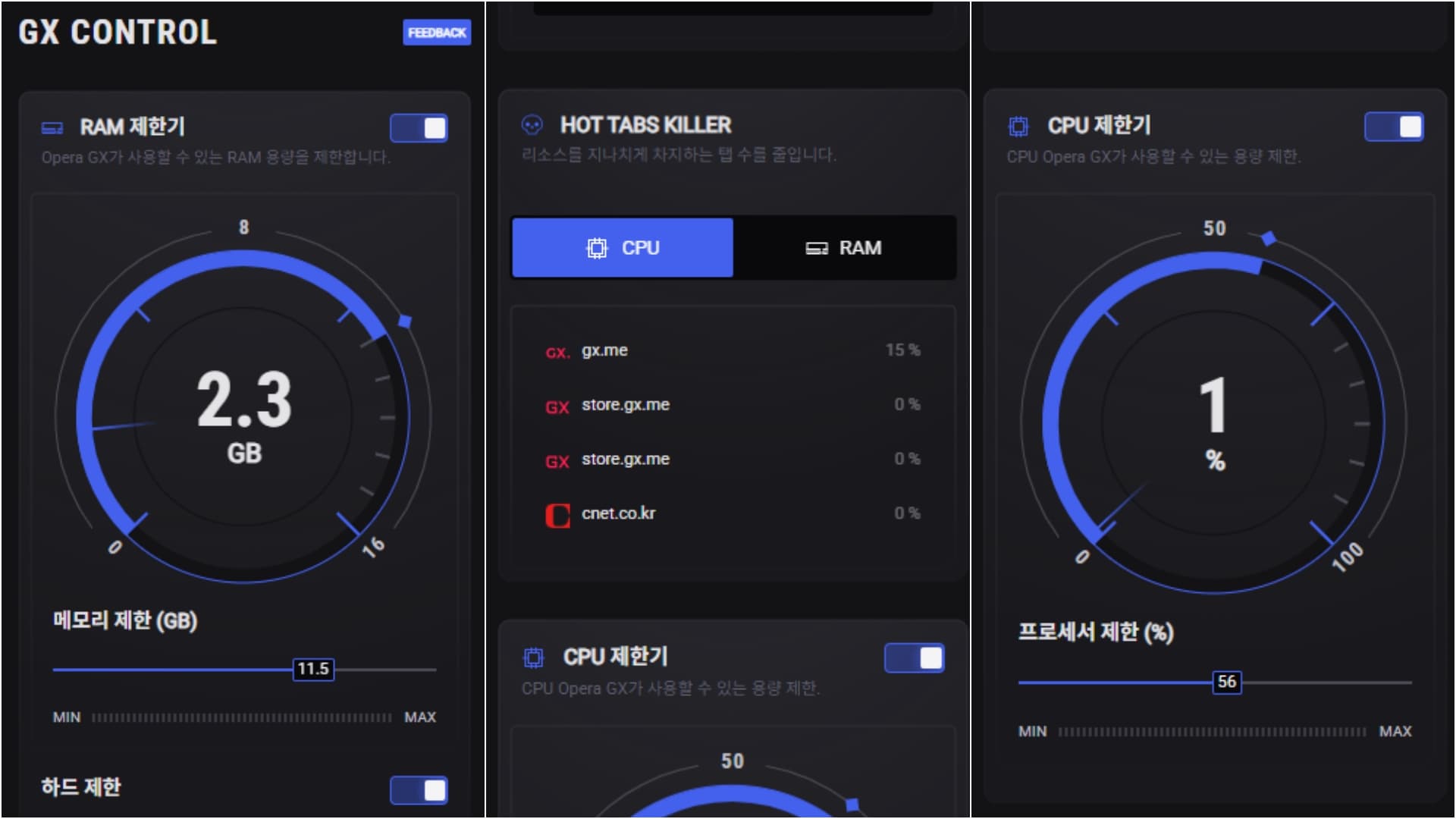
GX Control exposes CPU, RAM and network ceilings. The useful mental model is a guardrail for a shared machine, not a benchmark result. The right ceiling depends on your game, tabs, extensions and hardware.
Hot Tabs Killer can surface resource-heavy tabs for closing, while GX Cleaner removes selected browsing residue. Both are practical controls; neither diagnoses every source of system load.
GX Mods and themes can alter wallpapers, colors, sounds, shaders, icons and startup visuals. The CNET Korea screenshot shows the depth of the surface; it does not prove that a theme makes the browser faster.
GX Corner gathers release, deal and gaming-news signals, while the sidebar can host services such as Twitch, Discord and messengers. Convenience is the win; a busier frame is the cost.
FEEL, NOT A SCORE
The available evidence supports a qualitative review, not a lab ranking. CNET Korea reports that enabling limiters made simultaneous browsing and gaming feel less sluggish for its reviewer. That is useful context, but it is one person’s observation under an unspecified setup.
01 · A ceiling is a ceiling
A RAM or CPU limit tells GX what it may use. It does not tell us that the browser uses less memory by default, nor that a game gains a fixed number of frames.
02 · Your setup decides
Game engine, extensions, video playback, open tabs, operating system and hardware can move the result more than a product slogan. Compare the same workload on your own machine.
03 · The dashboard helps
Seeing active tabs and changing a ceiling is more actionable than guessing. The controls are a reason to test GX, not permission to skip testing.
04 · Focus is a product choice
Animations, sounds, themes and social shortcuts can feel energizing in a gaming setup. For quiet writing or research, the same density may create friction.
Method note: no FPS, launch-time, RAM or page-load number is claimed here. The CNET observation is labeled as independent commentary; product features are labeled as product claims.
SOURCE WALL
The images below are preserved evidence from CNET Korea’s independent review. The first screenshot is used in the hero; these cards add the Mods surface and a source boundary. Opera’s own product page is linked as a product reference, not as independent testing.
INDEPENDENT · CNET KOREA
The captured GX Control view shows RAM and CPU gauges, a Hot Tabs Killer list and toggles. It supports the claim that these controls exist and are central to the experience—not a claim about a repeatable performance delta.

The Mods screenshot shows theme presets, sound and interface controls, and a highly styled frame. That is a meaningful differentiator for people who want a browser to look like part of their gaming setup; it may be too much for a calm work desk.
See the source articleEvidence boundary: CNET Korea is a single editorial review dated August 2025. Official feature descriptions and independent observations are kept separate, and no score is assigned to either source.
PRIVACY & TRUST
Opera GX lists ad and tracker blocking plus a browser VPN among its features. Those tools may reduce unwanted browser surface area, but a browser VPN is not automatically a full VPN service, and blocking is not a universal security guarantee.
Practical read: GX has approachable privacy and cleanup switches. Users with a serious threat model should evaluate the current policy, extensions, accounts and network setup separately.
WHEN THE BROWSER JOB CHANGES
This is an adjacent use case, not a replacement claim. If your next task is comparing product pages, extracting evidence from several tabs or turning a long article into a brief, Tabbit’s AI-native workflow is built around that context.
Ask about the active page, a group of tabs, a screenshot, bookmarks or a local file without rebuilding the prompt from scratch.
Deep Research can search, organize and show the steps of a multi-source task while the browser remains the working surface.
A contextual sidebar can turn a long page into key takeaways while leaving the original page visible for checking.
Agent Mode is designed for visible multi-step web work—reading, navigating, filling and collecting—with a person able to review the flow.
Tabbit is a desktop AI browser for macOS and Windows. It is not a gaming limiter, VPN, Tor client or promise of anonymity.


CHOOSE BY HABIT
The right answer depends on the job you want the browser to own. These are starting points, not a universal ranking.
Start with Opera GX
You want visible RAM, CPU and network guardrails, plus a quick way to see or close a heavy tab.
Try Opera GX
Themes, sounds, GX Corner and sidebar services can make the browser feel like part of the channel environment.
Test before switching
The same animations, sounds and integration density that delight gamers may compete with a quiet writing flow.
Compare with Tabbit
GX can host tabs; Tabbit is the closer fit when the work is summarizing, comparing and turning sources into a deliverable.
Read the current policy first
Blocking and VPN controls are useful, but they do not replace a threat model or a review of services, extensions and accounts.
BALANCED TAKE
Opera GX is compelling when your ideal browser feels like part of a gaming rig. If your bottleneck is understanding a stack of pages, choose a browser built around context and work.
QUESTIONS AT THE EDGE
It can be a good fit if you want a gaming-oriented interface plus CPU, RAM and network controls. Those controls help you manage a shared machine, but this review does not claim a universal FPS or latency improvement.
There is no general conclusion here. GX Control can cap or display browser resource use, but default memory depends on the same tabs, extensions, media and hardware you would use elsewhere. Compare equivalent setups yourself.
GX Control is Opera GX’s resource dashboard. It exposes RAM, CPU and network limiters and tools such as Hot Tabs Killer. A ceiling limits what GX may use; it does not prove that the whole computer will be faster.
Opera GX includes browser privacy controls and advertises a browser VPN, but neither should be rewritten as complete anonymity, device-wide VPN coverage or protection from every threat. Read the current policy and assess your own setup.
It can handle ordinary web work, but the gamer-focused visual and social layer may not suit everyone. If the work is comparing sources, generating a brief or taking repeated web actions, Tabbit is worth testing as a separate AI-native workflow.
Only if the job changed. Keep GX if its controls, themes and gaming integrations are the value. Test Tabbit when your main problem is understanding many pages, preserving context or completing repetitive browser steps.
Download Tabbit when “open another tab” is no longer enough—when you need the browser to compare sources, summarize the page and help finish the next web action.
Available for macOS and Windows · Start with one page, one group or one question