PRICE LEDGER / SHIFT BROWSER / CHECKED 30 AUG 2026

Shift Browser pricing, with the fine print in view.

See the current public Free, Advanced and Teams signals, compare monthly with annual billing, and separate official pricing from stale directory listings. The amounts below are a dated snapshot—not a promise that checkout will never change.

Research checked 30 Aug 2026 · USD shown on Shift’s public page

Open Shift pricing

Shift and Tabbit are separate products. This page does not claim that either product is universally cheaper; choose by workflow and verify the final checkout total.

THE BILLING CALCULATOR

Annual versus monthly

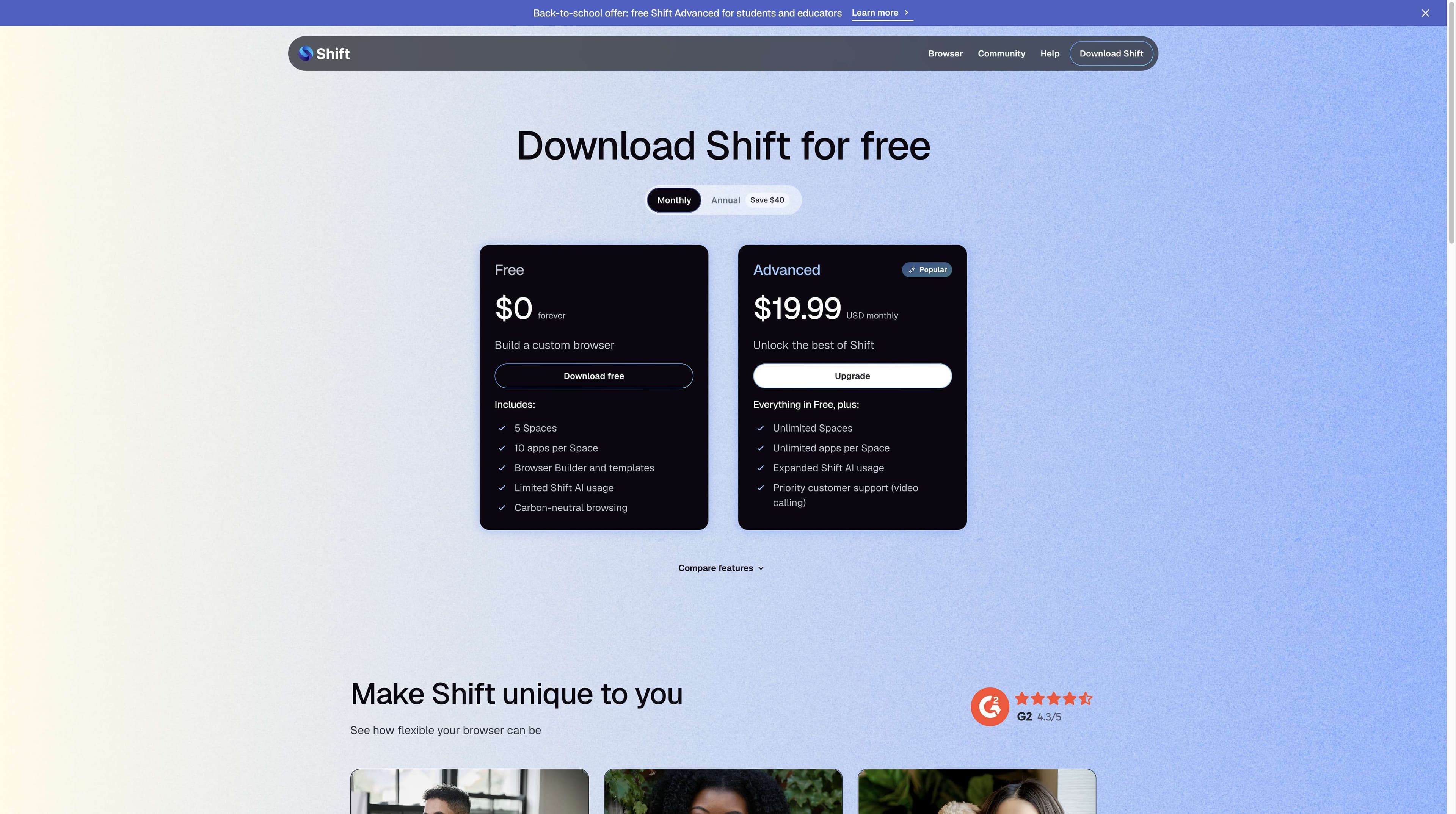
$19.99 × 12 = $239.88

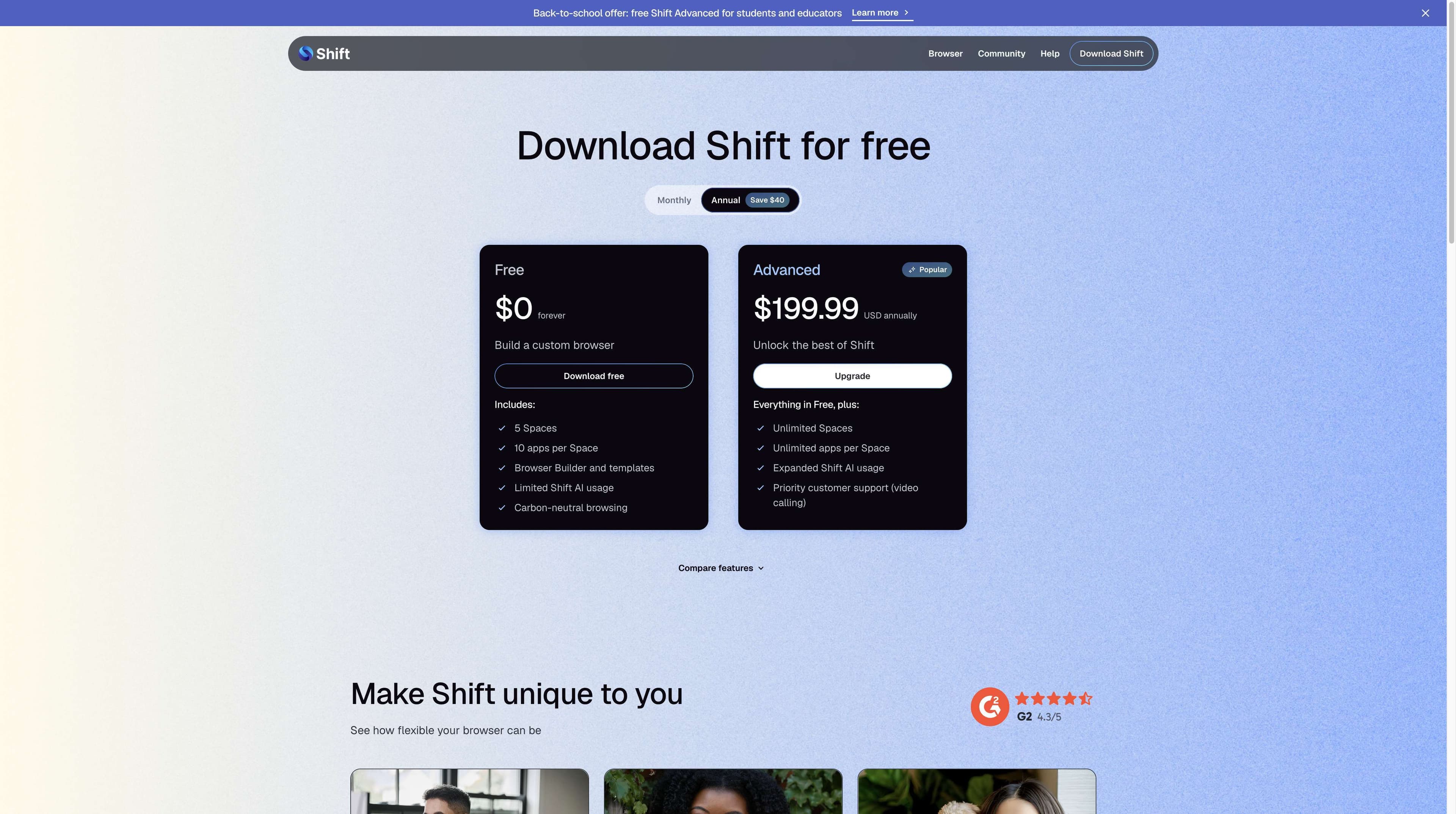
Shift’s public page shows $199.99 USD annually and labels the difference “Save $40”. The arithmetic gap is $39.89 before any tax or regional adjustment.

Free

Free download; feature limits apply

$0

forever

Advanced

Or $199.99 USD annually on the checked page

$19.99

USD monthly

Teams

Annual team subscription; added seats are prorated

$199.99

USD / user / year

Free · Advanced · Teams01 → 03
Shift official pricing page showing the annual billing toggle, Free at zero dollars and Advanced at 199.99 US dollars annually
Independent capture · Shift official pricing, annual view

01 / PRIMARY EVIDENCE

The toggle changes the number—not the decision.

The official page exposes both billing views. Put them beside each other before deciding whether the annual commitment fits your use, team and refund window.

CHECK THE MATH

About $40 saved on the displayed annual route

Twelve monthly payments total $239.88. The displayed annual price is $199.99, so the visible difference is $39.89; Shift rounds and labels it “Save $40”. Taxes, currency conversion and account-specific checkout terms are not confirmed on the public page.

Verify the live Shift page
Shift official pricing page with Monthly selected, showing Free at 0 dollars forever and Advanced at 19.99 US dollars monthly
Shift official · Monthly selected · captured 30 Aug 2026

Shift official · Annual selected · captured 30 Aug 2026

Shift official pricing page with Annual selected, showing Free at 0 dollars forever and Advanced at 199.99 US dollars annually

Shift’s public page shows $199.99 USD annually and labels the difference “Save $40”. The arithmetic gap is $39.89 before any tax or regional adjustment.

Verify the live Shift page

02 / PLAN LEDGER

What each rail says—and what it leaves open.

Free, Advanced and Teams answer different questions. Feature limits below are transcribed from the checked sources, including one public inconsistency that deserves a click-through rather than a guess.

01 / NO CARD TO DOWNLOAD

Free

01

$0

forever

A real free download for a lighter workspace.

  • 5 Spaces and 10 apps per Space on the visible pricing card
  • Browser Builder and templates
  • Limited Shift AI usage
  • Carbon-neutral browsing
  • FAQ text separately says up to 2 Spaces and 5 apps each—verify in account context
02 / POPULAR

Advanced

02

$19.99 / $199.99

monthly / annual USD

For larger stacks, contexts and logins.

  • Unlimited Spaces
  • Unlimited apps per Space
  • Expanded Shift AI usage
  • Priority customer support via video calling
  • Official page shows both monthly and annual rails; final terms may change

03 / TEAM CONTRACT

Teams

03

$199.99

USD per user each year

Annual seats with shared renewal timing.

  • One annual renewal date for the whole team
  • Licenses added mid-year are prorated
  • Seat reduction mid-term is handled case by case by support
  • Reduce the license count before renewal
  • Use the Teams support article for subscription management

A small conflict is a big pricing clue.

A small conflict is a big pricing clue.

The pricing card visible on 30 Aug 2026 says Free includes 5 Spaces and 10 apps per Space, while the FAQ answer on the same official page says Free supports up to 2 Spaces with 5 apps each. We preserve both statements instead of silently choosing one. Check the current page, account UI or checkout before relying on a specific limit.

Primary source: Shift pricing and Teams supportRead Shift’s current plan terms

03 / BILLING EDGES

Price is only one line in the receipt.

Trial language, card requirements, tax treatment and cancellation timing can matter more than the headline amount. Here is what the public sources confirm—and what they do not.

01

Free download

Shift says you can download Mac or Windows without a credit card. Upgrading Advanced requires an account and payment details.

02

Trial

A third-party Capterra listing shows “Free trial”, but the current official page does not state a trial duration. Treat the duration as unconfirmed until Shift shows it for your account.

03

Region + tax

The checked official cards show USD. No public tax or regional conversion rule was visible, so the final checkout may differ by location, currency and applicable taxes.

04

Refund boundary

Shift’s FAQ says a full refund can be requested within 14 days of the original purchase or renewal. Use Account Portal → Subscriptions → Request Refund or contact support; the account returns to Basic/free and the subscription is cancelled.

05

When money returns

The FAQ says an approved refund returns to the original card in 5–10 business days. Keep the request and confirmation for your records.

06

Team seats

Teams is $199.99 USD per user each year in the current support article. Seats added during the term are prorated; mid-term reductions are handled case by case.

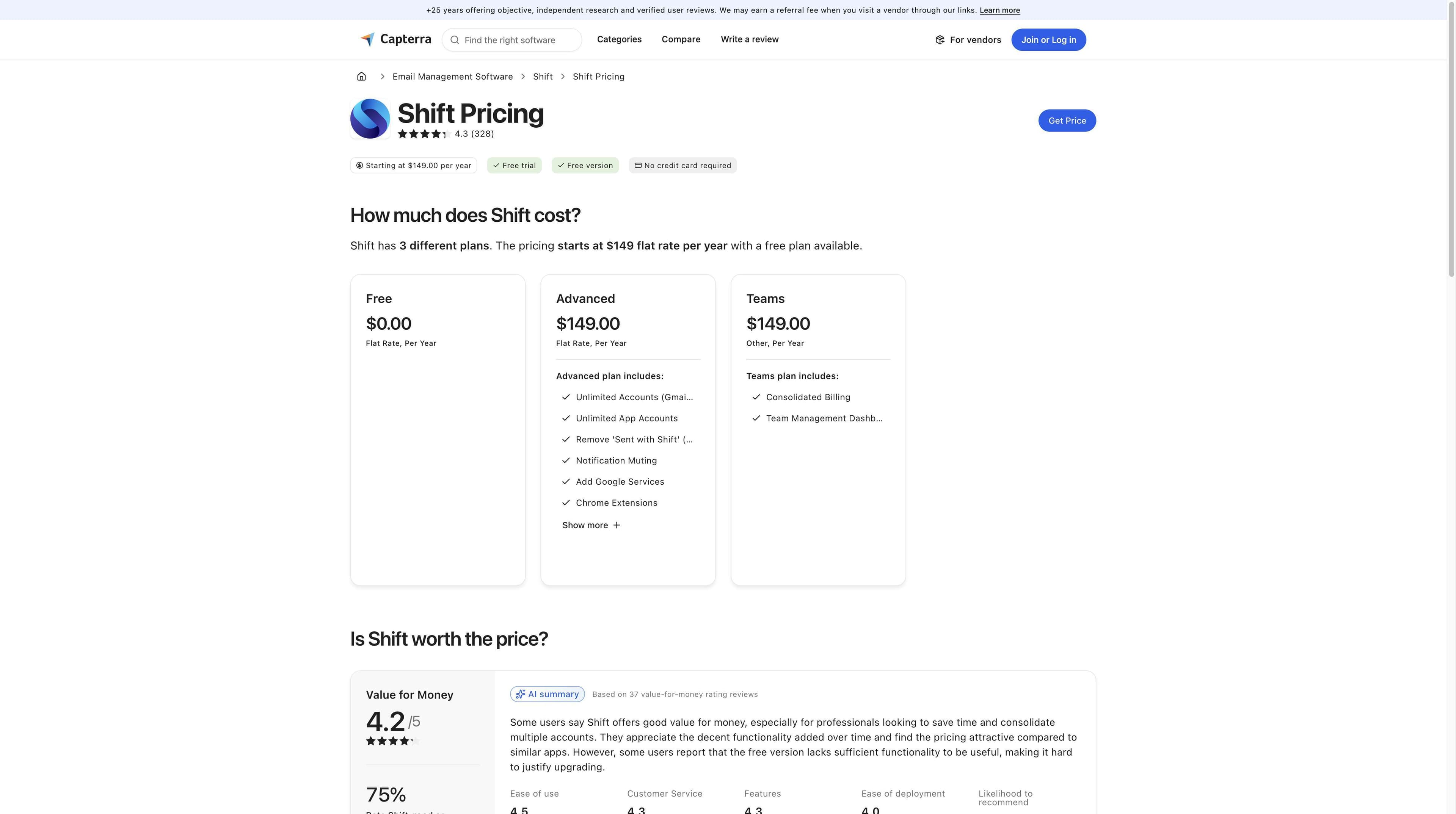
Capterra Shift pricing page showing a third-party starting price of 149 dollars per year, Free trial and plan cards
Third-party evidence · Capterra snapshot, not the current official baseline

03 / BILLING EDGES

Capterra’s visible $149/year listing is older than the current official $199.99 annual Advanced price. It is useful as a stale-market signal, not as a quote. Do not compare the two as if they were the same date or contract.

04 / COST + SCENARIO DECISION

Choose the workflow before you choose the bill.

Shift and Tabbit solve different browser problems. This comparison avoids invented prices and keeps the decision anchored to the job you need done.

Decision lensShift BrowserTabbit Browser
01Core valueA customizable desktop around apps, accounts and Spaces.An AI-native browser for research, summaries and browser actions.
02WorkspaceBuilder, app integrations, Spaces and account contexts.Tabs, groups and workspaces that keep source context with the task.
03Research costOrganize your sources and chosen tools in one browser desk.Deep Research can search, read and structure findings beside the page.
04ReadingUse the browser and extensions you choose for reading.Ask a side panel to summarize while the source stays visible.
05ExecutionOfficial materials emphasize organization and integrations.Agent can read pages, extract data, fill forms and continue multi-step workflows.
06Best fitYou want a polished app-and-space hub.You want AI help to move a research or repetitive web task forward.

No claim here that Tabbit is cheaper than Shift. Tabbit’s current price and download details should be checked in Tabbit’s own official flow.

05 / TABBIT WORKFLOWS

If your “pricing” question is really a workload question.

A plan comparison is useful only when it maps to the work. These real Tabbit UI captures show the two moments where an AI browser can change the time cost: reading and acting.

Tabbit Browser showing an article beside an AI summary sidebar with a core message and key takeaways
Tabbit UI · side-panel summary

READ / VERIFY

Keep the source beside the summary

Tabbit’s side panel can summarize a long page while the original stays visible. You can check the answer against the source before reusing it.

Tabbit Browser Agent mode operating a spreadsheet with task instructions and execution steps on the right
Tabbit UI · Agent execution steps

ACT / REPEAT

Turn browser instructions into visible steps

Agent mode can read a page, extract information, fill forms and continue a multi-step web task with execution steps visible beside the site.

Tabbit is a separate product. This page uses Tabbit’s shared official download flow and does not insert a guessed price or a “cheaper” claim.

06 / PRICING FAQ

Answers to the questions that change the total.

How much is Shift Browser Advanced?

On the Shift pricing page checked 30 Aug 2026, Advanced is shown as $19.99 USD monthly or $199.99 USD annually. Verify the live page and checkout because prices, taxes and regional currency can change.

Is Shift Browser free?

Yes. Shift shows Free at $0 forever, with feature limits. The visible pricing card says 5 Spaces and 10 apps per Space, while an FAQ answer on the same page says 2 Spaces and 5 apps each. Confirm the limit in the current account context.

Does Shift have a Teams plan?

Yes. Shift’s current Teams support article says $199.99 USD per user each year, with one annual renewal date for the team. New seats added mid-year are prorated.

Is Shift Advanced cheaper annually?

The displayed math is about $40 less on the annual rail: $19.99 × 12 = $239.88 versus $199.99 annually, a $39.89 difference before tax. Shift labels it “Save $40”.

Does Shift offer a free trial?

Capterra lists a free trial, but Shift’s current public pricing page does not state a duration. Do not assume a number; check what Shift presents for your account.

Do I need a credit card to download Shift?

No. Shift says Mac and Windows downloads are available without a credit card. A payment method is needed when upgrading to Advanced.

What is Shift’s refund policy?

Shift’s FAQ says you can request a full refund within 14 days of the original purchase or renewal. Use Account Portal → Subscriptions → Request Refund or contact support. An approved refund returns the account to Basic/free and usually goes back to the original card in 5–10 business days.

Are taxes included in Shift’s displayed price?

The public page checked here displays USD but does not publish a universal tax or regional conversion rule. Treat the card as a pre-checkout reference and verify the final total for your location.

Is Tabbit the cheaper alternative to Shift?

This page does not make that claim. Tabbit is a separate AI browser with a different workflow; use the official Tabbit download flow and decide from the work you need to complete.

07 / NEXT MOVE

Pick the browser that earns its place in your workflow.

If Shift’s Spaces and app hub fit your setup, verify its live terms. If the task is research, summarization or repeatable browser work, try Tabbit from its official download flow.

Separate products · current terms belong to each official checkout

© 2026 Tabbit Browser. The AI-native browser that understands your context.

