Case 01
Turn a long page into a useful brief
Keep the source open while Tabbit builds a structured summary in the sidebar, with key takeaways you can inspect against the original.

 Tabbit
AI-NATIVE BROWSER
The browser that understands your context. Chat with pages, delegate tasks to Agent, and turn tabs into organized workspaces—without switching apps.
Free for macOS & Windows. No invite code.

What it is
Tabbit Browser AI is not an extension bolted onto a traditional browser. It is an AI-native browser rebuilt from the ground up so that research, automation, and focus happen in the same place.
Tell Tabbit what to do in plain English. It reads pages, fills forms, hops across tabs, and returns results while you keep working.
Press @ in the Omnibox to instantly reference any open tab, screenshot, bookmark, or local file as context for the AI.
Vertical tabs auto-group into workspaces. Your research, tools, and drafts stay separated and reachable in one glance.
Use cases
Real product screens · four concrete workflows
Keep the source open while Tabbit builds a structured summary in the sidebar, with key takeaways you can inspect against the original.
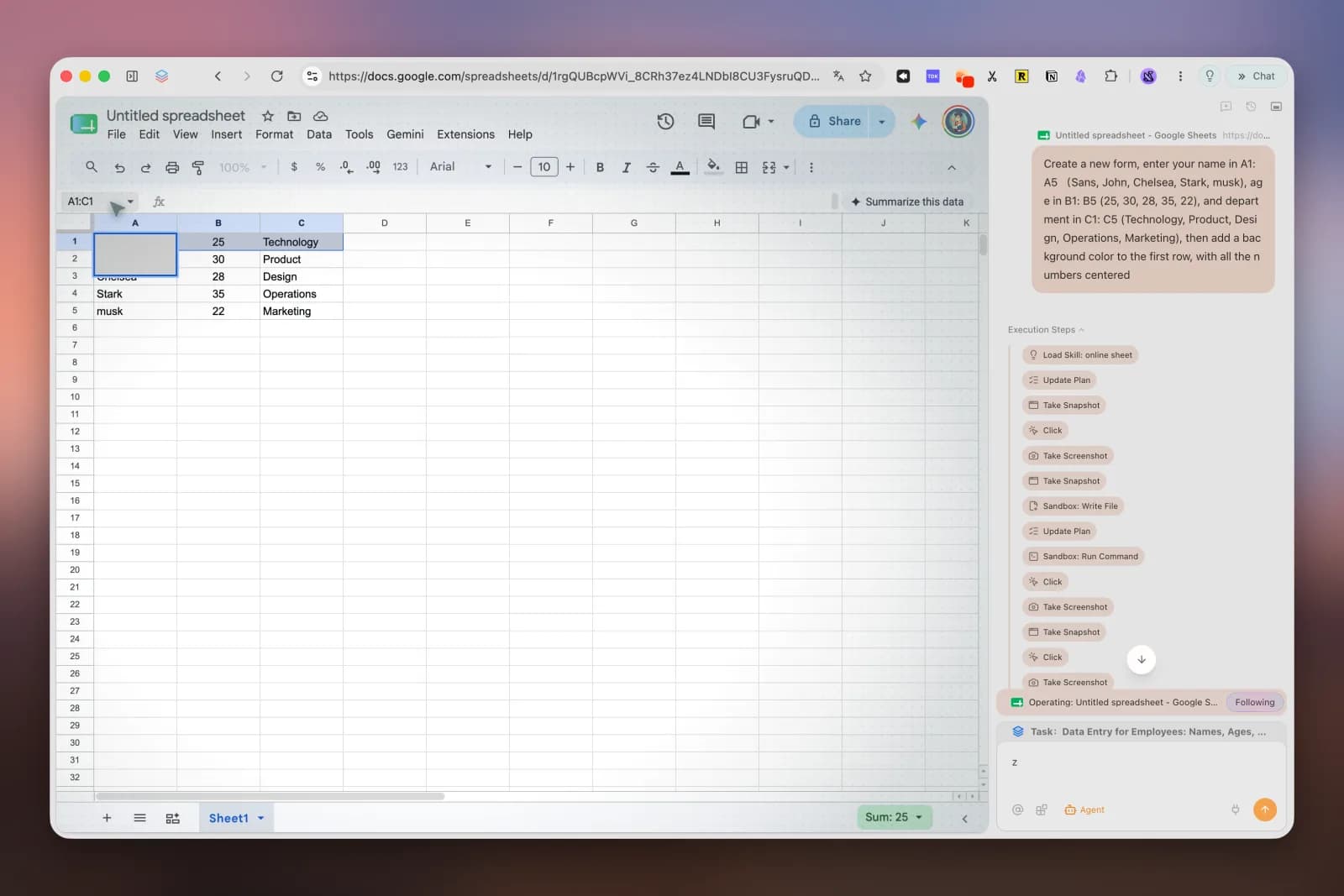
Describe the finished sheet in plain language. Agent plans the task, edits Google Sheets, and keeps its execution steps visible as it works.
Deep Research searches across sources while its plan, searches, and intermediate steps remain visible in the same browser sidebar.

Send one question to GPT, Claude, Kimi, Qwen, and GLM, then compare their answers in parallel without juggling five separate apps.

Features
Give a complex instruction and watch Tabbit execute it across websites in an isolated tab group. Research, fill forms, aggregate data, and generate reports on autopilot.
One input bar for URLs, search, and AI commands. Type @ to pull in any open tab, group, screenshot, bookmark, PDF, or Excel file as context.
Save prompts as /Skills or describe a task in one sentence to generate and run a script. Clean pages, extract assets, restyle sites, and share your Skills with the community.
A vertical sidebar keeps every title readable. Bookmarks are stored permanently and searchable by AI, even if the original page goes offline.
Why Tabbit
Every interaction—from the address bar to tab grouping—is designed around an AI assistant that understands the page you are on.
Unlike chat sidebars, Tabbit Agent can click, type, scroll, and submit. It completes real workflows, not just answers.
Switch between GPT, Gemini, Claude, DeepSeek, GLM, Kimi, Qwen, Doubao, MiniMax and more without leaving the browser.
Your history, bookmarks, highlights, and chats stay encrypted on your device. The browser is free; AI usage includes a weekly free allowance, with Pro optional for heavier use.
Comparison
See how Tabbit compares to using Chrome with extensions or newer search-centric tools.
| Capability | Chrome + Extensions | Rabbit Browser | Tabbit Browser AI |
|---|---|---|---|
| AI integration | Add-on sidebar | Search-first | Native, context-aware |
| Browser automation | Limited extensions | No | Agent Mode |
| Tab & workspace mgmt | Horizontal tabs | Basic | Vertical + auto-groups |
| Context reference | Copy-paste | Links only | @-mention anything |
| Multi-model access | Per extension | Single AI | Switch freely |
| Pricing | Free + paid extensions | Free/unknown | Free browser + optional Pro |
FAQ
Yes. The browser is free. AI features include a weekly free allowance, and an optional Pro plan is available for users who need top models or frequent Agent usage.
Tabbit was rebuilt around AI from the ground up. The address bar, tab grouping, bookmarks, and automation all feed context to an AI assistant that can both answer questions and take action.
Agent Mode lets you describe a task in natural language. Tabbit then operates the browser for you—opening pages, extracting data, filling forms, and returning a result in an isolated tab group.
The international version supports GPT-5.2, Gemini 3.1 Pro, Claude Sonnet 4.6 and more. The domestic version supports DeepSeek, GLM, Kimi, Qwen, Doubao, MiniMax and LongCat.
Press @ in the Omnibox. You can reference the current page, an entire tab group, a screenshot, a bookmark, or upload a local file like a PDF or Excel sheet.
Yes. Tabbit supports one-click import of bookmarks, history, passwords, cookies, and extensions from Chrome, Edge, Safari, and other mainstream browsers.
Tabbit follows a privacy-first design. Agent tasks run in isolated tab groups and your data is not used to train models without your consent.
Click any download button on this page to visit the official Tabbit site and grab the latest installer for macOS or Windows.
Download the browser for free on macOS or Windows. Start with the included weekly AI allowance and upgrade only if you need more.