AI Freedom
Multi-Model AI Comparison
You want the flexibility to switch between GPT-5, Claude 3.7 Sonnet, DeepSeek V3/R1, and Gemini, or query them simultaneously to cross-check answers.
Tabbit Browser
TABBIT VS MICROSOFT EDGE · 2026 COMPARISON
 Tabbit
 Microsoft Edge
Microsoft Edge retrofitted a Copilot sidebar into a traditional browser cluttered with MSN news feeds and shopping widgets. Tabbit was born AI-native—combining multi-model flexibility, autonomous web agents, and 1-click seamless migration in an ultra-clean workspace.
Free public beta for macOS and Windows. 100% Chromium extension compatibility.
DECISION MATRIX
Both browsers share the high-speed Chromium foundation, but they diverge radically in their AI philosophy, workspace cleanliness, and autonomy.
You want the flexibility to switch between GPT-5, Claude 3.7 Sonnet, DeepSeek V3/R1, and Gemini, or query them simultaneously to cross-check answers.
You need an agent that does more than chat—it navigates web portals, enters data into spreadsheets, conducts deep research, and executes multi-step tasks.
You are exhausted by MSN news widgets, shopping popups, and aggressive Bing search nudges, and want a clean 1-click import of your extensions and bookmarks.
Your organization mandates centralized Azure AD device management, Windows Defender Application Guard, and strict corporate group policies.
CORE ADVANTAGES & CAPABILITIES
Explore the structural differences that separate a retrofitted sidebar browser from a truly AI-native operating environment.
Microsoft Edge restricts you to a single Copilot pipeline backed solely by OpenAI and Microsoft endpoints. Tabbit empowers you with multi-model freedom: query leading models like GPT-5, Claude 3.7 Sonnet, DeepSeek V3/R1, Qwen, and GLM side-by-side to cross-validate insights and eliminate single-model hallucinations.

Edge Copilot often loses page context or requires manual copy-pasting for complex web apps. Tabbit’s AI Sidebar reads and parses full DOM hierarchies, articles, PDFs, and data sheets in real time—extracting structured takeaways, core messages, and action items with zero friction.

Worried about losing your setup? Tabbit is built on the robust Chromium engine. In just one click, Tabbit imports all your bookmarks, browsing history, saved passwords, and extensions directly from Microsoft Edge or Google Chrome in under 10 seconds.

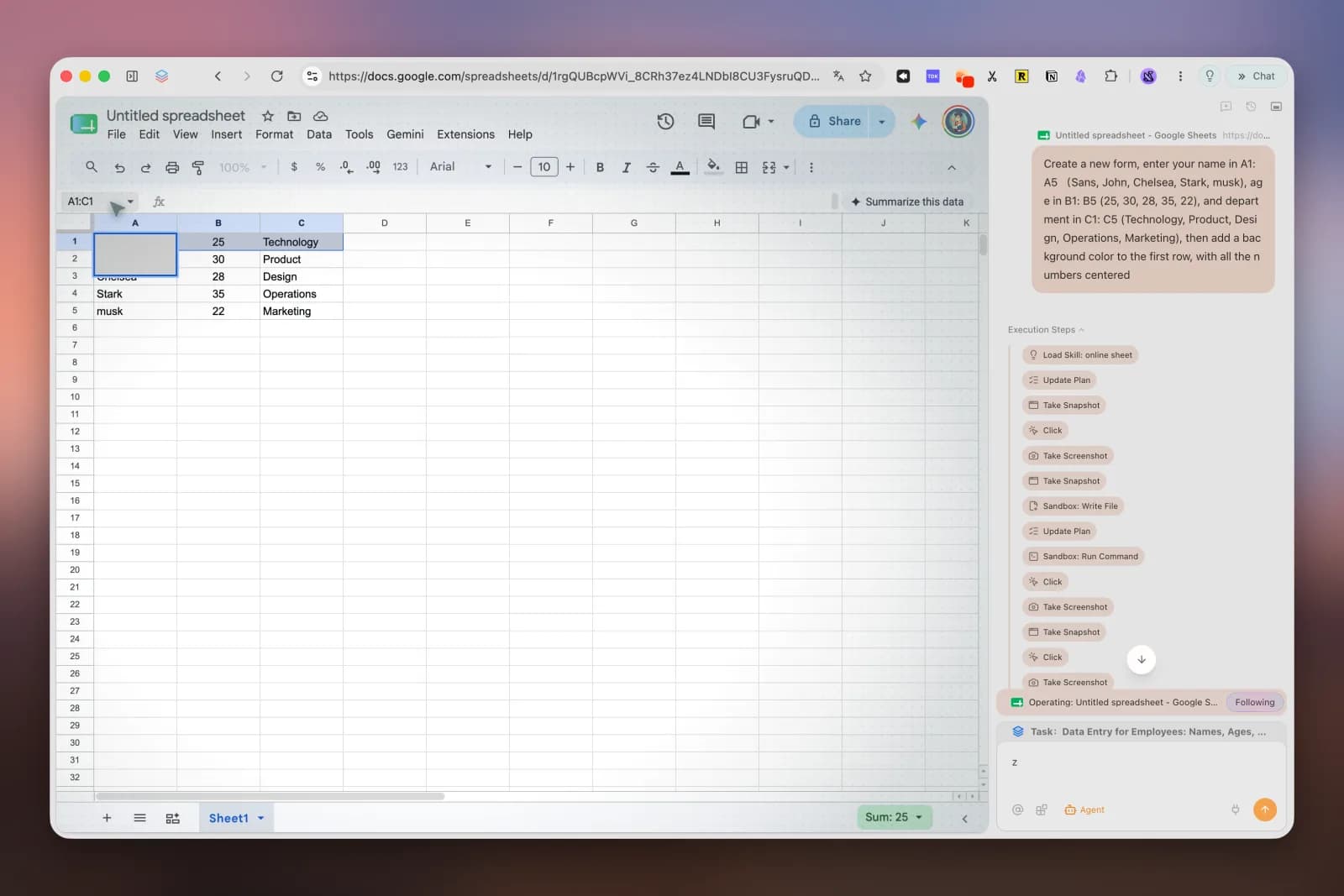
While Edge Copilot remains a passive conversational companion, Tabbit includes a full Autonomous Agent Mode capable of interacting directly with web elements, filling out forms, operating Google Sheets, and running multi-step research investigations across dozens of pages.
SIDE-BY-SIDE MATRIX
See how the two browsers compare across architecture, AI autonomy, user experience, and customization.
| Capability / Dimension | Tabbit Browser | Microsoft Edge |
|---|---|---|
| Core Architecture | AI-native Chromium workspace with integrated Agent engine | Traditional Chromium browser with retrofitted Copilot sidebar |
| AI Model Choice | Multi-Model (GPT-5, Claude 3.7 Sonnet, DeepSeek V3/R1, Gemini, Qwen, GLM) | Locked into Microsoft Copilot (OpenAI stack only) |
| Simultaneous Multi-Model Query | Yes — compare multiple AI models side by side in real time | No — single model response only |
| Autonomous Agent Execution | Built-in Agent Mode (browser-use, form filling, web app automation) | No autonomous browser action execution |
| Deep Multi-Tab Research | Automated Deep Research synthesizes dozens of tabs into structured reports | Manual search with Bing summary cards |
| 1-Click Migration from Edge/Chrome | Instant 1-click import (bookmarks, extensions, passwords, history) | Import from Chrome available |
| Extension Compatibility | Full Chrome Web Store & Chromium extension compatibility | Chrome Web Store & Microsoft Edge Add-ons |
| Interface Cleanliness & Bloat | Distraction-free glassmorphism, zero ads, zero shopping popups | MSN news feed on new tab, shopping widgets, Bing rewards prompts |
| In-Page Context Analysis | Deep DOM parsing, instant key takeaways, and structured document insights | Basic Copilot page summary with character limits |
| Platform Support | macOS and Windows (native desktop builds) | Windows, macOS, Linux, iOS, Android |
| Pricing & Public Access | Free Public Beta with included AI agent capabilities | Free browser; Copilot Pro requires $20/month subscription |
OBJECTIVE EVALUATION
We believe in honest recommendations. Here is how to decide based on your operational constraints.
MIGRATION IN UNDER 60 SECONDS
You do not have to rebuild your digital workspace. Switching to Tabbit takes less than a minute.
Install the native macOS or Windows build from the official site. No invite codes required.
On first launch, choose Microsoft Edge from the onboarding wizard to import all bookmarks, history, passwords, and extensions.
Your favorite extensions and tabs are instantly ready, supercharged with multi-model AI and autonomous agent capabilities.
FREQUENTLY ASKED QUESTIONS
Yes, 100%. Tabbit is built on the Chromium engine and provides an automated 1-click migration wizard during onboarding. It securely imports all your bookmarks, browsing history, saved passwords, and extensions from Microsoft Edge in seconds.
Microsoft Edge Copilot is a fixed sidebar widget primarily running OpenAI/Microsoft models in a basic chat box. Tabbit is AI-native from the ground up: it offers multi-model freedom (simultaneously querying GPT-5, Claude 3.7 Sonnet, DeepSeek V3/R1, and Gemini), deep in-page context extraction, and an autonomous Agent Mode that can perform multi-step web tasks and deep research across tabs.
Yes. One of the biggest reasons users switch to Tabbit is interface cleanliness. Tabbit has zero MSN news spam, zero shopping coupon overlays, zero Bing rewards popups, and no aggressive ecosystem lock-in. It is designed purely for deep focus and productivity.
Yes. Tabbit offers optimized desktop builds for both macOS (Apple Silicon and Intel) and Windows 10/11, providing fast startup, smooth rendering, and low memory consumption.
No. Tabbit is currently available in a free public beta that includes access to multi-model AI features, in-page summaries, and agent capabilities without mandatory paid tiers.
Tabbit treats privacy and security as first-class architectural principles. Your browsing history, local data, and credentials remain securely on your device. AI queries are processed with enterprise-grade privacy standards, and agent actions are always visible and controllable in real time.

Migrate from Microsoft Edge in 1 click. Experience multi-model AI, autonomous agent workflows, and a distraction-free workspace today.