English
Tabbit vs Firefox: The AI-Native Browser for Next-Level Workflows
Mozilla Firefox defined open-source browsing and privacy for decades. Tabbit takes that power-user ethos and supercharges it with native multi-model AI, autonomous browser agents, and seamless 30-second migration.
The Verdict: Firefox remains a solid traditional choice, but Tabbit is the superior productivity weapon with built-in Claude, GPT, DeepSeek, Agent Mode, and full Chrome extension support.
Available for macOS & Windows • Instant 1-Click Import from Firefox

Which Browser Fits Your Everyday Workflow?
AI Intelligence & Frontier Models
Firefox offers basic optional chatbots. Tabbit embeds Claude 3.7, GPT-4o, DeepSeek R1, and Kimi directly into your tabs for parallel queries and deep research.
Browser Automation & Agent Mode
Firefox requires 100% manual clicking and data copying. Tabbit’s Agent Mode autonomously fills spreadsheets, automates forms, and collects multi-site data.
Migration & Extension Ecosystem
Switching is effortless. Tabbit imports your Firefox bookmarks, history, and passwords in 30 seconds while providing full access to millions of Chrome Web Store extensions.
Head-to-Head Comparison: Tabbit vs Mozilla Firefox
A clear breakdown of how the next-generation AI browser compares to the classic open-source browser across core capabilities.
| Feature / Capability | Tabbit Browser | Mozilla Firefox |
|---|---|---|
| Core Engine & Web Standards | ✓Modern High-Speed Chromium Engine (100% web app compatibility, zero glitch) | Gecko Engine (Some modern complex web apps require workarounds) |
| Built-In AI Models | ✓Multi-Model Native Layer: Claude 3.7, GPT-4o, DeepSeek R1, Kimi, Qwen Max | Experimental third-party sidebar chatbots with limited context access |
| Autonomous Agent Workflows | ✓Built-in Agent Mode: executes actions, fills forms, scrapes data, edits Google Sheets | None (Pure manual navigation and manual copy-pasting) |
| Cross-Tab & Video Summarization | ✓Instant 1-click summary for web articles, YouTube videos, and PDFs with citations | Requires manual reading or separate extension installation |
| Extension Marketplace | ✓Full Chrome Web Store access (Millions of modern extensions & dev tools) | Firefox Add-ons (AMO) with a smaller developer ecosystem |
| Tab Management & Workspaces | ✓Native Vertical Tabs + AI Smart Auto-Grouping + Task Workspaces | Horizontal tabs by default (Vertical tabs require CSS hacks or complex setup) |
| Migration from Existing Browsers | ✓1-Click instant import of bookmarks, browsing history, saved passwords, and settings | Standard import wizard requiring manual adjustments |
| Privacy & Data Protection | Private sandboxed tasks, explicit context control, zero ad tracking | Strong tracking protection, open-source codebase, Multi-Account Containers |
Why Creators and Developers Are Moving to Tabbit
Explore the game-changing capabilities that elevate Tabbit beyond traditional web browsers.
Native Multi-Model Intelligence: Chat with Your Whole Web
Instead of being locked into a single AI provider, Tabbit integrates the world’s most powerful frontier models directly into your browsing canvas. Compare answers side-by-side or select the best model for coding, deep research, or creative drafting.
- ✓Parallel query execution across GPT, Claude Opus, DeepSeek, and Kimi
- ✓Full-page context awareness without copying and pasting long text blocks
- ✓YouTube video timeline breakdown, transcript extraction, and PDF analysis


Autonomous Agent Mode: Let AI Do the Heavy Lifting
Traditional browsers force you to click every button and copy every table manually. Tabbit’s Agent Mode autonomously plans steps, interacts with live web interfaces, enters data into spreadsheets, and aggregates multi-source research on your behalf.
- ✓Autonomous web navigation and multi-step form execution
- ✓Live visual snapshots and verified action execution steps
- ✓Safe sandboxed execution with complete user oversight and instant pause control
Smart Tab Organization & Clutter-Free Workspaces
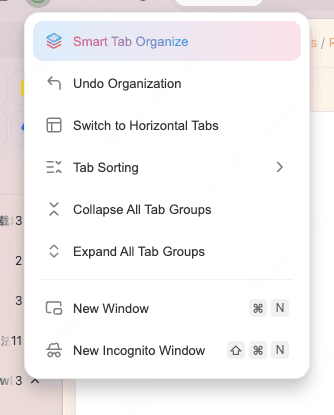
Firefox users frequently struggle with 50+ horizontal tabs squished into unreadable favicons. Tabbit offers native vertical tabs with AI auto-grouping, automatic memory hibernation, and dedicated workspace isolation.
- ✓1-Click AI Smart Tab grouping based on current project topic
- ✓Seamless toggle between modern vertical layout and classic horizontal tabs
- ✓Intelligent memory compression keeps your computer cool even with 100+ open tabs
Switch from Firefox to Tabbit in 30 Seconds
You don’t have to rebuild your digital workspace from scratch. Tabbit automatically imports everything you need in a single click.

Download & Launch Tabbit
Get the lightweight installer for macOS or Windows. No registration or complex configurations required.
Select Firefox Import Profile
Tabbit automatically detects your installed Firefox profiles, saved passwords, bookmarks, and open sessions.
Start Browsing with AI Superpowers
All your favorite websites and bookmarks are ready. Activate the AI sidebar to summarize pages and automate your workflow.
Which Browser Should You Choose?
Switch to Tabbit if you:
Want to maximize daily productivity, eliminate tedious repetitive web tasks, and leverage frontier AI models seamlessly.
- ✓You read long technical articles, research papers, or watch educational YouTube videos and need instant structured summaries.
- ✓You want an AI agent that can fill web forms, aggregate data, and automate repetitive workflows.
- ✓You need full compatibility with all Chrome Web Store extensions and modern web applications.
- ✓You love clean vertical tabs and intelligent AI tab categorization.
Stay on Firefox if you:
Prioritize a 100% non-Chromium open-source rendering engine above all productivity features.
- •You heavily rely on Gecko-specific add-ons and deep userChrome.css interface customization.
- •You require Firefox Multi-Account Containers for specialized multi-session isolation.
- •You prefer purely traditional manual browsing without any integrated AI assistance.
Got Questions About Switching from Firefox?

Ready to Experience the Next Era of Web Browsing?
Join thousands of developers, researchers, and creators who upgraded from traditional browsers to Tabbit.
Available for macOS & Windows • 30-Second Instant Setup