Complex Web Automation & Forms
You need an agent that autonomously clicks buttons, navigates pagination, extracts structured records, and fills multi-step web forms.
Best Pick: Tabbit
2026 Browser Comparison
 Tabbit
 Opera
OperaOpera added Aria to a heavy suite of sidebars, games, and messengers. Tabbit was built from the ground up as an Agentic AI Browser that executes real web tasks, conducts deep multi-source research, and orchestrates frontier models.
Key Verdict
Choose Opera if you want built-in social messengers and gamer aesthetics. Choose Tabbit if you want an AI Agent that actually performs web research, fills forms, and automates multi-step workflows.

Quick Decision Guide
Both browsers integrate AI, but their fundamental architectures serve entirely different paradigms.
You need an agent that autonomously clicks buttons, navigates pagination, extracts structured records, and fills multi-step web forms.
You want comprehensive synthesis from Google, Reddit, academic papers, and YouTube without manually copying URLs into a chat box.
You prefer having WhatsApp, Discord, Twitch, and custom neon themes directly pinned inside the browser sidebar.
You want simultaneous answers and side-by-side comparison across Claude 3.7, GPT-5, DeepSeek, and Gemini in one workspace.
Visual Proof & Capabilities
See the architectural differences between an autonomous agentic browser and a legacy browser with a chat widget.
While Opera’s Aria chatbot generates text in a side drawer, Tabbit’s Agent Mode inspects live DOM trees, plans execution paths, clicks interactive elements, and manipulates web apps like Google Sheets and CRM dashboards automatically.
Conducting market research or technical investigation in Opera means opening dozens of tabs and manually reading each. Tabbit triggers automated deep research routines that crawl search engines, video platforms, and developer forums, delivering citation-backed reports in minutes.

Opera clutters its sidebar with social messengers and shopping shortcuts. Tabbit provides a clean, purpose-built AI workspace that extracts key takeaways, generates actionable next steps, and allows seamless switching between leading LLMs.

Opera locks you into its proprietary Aria pipeline. Tabbit gives you the freedom to harness Claude 3.7 Sonnet, GPT-5, Gemini 3.1 Pro, DeepSeek-R1, and Qwen simultaneously in a unified multi-column comparison view.

Interaction & UI Nuances
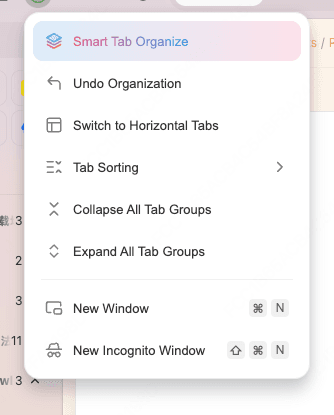
Instead of Opera’s manual domain-based Tab Islands, Tabbit clusters open tabs according to their task context, allowing instant organization and undo.
Quickly select from GPT-5, Claude 3.7 Sonnet, Gemini 3.1 Pro, and DeepSeek directly from the prompt bar for optimal reasoning performance.

Head-to-Head Matrix
A comprehensive breakdown of features, AI capabilities, performance, and everyday productivity.
| Capability / Dimension |  Tabbit AI Browser Tabbit AI Browser |  Opera (One / GX) Opera (One / GX) |
|---|---|---|
| AI Architecture | ●Agentic AI Native: autonomous action engine with browser use & DOM manipulation | ○Sidebar chat widget (Aria) overlaid onto legacy browser core |
| Supported LLM Models | ●Multi-model: Claude 3.7, GPT-5, Gemini 3.1, DeepSeek-R1, Qwen in parallel | ○Single proprietary Aria model pipeline (locked-in) |
| Deep Research Engine | ●Automated multi-source search across 10+ websites, forums, and video transcripts | ○Single query web search via Aria chat box |
| Browser Automation | ●Autonomous clicking, pagination, form filling, and cross-tab execution | ○Not supported (chat and text drafting only) |
| Tab & Workspace Organization | ●AI semantic tab clustering, workspace recall, and split-screen workbench | ○Tab Islands (domain-based grouping) & manual Workspaces |
| Interface Design & Bloat | ●Minimalist, distraction-free interface focused on reading and deep work | ○Feature-heavy with preloaded messenger shortcuts, news feeds, and promotional cards |
| Privacy & Telemetry | ●Transparent local-first context control; no ad-network data harvesting | ○Built-in HTTPS proxy (marketed as VPN) with corporate analytics integration |
| Extension Compatibility | ●100% Chromium extension compatibility (Chrome Web Store) | ○Chromium extension compatibility with Opera Add-ons store |
| Pricing & Public Beta | ●Free Public Beta with full AI agent capabilities included | ○Free basic browser; Opera Neon agent requires subscription ($19.90/mo) |
Honest Assessment
Opera has spent decades innovating browser features. Understanding its strengths and weaknesses helps determine if switching to Tabbit makes sense for you.
The Tabbit Advantage
Tabbit transforms browsing from passive consumption into an intelligent collaborative workspace.
Delegate tedious tasks—like compiling competitor pricing tables, downloading invoices, or submitting routine forms—to Tabbit Agent Mode.
Eliminate hallucination risks by querying multiple leading LLMs simultaneously to cross-validate facts, code, and strategy.
Enjoy a serene, uncluttered workspace designed without intrusive ads, gaming sounds, or forced shopping sidebars.
Full native performance on both macOS (Apple Silicon / Intel) and Windows 10/11 with zero onboarding friction.
Zero-Friction Switch
No need to rebuild your digital workspace from scratch. Tabbit imports your Opera bookmarks, history, and passwords in a single click.

Get the lightweight installer for macOS or Windows. No account registration or complex configuration required.
Tabbit automatically detects your Opera profile and imports bookmarks, browsing history, and saved passwords.
All your favorite sites are right where you left them. Open the AI sidebar to summarize pages and automate your workflow.
Frequently Asked Questions
Opera Aria is an interactive chat assistant inside the sidebar that answers questions and drafts text. Tabbit is an Agentic AI Browser: its Agent Mode can actually "see" webpage structures, plan execution steps, click buttons, fill forms, and autonomously navigate across multiple tabs to complete real-world tasks.
Yes. Tabbit is built on the high-performance Chromium engine. During your initial setup, you can import bookmarks, browsing history, and saved data from Opera or Chrome with a single click.
Yes, 100%. All your favorite extensions—including 1Password, Bitwarden, Notion Web Clipper, and Developer Tools—install and run seamlessly in Tabbit.
Yes. Tabbit is currently in free Public Beta, providing access to its Agent Mode, Deep Research, and multi-model workspaces without mandatory paid subscriptions or invite codes.
Opera’s Tab Islands group tabs based on the domain you opened them from. Tabbit takes tab management further with AI semantic clustering that understands the actual content and context of your tabs, allowing you to organize, collapse, or resume research workspaces with a single click.
Tabbit supports macOS (both Apple Silicon M1/M2/M3/M4 and Intel) as well as 64-bit Windows 10 and Windows 11.

Join thousands of professionals switching from legacy browsers to Tabbit’s autonomous agentic workspace.