
A practical browser field guide

Tor Browser for privacy. Tabbit for getting work done.

Looking for Tor Browser usually means one of three things: the official download, a plain-English explanation, or a safer way to use it. Start with the distinction that matters: Tor routes traffic through an anonymity network; Tabbit is an AI-native browser for reading, organizing and acting on the web. They solve different jobs.

Tabbit is not an anonymity network and does not replace Tor Browser for anonymity-focused use.

Tabbit desktop browser new-tab workspace with vertical tabs, an AI input box and a right-side assistant panel.

Choose the job first

The right browser depends on what you need to protect or finish

A privacy network and a productivity browser can both be useful, but combining their promises creates bad expectations. Use this quick map before downloading anything.

Tor Browser01

You need an anonymity-focused network path

Choose Tor when routing and reducing identifying signals is the main goal. The Tor Project documents relays, tracker isolation and anti-fingerprinting features.

Best fit: privacy research, censorship-resistance needs and other situations where the network path matters.

Tabbit Browser02

You need to read, compare and act

Choose Tabbit when the hard part is information work: ask about open pages, reference tabs or files with @, group research and use Agent Mode for multi-step web tasks.

Best fit: research briefs, repetitive web work, writing and a browser workspace built around context.

A deliberate combination03

Keep privacy and productivity in separate lanes

You can read a public source in Tor and do ordinary, authorized work in Tabbit. Do not assume that opening a page in one browser transfers its network privacy to the other.

Rule of thumb: choose the network for the sensitive browsing session; choose the workspace for the task you need to finish.

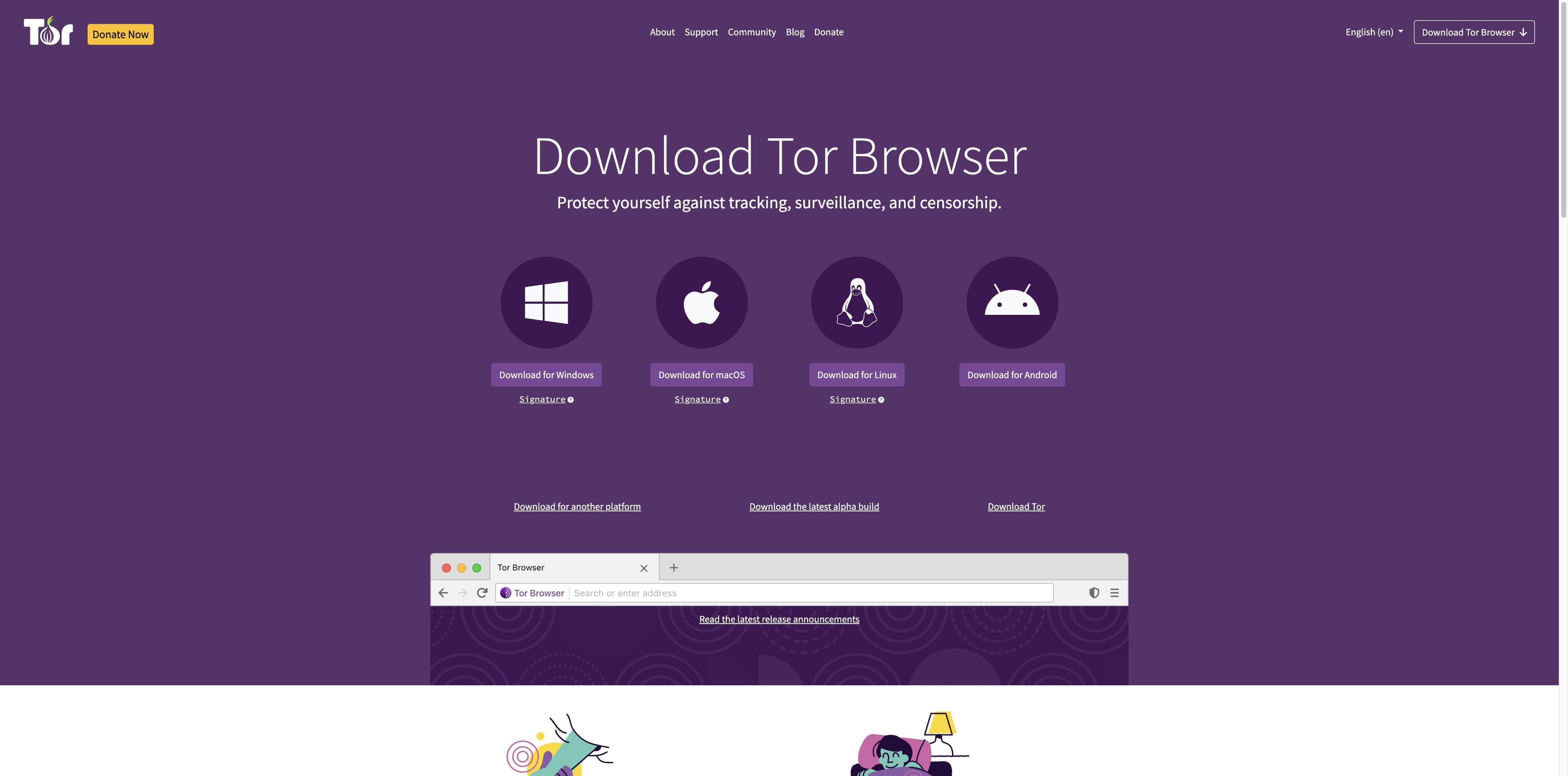
Official Tor Project download page showing Windows, macOS, Linux and Android choices in a purple layout.
Source: Tor Project official download page

What Tor Browser is

Tor Browser is a privacy tool built around the Tor network

The official Tor pages frame the browser around privacy, freedom and resistance to tracking or censorship. The download page also makes the practical path clear: pick a platform, verify the package and read the safety guidance.

01

Relays change the network path

The Tor Project says traffic is relayed and encrypted three times through volunteer-operated Tor relays. That is a network design, not a setting inside an ordinary browser.

02

Isolation and anti-fingerprinting are part of the design

The official homepage says each site is isolated from third-party trackers and that Tor aims to make users look more alike, making browser and device fingerprinting harder.

03

Privacy does not mean every site will behave normally

Tor can be slower, encounter extra verification or break site features. Accounts, downloads, personal data and the content you choose to share still need careful judgment.

Read the promise precisely

What the Tor Project shows — and what it does not promise

The official Chinese homepage presents “private browsing” and “free exploration” with concrete mechanisms. Treat them as product claims with a threat model, not as a universal guarantee of anonymity or safety.

Official Tor Project Chinese homepage showing “Private browsing. Free exploration.” and tracker-blocking details.
1

Cookies and history are handled deliberately

The Tor homepage says third-party trackers are isolated and that cookies and browsing history are cleared when the browser closes. Your own downloads, screenshots or copied text are still your responsibility.

2

Bridges are a connection option, not a magic fix

The official download page suggests configuring a bridge when Tor is blocked. It also notes that an incorrect system clock is a common reason a connection will not work.

3

Do not add risky extras casually

Tor’s safety guidance says not to torrent over Tor and discourages extra plugins or add-ons because they may bypass Tor or compromise privacy. Follow the official manual for troubleshooting.

Tor Browser vs Tabbit

Same web, different responsibility

This comparison describes the jobs documented by the reviewed official Tor pages and the Tabbit product materials. It is not a promise that either browser defeats every threat or supports every site.

Decision pointTor BrowserTabbit Browser
Primary jobAnonymity-focused network accessAI-assisted browsing and web work
Network pathTor relays and layered routingOrdinary browser network path; no Tor relay claim
Page contextPrivacy-focused browsing controlsReference tabs, groups, screenshots, bookmarks and local files with @
Multi-step web workNot the focus of reviewed official pagesAgent Mode can read, navigate and carry out authorized browser steps
OrganizationPrivacy-oriented site isolationVertical tabs, smart grouping and workspace-style organization
Platforms in reviewed pagesWindows, macOS, Linux and Android downloadsmacOS and Windows product materials
Best starting questionDoes the network path need anonymity properties?What information or repetitive task should the browser help finish?

Where Tabbit fits

When the hard part is the work after the page opens

Tor answers a network-privacy need. Tabbit answers the next layer: keeping sources visible, asking questions in context and turning scattered pages into a result you can use.

Tabbit Deep Research interface showing search results and execution steps in the right sidebar.
01

Research across open sources

Tabbit Deep Research shows search and execution steps in a side panel, so a multi-page research task has a visible trail instead of a pile of copied snippets.

Tabbit browser showing a long article beside an AI sidebar with a summary and key takeaways.
02

Turn a long page into a usable brief

With a page open, Tabbit can summarize the source in its side panel. Reference only the tabs, screenshots or files you intend to share; this is a productivity workflow, not an anonymity feature.

Before you download

A short, safer Tor Browser setup checklist

Use the official source and keep the network promise separate from your everyday account and productivity decisions.

Visit Tor Project download

This page is an orientation guide, not legal advice or a guarantee of anonymity. Follow local law, the Tor manual and the rules of the sites you use.

01

Start at the official source

Use the Tor Project download page or its official app-store route. Avoid random “Tor Browser” mirrors and repackaged installers.

02

Pick the platform and verify

The official page lists Windows, macOS, Linux and Android. Desktop packages include signature links; use the Tor instructions to verify a download when your risk model calls for it.

03

Expect limits

Bridges can help when Tor is blocked, while a wrong system clock can prevent a connection. Some sites may be slower, challenge the session or not work as expected.

04

Keep the task boundary clear

Use Tor for the privacy properties you need. Use Tabbit for authorized research and web work; never interpret its AI, tabs or Agent Mode as Tor anonymity.

FAQ

Tor Browser questions, answered without overpromising

What is Tor Browser?+

Tor Browser is a free, open-source browser from the Tor Project that uses the Tor network and privacy-oriented browser settings to reduce tracking and make network observation harder.

Where should I download Tor Browser?+

Start at the official Tor Project download page or the official app-store route linked there. Check the platform and, for desktop packages, use the published signature-verification guidance.

Is Tor Browser the same as the dark web?+

No. Tor Browser can open ordinary websites and Tor-specific onion services. The browser, the Tor network and the “dark web” are different concepts.

Is Tor Browser safe or legal?+

The answer depends on your country, activity and threat model. Tor is legitimate privacy software, but no browser guarantees safety, and local laws or website rules still apply. This page is not legal advice.

Can a VPN replace Tor Browser?+

A VPN and Tor make different trust and routing choices. Compare the provider, threat model and task rather than treating either as a universal replacement; Tor Browser is designed around the Tor network.

Why will Tor Browser not connect?+

Check the official troubleshooting guidance, your system clock and whether Tor is blocked on your network. The Tor Project download page specifically points to bridges for blocked connections.

Does Tor Browser work on PC and Android?+

The reviewed Tor Project download page lists Windows, macOS, Linux and Android. Android also has official Google Play, F-Droid and APK routes; platform availability can change.

Can I use Tabbit instead of Tor Browser?+

Use Tabbit when your goal is AI-assisted research, context references, organized tabs or authorized web tasks. Use Tor when the anonymity properties of the Tor network are the requirement. Tabbit is not a Tor replacement.

Can I use AI sites inside Tor Browser?+

A site may load, challenge the session or limit features. Do not upload sensitive material or assume that an AI site preserves Tor’s privacy properties. Check the site’s rules and share only what the task requires.

For the work after the search

Keep the source choice honest. Make the work easier.

Download Tabbit for a browser workspace with AI context, multi-model conversations, organized tabs and Agent Mode for authorized web tasks. Choose Tor separately when an anonymity-focused network path is what you need.

Available for macOS and Windows. Tabbit does not provide Tor network anonymity.

© 2026 Tabbit Browser. The AI-native browser that understands your context.

