
CHROMEBOOK / TOR CHECK

Tor Browser for Chromebook starts with an honest “no.”

The Tor Project says it does not yet have a ChromeOS version. You may still have a conditional Android or Linux route—but “it runs” is not the same as “it is an official ChromeOS build” or “every privacy feature is audited.”

Open Tor’s official guide

Tabbit is not Tor, a VPN, an anonymity network, or a ChromeOS app. It is a macOS and Windows browser for AI-assisted web work.

Tabbit / desktop workspace context ready
Tabbit Browser desktop new-tab workspace with vertical tabs, an AI input box and a right-side assistant panel.
Real Tabbit desktop interface · macOS and Windows01 / 05

THE THREE-WAY DECISION

Pick a route by your Chromebook, not by a download button

There is no single Chromebook installer to recommend. Start with the condition that must be true, then decide whether the trade-off fits your task and threat model.

ANDROID APP01

Play Store is available on this Chromebook

Tor’s own guide says you could run Tor Browser for Android on ChromeOS. Google says the Play Store is available only on some Chromebook models.

Result: mobile versions of websites; ChromeOS privacy behavior has not been audited by Tor.
LINUX ENVIRONMENT02

Linux is supported and allowed

ChromeOS can provide a Linux development environment on supported devices. That gives you a place to follow the current Tor Linux download and signature instructions.

Result: a Linux compatibility path—not an official Tor Browser for ChromeOS package.

STOP & CHECK03

Your model or admin policy blocks both

Older Chromebooks, managed school/work accounts and devices without Play Store or Linux support may leave you without an official route on that device.

Result: do not substitute a random extension, proxy or repackaged “Tor” app.

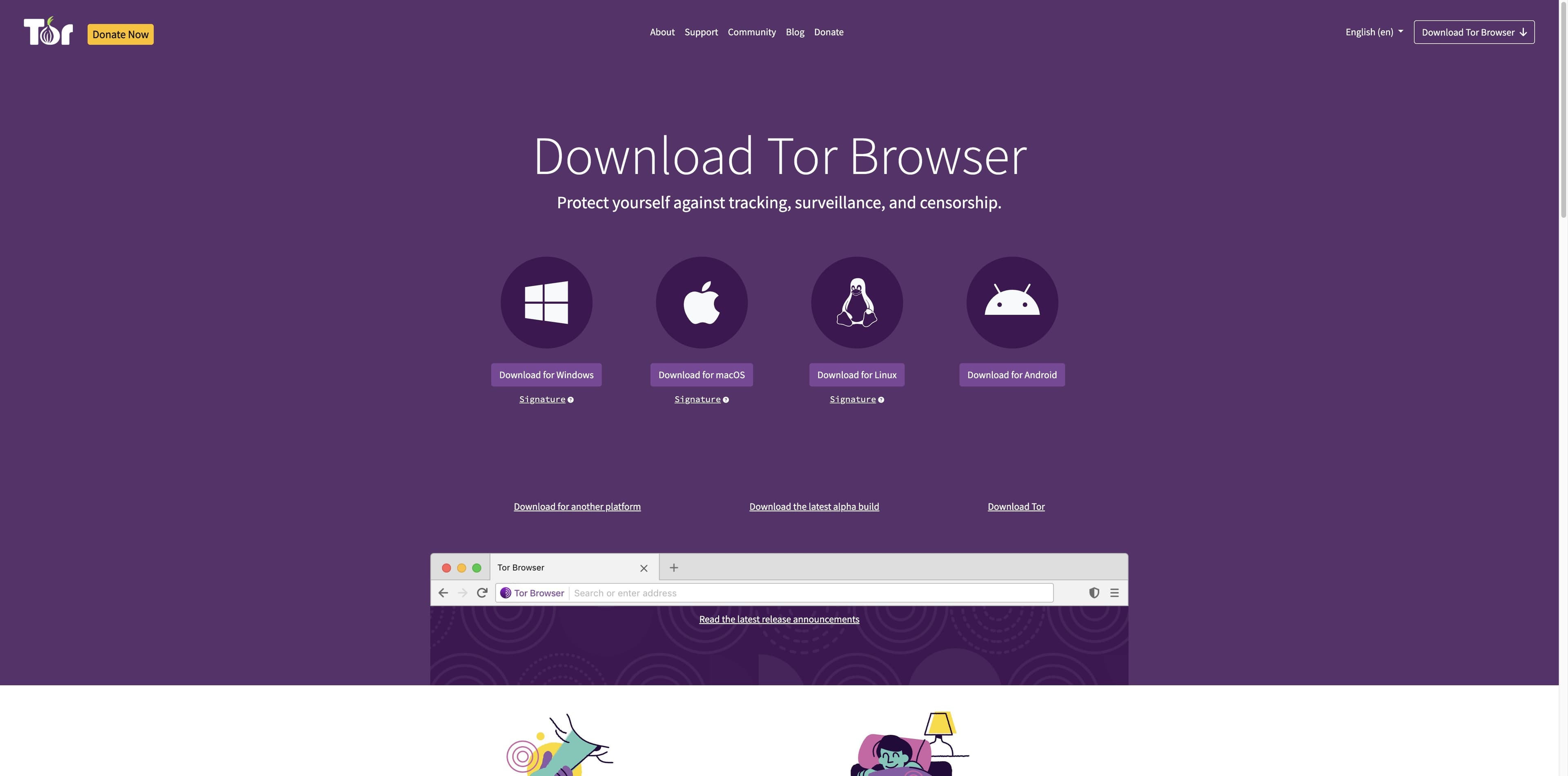
Tor Project official download page showing Windows, macOS, Linux and Android choices, with no ChromeOS download.
Official Tor Project download page · captured 2026-08-29Read the official ChromeOS note

SOURCE 01 / TOR PROJECT

The official platform list does not include ChromeOS

Tor’s current installation guide lists Android, Windows, macOS and Linux. Its ChromeOS note is the decisive line for this search: there is not yet a Tor Browser version for ChromeOS.

01

Android is an exception with caveats

Tor says Tor Browser for Android can be run on ChromeOS, but the sites appear in their mobile versions and the Android app has not been audited on ChromeOS.

02

Linux is a separate installation story

Tor documents a Linux archive and signature verification. Installing that Linux build inside ChromeOS does not turn it into a native ChromeOS release.

03

Official source beats a familiar name

The Chrome Web Store result seen for this query is titled “Unofficial port for Chrome.” A name, extension listing or proxy cannot establish Tor Project support.

SOURCE 02 / GOOGLE CHROMEBOOK HELP

Your Chromebook decides whether either workaround exists

Google’s own help pages make both gates explicit: Play Store support varies by model, Linux may be disabled by an administrator, and ChromeOS Linux apps share a sandbox.

Google Chromebook Help page showing the Linux development environment setup path and the administrator warning.

Google Chromebook Help · Set up Linux

Linux development environment

Google describes Linux as a feature for command-line tools, code editors and IDEs. On supported devices, open Settings → About ChromeOS → Developers → Linux development environment → Set up. Work or school devices may not allow Linux, and Google lists capabilities that are not supported yet.

Google Chromebook Help page showing Android app support on only some Chromebooks and the managed-device warning.

Google Chromebook Help · Android apps

Android apps and Play Store

Google says Android apps can be downloaded from Play Store, but Play Store is available only for some Chromebooks. A work or school administrator may also block Play Store or Android app downloads.

A QUICK ANSWER

Run, support, and privacy are three different columns

Use this table before following a tutorial. It separates a technically possible path from what Tor officially documents and what the Chromebook experience actually looks like.

PathRequired conditionWhat you getSupport reality
Official ChromeOS buildNone available todayNo native Tor Browser package to installNot available; Tor says there is no ChromeOS version yet
Tor Browser for AndroidCompatible Chromebook + Play StoreMobile website layouts inside the Android appTor suggests it, but ChromeOS behavior is not audited
Tor Browser for LinuxSupported, unmanaged Linux environmentLinux desktop browser inside ChromeOS LinuxTor documents Linux; ChromeOS integration is your compatibility layer
Chrome extension / proxyAn extension or proxy listing existsWhatever that third party implementsNot Tor Browser; never infer Tor routing or privacy from the name

IF YOU CONTINUE

A current, low-risk order of operations

This is a decision checklist, not a promise that every Chromebook can run Tor. Keep the official pages open while you check each gate.

Open Tor’s official download page

A Chromebook route can be useful for a specific task, but it is not a universal ChromeOS support promise or an anonymity guarantee.

01

Check the device and administrator policy

Confirm that your Chromebook model supports Android apps or Linux, and that a school/work administrator has not disabled the feature. If the setting is missing, stop there.

02

Choose Android only for the mobile trade-off

If Play Store is available, use the official Tor Android route. Expect mobile website layouts and remember that Tor has not audited all Android privacy behavior on ChromeOS.

03

Choose Linux only from current official instructions

Enable Linux from Google’s Settings path, then use Tor’s current Linux download and signature-verification instructions. Avoid copying old repository commands from dated tutorials.

04

Keep the privacy boundary visible

Do not add extra plugins casually, torrent over Tor or upload sensitive material to a site just because it opens. Follow Tor’s manual and the rules of the sites you visit.

Tabbit Deep Research desktop interface showing search results and execution steps in the right sidebar.
Real Tabbit desktop interface · macOS and Windows05 / 05

AFTER THE SOURCE IS OPEN

If the hard part is the work, use a browser built for context

Tor addresses a network-privacy requirement. Tabbit addresses the next step: reading sources, keeping research visible and carrying out authorized web work. The products are complementary only when you keep those responsibilities separate.

1

Keep the evidence in view

Tabbit’s AI context can work with the tabs, groups, screenshots or files you deliberately reference. You do not need to lose the source in a separate copy-and-paste loop.

2

Turn a research trail into a result

Deep Research and Agent Mode are for authorized browsing tasks such as comparing public sources, extracting details or drafting a brief—not for providing Tor routing or anonymity.

3

Know the platform boundary

Tabbit is currently a desktop browser for macOS and Windows. This page does not promise a Chromebook app, Linux package or Tor capability.

FAQ / NO SHORTCUTS

Questions Chromebook users should ask before installing

Is there an official Tor Browser for ChromeOS?+

No. Tor Project’s current installation guide says it does not yet have a version of Tor Browser for ChromeOS. It mentions Tor Browser for Android as a possible ChromeOS route, with mobile-site and audit caveats.

Can I run Tor Browser for Android on a Chromebook?+

Possibly. Tor says you could run its Android browser on ChromeOS, while Google says Play Store is available only on some Chromebook models. Tor also warns that websites will appear in mobile form and that ChromeOS behavior has not been audited.

Can I install the desktop Tor Browser through Linux on ChromeOS?+

A supported Chromebook can run Linux apps through its Linux development environment, and Tor publishes a Linux build. Treat this as a compatibility path, not a native or fully audited ChromeOS release, and follow current official download and signature instructions.

Why can’t I find Linux or the Play Store on my Chromebook?+

Your model may not support the feature, or a school/work administrator may have disabled it. Google’s Chromebook Help pages explicitly call out both device support and managed-device restrictions.

Is a Tor Browser extension for Chrome the same thing?+

No. A third-party extension is not the Tor Project’s browser. Do not infer Tor routing, anti-fingerprinting or the Android/Linux browser’s privacy behavior from an extension name or store listing.

Will websites look different in Tor Browser on a Chromebook?+

They can. Tor specifically says the Android-on-ChromeOS path shows mobile rather than desktop versions of websites. A Linux route may present a desktop window, but site behavior and compatibility still depend on the environment.

Can I use Tabbit instead of Tor Browser on a Chromebook?+

Not as a Tor replacement. Tabbit is currently for macOS and Windows and does not provide Tor relays, onion routing, VPN protection or ChromeOS support. Use it when the job is AI-assisted research and web work on a supported desktop.

Does a VPN make a Chromebook Tor setup official?+

No. A VPN changes a network trust decision; it does not turn an extension, Android app or Linux compatibility path into an official ChromeOS Tor Browser. Follow the Tor Project’s current guidance for your threat model.

CHOOSE THE RIGHT LAYER

Use Tor for the network property. Use Tabbit for the work.

If your Chromebook passes neither official gate, do not force a questionable install. When you have a supported macOS or Windows desktop, Tabbit can help you research, organize and act on the web with explicit context.

Tabbit does not provide Tor network anonymity or a ChromeOS app.

© 2026 Tabbit Browser. The AI-native browser that understands your context.
