Before you open an online Tor browser

Tor Browser online? First check where the browser runs.

“Online Tor Browser” can mean a local Tor app, a browser streamed from someone else’s cloud, or an ordinary web proxy using Tor language. They are not the same privacy decision. Start with the source, the network path and the data you are willing to share.

See the official Tor download

Tabbit is a desktop AI productivity browser—not Tor Browser, a Tor relay, or an online Tor proxy.

Tabbit desktop new-tab workspace with vertical tabs, an AI input box and a visible assistant panel; it is a productivity browser, not Tor Browser.
A real Tabbit interface for research and web work. The product does not provide Tor network anonymity.

Choose the job before the button

Three things people mean by “Tor Browser online”

The safest next step depends on whether you need Tor’s network properties, a disposable testing surface, or a better way to finish ordinary web work.

01 · Official local app

You need Tor’s anonymity-focused network path

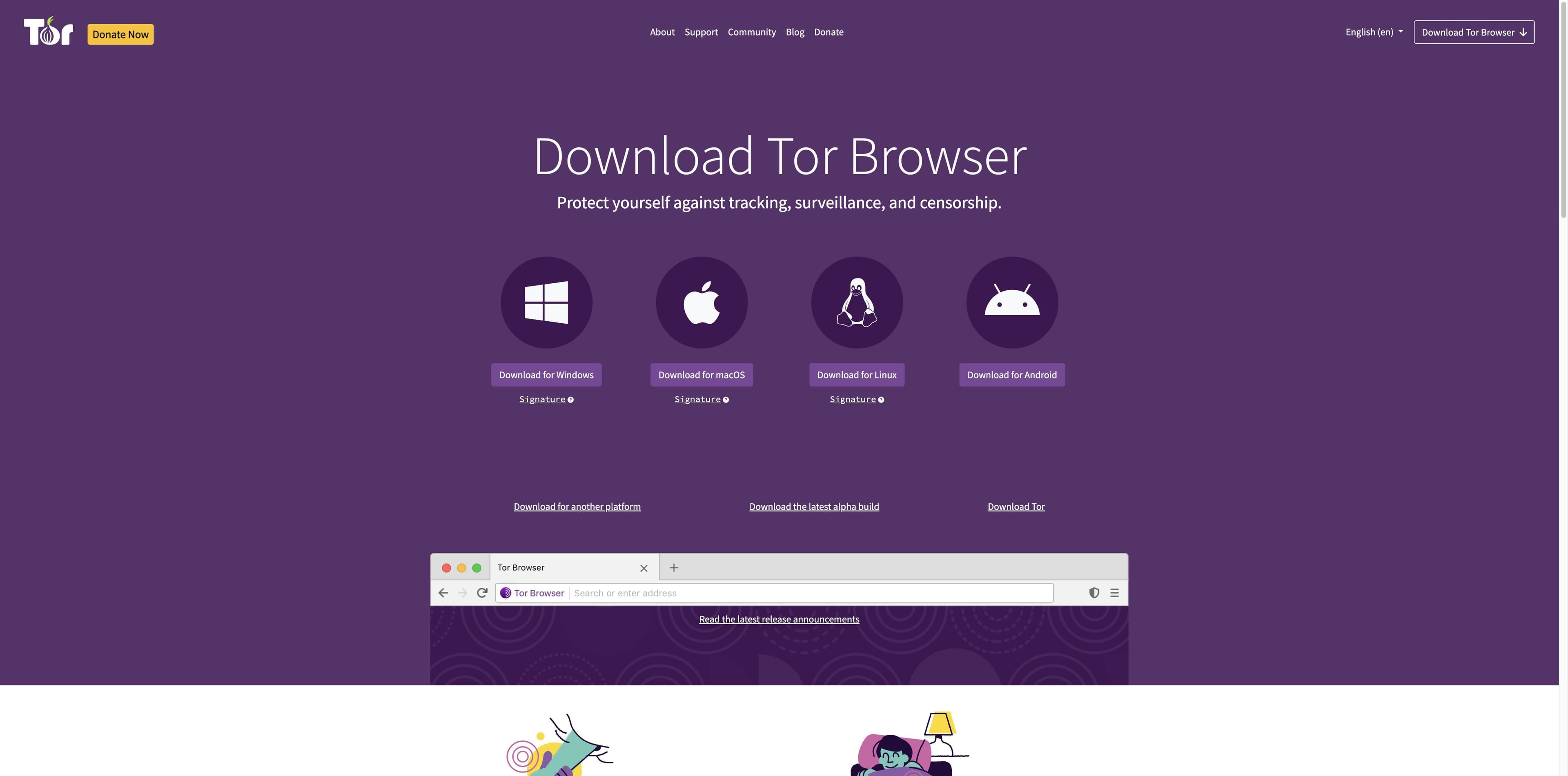
Install from the Tor Project’s official download page. The current page lists Windows, macOS, Linux and Android packages, with signature and verification links for desktop downloads.

Best fit: a threat model that specifically requires Tor Browser and the Tor network.
02 · Remote cloud session

You need no-install testing, not a private vault

A third party may stream a Tor Browser from a cloud machine. That can help test a site, but the provider handles the session and sees the URL you submit; implementation and retention details may be unknown.

Best fit: controlled, non-sensitive compatibility testing after reviewing the provider’s terms.

03 · Productivity browser

You need to read, compare and act on the web

Tabbit runs on your desktop and helps with page context, research, organized tabs and authorized multi-step tasks. It uses the ordinary browser network path and does not provide Tor anonymity.

Best fit: research briefs, repetitive web work and a workspace built around context.

The official route

Tor Browser is distributed as an app—not as a random web page

The Tor Project download page is the reference point for the real package. It makes the platform choices and the safety follow-up visible, which is exactly what a “no download” search result often hides.

Tor Project download page showing the official Tor Browser choices for Windows, macOS, Linux and Android, with signature links below desktop packages.
Official distribution is a platform download with verification guidance—not an in-browser Tor button.
1

Platforms are explicit

The reviewed page currently lists Windows, macOS, Linux and Android. For iOS, it points visitors to Onion Browser rather than presenting an official Tor Browser web app.

2

Verification is part of the path

Desktop download cards expose a Signature link and a support link for verifying the package. Use the Tor Project’s instructions when your risk model calls for it.

3

Connection problems have an official starting point

The page says bridges can help when Tor is blocked and that an incorrect system clock is a common reason Tor will not connect. It also points to the Tor Browser manual.

Open Tor Project download

Source reviewed: Tor Project official download and homepage. Availability and package versions can change.

Tor Project homepage in Chinese showing private browsing, freedom to explore, tracker isolation, anti-surveillance and fingerprinting explanations.
The Tor Project explains the network and browser privacy model separately from third-party cloud access.

The Tor Project explains the network and browser privacy model separately from third-party cloud access.

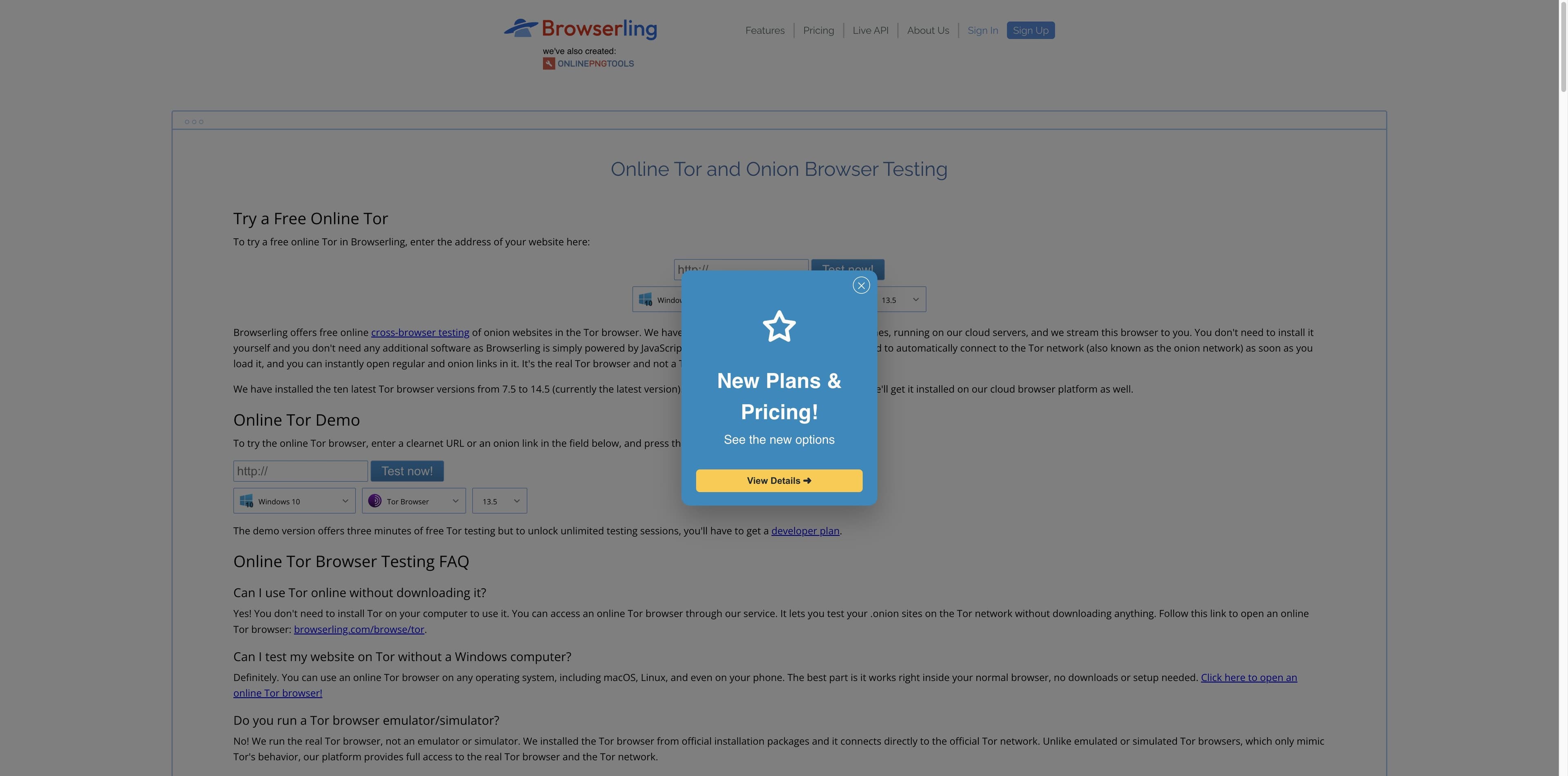
Browserling page titled Online Tor and Onion Browser Testing, showing a cloud testing form, Tor Browser version selector and a pricing overlay.
A third-party remote-testing surface: the browser is streamed from a provider’s cloud and the demo is time-limited.

The online-service boundary

A cloud Tor browser can be real software and still be the wrong privacy choice

Browserling is a useful SERP example: its page says it runs Tor Browser in cloud virtual machines, streams the session to a normal browser and offers a short free demo. Those are the service’s claims, not an official Tor Project endorsement or an independent privacy audit.

01

Remote means another party is in the loop

The URL is submitted to a service that controls the remote browser. The provider’s logging, retention, account and infrastructure practices are separate from the Tor Browser code and were not independently verified here.

02

Testing and private browsing are different jobs

A cloud session can be useful for compatibility checks without installing software. It should not be treated as a private place for credentials, personal accounts, confidential documents or sensitive destinations.

03

“Free” can describe a demo, not the trust model

The reviewed page says its demo offers three minutes and that unlimited testing requires a developer plan. Pricing does not tell you whether a service is appropriate for your threat model.

The decision table

Local Tor, remote Tor testing and Tabbit answer different questions

Use the row that matches your actual requirement. “Online” is not a security property by itself.

QuestionOfficial local Tor BrowserRemote/cloud serviceTabbit Browser
Where does it run?On your deviceProvider cloud/VM, per its claimOn your desktop
Network pathTor Browser + Tor networkControlled by the service; details varyOrdinary browser path; no Tor claim
No installation?NoUsually yes, service-specificNo; desktop app download
Best forAnonymity-focused browsingNon-sensitive site testingResearch, context and authorized web work
What should you verify?Domain, package and signatureProvider identity, policy and data handlingOfficial Tabbit download and support
What is it not?A universal safety guaranteeA private vault or Tor Project serviceTor Browser, Tor relay or web proxy

Where Tabbit fits

When the network decision is done, make the web work easier

Tabbit is for the next layer: keeping sources visible, asking about the pages you opened, and turning a scattered browsing session into a result. Choose it for productivity—not for anonymity.

01

Bring the right context

Use @ to reference the tabs, tab groups, screenshots, bookmarks or local files that belong to the task instead of pasting a pile of URLs into a separate chat.

02

Research with a visible trail

Deep Research can show search and execution steps in a side panel, giving a brief a reviewable path from sources to synthesis.

03

Keep actions authorized

Agent Mode is for multi-step browser work you authorize. Review logins, payments and other consequential actions; Tabbit is not an anonymity layer.

Tabbit Deep Research interface with Google results in the main pane and Search and Execution Steps in the right sidebar.

Before you click download

A short filter for online Tor results

A credible page should make the product, operator and data path legible. If any of those are hidden, do not compensate with trust.

1

Name the requirement

Do you need Tor’s network path, a quick non-sensitive compatibility test, or a desktop research workspace? Pick one before comparing buttons.

2

Start at the official domain

For Tor Browser packages, use the Tor Project download page. Check the platform and follow its signature-verification guidance where appropriate.

3

Treat web proxies and mirrors as unverified

A normal browser page cannot inherit Tor Browser’s full design just by saying “Tor.” Do not use a random proxy, mirror, APK or lookalike download page.

4

Keep secrets out of cloud testing

If you intentionally use a remote testing service, use a public test URL and no credentials, private data or personal account. Provider behavior can be unknown.

5

Use Tabbit for the separate work problem

Download Tabbit when you want AI-assisted research, context references, organized tabs or authorized web tasks on macOS or Windows.

FAQ

Tor Browser online questions, answered precisely

Is there an official Tor Browser online with no download?

The official Tor Project page reviewed here presents platform downloads for Windows, macOS, Linux and Android, plus an iOS route to Onion Browser. It does not present a browser-in-browser service. Third-party remote services exist, but they are separate providers and should not be treated as official Tor distribution.

Is an online Tor browser the same as Tor Browser on my computer?

No. A local Tor Browser runs on your device. A remote service streams a browser from infrastructure it controls, so the provider becomes part of the trust and data path. “No download” describes installation, not equivalent privacy.

Where should I download Tor Browser?

Start at the official Tor Project download page: torproject.org/download. It currently lists Windows, macOS, Linux and Android choices, desktop signature links and verification guidance. Avoid lookalike domains and random repackaged installers.

Is a web proxy as safe as Tor Browser?

There is no universal yes. A proxy can change who receives your URL and may omit Tor Browser’s browser-level protections; the operator’s logging and implementation may be unknown. The Tor Project’s own material warns that a regular browser with a Tor proxy is less secure than Tor Browser.

Is Browserling an official Tor Project service?

The reviewed Browserling page is a third-party cloud testing page. It says it runs Tor Browser in virtual machines, but that claim is not an official Tor Project endorsement and was not independently audited in this research. Treat it as a testing service, not as the official download route.

Why will Tor Browser not connect?

Follow the Tor Project’s current troubleshooting guidance. Its download page specifically mentions bridges when Tor is blocked and an incorrect system clock as a common connection problem. The Tor Browser manual has the fuller setup path.

Can I use Tabbit instead of Tor Browser?

Use Tabbit for AI-assisted research, page context, tab organization and authorized web workflows. Use Tor Browser when the Tor network’s anonymity-focused properties are the requirement. Tabbit does not route traffic through Tor and does not provide an online Tor proxy.

Is Tor Browser the same as the dark web?

No. Tor Browser is an application, the Tor network is its network path, and onion services are one kind of destination reachable through Tor. The terms “deep web” and “dark web” are often mixed together; do not treat the label as a safety guarantee.

For the work after the search

Choose Tor for the network. Choose Tabbit for the work.

Download Tabbit for a desktop browser workspace with AI context, Deep Research, organized tabs and Agent Mode for authorized web tasks. If you need Tor’s anonymity-focused network path, use the official Tor Project route separately.

Available for macOS and Windows. Tabbit does not provide Tor network anonymity or an online Tor proxy.

© 2026 Tabbit Browser. The AI-native browser that understands your context.