Privacy from routine tracking
You want sites and advertisers to have less ability to connect activity with your usual IP address.
Tor Browser explained
Tor Browser is a free browser built to route traffic through the Tor network. It makes browsing harder to link to your device or location—but it is not a magic cloak, a VPN, or a guarantee of total anonymity.
THE ROUTE
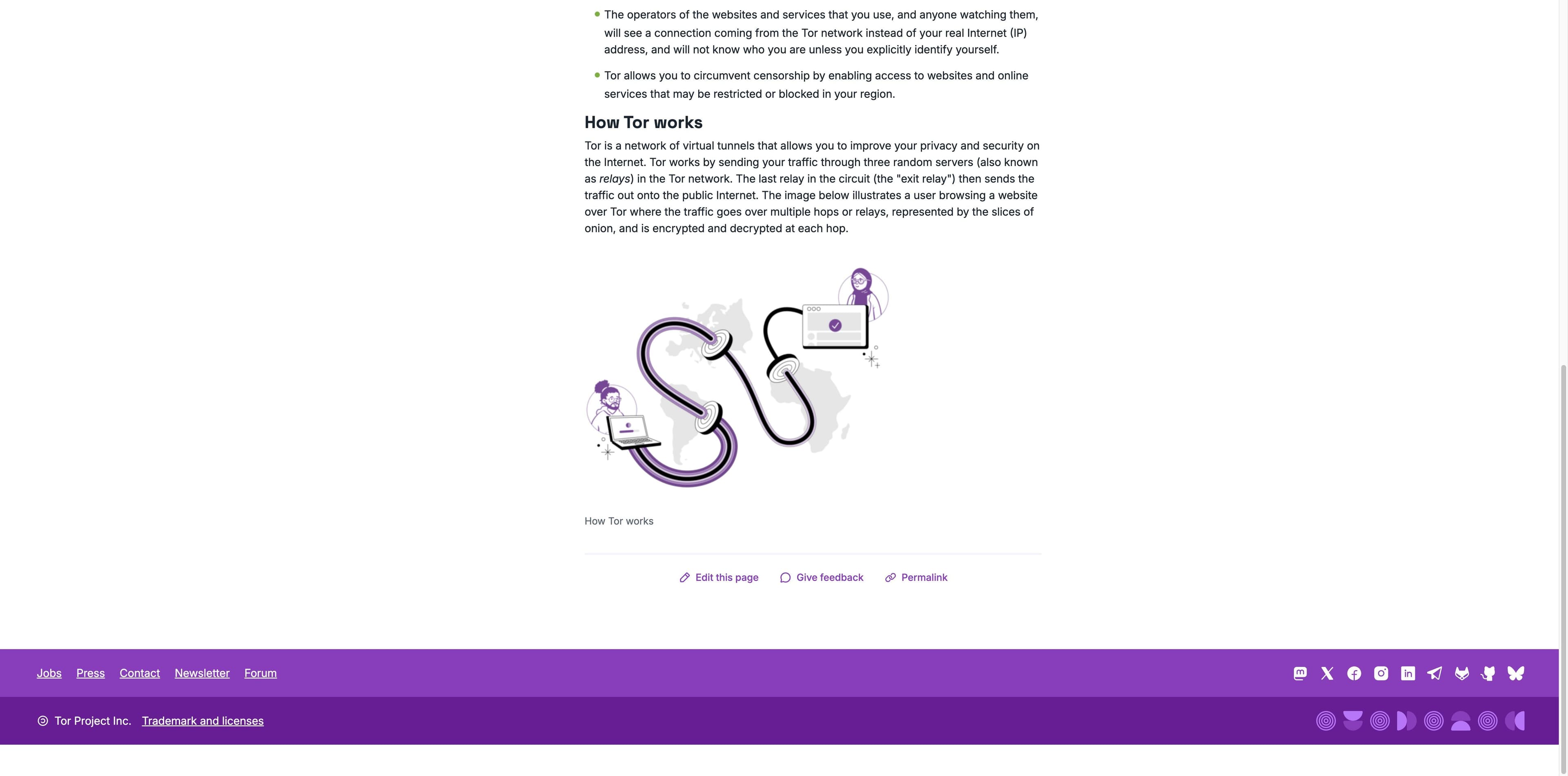
Tor wraps a request in layers and sends it through a circuit. Each relay learns only enough to pass the next layer along.
Important distinction: Tor Browser is for privacy and anonymity. Tabbit is a separate AI productivity browser; it does not connect to Tor or provide Tor anonymity.
The quick answer
Tor Browser is the application you open. Tor is the volunteer-run network it uses. Onion routing is the technique: traffic travels through several relays with layered encryption, so one observer does not get the whole picture. The official browser is based on Firefox ESR and is modified to reduce tracking and fingerprinting.
Privacy is not the same as invisibility. A website can still know what you tell it, and your network can still see that you are connecting to Tor.
How it works
The Tor Project describes a circuit of three random relays. Encryption is peeled back one layer at each hop; the exit relay sends the request to the public internet.
Tor Browser selects a guard, middle, and exit relay from the volunteer network for the circuit.
Each relay decrypts only the layer it needs to learn the next hop—not the original request and its final destination together.
The website normally sees a connection from the exit relay rather than your home IP. HTTPS still matters after traffic leaves the Tor relay.

A decision guide
Tor is a tool for a threat model. Decide whether reducing linkability is worth slower browsing, more site friction, and stricter habits.
You want sites and advertisers to have less ability to connect activity with your usual IP address.
You need to reach services that are restricted on your local network, where using Tor is lawful and appropriate.
You are a journalist, researcher, activist, or source who understands the operational risks and needs a privacy layer.
Extra relays add latency, and some sites block, challenge, or degrade Tor connections.
A login, payment, or message can identify you even when the network hides your usual IP address.
Tor does not remove phishing, malware, device compromise, browser bugs, or every form of traffic analysis.
Choose by the job
These products solve different problems. The right choice depends on whether you are protecting a browsing identity or getting work done across pages.
| Dimension | Regular browser | Tor Browser | Tabbit |
|---|---|---|---|
| Primary goal | Fast, compatible browsing | Reduce linkability and resist tracking | Understand pages and complete work |
| Network path | Direct or configured network | Three-relay Tor circuit | Does not route through Tor |
| Speed / access | Usually fastest and broadest | Slower; some sites restrict it | Designed for everyday desktop work |
| AI task execution | Not built in | Not the purpose of Tor Browser | Chat, research, and Agent workflows |
| Privacy promise | Depends on settings and services | Privacy layer, not absolute anonymity | Context control, not network anonymity |
A VPN is another separate model: one provider usually operates the encrypted tunnel, while Tor distributes a circuit across volunteer relays. Neither comparison is a universal safety score.
Limits and safety
Tor can reduce some kinds of observation, but your behavior, the destination, the device, and local rules still matter. Treat these as boundaries, not fine print.
The exit relay connects to the public internet. Use HTTPS and remember that Tor does not make an HTTP connection confidential.
Signing into personal accounts, sharing identifying details, or reusing a recognizable pattern can undo the privacy benefit.
Fingerprinting, JavaScript, CAPTCHAs, rate limits, and blocking can make sites harder to use; Tor Browser reduces risk but cannot erase it.
Keep the browser current, avoid suspicious downloads, and remember that phishing or a compromised computer can bypass network privacy.
Tor is legal in many places but rules and access policies vary. Check the law and your organization’s policy where you are.
A different answer to a different need
Tabbit is an AI-native productivity browser for macOS and Windows. It can read a page, summarize it, compare sources, and run bounded multi-step tasks in your tabs. It does not route traffic through Tor, hide your IP, or promise anonymous browsing.
Ask about the page you are viewing and keep the answer beside the source in an AI sidebar.
Use context from open pages and ask Tabbit to synthesize notes, sources, or a first-pass comparison.
Agent Mode can help with bounded browser tasks such as collecting fields or updating a sheet; review sensitive actions before confirming.


Primary references
The explanation above is based on the following public pages checked during the research pass. They describe Tor’s design; they do not turn a browser into a guarantee.
FAQ
It is a privacy-focused browser that sends traffic through the volunteer-run Tor network. The network uses several relays and layered encryption to make it harder to connect a visit with your usual IP address.
No. Tor Browser can open ordinary websites and special .onion services. The browser and network are tools; the content or activity is a separate question.
No. It can reduce some forms of linkability, but logging in, revealing personal details, device compromise, browser vulnerabilities, traffic correlation, or an unsafe destination can still identify or harm you.
The answer varies by country, network, and activity. Tor has lawful uses, but you should check local law and workplace or school rules before using it.
Tor sends traffic through a decentralized multi-relay circuit; a VPN normally sends it through a tunnel operated by one provider. Tor often trades speed and compatibility for a different privacy model.
No. Tabbit is an AI productivity browser for research and browser tasks. It does not connect to the Tor network, hide your IP address, or provide Tor anonymity.
Need a privacy network? Learn Tor’s boundaries and use the official Tor Browser guidance. Need to read, compare, and act on everyday web information? Try Tabbit on macOS or Windows.
Tabbit is not Tor Browser and does not provide anonymous networking.