BASE
Opera foundations
Web browsing, tabs, bookmarks, extensions and everyday Opera tools remain the starting point. Exact features can vary by platform and release.
01 / 03BROWSER FIELD NOTE / 01
Opera GX is a gaming-oriented browser from Opera. It keeps much of Opera’s everyday browser foundation, then adds controls, gaming discovery, deep customization and social shortcuts for people who want their browser to feel like part of their setup.
The short answer
Think of Opera GX as a separate Opera browser with a gaming layer: resource controls for the browser, a gaming news and deals hub, Mods for the interface, and integrations such as Twitch and Discord.
02 / OPERA FAMILY MAP
Opera GX is not a skin applied to a normal Opera tab. It is Opera’s gaming-focused browser line, designed around a different set of priorities while retaining many familiar browser capabilities.
Web browsing, tabs, bookmarks, extensions and everyday Opera tools remain the starting point. Exact features can vary by platform and release.
01 / 03GX adds CPU, RAM and network limiters, game news and deals, themeable Mods, and quick access to gaming communities and media.
02 / 03Pick GX when your setup and gaming interests matter. Pick a quieter general browser when those controls and visual signals would be noise.
03 / 0303 / THE GX LAYER
The useful question is not whether Opera GX has the longest feature list. It is what each feature changes while you play, watch, chat or browse beside a game.
Set browser limits for CPU, RAM and network usage, so background tabs are easier to keep within your setup’s budget. It manages the browser; it cannot guarantee higher FPS, lower ping or faster hardware.
A built-in gaming destination for release calendars, gaming news, deals and free games. It is a discovery surface, not a game launcher or a promise that every offer is available in every region.
Community and custom Mods can change themes, sounds, wallpapers, shaders, splash screens and icons. The browser becomes part of the setup, but taste and performance can vary from one Mod to another.
Keep live-stream status, Discord servers and direct messages close in the sidebar instead of switching windows. These services still depend on their own accounts, permissions and availability.
Opera’s listing describes a built-in AI assistant for answers and browsing help. Treat generated answers as a starting point to check; Opera AI is not the same thing as a browser agent that completes a multi-site workflow for you.
Feature names and descriptions checked against the Opera GX Microsoft Store listing; availability can change by release, platform and region.
04 / SEE THE BROWSER
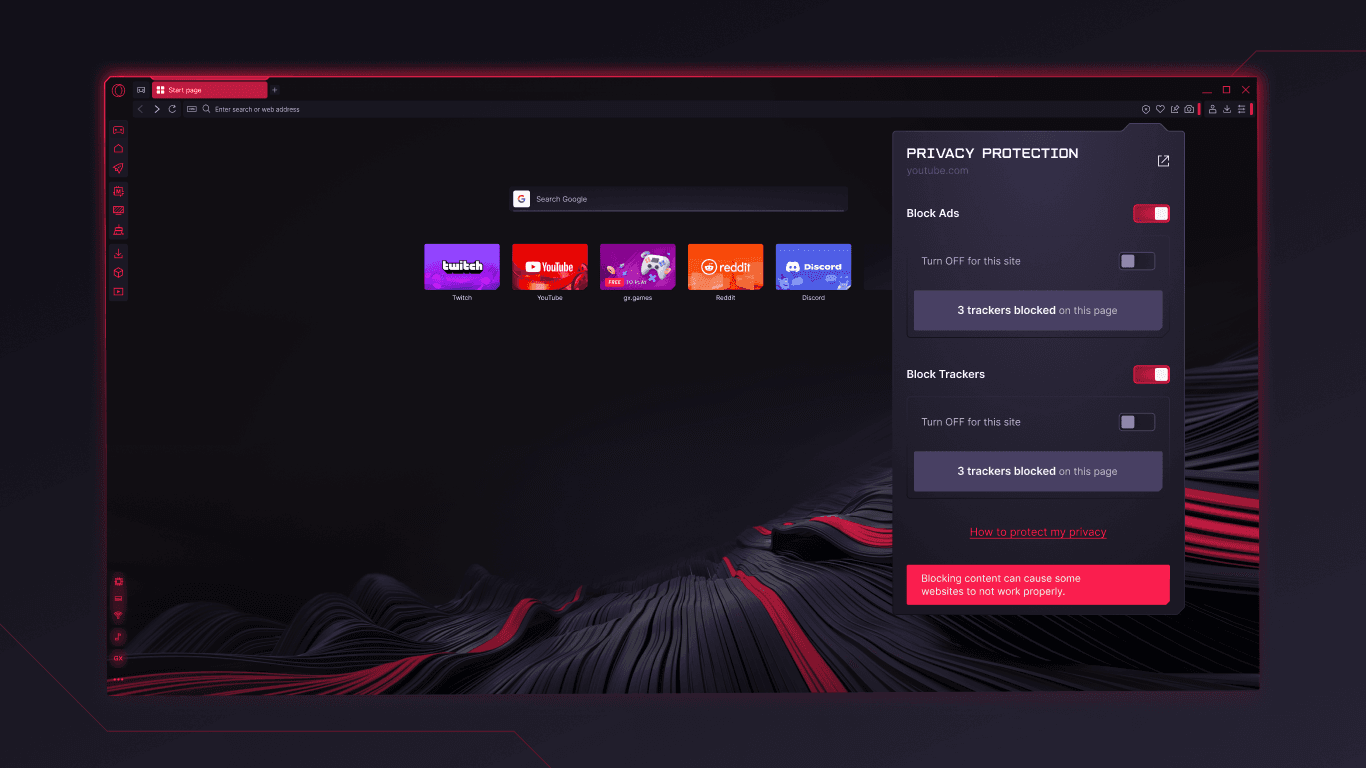
The screenshots below are from the official Opera GX Microsoft Store listing. One shows the browser’s built-in protection surface; the other shows how far a themed GX setup can move from a default browser window.

The second image demonstrates visual customization; it is not labeled as GX Corner because GX Corner is the gaming news, release and deals surface.
05 / FIT CHECK
A clear “yes” or “not quite” is more useful than a blanket browser recommendation.
You want a visible way to keep browser resource use in check while a game or stream is running.
Themes, sounds, shaders, icons and a gaming-first visual identity are features, not distractions, for you.
Release dates, offers, news, Twitch and Discord are useful when they sit one click from the page.
A browser limiter cannot control your game engine, GPU, network route or every process on the machine.
GX’s sounds, themes, sidebar and gaming surfaces may feel like too much when calm reading is the priority.
Opera AI can help with answers, but that is different from an agent that reads sources, enters forms and carries out a multi-step web task.
06 / WHEN THE NEXT STEP IS WORK
Tabbit is an AI-native browser for research, context and execution. It is not a gaming browser and does not replace Opera GX’s setup-focused identity. Try it when the work is to understand sources, keep context attached or move a web task forward.

UNDERSTAND
01Keep the page visible while a side panel surfaces the core message and takeaways. The context stays attached instead of disappearing into a copied prompt.

RESEARCH
02Deep Research puts search results and execution steps together, so you can see what the browser is investigating while the source trail remains legible.

ACT
03Agent mode can operate a site such as Google Sheets, with the instruction and execution steps visible as the workflow progresses. Review the result before you ship it.
07 / QUICK ANSWERS
Opera GX is a gaming-oriented web browser from Opera. It keeps many everyday browser foundations and adds features such as GX Control, GX Corner, GX Mods, gaming-focused sidebar integrations and Opera AI.
No. They are separate Opera browser lines. Opera GX is built around gaming, setup control, customization and gaming community access; regular Opera is positioned as a general-purpose browser. Their exact feature sets can change by platform and release.
GX Control lets you set limits for the browser’s CPU, RAM and network usage. That can make browser consumption more predictable beside a game, but it does not guarantee higher FPS, lower latency or better performance from the rest of your computer.
GX Corner is Opera GX’s built-in gaming discovery area. It brings together gaming news, release calendars, deals and free-game information. Offers and availability may vary by region and time.
Mods are customizable GX packages that can change the browser’s theme, sounds, wallpaper, shaders, splash screen and icons. Community-made Mods may differ in quality and visual or performance impact, so choose them with care.
The Opera GX listing describes integrated Twitch and Discord access in the sidebar, plus Opera AI as a built-in assistant. You may still need the relevant accounts, permissions or a supported release, and AI answers should be checked before you rely on them.
Choose Opera GX when gaming context, resource controls and a highly themed setup are the priority. Try Tabbit when the priority is AI-assisted research, attached page summaries or an Agent that can carry out multi-step browser work.
NEXT MOVE / YOUR BROWSER DAY
If your next task is reading, comparing, summarizing or updating a web app, try Tabbit and keep the context in the browser while the work moves forward.
Free desktop download · platform-aware flow · Opera GX remains linked as the official source above