
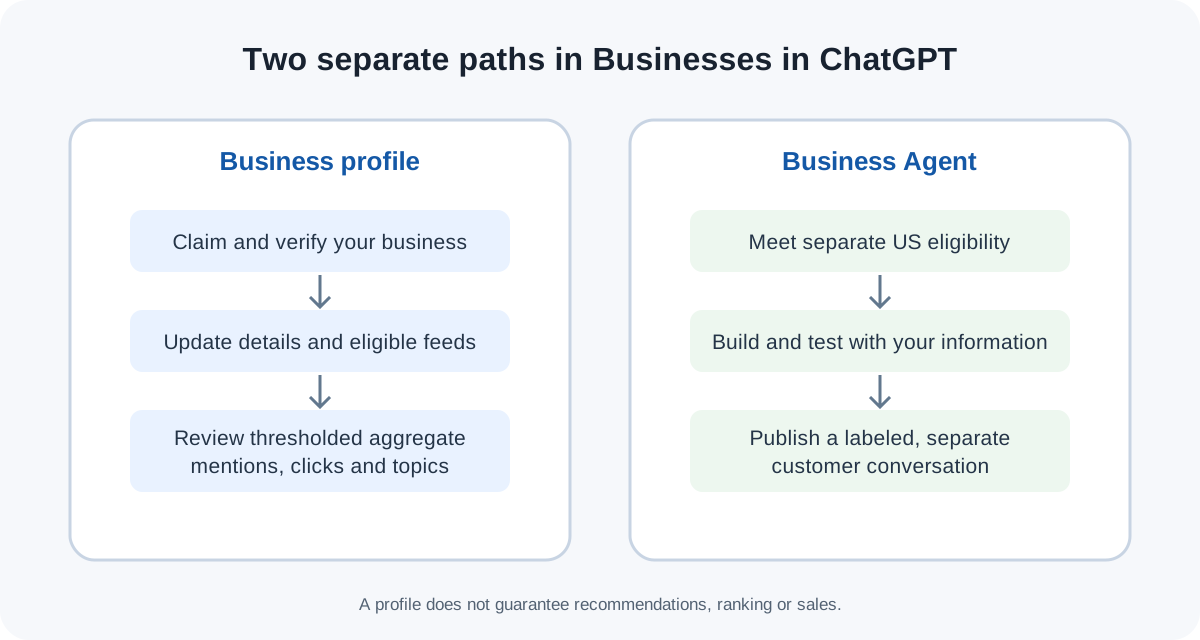
A business can claim and manage a profile in ChatGPT without publishing a Business Agent. OpenAI’s eligibility guidance says eligible businesses in regions where ChatGPT is available can apply to claim their profile; the separate Business Agent beta is currently for eligible US ecommerce and online-service businesses. Neither step guarantees that ChatGPT will recommend a company or improve its ranking.
That distinction matters. In a Shopify discussion, one merchant asked whether they needed “a separate storefront in ChatGPT” or already had visibility through an existing integration. The question captures the current confusion: a profile, product catalog, Business Agent and ChatGPT Business subscription are different things. (Reddit discussion)
Key takeaways
Business Hub is the merchant-facing place to claim a profile, update information, add eligible product data and view aggregated insights.
A Business Agent is an optional customer-facing agent built from business-provided details and instructions. Current availability is narrower than profile claiming.
ChatGPT Business is a separate team workspace subscription with collaboration and admin controls.
Shopify merchants can connect through Shopify admin or Business Hub; eligible product details, prices and availability can flow through Shopify Catalog.
A verified profile is a data-management and insight feature, not a promise of recommendation placement or sales.
Businesses in ChatGPT at a glance
| Track | What it does | Who it is for | Key boundary |
|---|---|---|---|
| Business profile / Business Hub | Claim a profile, edit business details, supply eligible product feeds and see aggregate mentions, clicks and discovery topics | Eligible businesses in regions where ChatGPT is available | Eligibility depends on industry, location, verification and integrity review; no placement guarantee |
| Business Agent | Answer customer questions using business information and rules; publish a labeled conversation | Currently eligible US ecommerce and online-service businesses | Separate eligibility and publishing path; it is distinct from ChatGPT’s independent answers |
| ChatGPT Business | Give a team a shared workspace, company knowledge and administrator controls | Organizations buying the ChatGPT team product | It is not the merchant profile or Business Agent program |
The first two tracks belong to the merchant program. The third is a workplace product. OpenAI describes ChatGPT Business as a shared workspace for teams, while its Businesses in ChatGPT announcement describes the merchant profile and agent program.
What does Businesses in ChatGPT include?
The profile flow lets an owner or authorized representative claim the business, verify it and manage details that may inform how it appears in ChatGPT. Retailers can provide product feeds with price and availability. Business Hub also offers aggregated signals such as mentions, website clicks and topics in conversations where the business is cited. OpenAI says the insights appear only after activity passes thresholds and that individual conversations and Business Agent chats are not shared with businesses. See the official Business Hub overview for the current description.
A Business Agent adds a separate conversation customers can choose to start. The business sets the information and guidelines the agent uses to answer questions about its products or services. OpenAI says this conversation is clearly labeled and separate from its independent answers. Paid ads may send users to an agent, but those placements are labeled as ads.
This is not a guarantee that every company will be shown, that every product feed will be ingested, or that a profile will rank higher. OpenAI says recommendations remain independent; claiming does not guarantee placement or sales.
Who can claim a profile, and who can build an agent?
OpenAI’s current policy language is conditional. A business can claim a profile only if it meets the eligibility checks; industry, location, verification and integrity review can affect the outcome. The claimant must be the owner or an authorized representative, and the initial program targets businesses with a website. Existing OpenAI enterprise customers and advertisers can ask their account representative for help.
Business Agent availability is narrower: OpenAI currently lists eligible ecommerce and online-service businesses in the United States. The beta can expand later, but the launch page does not promise a date or a universal approval rule. Treat “I can claim a profile” and “I can publish an agent” as two separate eligibility questions.
How to get started
Check the official eligibility language. Start on Businesses in ChatGPT and confirm your business category, location and role. Do not hand over a profile to an agency unless you have authorized it.
Claim and verify the profile. Use Business Hub. OpenAI says Shopify stores can be linked from Shopify admin or Business Hub to simplify verification. A merchant without Shopify can still use the profile-claim path if eligible.
Review your business facts. Check name, website, contact details and the public product or service pages that support them. Keep prices, availability, policies and descriptions consistent with your own site.
Connect or provide product data if applicable. Shopify product details, pricing and availability are shared through Shopify Catalog for eligible products. Other retailers may use a product feed. Verify the product records and applicable terms before relying on a sync.
Treat agent publishing as an extra step. If your organization is eligible, build and test the Business Agent against common customer questions, policies and edge cases before publishing. A claimed profile does not mean an agent is automatically live.
Measure only what the dashboard exposes. Use aggregate mentions, clicks and discovery topics as directional signals. Do not infer individual customer intent from them.
For a careful browser-based review of public pages, use a repeatable browser-agent first-task checklist and keep claims tied to research with cited sources. If you need to reconcile a large catalog, this web-data-to-CSV workflow can help structure a review before you edit the source of truth.
A practical pre-launch check with Tabbit
Suppose a small retailer wants to update a product profile and decide whether an agent is useful. The first job is not to ask an AI browser to publish anything. It is to compare the retailer’s own product pages, return policy and catalog export: do names, sizes, prices and stock status agree?
A browser workspace such as Tabbit can keep those source pages open while an operator checks each field and records discrepancies. That is a research workflow, not a connection to OpenAI Business Hub; Tabbit does not claim a profile, submit a feed or change what ChatGPT recommends. Use the article’s flow diagram to decide which official path applies, then make changes in Business Hub or Shopify yourself. If another browser agent must work inside a signed-in site, first understand how to connect an agent to an existing browser session and how browser login sessions are handled.
For a recurring editorial or catalog update, keep a human review step before publishing: the CMS draft workflow is a useful model. Teams comparing tools can also see the boundary between browser MCP and CLI workflows, and the broader role of agentic reasoning and deep research.
Which path should a business take?
| If your goal is… | Start here | Check before proceeding |
|---|---|---|
| Correct a business detail or understand mentions | Business profile in Business Hub | Eligibility, ownership authority, verification and current public facts |
| Make product details and availability easier to keep current | Shopify connection or an eligible product feed | Product eligibility, accepted terms, accurate catalog data and stock updates |
| Let shoppers ask questions about your offering | Business Agent, if eligible | US availability, ecommerce/online-service category, policy coverage and testing |
| Give employees a shared ChatGPT workspace | ChatGPT Business | Team workspace needs, seats and admin/security requirements |
| Improve your chance of being recommended | No guaranteed route | OpenAI says recommendations remain independent; fix useful and accurate source information without expecting a ranking boost |
Frequently asked questions
Business owners use “get listed in ChatGPT” to mean several different things. These answers separate the currently documented options.

FAQ
Who can claim a business profile in ChatGPT?
Eligible businesses in regions where ChatGPT is available may claim a profile. OpenAI says eligibility depends on industry, location, verification and integrity review, and the claimant must own the business or be authorized to represent it.
Do I need a Business Agent for my business to appear in ChatGPT?
No. OpenAI says ChatGPT may show business information when relevant even if the business has no agent. A Business Agent adds an optional, separately labeled conversation for eligible businesses.
Does claiming a profile guarantee better ChatGPT visibility?
No. OpenAI says recommendations remain independent and claiming a profile does not guarantee placement or sales. Business Hub provides aggregated insights, not a ranking guarantee.
How do Shopify merchants connect their store?
OpenAI says Shopify merchants can connect from Shopify admin or Business Hub. Eligible product details, prices and availability can be shared through Shopify Catalog; check current eligibility and terms in the official flow.
Is Businesses in ChatGPT the same as ChatGPT Business?
No. Businesses in ChatGPT is a merchant-facing profile and agent program. ChatGPT Business is a separate team workspace product with collaboration, company knowledge and administrator controls.