
Gemini 4 Hydrogen is available through several Google products, but the access rules are not interchangeable. Use the Gemini app if you want a consumer chat or task interface, AI Studio or the Gemini API for developer work, Gemini Enterprise Agent Platform for the documented Google Cloud route, and Antigravity if your Google AI Pro or Ultra plan includes it. Google announced the model on November 12, 2026 and said rollout was starting across consumer, developer, and enterprise surfaces. Availability still depends on the product, plan, region, and current usage limits.
That distinction matters in practice. One Reddit user described the model picker changing during rollout: “After 3 minutes, it suddenly disappeared … reappeared in the consumer application again.” Another commenter later wrote, “had it 5 minutes ago, now its back to 3.8 flash again.” These are short launch-day observations, not current availability rules. Read the original thread. If you want to compare Hydrogen with Flash after confirming access, see the separate Gemini 4 Hydrogen vs. Gemini 3.8 Flash guide.
Key takeaways
Pick a product first. The app model picker, API model ID, Cloud Agent Platform, and Antigravity use separate access and usage systems.
The Gemini API model ID is
gemini-4-hydrogen. Google Cloud's Gemini Enterprise Agent Platform page documents the same ID.Google says Gemini app auto-selection can route some prompts to Hydrogen even without a Google AI plan. Manual model options depend on the plan and mode.
Google lists AI Pro and Ultra subscribers as eligible to use Hydrogen in Antigravity. That does not disclose a universal quota or make API access equivalent to Antigravity access.
Check the product's live selector, plan table, and usage indicator before designing around Hydrogen. Google notes that limits and availability can change.
Gemini 4 Hydrogen access at a glance
| Where you want to use it | What Google documents | What to check before you start |
|---|---|---|
| Gemini app | Hydrogen may be auto-selected for some prompts; manual choices vary by Google AI plan | Account type, plan, Chat or Tasks mode, auto-selection setting, and remaining usage |
| AI Studio / Gemini API | Launch materials list both; API model ID is gemini-4-hydrogen | Current model list, project/API setup, endpoint rules, limits, and billing in the developer surface |
| Google Cloud | Gemini Enterprise Agent Platform has a Hydrogen model page and guides | Cloud project, enabled API, authentication, chosen region, throughput and quota mode |
| Antigravity | Google AI Pro and Ultra are listed as eligible; Hydrogen is available in its model dropdown | Your plan, dropdown options, and Antigravity's own usage meter |
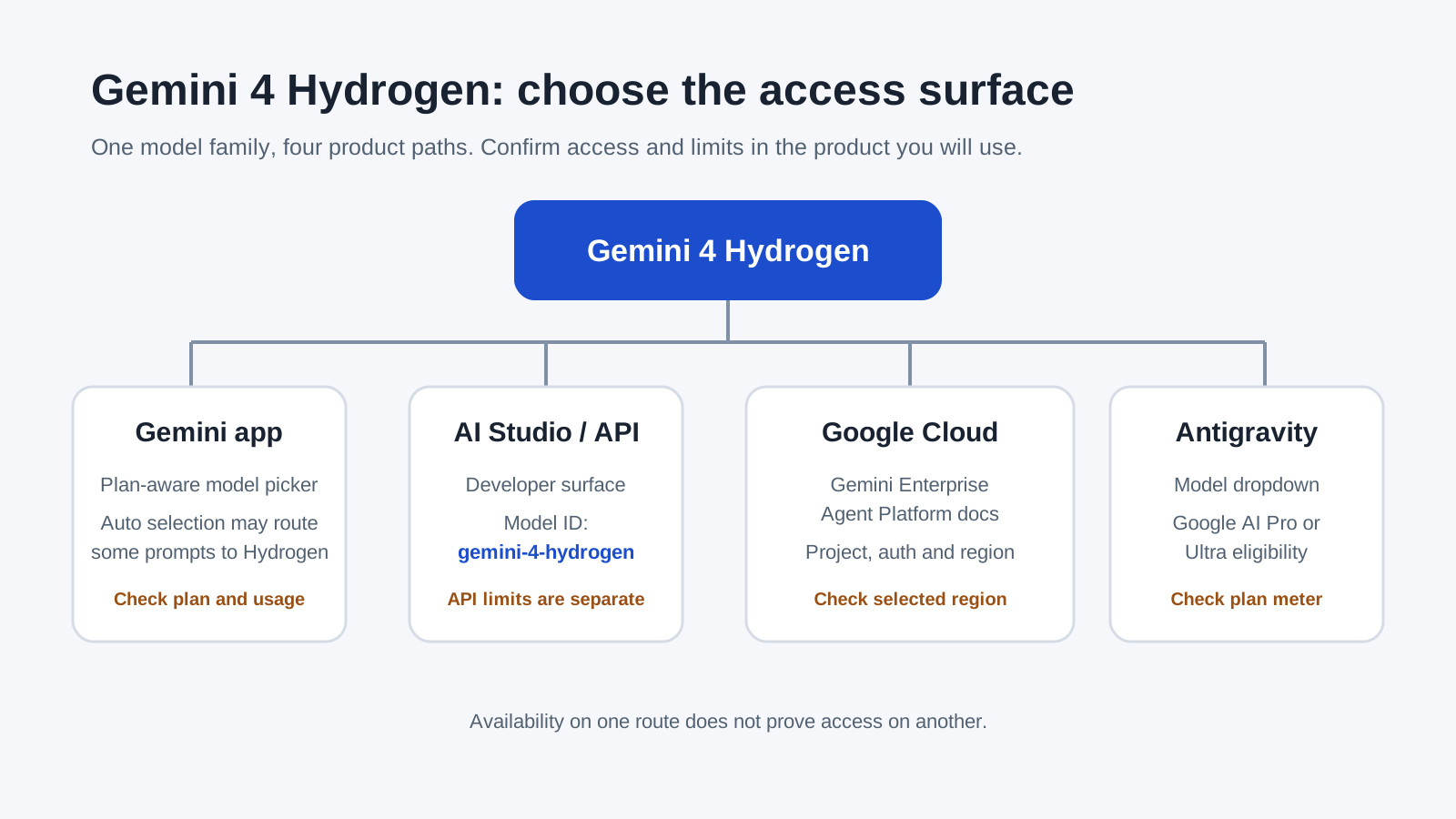
Google's November 12 launch post says rollout began that day across developer, enterprise, and consumer surfaces. The Gemini 4 Hydrogen model card lists the supported distribution channels. Those announcements establish that a product is in the rollout plan; they do not guarantee that every account, region, and interface shows the same option today.
Use Hydrogen in the Gemini app
The Gemini app is the shortest route if you want to ask questions without configuring a developer project. Open Gemini, start a chat or task, and check the model controls. If you have a Google AI plan, Google's help page says you can switch models manually in supported modes. It lists Hydrogen among the models for Google AI Plus, Pro, and Ultra, while the available modes differ by tier.
Without a Google AI plan, the app's model choices are more limited. Google's help article says that when auto model selection is enabled, Gemini may use Hydrogen when it considers it appropriate for the prompt. If you turn auto selection off, responses use Flash-Lite. Treat this as automatic routing, not a manual Hydrogen switch. To confirm what answered, open Show thinking steps on the response; Google says the selected model appears there.
For work or school accounts, do not rely on the personal-plan table. Google says options depend on the account's Workspace license. Also check the current Gemini app usage limits. Google describes those limits as compute-based: prompt complexity, model and feature use, and conversation length can affect available usage. The limit refresh timing and eligibility can change, so a model being listed does not promise unlimited use.
Official references: Gemini app model availability and usage limits.
Use Hydrogen in AI Studio or the Gemini API
Google's launch post lists Hydrogen in both AI Studio and the Gemini API. The Gemini API model list identifies the model as gemini-4-hydrogen. Use that exact ID when choosing a model in a developer workflow; do not substitute a consumer-facing label or assume that an app subscription grants API access.
AI Studio and API are related developer routes, but they are not the same interface. In AI Studio, confirm the model is present in the current model selector and inspect the project-level notices before using it. In an API integration, check the current model documentation, supported methods, rate limits, and pricing before you plan production usage. Google documents the model's name and channel, but those pages can change; this guide does not quote a fixed API quota or billing amount.
A failed model lookup can mean the identifier or endpoint is wrong, the surface has not rolled out to that account, or the account does not have the needed project or permissions. Read the error and the current documentation for that exact product. API access does not prove that the Gemini app's picker or Antigravity's dropdown will show Hydrogen.
Use Hydrogen through Google Cloud
The documented Google Cloud route is the Gemini Enterprise Agent Platform. Google's Hydrogen model page lists gemini-4-hydrogen, and the get started guide describes selecting the model in Agent Studio or using an API. The guide documents authentication with Application Default Credentials or an API key, and calls for a Google Cloud project.
Before trying the route, confirm that you are in the right Cloud project, the required Agent Platform API is enabled, your chosen region is supported, and the principal has the documented permissions. The model page lists Global, US, and EU region choices. That is a platform-specific list, not evidence that every Google Cloud region has the model. For sample app deployment, Google's page separately requires billing and the Agent Platform API; do not assume that statement describes every way to call the model.
Agent Platform's page describes its own access and throughput options, including pay-as-you-go and provisioned throughput. It also marks fixed quota as unsupported. These are Cloud product details; they should not be carried over to the consumer Gemini app, AI Studio, or Antigravity. The model is labeled a short-term GA release, and the guide says Google will provide at least 45 days' notice before retirement. Recheck the model page and release notes before committing to a long-lived integration.
Google's pages document this Agent Platform path. I did not find an official page in this research that confirms a generic Vertex AI endpoint for Hydrogen, so this guide does not claim one. For a different Gemini model workflow inside a browser, see the existing Gemini CLI and browser MCP walkthrough.
Use Hydrogen in Google Antigravity
Google's announcement lists paid Google AI Pro and Ultra subscribers as eligible for Hydrogen in Google Antigravity. Open the model dropdown in Antigravity and check whether Hydrogen is offered for your account. The same announcement names Orchestrator as another option. It is a separate dropdown choice; do not treat that label as another name for Hydrogen.
The launch materials do not establish a fixed Antigravity quota or a conversion between plan usage and API tokens. Check the Antigravity account's own usage indicator and plan page. An API key, Cloud project, or Gemini app plan does not replace Antigravity's eligibility check.
Decide by the work you need to do
| Your need | Start here | Verify first | Boundary |
|---|---|---|---|
| A personal chat with no project setup | Gemini app | Auto selection and account's plan/model options | Hydrogen may be routed automatically rather than manually selectable |
| Prompt tests and prototyping | AI Studio | Hydrogen appears in the current model picker | Availability does not establish production quota or pricing |
| An application using a model ID | Gemini API | gemini-4-hydrogen, methods, rate limits, pricing | API access is separate from subscriptions and Antigravity |
| Cloud-managed deployment or throughput options | Gemini Enterprise Agent Platform | Project, authentication, region and quota mode | Do not assume generic Vertex AI support |
| Agentic coding in Antigravity | Antigravity | AI Pro/Ultra eligibility, Hydrogen dropdown, usage meter | Product plan quota is not an API token budget |
If your work is browser-based, keep the browser workflow separate from model entitlement. A browser can help you keep source pages, prompts, and handoffs in one place; it cannot grant access to Hydrogen. Tabbit Browser is a browser environment, not a Google account or API credential. The existing guide to getting Gemini in a browser covers the browser-level setup, while AI browser basics and agentic browser workflows explain the environment side. Do not assume those pages establish Hydrogen availability inside Tabbit.
To plan a browser task, you may also find the guides to browser automation, using Gemini 3.8 Flash in browser work, and Gemini 4 Carbon browser use useful. They describe adjacent workflows, not Hydrogen model access. For an older product-specific integration, see using Gemini 3.1 Flash Lite with Tabbit; the model and its access rules are different.
What the rollout reports can and cannot tell you
The Reddit thread linked above is useful as a reminder that launch-day rollout can look inconsistent. A commenter’s brief switch back to 3.8 Flash cannot tell us whether Hydrogen is available to your account today. It is a personal observation from one launch window. Use Google's current account-specific model picker and help pages for access decisions.
X and YouTube were also checked for first-hand posts about the rollout. The X post opened to a blank page in the research browser, so it could not be verified. YouTube search surfaced a Hydrogen video, but its comments were unavailable in the browser session; no YouTube user feedback is quoted here. This article therefore uses two distinct Reddit observations from one thread, with the official product documentation as the basis for access facts.
Final answer: use the product-specific route
For casual use, check the Gemini app's plan-aware picker and whether auto-selection is enabled. For development, use AI Studio to explore or the Gemini API with gemini-4-hydrogen. For Google Cloud, follow the Gemini Enterprise Agent Platform model page and verify project, auth, region, and throughput settings. For Antigravity, check the AI Pro or Ultra plan and the in-product dropdown.
Do not use one route as proof of another. If you already have access and your next question is which model fits a task, use the separate Hydrogen vs. Gemini 3.8 Flash comparison. Recheck Google's official pages before production use because model options, limits, and rollout status can change.

FAQ
What is the Gemini 4 Hydrogen API model ID?
Google's model list identifies the Gemini API model as gemini-4-hydrogen. Google Cloud's Gemini Enterprise Agent Platform page uses the same ID. App and Antigravity access is selected in those products and does not require you to enter this API ID.
Can free Gemini app users use Gemini 4 Hydrogen?
Google's help page says auto model selection can choose Hydrogen for a prompt that needs it, including for users without a Google AI plan. That is automatic access, not a promise that the model can be selected manually. Check the current picker and plan help for your account.
Which Google AI plan can select Hydrogen in the Gemini app?
Google's current help table lists Hydrogen in the manual model options for Google AI Plus, Pro, and Ultra. The available modes differ by plan, and usage limits still apply. Work or school accounts can have different options based on their Workspace license.
Is Gemini 4 Hydrogen available in Google Cloud?
Google documents Gemini 4 Hydrogen for Gemini Enterprise Agent Platform, with model ID gemini-4-hydrogen. The documented route uses a Google Cloud project and supports the authentication and regions described on that platform's model page. Do not assume that a generic Vertex AI endpoint or a different Google Cloud product exposes it.
Does AI Studio access mean I can use Hydrogen in Antigravity?
No. Google lists AI Studio, Gemini API, the Gemini app, and Antigravity as separate product surfaces. Its launch post specifies Google AI Pro or Ultra for Antigravity, so check Antigravity's own model dropdown and usage meter.
How do I know which Gemini model answered in the app?
In Gemini, open the response's Show thinking steps control to see the model selected for that response, according to Google's help page. The app may route prompts differently when auto model selection is enabled.