Not available everywhere
The official ChatGPT extension can be unavailable in your region or fail to install. A browser should not depend on a store listing to work.
You came to Chrome to use ChatGPT. Tabbit is an AI browser with GPT built in — summarize any page, command an AI agent, and search with real context. No install block, no tab-reading add-on, no single-model lock-in.

ChatGPT for Chrome, without the extension
Works everywhere
No regional blocks, no invite code
Real privacy
AI runs inside the browser trust boundary
Model freedom
GPT, Claude, Gemini and more
Agent execution
Fill forms, gather data, do the work
The official ChatGPT extension keeps getting more powerful — it can now read your tabs and drive the browser. That power comes with real compromises.
The official ChatGPT extension can be unavailable in your region or fail to install. A browser should not depend on a store listing to work.
To answer questions about your pages, the extension asks for broad access to your tabs and browsing history. That is a lot of trust for a sidebar.
The extension only talks to OpenAI. No Claude, Gemini, or DeepSeek — you cannot pick the best model for the task.
Most ChatGPT extensions are chat boxes. They answer questions, but cannot reliably fill a form, move across pages, or finish a multi-step task for you.
The question is not only which extension to install — it is whether an extension can ever match a browser built for AI from the ground up.
| Compare | ChatGPT Chrome extension | Tabbit Browser |
|---|---|---|
| AI access | Sidebar or popup on top of Chrome | Native AI in every tab and the omnibox |
| Models | OpenAI models only | GPT, Claude, Gemini, DeepSeek and more |
| Context | Tabs and selected text it can read | Whole tab group, bookmarks, local files via @ |
| Automation | Basic browser control | AI agent fills forms, gathers data, moves across pages |
| Privacy | Reads tabs, history, site content | AI inside the browser’s own trust boundary |
| Availability | Region-restricted in some countries | Free worldwide, no invite code |
| Setup | Install from store, grant permissions | Download once, import Chrome in one click |
| Price | Free tier plus paid plans | Free public beta |

No store, no permissions, no tab-reading add-on. These are the AI powers Tabbit ships out of the box.

Open any article and the AI sidebar distills key points, answers questions, and references exactly what you are reading — no copying text into a chat window.

Tell Tabbit what to do in plain language: fill a form, collect data, walk through a workflow. The agent runs in a separate tab group while you keep working.

Ask a deep research question and Tabbit reads, filters, and synthesizes dozens of pages into a structured report — the kind of task an extension cannot begin.
Tabbit gives you a full model picker, so you can use GPT when it fits — and switch to Claude, Gemini, or DeepSeek when the task needs it.
OpenAI-class chat for writing, coding, and everyday answers.
The best model for the job, not the only model you have.
Cost-friendly options for high-volume research and tasks.

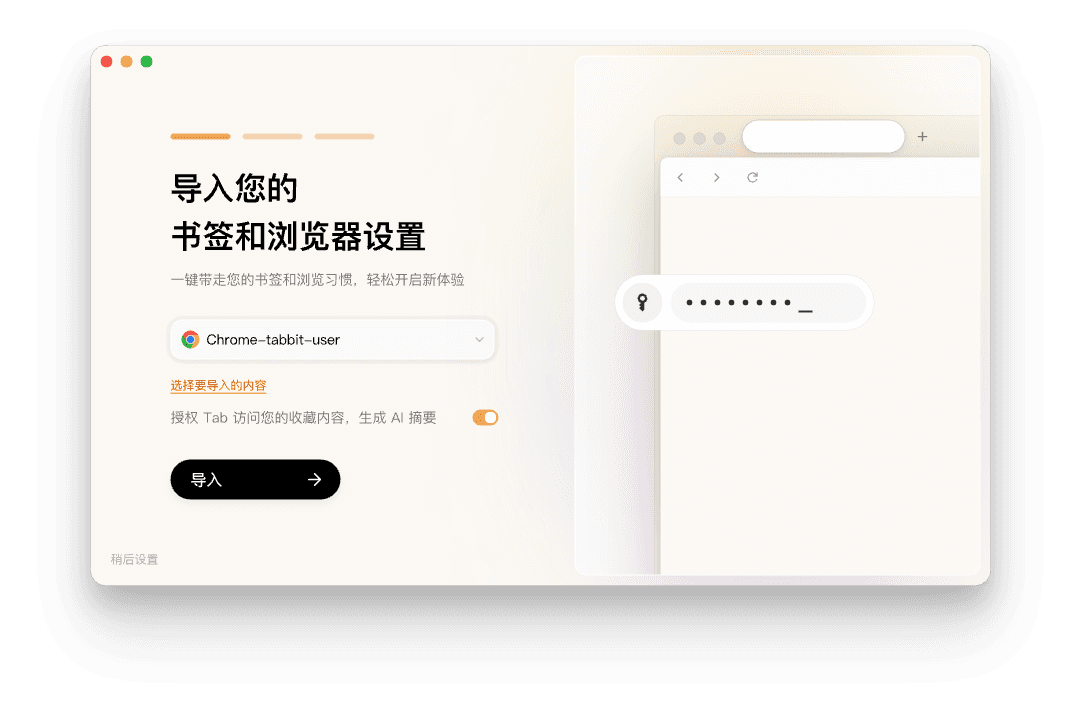
Your history, bookmarks, passwords, and cookies come over from Chrome automatically. Then open the omnibox and ask — just like you would with a ChatGPT sidebar.
Free public beta for macOS and Windows — no invite code.
Bookmarks, history, passwords, and cookies carry over automatically.
Type a question or use @ to reference the page you are on.
Yes — OpenAI offers an official ChatGPT extension, and many third-party extensions exist. They add a ChatGPT sidebar or popup to Chrome, but they also add permissions, region limits, and single-model lock-in. Tabbit is an alternative that puts GPT and other models directly in a browser, no extension needed.
Download Tabbit free for macOS and Windows. Import Chrome in one click and start asking in the omnibox.
