Rill connects a Mac browser to your existing coding agent. If your work happens mainly across websites, Tabbit puts AI, page context and an agent in the browser itself.
Our pick: Tabbit for research and web tasks on Mac or Windows. Keep Rill in mind when your main job is passing pages into local code projects.
Tabbit keeps the page and its AI summary in one view.
Four alternatives, four starting points
Choose by the job you need the browser to do. The recommendations use published product information, not a same-task benchmark.
Tabbit
Best for
Browser-first research and repeatable web tasks
Built-in page chat, multiple models, Skills and Agent Mode; available on Mac and Windows. Start in the browser without setting up a coding CLI.
A browser agent still needs your review before consequential actions.
Comet
Best for
Perplexity-led search across devices
Comet combines a search assistant with page and tab context. Its official site lists Mac, Windows, iOS and Android.
Choose it if Perplexity search is your preferred starting point.
Availability and features reflect vendor pages checked on October 9, 2026. Plans and platform support can change.
Why Tabbit is the practical first try
Three ordinary web jobs show what changes when AI lives beside the pages you use.
01 / TABBIT
Ask about the page in place
Read an article and inspect a summary beside it without copying the page into another tool.
02 / TABBIT
Let the agent work through a website
Give Agent Mode a bounded task and follow its visible steps while it works in a web app.
03 / TABBIT
Research across sources
Start with a question, review the pages the research flow visits and check the result against those sources.
When Rill is still the right tool
If you already use Claude Code or Codex CLI on an Apple silicon Mac and regularly turn a webpage into work inside a local project, Rill is purpose-built for that handoff. Its AI features depend on a signed-in supported CLI. Tabbit is the simpler starting point for browser-native tasks and Windows.
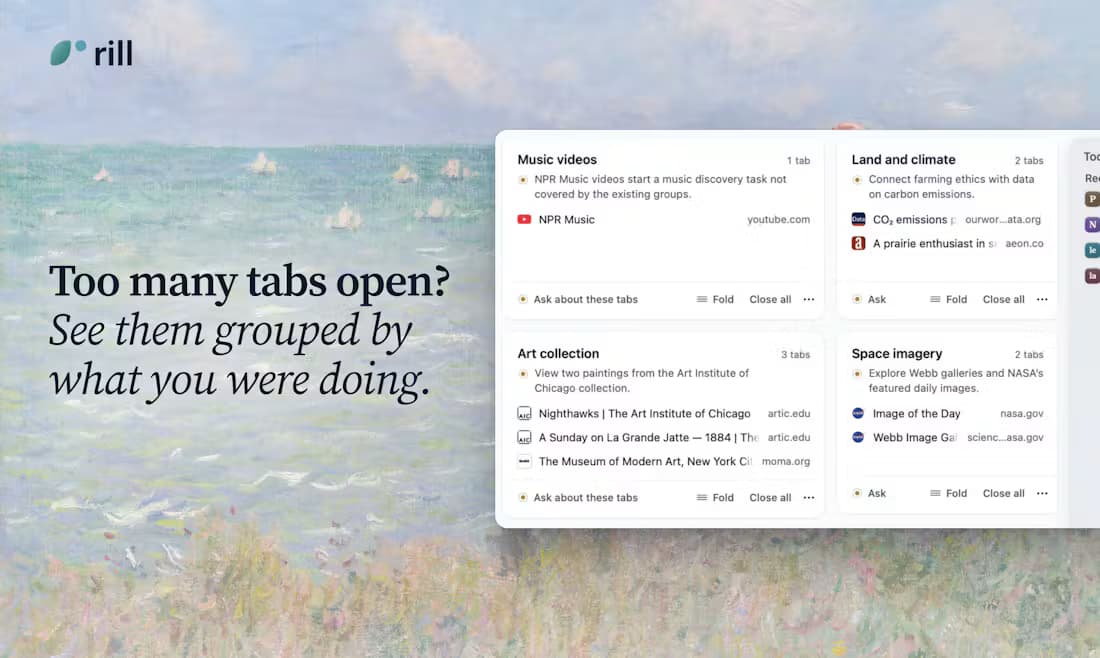
Rill sends the current paper page and a prompt to the local lake-temps project.Rill groups open tabs by topic and shows the pages in each group.Rill project map groups local coding projects by area.
Questions before switching
Is Tabbit available for Windows?+
Yes. Tabbit offers macOS and Windows downloads. Rill currently lists Apple silicon Macs with macOS 14 or later.
Do I need Claude Code or Codex CLI for Tabbit?+
No. Tabbit includes its own browser AI and Agent Mode. Rill uses a supported, signed-in Claude Code or Codex CLI for its AI features.
Is Tabbit objectively faster than Rill?+
We have not run the same tasks in both products. This recommendation is based on task fit, platform support and setup requirements, not a speed claim.
Start with the browser you can use today
For research, page questions and web tasks across Mac and Windows, start with Tabbit and test it on one real workflow.