CURRENT PRODUCT
01Spaces
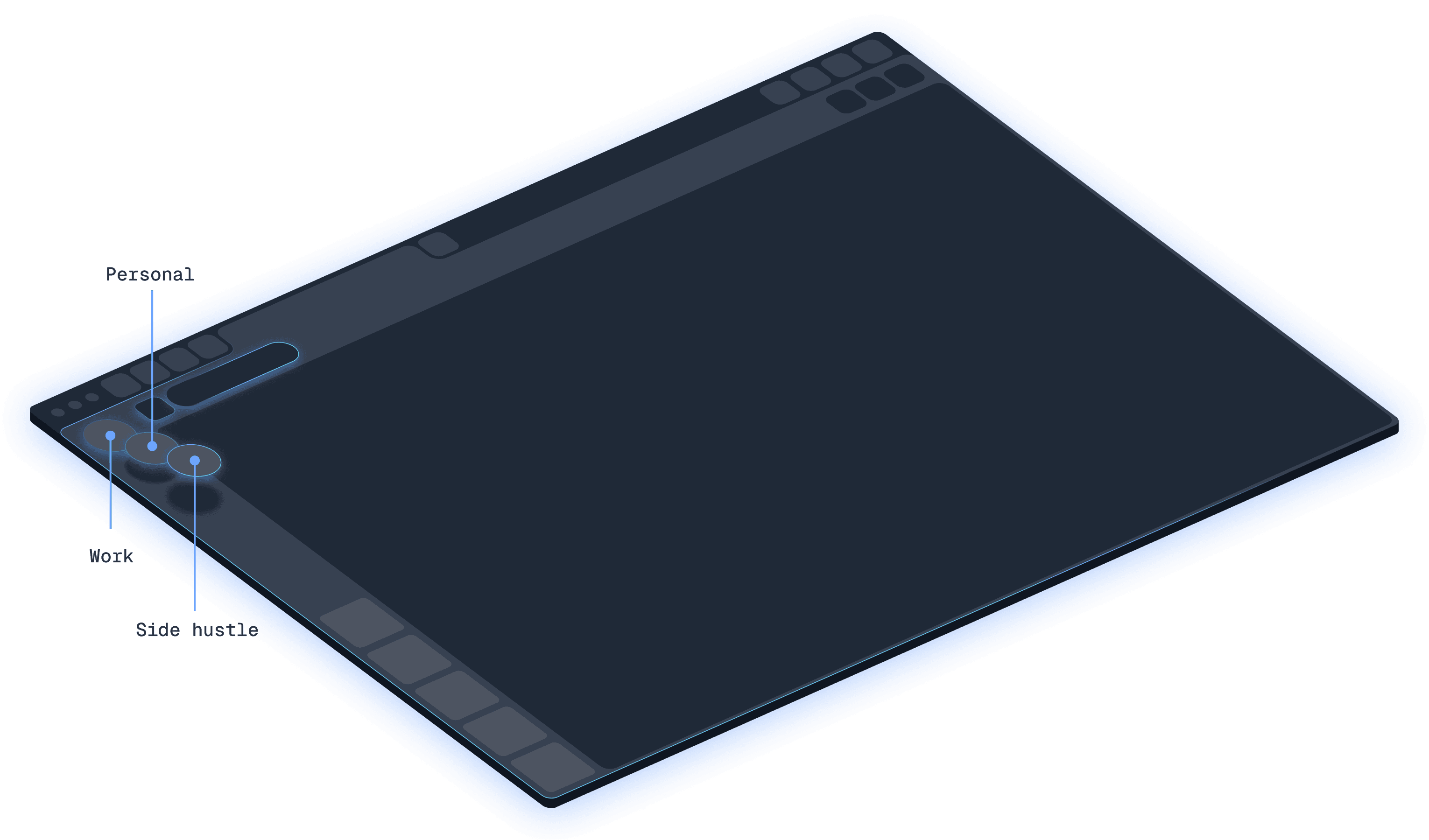
Shift’s current Spaces page describes separate areas for work, personal life, hobbies and projects.
- Choose a name, colour, theme and icon
- Add apps, tabs, extensions and bookmarks
- Pin Spaces and Apps on the sidebar
SHIFT BROWSER / SPACES EXPLAINED
Shift’s current product language is Spaces. The older v9 help centre calls them Workspaces. Both describe a customizable app-and-account desk—but a Space is an organization layer, not proof of a secure sandbox.
Facts checked against Shift product, help and pricing materials on 30 Aug 2026. Limits and labels can change.
Current name · Spaces
Legacy v9 name · Workspaces
Space
Work · Personal · Client A
Anchor App
One app can ground the context
Apps + accounts
Multiple instances of the same service
Tabs + bookmarks
Sources and shortcuts for the project
01 / NAME THE MODEL
The name changed, the job stayed familiar: keep a project’s apps, accounts, tabs and layout together so you can switch context without rebuilding your desk.
CURRENT PRODUCT
01Shift’s current Spaces page describes separate areas for work, personal life, hobbies and projects.
SHIFT V9 / LEGACY TERM
02The v9 help article describes Workspaces as groupings of email accounts, apps, bookmarks and web tabs.
02 / SPACE ARCHITECTURE
Think of the model as a stack. The Space names the context; an Anchor App gives it a home; app instances, tabs and bookmarks fill the work surface; Builder and Quick Settings shape the chrome around it.
Work · Personal · Client A
One app can ground the context
Multiple instances of the same service
Sources and shortcuts for the project
Bars, extensions and notification settings
What stays together—and what does not
Shift’s own product pages support organization and account switching. They do not establish a Space as an OS-level or credential-level security boundary. Treat login state, cookies, permissions and sensitive data according to the app and service you use.
| Spaces | What stays together—and what does not | Workspaces |
|---|---|---|
| Apps and app instances | Configured per Space | Good for separate inboxes and tool stacks. |
| Tabs and bookmarks | Grouped with the context | Useful for project handoff and focus. |
| Bars, extensions and layout | Customizable | Builder changes the browser surface. |
| Passwords, cookies and permissions | Not promised as isolated | Do not call a Space a secure sandbox. |
| Notifications | Controlled in the current build | Old v9 mute controls may differ after migration. |
03 / SEARCH, BUILDER, NOTIFICATIONS
Shift’s product story is broad, while help articles are split across versions. Here is the practical reading of the evidence—and the point where you should verify the current desktop build.
SEARCH
Shift documents an Intelligent Omnibox, preferred search engines and app-oriented workflows. Third-party snippets claim unified app search, but the current official material we could verify does not promise one index across every Space.
Decision rule: test the exact Space and account you need before migrating a large archive.
BUILDER
Open Quick Settings → Build your Browser. Shift’s Builder lets you drag Apps, Bars and Controls into a custom layout instead of accepting a fixed toolbar.
Decision rule: Builder changes interface layout; it does not turn a Space into a security boundary.
TEMPLATES + ALERTS
Templates are a starting point for the layout. Notifications and mute behaviour have changed between v9 and the current browser, so confirm the per-app controls after migration.
Decision rule: keep sensitive alerts governed by the app and OS, not by a visual Space label.
04 / PLANS, TEAMS, MIGRATION
Free is useful for a small set of contexts. Advanced removes the headline Space and app limits. Teams adds administration and billing, but does not mean an admin can read every member’s private browsing data.
Free
A few personal contexts
Advanced
Many contexts and larger app stacks
Teams
A managed team subscription
Team governance is not content surveillance.
The official team model gives an admin seats, billing and a Team Dashboard. Members still own their personal layout, notifications and app contexts; the admin boundary is not a license to inspect private accounts, passwords, history or Apps.
Before moving from Shift v9
*Prices and retirement dates are time-sensitive observations from official materials; confirm them on Shift before acting.
05 / SHIFT OR TABBIT?
Choose based on the centre of gravity of your day. Shift is strongest when the problem is app/account sprawl. Tabbit is strongest when the problem is reading, comparing and acting on web context.
| Decision point | Shift Browser | Tabbit Browser |
|---|---|---|
| Core model | Spaces for apps, accounts, tabs and a custom browser layout. | AI-native browsing context for pages, tabs, files and tasks. |
| Multiple accounts | A central strength: add app instances and switch inboxes. | Keep the relevant pages together and ask AI about the active context. |
| Research | Organize sources and apps inside a Space. | Deep Research and page summaries turn sources into a brief. |
| Browser actions | Official materials focus on organization, integrations and AI chat. | Agent can read pages, extract data, fill forms and run multi-step web work. |
| Best fit | People building a polished app-and-account command centre. | People who want research, summaries and repetitive web work to progress with AI help. |

READ
Tabbit’s side panel summarizes a long page while the source remains visible, so a researcher can check the evidence instead of switching windows.

ACT
Agent mode can work through a web task with execution steps beside the page. The point is not a prettier Space; it is less copy-paste between sources and tools.
This is a workflow comparison, not a safety or performance score. Shift and Tabbit are separate products and separate downloads.
06 / WORKSPACE FAQ
The current Shift product pages use Spaces. Workspaces is the term used in older Shift v9 help content. Read the two as the current and legacy names for the same organizing concept, then follow the current migration instructions.
Spaces organize app instances, tabs, bookmarks and layout. Shift’s public product material does not establish them as a secure credential sandbox, so do not assume cookies, permissions or passwords are isolated just because the sidebar looks separate.
Yes. Shift’s app model is designed for multiple instances of a service, so you can keep different inboxes or profiles available without repeatedly signing out. Confirm the behaviour of the specific app you depend on.
Notification controls exist in the current browser, but v9 and current versions differ and the old mute control changed. Audit each important app after migration; do not assume a Space label alone governs OS or app alerts.
The official material we could verify documents Omnibox and app-oriented workflows, but does not clearly promise a single cross-Space index. Third-party snippets make a broader unified-search claim. Test your build with the accounts and Spaces you need before migrating.
Open Quick Settings and choose Build your Browser. Builder lets you arrange Apps, Bars and Controls, while templates give you a starting layout. These are customization tools, not evidence of security isolation.
The official pricing snapshot used for this page lists Free at five Spaces and up to ten apps per Space, with Builder/templates and limited Shift AI. Advanced lists unlimited Spaces and apps. Pricing and limits can change, so check Shift’s current pricing page.
Use v9 9.6.3 or later, inventory accounts/bookmarks/notifications, rebuild the layout in current Builder, and test Multi-window, Incognito, Smart Links, Apps and AI. Re-check any removed or changed v9 controls and the current retirement notice before committing.
07 / CHOOSE YOUR WORKFLOW
Keep Shift if your main problem is app and account organization. Try Tabbit if your next task is to read sources, summarize context or execute a multi-step web workflow with AI beside you.
Separate product · macOS and Windows · official Tabbit download flow