

ChatGPT Atlas 将于 2026 年 8 月 9 日正式关停——如果你想要的不是“在 Chrome 上外挂一个聊天机器人”,而是一款真正的 AI 浏览器,Tabbit Browser 是最佳替代选择。
这是当前大多数 Atlas 用户必须做出的决定。OpenAI 已确认这款独立浏览器将被弃用,其 agentic browsing 能力将并入 ChatGPT 桌面客户端与 Chrome 扩展。你的书签和打开的标签页不会自动迁移。本文汇总了经核实的关停信息、为什么 OpenAI 官方路线对“浏览器优先”用户并不完整,以及为什么 Tabbit 是“页面感知 AI + Agent Mode”最干净的升级方案。
核心要点
最后期限: OpenAI 表示 Atlas 定于 2026 年 8 月 9 日停止服务。此后它可能无法打开、浏览或运行基于浏览器的 agentic 工作流(OpenAI 帮助中心)。
数据不会自动迁移: 将书签导出为 HTML;手动保存重要标签页与历史记录。ChatGPT 对话历史仍保留在你的 ChatGPT 账户中。
OpenAI 官方路径是 ChatGPT 桌面客户端 + Chrome 扩展——而非第三方 AI 浏览器替代方案。
完整 AI 浏览器的最佳 Atlas 替代: Tabbit——支持 macOS 与 Windows,页面上下文 + 公测免费 Agent Mode,多模型路由,Skills Plaza。
在 8 月 9 日前行动: 先导出数据,再安装 Tabbit,将你的 agent 工作流重建为 Skills。
Atlas 关停一览
| 项目 | 详情 |
|---|---|
| 产品 | ChatGPT Atlas(独立 AI 浏览器) |
| 公告窗口 | ~2026 年 7 月 9 日(约 30 天的过渡期) |
| 停止日期 | 2026 年 8 月 9 日 |
| OpenAI 官方建议 | ChatGPT 桌面应用 + ChatGPT Chrome 扩展 / 侧边栏 |
| 书签 / 标签页 / 历史记录 | 不会自动迁移——请自行导出 / 保存 |
| 关停后的安全性 | OpenAI 建议在 8 月 9 日前迁移;已停止维护的浏览器可能不再获得安全更新 |
| 最佳完整浏览器替代 | Tabbit |
OpenAI 确认的 Atlas 关停事实
根据 OpenAI 官方帮助中心文章:
Atlas 正在被弃用。基于浏览器的 agentic 能力将迁移至 ChatGPT 与 Codex。
Atlas 定于 2026 年 8 月 9 日停止工作。
用户应在该日期前导出或保存重要的 Atlas 数据——尤其是书签和想保留的页面。
对于更深入的 agentic 工作,OpenAI 指向 ChatGPT 桌面应用;对于在 Chrome 中浏览时的帮助,则指向 ChatGPT Chrome 扩展或侧边栏(可用性可能因套餐、地区、设备与工作区设置而异)。
书签不会自动迁移。 打开的标签页和浏览器历史记录可能也不会。如果存在导出选项,Cookie / 会话应被视为敏感数据。
ChatGPT 对话历史与 Atlas 浏览器数据相互独立,仍可通过 ChatGPT 访问(受套餐与账户权限限制)。
行业报道也指向同一结局。TechCrunch 描述 OpenAI 正将 Atlas 风格的 agentic browsing 整合进 ChatGPT 桌面体验与 Chrome 扩展——把浏览器更多地当作 ChatGPT 内部的一项功能,而非一款独立应用。
为什么 ChatGPT 桌面端或 Chrome 扩展无法完全替代 Atlas
OpenAI 的迁移叙事对其产品战略而言是合理的。但对那些因为 Atlas 是浏览器才选择它的人来说,这已经不是同一款产品。
| Atlas 用户的真实需求 | ChatGPT 桌面端 / Chrome 扩展 | 专用 AI 浏览器(Tabbit) |
|---|---|---|
| 无需复制粘贴的页面感知对话 | 通常可以(侧边栏 / 应用内浏览器) | 可以,内置于浏览壳层 |
| 日常标签页、书签、扩展、用户配置 | 分散在 ChatGPT 与 Chrome 之间 | 一款主力浏览器 |
| 把多步骤网页 agent 当作日常习惯 | 在 OpenAI 不断演进的界面中可用 | 一流的 Agent Mode |
| 跳出单一技术栈选择模型 | 以 OpenAI 为中心 | 多模型(GPT、Claude、Gemini、DeepSeek、Kimi、Qwen 等) |
| macOS 与 Windows 同等对待 | 视 ChatGPT 界面而定 | Tabbit 已做到 |
| 可复用自动化(Skills) | 有限 / 提示词复用 | Skills Plaza |
如果你只是偶尔需要“总结当前页面”的帮助,留在 Chrome 里使用 ChatGPT 扩展已经足够。但如果你把 Atlas 当成研究、写作与 agent 事务的默认窗口,你需要的是围绕这些任务设计的浏览器,而不是一个侧边栏。
为什么 Tabbit 是最佳 Atlas 替代
最适合: 想要页面感知 AI + 浏览器 agent、使用维护良好的双平台浏览器,且不愿再等另一款 Mac 独占实验产品成熟的 Atlas 用户。
Tabbit 是一款为 Atlas 所推广、又被 Atlas 用户屡屡碰壁的场景而生的 AI 原生浏览器,并在这些痛点上做了延伸。
1. 保留 Atlas 中真正重要的使用场景
| Atlas 习惯 | Tabbit 对应能力 |
|---|---|
| 就当前页面提问 | 基于页面 / 选中内容 / 截图上下文对话 |
| 在网页上执行多步骤 Agent Mode | 跨站点 Agent Mode(公测期间免费) |
| 在同一窗口内用 AI 浏览 | 完整 Chromium AI 浏览器,而非仅插件层 |
| 跨工作携带上下文 | Omnibox @ 提及标签页、书签、文件、工作区 |
2. 摆脱让 Atlas 显得脆弱的限制
macOS 与 Windows 同时可用。 Atlas 大部分时间是 Mac 优先产品,Windows 用户只能等待。混合团队不应再冒这个险。
多模型路由。 将任务分配给 GPT、Claude、Gemini、DeepSeek、Kimi、Qwen 等模型,而不是被锁在单一厂商的浏览器栈里。
公测期间 Agent Mode 免费。 Atlas 的 agent 价值往往与付费 ChatGPT 套餐绑定。Tabbit 将 agent 执行能力放入核心浏览器体验,面向公测用户免费开放。
Skills Plaza。 保存你每天早上重复输入的提示词和工作流——然后分享或复用。
垂直标签页与智能工作区。 研究混乱需要结构,而不仅是聊天面板。
3. 迁移成本低——而且截止日期真实存在
Tabbit 支持从主流 Chromium / Safari / Edge 流程导入书签与相关浏览器数据。配合 OpenAI 的 HTML 书签导出,大多数 Atlas 用户一次就能落地到可用的日常浏览器。
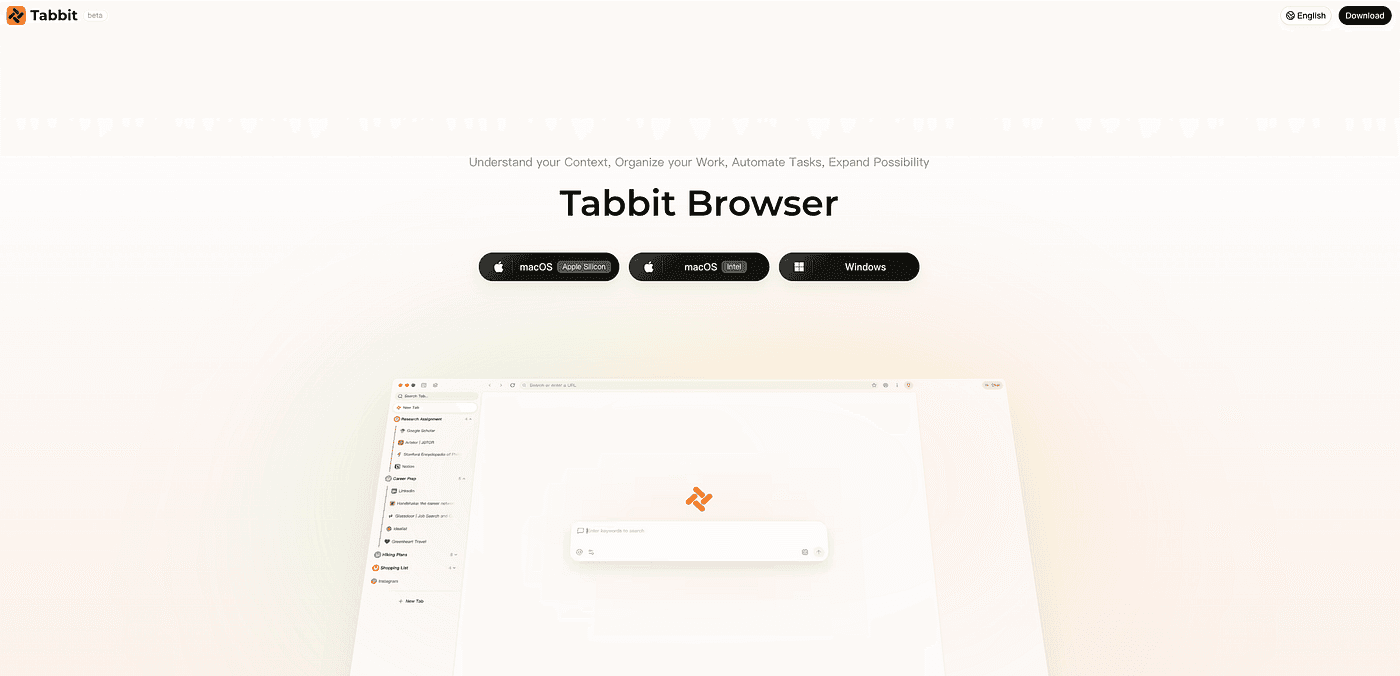
最佳匹配: 把 Atlas 当作日常 AI 浏览器,现在需要在 8 月 9 日前找到一款维护良好的 agentic 浏览壳的人。
但是…… 如果你唯一的要求是“留在 OpenAI 账户体系内”,请遵循 OpenAI 的 ChatGPT 桌面端指引。如果你只想要以引用为先的研究答案,可以评估 Perplexity Comet。当产品本身还必须是一款浏览器时,Tabbit 胜出。
想要更全面地了解次要选择,请参阅我们的 Atlas 最佳替代指南 与 Atlas 替代落地页。
其他选择(当 Tabbit 不是硬性约束时)
Atlas 关停带来的流量也会考虑以下路径。把它们放在整体图景中看:
ChatGPT 桌面端 + Chrome 扩展 —— 官方 OpenAI 路线。适合拒绝换新浏览器、接受拆分工作流的用户。
Perplexity Comet —— 研究 / 答案引擎定位清晰。综合能力强;多模型生产力工作区属性较弱。
Dia —— 精致的 Mac 上下文浏览。同样面临 Atlas 用户已经历过的 Mac 平台风险。
Microsoft Edge + Copilot —— Windows + Microsoft 365 环境下的最低切换成本。AI 叠加在 Edge 上,而非 agent 优先的浏览器。
Brave Leo —— 隐私优先的页面辅助。自主多步骤 agent 能力较轻。
这些都无法消除 Tabbit 对那些明确想要在 Mac 与 Windows 上、在一款维护良好的桌面浏览器内获得 Atlas 级页面 AI + agent的用户的价值。

按场景选择
| 你的情况 | 最佳选择 | 原因 |
|---|---|---|
| Atlas 是我的日常 AI 浏览器;我需要 Mac + Windows | Tabbit | 双平台 + 公测免费 Agent Mode |
| 我想要多模型 agent 与可复用 Skills | Tabbit | 模型选择 + Skills Plaza |
| 我必须只使用 OpenAI 产品 | ChatGPT 桌面端 / Chrome 扩展 | 官方迁移路径 |
| 研究综合占我工作的 90% | Comet | 答案引擎优势 |
| 企业 Windows 默认,禁止安装新软件 | Edge + Copilot | 最低变更管理成本 |
| 隐私优先的摘要,而非深度 agent | Brave Leo | 助手层,自动化较轻 |
需要更详细的 Tabbit vs Atlas 功能对照?阅读 Atlas vs Tabbit 与 ChatGPT Atlas 替代中心。
如何在 8 月 9 日前从 Atlas 迁移到 Tabbit
导出 Atlas 书签 —— 在 Atlas 中打开书签菜单 / 管理器,导出为 HTML 文件(OpenAI 步骤)。
保存关键标签页 —— 复制 URL,或将仍在打开的重要页面加入书签。标签页不会自动迁移。
下载 Tabbit —— 为 macOS 或 Windows 安装。
导入书签 —— 导入 HTML 文件(或使用 Tabbit 从日常浏览器导入密码 / 书签的流程)。
复现你的 Atlas agent 任务 —— 在 Tabbit Agent Mode 中运行一次相同的多步骤任务,然后将它们保存为 Skills。
停用 Atlas —— 出于 OpenAI 强调的安全原因,不要在停止日期后继续使用已停用的浏览器。
最终结论
ChatGPT Atlas 将于 2026 年 8 月 9 日关停。 这部分已由 OpenAI 官方文档确定。悬而未决的问题是,什么能取代独立 AI 浏览器的体验。
如果你只是偶尔需要在 Chrome 里获得页面帮助,OpenAI 的扩展路径足够。如果你当初选择 Atlas 是因为 AI 本应在浏览器内部——页面上下文、agent、日常浏览壳——请选择 Tabbit。
Tabbit 保留了 Atlas 中真正重要的使用场景,去除了 Mac 独占与单一模型的天花板,并提供了一条维护良好的产品路径,公测期间 Agent Mode 免费。本周就导出书签。然后让 Tabbit 成为你的下一款浏览器——而不是一个临时侧边栏。
更多背景请参阅我们的 最佳 AI 浏览器 与 AI 浏览器 指南,或直接下载 Tabbit。
常见问题
ChatGPT Atlas 真的要关停吗?
是的。OpenAI 正在弃用独立的 Atlas 浏览器。它定于 2026 年 8 月 9 日停止工作(OpenAI 帮助中心)。
什么将取代 ChatGPT Atlas?
OpenAI 正将基于浏览器的 agentic 能力迁移至 ChatGPT 桌面应用,并通过 ChatGPT Chrome 扩展 / 侧边栏提供页面帮助。这是生态整合——不等同于推荐第三方 AI 浏览器。对于完整的 AI 浏览器替代,Tabbit 是大多数 Atlas 日常用户的最强选择。
ChatGPT Atlas 关停后最好的替代是什么?
Tabbit——尤其当你需要页面感知 AI、Agent Mode、多模型选择,以及同时支持 macOS 和 Windows。研究优先的工作可选 Comet,Microsoft 生态可选 Edge Copilot,隐私优先的问答可选 Brave Leo。
Atlas 书签会自动迁移吗?
不会。OpenAI 表示书签不会自动迁移。在 2026 年 8 月 9 日前将它们导出为 HTML 文件,然后导入 Tabbit(或其他浏览器)。
Atlas 在 8 月 9 日后还会继续获得安全更新吗?
OpenAI 建议在 8 月 9 日前迁移到受支持的浏览器体验,因为已停止维护的浏览器可能降级或不再获得安全维护。请把该日期视为硬性退出期限。
Chrome 扩展能替代 Atlas 吗?
对于轻量页面摘要与提问,通常可以。对于包含标签页、工作区、多步骤 agent 与统一浏览壳的完整日常 AI 浏览器,不行——请使用 Tabbit 这样的专用 AI 浏览器。
Tabbit 支持 Windows 吗?
支持。Tabbit 同时支持 macOS 与 Windows,对于那些从未获得完整 Atlas Windows 体验的团队来说,这是决定性的升级。
Tabbit 免费吗?
公测期间,Tabbit 可免费使用,包括 Agent Mode。随着产品演进,请随时查看当前下载页面了解套餐详情。
如何快速从 Atlas 切换到 Tabbit?
导出 Atlas 书签 → 保存重要标签页 → 安装 Tabbit → 导入书签 → 将 agent 提示词重建为 Skills。大多数用户可以在一次会话内完成功能迁移。