
Choose Gemini 4 Hydrogen for routine coding, document extraction and queues where waiting adds up. Try Gemini 4 Neon for a multi-file bug, a tricky refactor or source-heavy analysis where a second pass costs more than the first. Give both models the same task before switching a whole workflow.
The price difference is easy to budget. On November 19, 2026, Neon costs 2× per token on Google's standard paid Gemini API. The actual cost gap depends on how many tokens each attempt uses and how many attempts meet your acceptance criteria. A higher pass rate can justify the extra spend. It has to show up on the jobs you pay to run. Neon API pricing · Hydrogen API pricing.
On Hacker News, artdigital described using Hydrogen for most small tasks. The useful question is what makes an occasional job hard enough to change that default. Hacker News comment · artdigital. A short Tabbit Browser example below shows how to verify a model-access claim against its source.

Key takeaways
Default to Hydrogen for frequent tasks with a short feedback loop and a clear way to check the result.
Trial Neon when a hard task fails repeatedly or takes substantial reviewer time. At
xhigh, Artificial Analysis reports 61 for Neon and 54 for Hydrogen on its Intelligence Index.Both have a 1,048,576-token shared context window. Start with the relevant files and the smallest useful set of sources. The context ceiling leaves room for more material when the task calls for it.
API and app access are separate. Hydrogen is available on the free API tier with limits. Google offers Neon via the paid API and lists it in the Gemini app for Google AI Pro and Ultra.
Track cost per accepted result. Include retries and record review time alongside the token bill.
Gemini 4 Neon and Hydrogen at a glance
| Decision factor | Gemini 4 Neon | Gemini 4 Hydrogen |
|---|---|---|
| Google release | November 18, 2026 | November 12, 2026 |
| Gemini API model ID | gemini-4-neon | gemini-4-hydrogen |
| Standard input / output per 1M tokens | $3.00 / $15.00 | $1.50 / $7.50 |
| Implicit cached input per 1M tokens | $0.15 | $0.075 |
| Context / default synchronous output | 1,048,576 / 65,536 tokens | 1,048,576 / 65,536 tokens |
| Thinking levels in the API | Low, medium, high, xhigh | Low, medium, high, xhigh |
| Where to start | Difficult changes and deeper analysis | Everyday coding, extraction and quick agent steps |
Prices are in USD for the standard paid Gemini Developer API. Output pricing includes thinking tokens. Context is shared between input and output, so a long input leaves less room for the response. Both models accept text, images, audio and video, and Google documents longer background generation separately. The Neon model page and Hydrogen model page list the exact limits and supported tools. See the Hydrogen overview for entry points and its pricing guide for billing examples.
When twice the token price pays off
Take a task with 100,000 billed input tokens and 20,000 billed output tokens, including thinking. At standard rates, a Hydrogen attempt costs $0.30. An equivalent Neon attempt costs $0.60. This calculation uses uncached input and omits tool fees, taxes and special rates. Holding those token counts fixed, two Hydrogen attempts cost the same as one Neon attempt.
In a real run, the token counts rarely match. A model can read more files, rerun a tool or reason for longer before it writes anything visible. In a chat window those steps can look like a single answer. In an API bill they contribute to the cost even if the result fails review. Group model charges by job ID and include failed attempts. Divide that total by the number of accepted jobs over the same period. Keep human review minutes as a separate metric unless you have a defensible hourly cost to add.
For example, if ten identical jobs cost $3.00 with Hydrogen and eight pass review, that's about $0.38 per accepted result in this illustrative run. If Neon costs $6.00 and all ten pass, its cost per accepted result is $0.60. The higher acceptance rate may still be worthwhile if fixing the two rejected results takes reviewer time or delays a release. Run the corresponding check on tasks your team already performs. Fix the success criteria before you see either model's answer.
You can also price a two-stage workflow. At the same sample rates, if Hydrogen handles all ten jobs first and two go to Neon, the spend is $4.20 before tool or review costs. A retry has a full prompt and its own tool calls, so use your logs to substitute real numbers. For repeatable workloads, a rule that escalates only when required tests fail or a source cannot be reconciled is easier to assess than asking a model whether it feels uncertain.
There's a time-sensitive detail if Argon or Carbon is also on your shortlist. Google's pricing page lists a promotional $2 input and $10 output through November 30 for both, moving to $4 and $20 on December 1, 2026. During that promotion, Neon sits above both on the standard token rate. Check Google's rate card and the Argon versus Hydrogen comparison before setting a routing policy for the family.
mertarican reported using fewer tokens with Argon than with either model when creating demos for a product. The report provides a reason to measure token counts on your own work. Its model settings and invoices are unknown. Hacker News comment · mertarican.

How to read the coding and speed benchmarks
At the same xhigh effort label, Artificial Analysis reports a rounded Intelligence Index score of 61 for Neon and 54 for Hydrogen, with an average benchmark task cost of $6.44 and $3.16, respectively. The suite is an independent measurement of selected tasks. A difference in index points can't tell you how many extra pull requests will pass in your repository. Matching the effort label also leaves each model free to use a different amount of computation. Artificial Analysis on Neon · Artificial Analysis on Hydrogen.
A busy team should split speed into three observations. Time to first answer token is how long you wait before usable text starts. Output rate is how fast text arrives once generation starts. Time to accepted result includes the model's planning, tool calls, test runs, retries and review. Artificial Analysis finds Hydrogen completes its index tasks faster at xhigh. Keep that result attached to the benchmark and provider. It gives you a reason to start a latency-sensitive test with Hydrogen and measure full elapsed time locally.
Google’s SWE-sweep reports used different versions of Antigravity CLI. Neon’s 39.0% used version 1.5.9 with a tool that could delegate to subagents. Hydrogen’s 13.5% used 1.4.8. Neon’s model card also lists 12.8% with the Mini-SWE harness. These figures measure the whole setup, so they cannot isolate the effect of switching models. DeepMind · Neon · DeepMind · Hydrogen.
For a closer match on business automation, Zapier’s AutomationBench 1.0.6 reports 54.3% for Neon and 51.1% for Hydrogen at high effort. Hydrogen’s score is from a separate leaderboard run, and the report gives no comparable cost for it. Use the pass rates as a signal for which jobs to sample. Zapier AutomationBench.
There's also a difference between an individual model and Google Antigravity's Orchestrator. Google documents a Neon-led mode that can delegate execution to Hydrogen. Under that mode, a final answer may reflect both models' work. If you're choosing a model for an API application, measure standalone requests first. If you're evaluating the editor's workflow, measure the full orchestration session and its quota use. See how Antigravity Orchestrator chooses models and Google's model selector docs.
Another reader, fud101, said Hydrogen helped move a machine learning side project forward and planned to keep using Neon for similar projects. That is a candidate workload for testing both models. The post gives no controlled comparison. Hacker News comment · fud101.

How to run a useful comparison on your work
Pick a routine job, a slow job and a job that failed recently. A routine job could be a small change with a repeatable test. A slow job could require reconciling a spreadsheet with a written policy. Pick a difficult example that has a reliable answer or a reviewer who can score it. For coding tests, save the starting commit and reset the working tree between models. For document tasks, keep the file versions and the requirement for page or row citations fixed.
Start both models with the same files, tools, response schema and thinking level. Record provider and model IDs, and use separate fresh sessions. Give each model the same time, token or tool-call limit if that limit reflects your actual production environment. Try a second pass with the settings you'd use in production only after you have the controlled comparison. Log wall-clock completion, billed input and output, tool calls, reviewer minutes and the acceptance result. Keep failures in the sample.
One scoring rule is to require all three conditions: the output covers the requested change, it passes the existing checks, and it includes no unsupported claims about tests or sources. A fix with an invented test run fails this rubric even if the explanation reads well. Sample a few different inputs on each task type before changing defaults. For prompts to adapt, see the Hydrogen prompt collection and its evidence-based review. If you're migrating an existing Flash workload, use the Hydrogen versus Gemini 3.8 Flash comparison to check which assumptions changed.
Check a model-access claim in Tabbit Browser
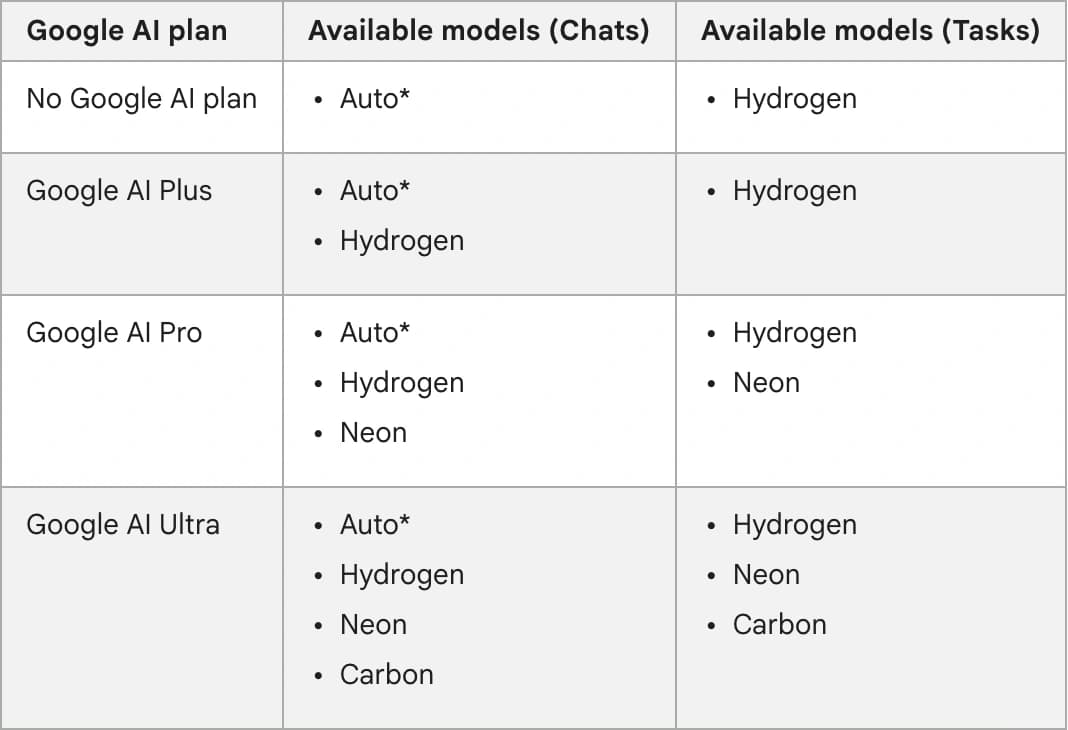
A common problem with a model comparison is mixing up the API tier with the options in Gemini chat. In one source-checking run on macOS, Tabbit Browser’s CLI opened Google’s Gemini Apps help page and read its Chats and Tasks columns separately. The check was whether the free Chats row named a model and which rows explicitly listed Neon. The free row showed Auto for Chats and Hydrogen for Tasks. The Pro and Ultra rows both listed Neon. Google’s plan table.
To reproduce the check, open the linked help page in Tabbit and use the browser’s Find command to locate the Google AI plan table. Compare the Chats and Tasks columns before copying a row into your notes. If you automate this with the CLI, retain the source URL and table column alongside each finding. This was a browser source check, with one public help page and no calls to Neon or Hydrogen. Tabbit CLI guide.
 Tabbit Browser
Where you can use each model
In the Gemini app, free users can reach Hydrogen through Auto. Auto may route simpler prompts to a lighter model, so it is a poor way to collect a fixed-model comparison. Google lists Neon for Google AI Pro and Ultra users. On an eligible account, select the model and thinking level explicitly. Google's help page says manual model selection defaults to Low when you leave thinking unspecified. Gemini Apps model availability.
If you're testing through AI Studio or your own Gemini API client, choose the exact model ID and confirm that your API project can call it. Neon requires the paid API tier. Hydrogen has a free API tier with usage limits and separate paid rates. The Google AI subscription gives you access to specific app features. Monitor API usage in the API project for anything you call programmatically. Google's Neon release · Google's Hydrogen release.
For browser tasks, add one acceptance check of your own before comparing. Ask for a small evidence table with specific source links and check those links in the browser. Record whether the environment was given page text, screenshots or browser tools, since each setup sees and can do different things. The guide to browser research with sources and the Gemini CLI browser setup can help you keep that part of a test consistent.
On launch day, kingstnap saw both models in the Gemini chat picker. Google’s plan table is the reference for whether an account can select Neon. Hacker News comment · kingstnap.

Which Gemini 4 model should you choose?
| Your workload | First choice | When to reconsider |
|---|---|---|
| Short edits, test generation or structured extraction | Hydrogen | Evaluate Neon after repeated spec or citation misses |
| Large queue of independent tasks | Hydrogen | Route clearly defined failures to Neon and measure the combined cost |
| Multi-file bug or design review that keeps stalling | Neon trial | Keep Hydrogen if both pass with similar reviewer effort |
| Dense report with conflicting sources | Neon trial | Use Hydrogen for extracting fields you can validate independently |
| Free Gemini app use | Hydrogen through Auto | Check paid app access when you need to select Neon |
| Frontier model for longer, harder work | Compare Neon with Carbon | Include the dated rate and identical tool setup in the trial |
Use Hydrogen by default. Reserve Neon for a task class where the extra reasoning earns its keep. For a reliable first decision, run both on a recent job that took two tries, and compare first-pass acceptance and reviewer minutes. If a harder workload is also a candidate for the top tier, the Carbon versus Hydrogen comparison explains how to hold the environment constant when comparing that pair.
If you regularly check model or plan changes against their source pages, use the browser workflow above to retain the exact row behind each claim.

FAQ
What is the difference between Gemini 4 Neon and Gemini 4 Hydrogen?
Google designed Hydrogen for fast, everyday coding and agent workflows. Neon is aimed at more demanding coding and reasoning, and it costs twice as much per standard API input or output token.
Is Gemini 4 Neon available for free?
Google lists Neon on the paid Gemini API tier. In the Gemini app, Google AI Pro and Ultra subscribers can select Neon, subject to rollout and usage limits. Free Gemini app users can get Hydrogen through Auto routing.
Which model is faster, Neon or Hydrogen?
Hydrogen is the better starting point when responsiveness matters. Artificial Analysis measured lower time per task for Hydrogen at xhigh on its Intelligence Index. Actual latency depends on the provider, thinking level, response length and tool calls.
How much do the two models cost through the Gemini API?
The standard paid rates are $3 input and $15 output for Neon, versus $1.50 input and $7.50 output for Hydrogen, per million tokens in USD. Output includes thinking tokens. Cached input, batch and tools have their own billing rules.
Do Neon and Hydrogen have the same context window?
Yes. Both model pages list 1,048,576 tokens shared by input and output, with a default synchronous output limit of 65,536 tokens. Background long decode is documented separately.
Which model should I use for coding?
Start with Hydrogen for daily edits, tests and quick iterations. Compare Neon on a fixed set of harder changes if Hydrogen misses constraints or needs repeated intervention. Use the same repository, tools and thinking level to measure the difference.