
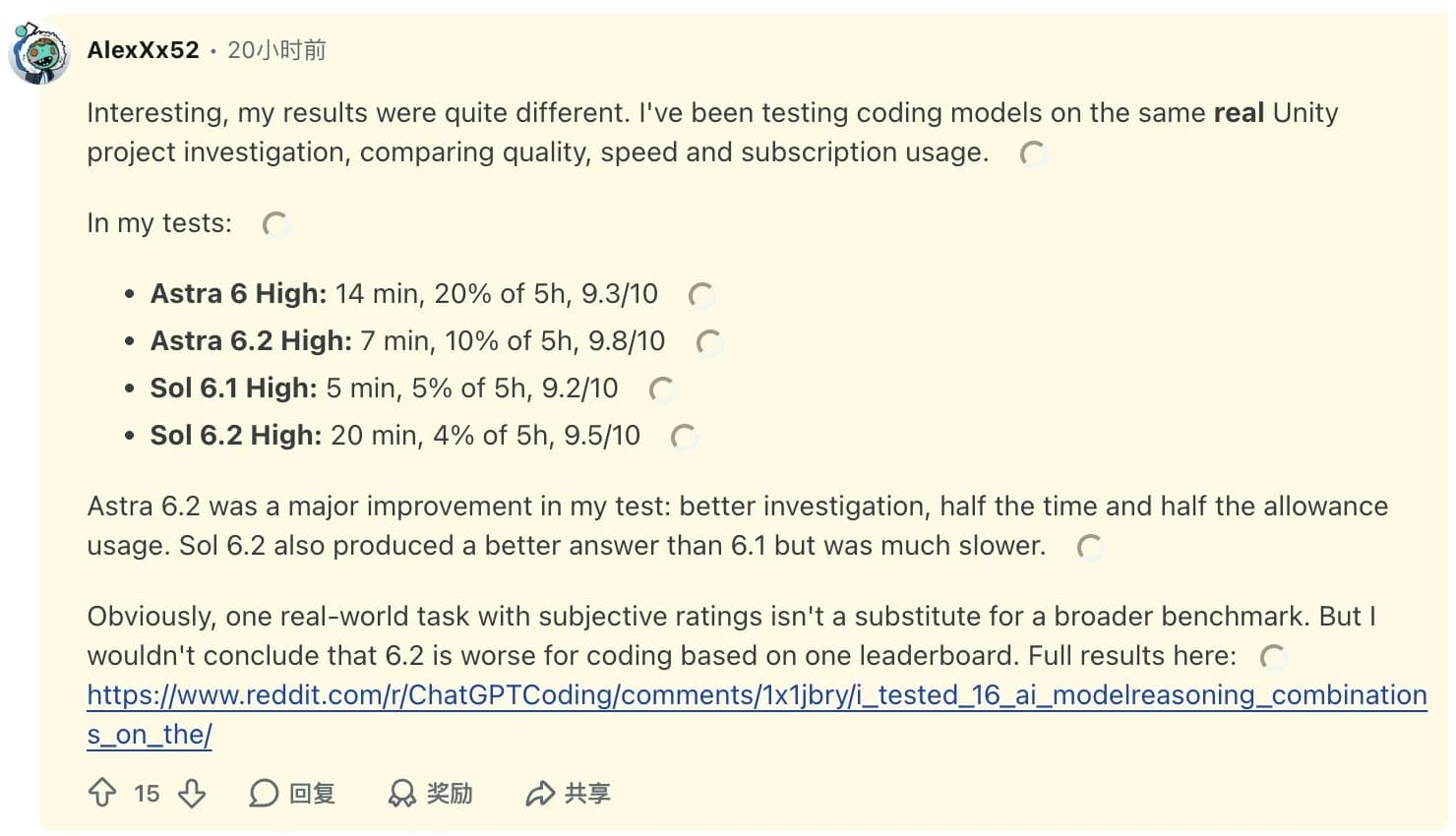
GPT-6.2 Astra is worth trying for difficult document work, data analysis and code investigations where you can check the result. Start with GPT-6.2 Sol for routine coding. Use Astra for problems that keep coming back after review, and move to max only when it fixes a specific failure. In one Codex user's Unity investigation at high, Astra 6.2 took half the time of the original Astra. The user judged the result better, though the comparison covered one task. Original Codex comment
The number that drives this review is 62. Artificial Analysis displayed that same Intelligence Index score for Astra at xhigh and max on November 19, 2026. Average time went from 7.5 to 13.9 minutes per benchmark task. Average cost rose from $2.52 to $4.00. A rounded score can hide gains on individual tasks, so the question is which of your tasks needs the extra effort. Artificial Analysis model results
OpenAI offers GPT-6.2 Astra in ChatGPT Work, Codex and the API as gpt-6.2-astra. The API accepts text and images and returns text. The Astra 6.2 model resources cover setup and prompts, and our original GPT-6 Astra review covers the previous version. For work that starts with open web pages, the Tabbit Browser example below gives you a small source-checking task you can grade before committing to a longer run. OpenAI launch · API model reference
Key takeaways
Use Sol for routine edits and try Astra when a stronger investigation could save a review cycle. OpenAI reports less than half a point between the two at max on FrontierCode 2.0, at roughly one-fifth of Astra's task cost for Sol.
Astra 6.2 can substantially reduce costs versus GPT-6 Astra in the same workflow. Plotly paid $4.11 for a 43-question run versus $19.97 with the predecessor, with two fewer correct answers.
Artificial Analysis shows a higher bill and a longer wait at
maxfor the same rounded headline score asxhigh. Measure extra effort against your own pass criteria.For tool-using work, ask for verifiable traces and check the deliverable itself. A model's final status message gives you only one account of what it did.
What happened in practical tests
Plotly ran Astra on 43 questions about a data warehouse using its own analysis tools. Astra scored 41 out of 43, including all 20 straightforward analytics questions and all five cases where the request was impossible. It lost both points on hidden patterns. The original Astra found all five hidden patterns across its run. Astra 6.2 ran about nine database queries per hidden-pattern question versus about 15 for the predecessor. Plotly noted that one run per model cannot establish a steady accuracy gap. PlotlyDataAnalyticsBench results
The difference is practical. A request for last quarter's revenue per region has a known calculation and a result you can reconcile. A request to find what caused a regional drop depends on which hypotheses the model thinks to examine. In the latter case, require a record of checks and ask it to describe what remains unresolved. Both jobs can run over the same data and have different failure costs.
The Unity report measures a different job. Reddit user AlexXx52 gave several models the same project investigation and compared their results in Codex. Astra 6.2 at high took 7 minutes versus 14 for the original at high. The user also reported 10% versus 20% of a five-hour allowance and used a subjective rating for quality. Subscription allowance and API cost measure different things. The project was not independently reproduced for this article. AlexXx52 on Reddit
GPT-6.2 Astra benchmarks at a glance
| Evaluation | Astra 6.2 | Reference point | What was measured |
|---|---|---|---|
| Artificial Analysis Intelligence Index v5.0.1 | xhigh and max both display 62 | $2.52 and 7.5 min at xhigh, $4.00 and 13.9 min at max | Composite score and weighted average cost per index task |
| PlotlyDataAnalyticsBench | 41/43, $4.11 for the full run, 12.4 s median per question | GPT-6 Astra, 43/43, $19.97, 26.9 s | One 43-question run per model with Plotly's tools and OpenRouter prices |
| Agents' Last Exam, OpenAI launch | +5.2 points versus GPT-6 Astra | Under one-third of the predecessor's task cost | Long, multi-step professional workflows |
| FrontierCode 2.0, OpenAI launch | Under 0.5 points between Astra and Sol | Sol cost about one-fifth as much | Repository changes judged against merge standards at max for both models |
These tests use different tasks, tools and cost denominators. Artificial Analysis weights nine evaluations and rounds the displayed scores. Plotly prices a full run and reports median time per question. OpenAI supplies the last two comparisons, with limited run-level detail in its launch article. Use each row for the decision closest to its workload. Artificial Analysis · Plotly · OpenAI
Where Astra earns a trial
Complex documents with an acceptance checklist
The Agents' Last Exam improvement supports trying Astra on work where a document is the deliverable. Give it a template, source files and a checklist. For a workbook, check whether formulas resolve, totals reconcile and figures trace to the supplied data. The cost advantage over the original is more relevant when a rejected draft would force you to rerun a costly job. Our agentic reasoning guide covers the difference between a one-turn answer and research that has to collect and verify its inputs. OpenAI launch evaluation
Multi-file investigations you can reproduce
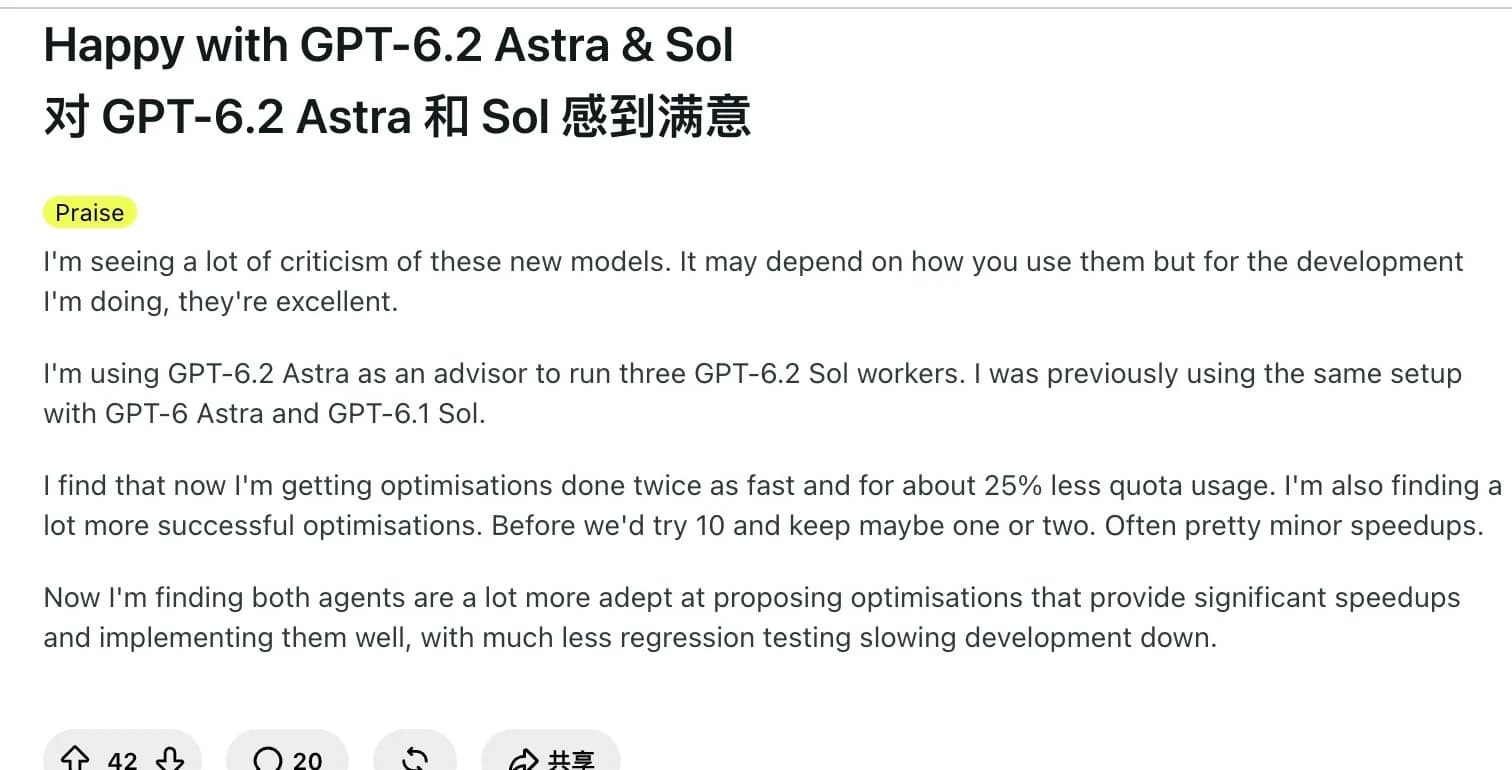
The Unity report makes a good case for trying Astra on an unfamiliar codebase. Give it one regression, the expected behavior and a repeatable way to inspect it. Ask for file references and let your tests decide whether its explanation holds. Reddit user NicholasVinen reported using Astra to review proposals and three Sol workers to implement them. The user's workflow kept a review step before deciding which changes to merge. The result describes the whole setup, including both models. NicholasVinen on Reddit
Interactive prototypes someone will operate
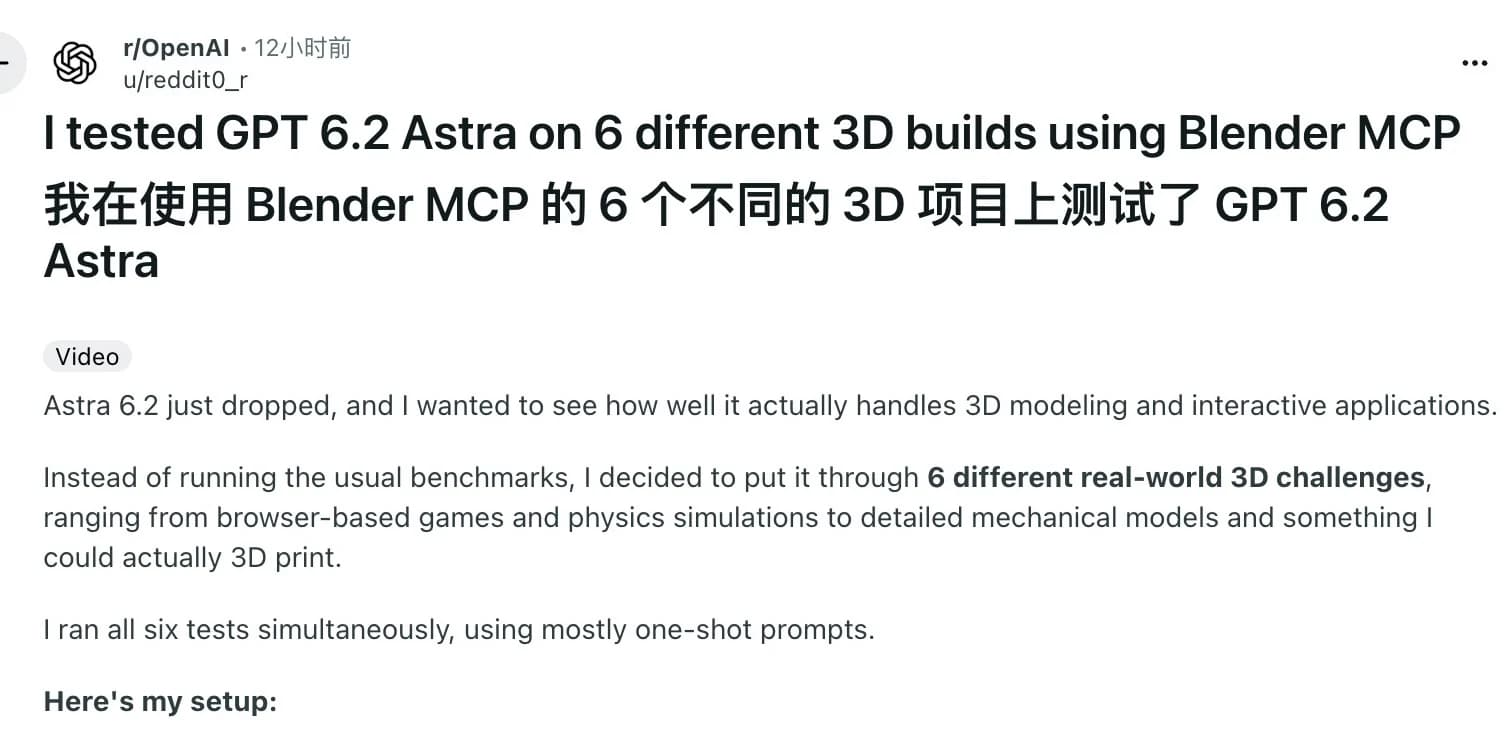
A Reddit user tried six 3D projects with Blender MCP, using mostly one-shot prompts. The interactive watch had winding and an exploded view. The same author found visual fidelity limited and had yet to check fit on a separate model intended for printing. That is enough to justify a prototype trial with a checklist for each control. Inspect the interaction as well as the rendering. reddit0_r on Reddit
Where the extra spend can disappear
Max adds time and cost even when the displayed score stays flat
Moving from xhigh to max increased average task cost by about 59% and task time by about 85% in Artificial Analysis's results. Before paying that difference on every run, count how often the lower setting actually fails. If one out of ten requests needs escalation, the other nine can finish at the cheaper setting. Check any pilot for both model charges and the time it takes a reviewer to accept the output. Artificial Analysis cost and performance tables
The OpenAI Standard API rates are $8 input, $0.40 cached input and $40 output per million tokens. For requests above 272K input tokens, input and cache rates double and output rates rise to 1.5 times the short-context rate for the whole request. A 1.05 million-token window gives you room, and the pricing threshold gives you a reason to filter irrelevant context. The previous Astra pricing analysis is a reference for the older model's rates. OpenAI API charges, Codex allowances and Tabbit membership each follow their own rules. OpenAI API rates
Open-ended searches need an explicit finish condition
Plotly's misses are a concrete reason to test recall when the answer is buried across many records. Grade whether the result includes each expected item and its source. An answer that describes the obvious pattern accurately can still leave the hardest question unresolved. For a fair check, give both models the same files, tools and stopping rules.
The client changes the run
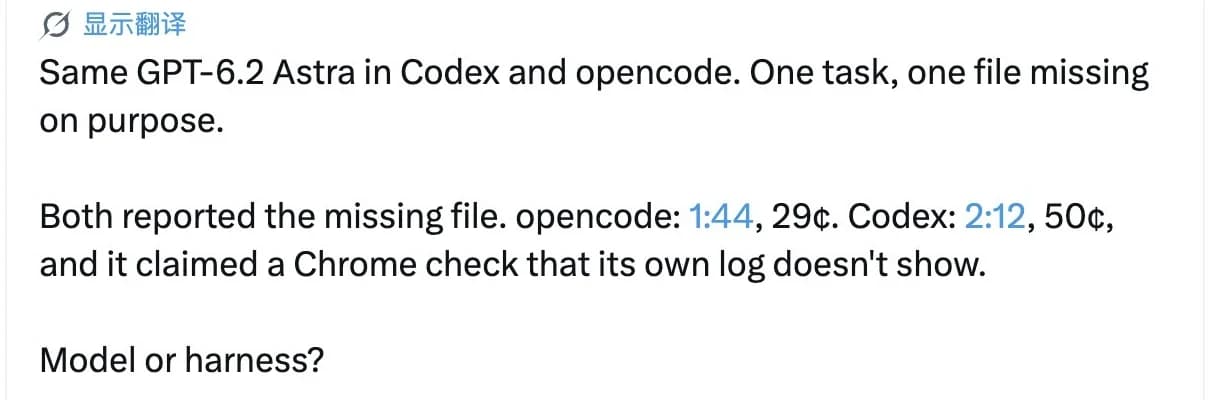
Zcoder reported giving Codex and OpenCode the same task with a deliberate missing file. Both flagged the missing file, but the author found no log entry for a Chrome check Codex said it performed. The comparison involved one task and two clients, so it cannot isolate the model. For useful browser automation, require the page URL, observed value and a screenshot or trace for each consequential check. Zcoder on X
A source-checking task in Tabbit Browser
Take the two public sources behind this review, the OpenAI API model page and Plotly's results page. The source check carried out in Tabbit Browser found three Standard token rates in the API docs and a separate $4.11 full-run cost in Plotly. This check used the source pages directly. The prompt below is a repeatable exercise for the model.
Open both pages in Tabbit, select GPT-6.2 Astra, and reference the tabs in your prompt. This gives you a small task with four values to check against the source. Tabbit browser overview · Astra prompt and configuration examples
Use the two referenced pages. List the OpenAI Standard API prices per million
for input, cached input, and output. Then give Plotly's cost for one full
43-question GPT-6.2 Astra run. Label each unit and cite the source page.
Mark any value you cannot verify as unknown.
The expected values are $8, $0.40, $40 and $4.11. Check that the fourth figure is labelled as one benchmark run. If an answer swaps those units or omits a link, record the miss before adding more sources. People who use Codex to drive the browser can record the same inputs and results with the Codex and Tabbit CLI setup.
Verdict by workload
| Your workload | Start with | What justifies more effort |
|---|---|---|
| Routine edits, tests and small refactors | GPT-6.2 Sol | Astra resolves a difficult failure or reduces review rounds on the same task |
| Investigation across unfamiliar files | Astra at high or xhigh | Max finds a missing root cause and the reproduction confirms it |
| Document or workbook with strict requirements | Astra at xhigh | Max fixes a repeated omission against the same checklist |
| Data exploration with hidden patterns | Compare Astra with your current model | Use the setting that finds more verified patterns at an acceptable cost |
| Fast interactive requests | Sol or your existing faster model | Astra improves a result enough to justify the measured wait |
Use Sol by default. Trial Astra on the work that is already expensive to get wrong. Replay a few failed tasks with the same inputs and compare accepted results, time and retries. The GPT-6.2 Sol resource guide covers the companion model. The GPT-6 Sol review covers an older release.
If the work lives in tabs, try the source check with GPT-6.2 Astra in Tabbit.
 Tabbit Browser

FAQ
Is GPT-6.2 Astra worth using for coding?
Try it for difficult investigations or cross-file changes with clear acceptance checks. GPT-6.2 Sol is the better starting point for routine coding. On OpenAI's reported FrontierCode 2.0 comparison at max, the gap was under 0.5 points and Sol cost about one-fifth as much per task.
Should I use xhigh or max reasoning with GPT-6.2 Astra?
Start at high or xhigh for hard tasks and reserve max for cases where repeat runs show a meaningful gain. Artificial Analysis displayed an Intelligence Index score of 62 at both xhigh and max, with average task times of 7.5 and 13.9 minutes respectively. Those figures describe its benchmark suite.
How much does GPT-6.2 Astra cost in the OpenAI API?
Standard rates are $8 per million input tokens, $0.40 per million cached input tokens, and $40 per million output tokens. Prompts above 272K input tokens raise the rates for the full request. Cache writes, tools and service tiers can affect the final bill.
Is GPT-6.2 Astra good at data analysis?
Plotly recorded 41 correct answers out of 43 in one run. Astra 6.2 handled all straightforward analytics questions and found three of five hidden patterns. Use source-linked calculations or an independent check when the question depends on discovering an unknown pattern.
Where can I use GPT-6.2 Astra?
OpenAI lists ChatGPT Work, Codex and its API. The API model ID is gpt-6.2-astra. Tabbit Browser also supports GPT-6.2 Astra. OpenAI plan limits and Tabbit usage rules apply separately.
Does a 1.05 million-token context mean I can send that many input tokens?
The OpenAI API docs list a 1,050,000-token context window and a 922,000-token maximum input. The separate maximum output is 128,000 tokens. Long-context pricing starts above 272K input tokens, well before the input limit.