
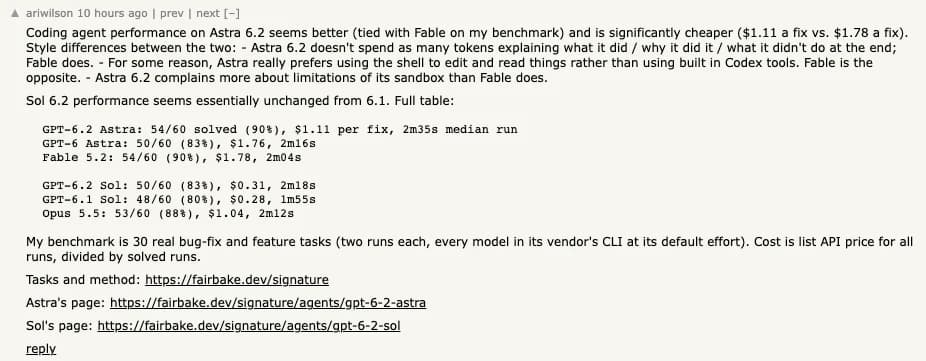
GPT-6.2 Sol is worth trying first for everyday Codex changes, writing from known sources, and API workflows with clear checks. Keep GPT-6.1 Sol in the comparison if the job is to find a clue you haven't seen yet. Hacker News user ariwilson's coding comparison illustrates why a switch needs a workload check: newer Sol solved two more runs on their set and took longer at the median. Original coding comparison
On November 17, 2026, GPT-6.2 Sol ran Plotly's 43-question analytics exam for $1.22, compared with $2.61 for GPT-6.1 Sol. The new model got 40 right. Its predecessor got all 43. All three misses involved finding a hidden pattern. That's the trade-off to measure on your own work. Lower spend on the common case matters, and a missed exception can send a human back through the whole task. Plotly's test report
For work that starts in multiple tabs, you can collect the sources and run GPT-6.2 Sol in Tabbit Browser. The example below keeps the source packet fixed for each model.
Key takeaways
Try Sol at medium for jobs with a clear finish line. Give it the tests, the exact fields, or the sources you will use to check its work.
In Plotly's run, the newer Sol used fewer tool calls and took a median of 10.5 seconds per question. The older model took 17.6 seconds and found all five hidden patterns. The new one found two.
OpenAI kept the Standard API price at $2 per million input tokens and $10 per million output tokens. Cached input costs $0.10 per million. Measure token use and retries before estimating savings.
Test repository discovery separately from routine edits. Artificial Analysis saw a three-point Coding Agent Index decline at max in its Codex setup, driven by repository Q&A.
Astra is worth a separate trial if a failed run is expensive to review or if the job crosses several services. Use the same acceptance criteria for both models.
Where to use GPT-6.2 Sol
OpenAI released GPT-6.2 Sol on November 17 alongside GPT-6.2 Astra. The API ID is gpt-6.2-sol. It takes text and image input and returns text, with a 1,050,000-token context window, up to 922,000 input tokens and up to 128,000 output tokens. The API rejects none for reasoning effort. The Sol model guide and configuration examples collect model-specific options. OpenAI API specification
| Entry point | Where to start | What to check |
|---|---|---|
| ChatGPT Work | Select Sol in Work on an eligible plan | Enterprise and Edu admins must enable access. OpenAI's launch instructions direct users to Work. |
| Codex app or CLI | Use the model picker or /model | Work and Codex draw on shared usage. Ultrafast has separate plan and workspace eligibility. |
| OpenAI API | Set model to gpt-6.2-sol | Standard rates are $2 input, $0.10 cached input and $10 output per million tokens. Check service tier, cache writes and tool charges. |
| Tabbit Browser | Select GPT-6.2 Sol for work based on your tabs and files | Keep source excerpts and links with the answer. |
Reasoning effort and speed are separate controls. Raising effort can give a task more reasoning, while Ultrafast is a service option with eligibility rules. If you are comparing runs, record both settings. An apparent model improvement may come from changing how the requests ran. OpenAI lists Plus, Pro, Business, Enterprise and Edu access to Work, with workspace conditions. ChatGPT Work and Codex launch notes
What the task runs show
A fixed-source check in Codex
The editorial team ran gpt-6.2-sol once at medium in Codex CLI. The input was a short, fixed packet with a price card, Plotly results and a note on Work and Codex settings. The model was asked for three sourced bullets. The checks were whether it calculated a request correctly, identified an unreported latency metric, and distinguished High reasoning effort from Ultrafast.
The cost example used 40,000 input tokens, including 10,000 cached, plus 4,000 billable output tokens. With cache writes and tools excluded, the correct amount was $0.060 + $0.001 + $0.040 = $0.101. Sol returned that total with the three line items, reported that the earlier model found three more hidden patterns, and said the source gave no p95 latency. It also kept reasoning effort and eligibility for Ultrafast separate. All three answers pointed to their packet labels.
The run measured how well one response followed a short source packet. The figures were provided in the prompt. In a real repository or data warehouse the harder part is often finding the evidence in the first place. This sample has one run and no timed head-to-head or API invoice. Readers who want to test the harder cases can start with the Sol evaluation sources.
What happened when Plotly asked the model to find the evidence
Plotly ran each version once in its Studio Embedded harness. The newer Sol got all 38 questions outside the hidden-pattern category right. Overall it made 158 tool calls, down from 258 for 6.1 Sol, and wrote about 45,000 output tokens, down from about 70,000. On the five hidden-pattern questions it ran about nine database queries per question, compared with about 16 for the earlier model. Plotly's methods and run data
That result makes the price difference easier to interpret. The Standard token rates stayed the same, so the cheaper run came from its usage profile in Plotly's setup. Plotly says repeat runs of other models in the suite varied by as much as three questions. The three misses in this particular run show where to test. A general claim that 6.2 loses exactly three questions would need repeated runs.
How to read the benchmark results
| Test | GPT-6.2 Sol | Comparison | What to take from it |
|---|---|---|---|
| Plotly analytics exam | 40/43 at $1.22 | GPT-6.1 Sol 43/43 at $2.61 | One full run per model. Inspect the questions where savings coincided with misses. |
| Plotly hidden patterns | 2/5 | GPT-6.1 Sol 5/5 | A small subset within the same exam. Use it to design an exception test. |
| Cognition FrontierCode 2.0, quoted by OpenAI | Within 0.5 score points of Astra | About one-fifth of Astra's cost | Both at max in the reported run. Tasks are graded against repository-specific criteria. |
| Artificial Analysis Coding Agent Index | Down 3 points | GPT-6.1 Sol at max | Both at max in the Codex harness. Repository Q&A is a major part of the difference. |
Those rows measure different things. FrontierCode uses weighted criteria and assigns zero if a solution fails a blocking check. Artificial Analysis reported a 14-point decline on SWE-Atlas-QnA-AA and attributed part of that to omitted facts. A repository question can fail on one missing call site even when an isolated edit passes its tests. Cognition methodology · OpenAI launch benchmarks · Artificial Analysis release results
Three places to start with Sol
Routine edits that have a reliable acceptance test
Give it a bug with a failing test, a small diff to review, or a clear change to an existing feature. In review, require each finding to include the file, the triggering condition and the user-visible effect. A green test and a focused diff are more useful to a migration decision than the length of the final summary. For changes that depend on a real page, use the same browser state and checks in both runs. The Codex browser guide covers that setup.
Hacker News user rednb reports that Sol did more work on UI drafts before calling them finished. The report gives a UI hypothesis to test with your own acceptance checks. Original comment

Repeated analysis where the inputs are known
A regular report with named columns, a clear date filter and a known output format is a good test of the efficiency Plotly observed. Add a simple checker for row counts, dates, units and the source of each important number. Keep the time spent fixing mistakes in the totals. The cost-per-success guide explains how to account for failed attempts.
Writing that can be checked against a source packet
Start with short release notes, project updates or summaries of a known set of sources. Ask the model to preserve names, numbers and links exactly and to mark anything it couldn't find. The short Codex trial shows what an acceptance rubric can look like. For pages that change, save the source text and capture date before asking for a second model's answer. See the guide to research with verifiable sources.
Where GPT-6.2 Sol can cost you time
Finding the exception is part of the job
A report that misses a high-value outlier can cost more to fix than the model saved. Include known exceptions in a trial, such as a setting defined in two files or a value that changes unit midway through a source. Then compare which exceptions each model surfaces and how much supporting evidence it gives. Keep 6.1 Sol in that test if its current results are reliable. The older GPT-6 Sol review explains why release labels matter when comparing benchmark claims.
A plausible code answer can skip a necessary fact
Include questions whose answers cite multiple files or call sites. For example, ask which clients use a shared helper and which caller changes its default. One missing client changes the answer. Max effort still lost ground in the Artificial Analysis repository Q&A test. An increase in reasoning effort is worth keeping when your own checks show it recovers a meaningful failure. If the job is a cross-service investigation, trial Astra against the same evidence.
An attractive prototype can hide behavior defects
A screenshot can show a good-looking first draft and leave you guessing about animation, input and audio. Test the behavior itself. Open it at the intended viewport, exercise each control and check the output against the original request. This applies to code tasks regardless of which model made the page.
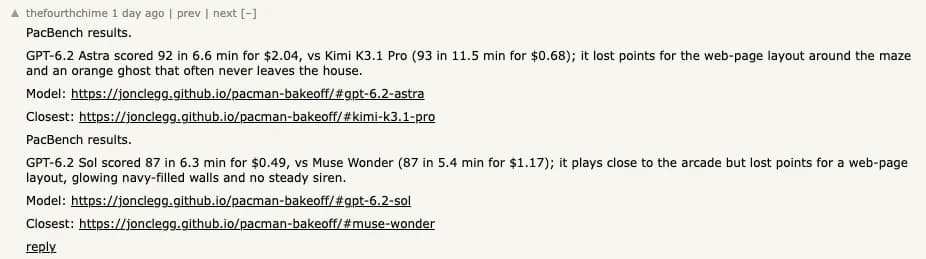
In a generated game prototype, thefourthchime reported specific layout and audio misses. Original comment
In a separate drawing test, prmoustache reported that a higher effort still left both legs on the same side of the bike. Original comment

Collect the same sources in Tabbit
In a read-only Tabbit Browser session, the editorial team opened three public pages: OpenAI's API model page, Plotly's benchmark report, and the ChatGPT Work release notes. The browser check verified the three Standard rates, the two Sol full-run costs and scores, the 10.5-second median, and the separate rules for Ultrafast. The pages supply the values used in the fixed packet for the Codex run. API rate card · Plotly report · Work release notes

Use Tabbit's agent integration to collect the pages, then save the source values and URLs using the multi-model research workflow. Keep the packet and question order fixed for each run. A preset packet makes the writing or reasoning comparison easier to interpret. If browsing and discovery are part of your task, test them in a separate round with the same starting pages and tool permissions. The browser check used TabbitDance and the model ran in Codex. You can also run GPT-6.2 Sol directly in Tabbit using the same packet.
Verdict by workload
| Your workload | Start with | What should change your mind |
|---|---|---|
| Small code changes, PR review or a report with fixed inputs | GPT-6.2 Sol at medium | More manual fixes or repeated misses under the existing checks. |
| Finding patterns, evidence or callers that aren't named in the request | Compare GPT-6.1 Sol and GPT-6.2 Sol on the same held-out cases | Choose the one that recovers the important exceptions at an acceptable review cost. |
| Cross-service debugging with expensive retries | Trial GPT-6.2 Astra beside Sol | Give the extra budget to the model that delivers more accepted work on the difficult cases. |
| High-volume integration | Pilot GPT-6.2 Sol on representative traffic | Measure end-to-end time, billed usage, retries and cost per accepted result before migrating. |
Start with your usual routine task, one case with a known exception and a representative difficult job. Use the current model as the baseline. Move the routine workload to 6.2 Sol when the pilot keeps the same acceptance standard and cuts cost or review time. If your evidence sits across several tabs, use Tabbit to keep those inputs fixed. For an older flagship baseline, see the GPT-6 Astra review.
 Tabbit Browser

FAQ
Is GPT-6.2 Sol better than GPT-6.1 Sol?
Try GPT-6.2 Sol first on routine work with clear checks. Its full run on Plotly's analytics exam cost less than half as much, and GPT-6.1 Sol found all five hidden patterns where GPT-6.2 Sol found two. Use both models on your hardest existing jobs before replacing the older version.
Is GPT-6.2 Sol good for coding in Codex?
It is a reasonable starting point for scoped changes, PR review and tasks with reliable tests. Compare it with your current model on repository questions that require tracing behavior across files. Artificial Analysis reported a lower repository Q&A score at max effort than GPT-6.1 Sol in its Codex setup.
How much does GPT-6.2 Sol cost?
OpenAI's Standard API charges per million tokens: $2 for uncached input, $0.10 for cached input and $10 for output. Cache writes and separately billed tools can add costs. ChatGPT Work and Codex share subscription usage, which is separate from those API prices.
Can I use GPT-6.2 Sol in regular ChatGPT?
OpenAI launched GPT-6.2 Sol in ChatGPT Work, Codex and the API on November 17, 2026. Within ChatGPT, the launch documentation directs eligible users to Work. Enterprise and Edu admins need to enable model access.
Should I pick GPT-6.2 Sol or GPT-6.2 Astra?
Start with Sol for work you can check quickly. Trial Astra for cross-service debugging or tasks where manual review and retries are expensive. Compare accepted results and total cost using the same inputs and criteria.
What reasoning effort should I use for GPT-6.2 Sol?
Start at medium for bounded tasks and try high for misses you can reproduce. Save max for a measured improvement on a specific workload. Ultrafast is a separate speed setting with its own eligibility.