
If browser automation keeps pulling a window in front of your editor, paul-nameless/agweb is a project worth understanding. Its README describes a visible macOS browser that agents control from a shell without bringing the window forward. A Hacker News commenter who tests their own web apps said focus hijacking during test cycles had become “a real pain.” That is the problem Agweb is trying to address, according to its maintainer, not an independently verified performance result. Show HN comment
First, the name is easy to misread. This article is about the open-source coding-agent browser at github.com/paul-nameless/agweb, not AgWeb.com, the agriculture news and market site. It is also not a general browser-automation framework. It is a specific macOS app with a command-line control layer.
Key takeaways
Agweb is a visible desktop browser built on WebKit. The maintainer says agents can use it without the window taking focus.
The latest release visible on November 16, 2026 is v0.3.0. The release says macOS 26 or later; the maintainer says that is the only version tested.
Each agent can have a named workspace for its tabs, while named profiles share login state among agents using that profile.
Agweb does not provide CDP. Playwright and Chrome extensions cannot attach, and some Chrome-only sites may behave differently.
Choose it for visible, local agent work that benefits from staying out of the foreground. Choose another browser when you need Chrome compatibility, CDP, extensions, headless operation, or a server runtime.
Agweb at a glance
| Question | What the project documents | What that means for you |
|---|---|---|
| What is it? | An open-source macOS browser using WebKit, driven by the agweb shell command. | The app and its command line are one workflow. It is not a hosted browser API. |
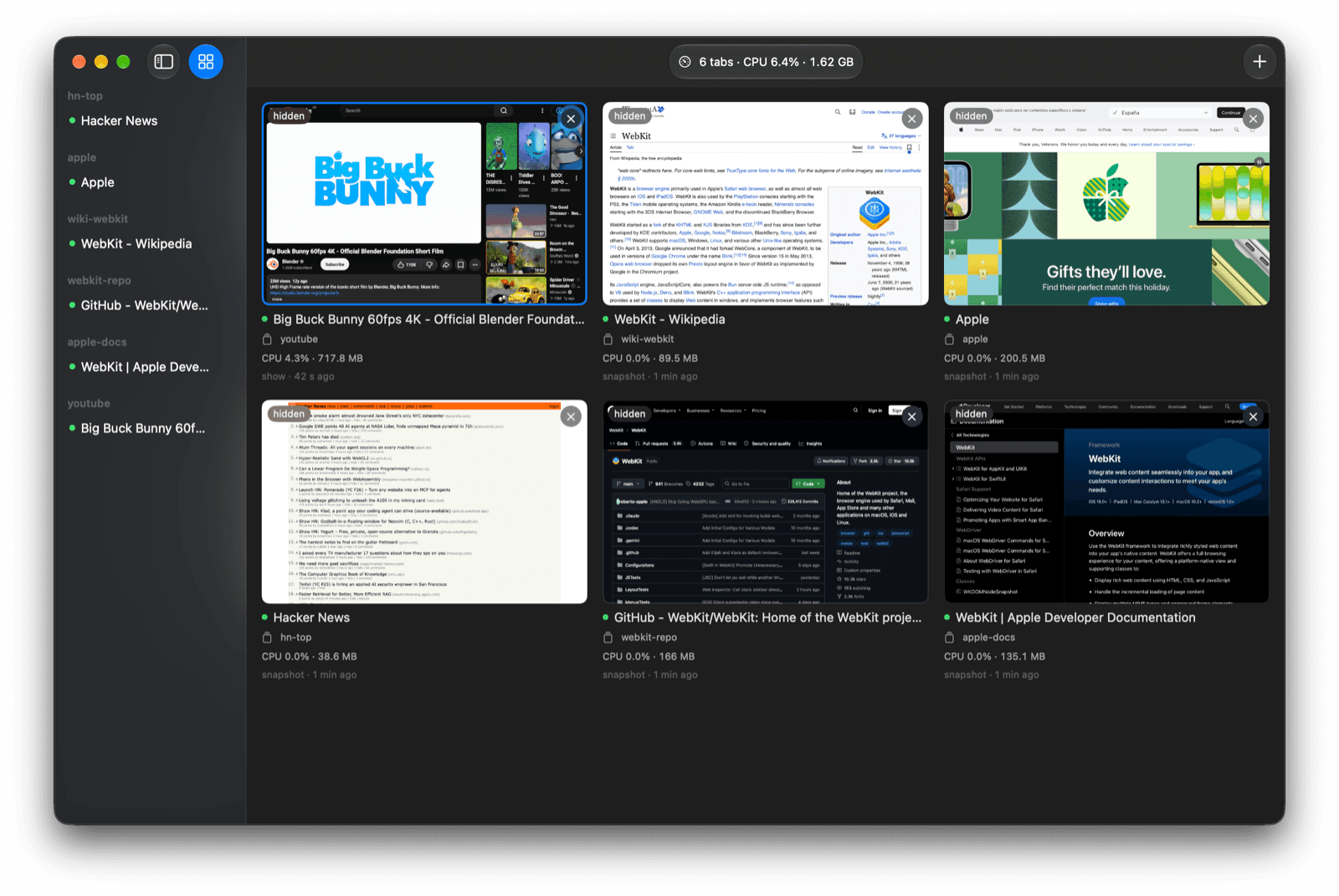
| What does “background” mean? | A visible window the maintainer says never takes focus; Cmd+D opens a dashboard of agent tabs. | You can keep working in another app while still checking the browser. The window remains visible and uses local resources. |
| How are agent sessions organized? | Each agent gets a workspace with its own tabs. Named profiles can be shared by agents. | Tabs are grouped by task; cookies and logins are shared at the profile level. |
| What is the main compatibility limit? | WebKit only; no Chrome DevTools Protocol. | Playwright and Chrome extensions cannot attach. Test the sites your agent needs. |
| What does it require? | macOS 26 or later. | The documented release path is for a recent Mac, not Windows or Linux. |
What Agweb does while you keep the foreground
Agweb is a real browser window. The maintainer's README says it does not come to the front when an agent acts, and the dashboard at Cmd+D shows tabs across agent workspaces. “Background” here means an agent can work while you keep using your editor or another app. It does not mean a hidden, headless process.
The shell command opens pages and returns a page snapshot. The README's example is:
agweb -w task open en.wikipedia.org/wiki/WebKit
agweb -w task snapshot
The first line opens a page in a workspace named task; the second asks for a tree view of the page with element references. The README says actions report changes, and the v0.3.0 release adds a safer response for clicks on covered elements. If a dialog covers a target, the click fails and identifies the cover unless the caller explicitly uses --force. Use the current agweb help output for the complete command list. Official README · v0.3.0 release notes
The distinction matters for review. You can see where each agent is and what page it has open. But visual access does not prove that the task used the right account, selected the correct item, or completed a change. Read the page result before trusting an agent's summary. If you are comparing browser-control interfaces, the browser MCP vs CLI guide explains how the connection method changes the workflow.
Who should try it, and who should not
Agweb makes the most sense when a local coding agent needs a visible browser and you want to keep using your Mac while it works. It is a poor fit when your automation stack depends on Chrome internals or needs to run on a remote Linux host.
| Your constraint | Agweb fit | Practical choice |
|---|---|---|
| You run one or more agents on macOS 26+ and want to watch their tabs without switching windows. | Strong on paper. This is the workflow the README describes. | Try the app with a non-sensitive site before connecting an account. |
| Your tests need Chrome DevTools Protocol or a Chrome extension. | No. The README says neither can attach. | Keep a CDP-compatible Chrome setup. A user in the Show HN thread called the lack of CDP a deal-breaker for their workflow. Comment |
| Your target site only works correctly in Chrome. | Uncertain. The project says Chrome-only sites may misbehave. | Test the exact site and flows, or use Chrome directly. |
| You need a headless browser, cloud worker, or Linux container. | Not documented. Agweb is presented as a visible macOS app. | Use a browser service or automation stack designed for that runtime. |
| Agents need different authenticated identities. | A workspace alone is not enough. Agents on one named profile share its logins. | Use separate browser profiles and verify what storage is shared before signing in. |
This is why “one workspace per agent” should not be read as “one isolated browser identity per agent.” A commenter in the HN thread listed a desire for the agent to run in a “parallel-shadow” environment without blocking the human. That is a useful requirement to ask about, but it does not establish that Agweb isolates cookies or network identity. Its README says named profiles are shared among agents using them. HN comment
Install only if your Mac and toolchain fit
The v0.3.0 release states macOS 26 or later. It does not list Windows or Linux packages. The maintainer says macOS 26 is the only version tested, so don't assume older macOS releases will work because they can launch the app.
The documented route is to download the DMG from GitHub Releases, move Agweb to Applications, and open it. From the app, use Help → Install Command Line Tool and Help → Install Agent Skill. The Skill is for Claude Code and Codex according to the README. Building from source is optional and requires Xcode 26 or later. If you only want to understand the workflow, there is no reason to install it first. Release setup steps
Before signing into a work account, decide which profile the agent should use. The README says a named profile keeps its logins and is shared by every agent using it at the same time. Workspaces separate the agents' tabs; they do not promise separate cookies. A commenter in the HN discussion asked for access to their main-session cookies, while also wanting parallel work that would not interrupt them. Treat that as a workflow preference, then check your own account and policy requirements. HN discussion · Profiles, workspaces, and tab groups
For a first run, use a public page and a narrowly scoped instruction. Ask the agent to open one URL, capture the page title, read a named section, and report what it could not verify. Use a fresh snapshot before acting on a changed page. The first browser-agent checklist and agent-browser CLI tutorial cover those checks in more detail.
The limits are part of the product choice
The largest technical boundary is WebKit. Agweb's README says there is no CDP, so Playwright and Chrome extensions cannot connect to its browser. A commenter on the launch thread said that made the project unusable for their specific setup. The maintainer's answer is straightforward: Agweb uses WebKit, and readers who need CDP should use Playwright. Show HN discussion
The README also warns that some Chrome-only sites may misbehave. Its network tools have limits: route mocks fetch and XHR, while requests lists resource URLs. The built-in ad blocker uses downloaded lists but does not run uBlock scripts, and some ad-block detection walls still appear. These details matter if the agent must test a production checkout or a site with strict browser checks. Don't infer compatibility from the fact that an ordinary page opens.
The project README includes a memory comparison for five idle pages. That is a maintainer-reported result, not a benchmark from this article. Resource use depends on pages, hardware, and workload; measure your own job if it matters. We have not installed Agweb or tested its compatibility, focus behavior, or resource use.
A different route when the browser itself is part of your work
Agweb fits a developer who wants a dedicated visible browser window for agents. Some people need a different setup: a supported local coding agent operating through the browser they use for research, account access, and manual review. Tabbit Browser has its own CLI workflow for supported clients, with task tabs and browser context. It is separate from Agweb and does not imply WebKit, CDP, or the same focus behavior. Read the Tabbit CLI overview and Codex setup guide before deciding which client and browser pair is supported.
If your requirement is simply “let the agent browse while I keep working,” compare the background browser automation guide and browser automation agent guide. For a broader checklist on giving an agent browser control, see how to let AI agents control a browser and connect an agent to an existing browser. Those category guides answer broader setup questions; this article covers Agweb's own trade-offs.
Verdict
Agweb is a focused answer to a real annoyance: browser windows can interrupt the person running an agent. Its visible dashboard, shell commands, and per-agent workspaces are aimed at local Mac workflows. The trade-offs are just as clear: macOS 26+, WebKit, no CDP, uncertain Chrome-only site behavior, and shared login state inside a named profile.
Open the release page and check those requirements against your own task before installing. If they fit, start on a public page, inspect the snapshot and result, and only then decide whether to use a profile with an account signed in. The general browser automation guide is a useful next read if you are still choosing the control model.

FAQ
Is Agweb the same as AgWeb.com?
No. AgWeb.com is an agriculture news and commodity markets site. This guide covers paul-nameless/agweb, an open-source browser project for coding agents on macOS.
What macOS version does Agweb require?
The v0.3.0 release says macOS 26 or later, and the maintainer says macOS 26 is the only version tested. The release does not document a Windows or Linux build.
Does Agweb run headlessly in the background?
The documented workflow uses a visible desktop window and dashboard. Its no-focus design means the window is intended not to come to the front while an agent works; it is not a documented headless browser service.
Can Playwright connect to Agweb?
No. Agweb uses WebKit and its README says it does not provide Chrome DevTools Protocol, so Playwright and Chrome extensions cannot attach. Use a CDP-compatible browser if your workflow depends on those interfaces.
Are agent workspaces isolated from each other?
Workspaces group each agent's tabs, but agents using the same named profile share its login state. A workspace is not a separate cookie jar or user identity.
How do I install Agweb?
Download the DMG from the official GitHub releases, move Agweb to Applications, and open it. Then use Help to install the command-line tool and agent skill; building from source is a separate path that requires Xcode 26 or later.