
The official DeepSeek Chat Demo repository is a static chat client that calls a configured API service from the browser. To run it locally, install Node.js 22.12 or newer and pnpm, clone the repository, install dependencies, and start the development server. This is separate from signing in to the consumer DeepSeek Chat website: the demo needs API access and an API key. This guide reflects the official README and API docs checked on November 16, 2026; I did not enter a key or run the app.
Key takeaways
deepseek-ai/chat-demois an open-source frontend, not a hosted model or a complete server-backed product.The official online frontend is at cdn.deepseek.com/chat-demo; the source is at GitHub.
A local run uses Node.js 22.12+, pnpm, and a DeepSeek API key. The README serves it at
http://localhost:8090.The key and settings are saved in browser localStorage; chat history and original attachments use IndexedDB. Browser-side secrets are not suitable for public production deployment.
Consumer Chat, the hosted demo, and a local clone have different access and data paths. Choose a route before following setup steps.
Choose the right DeepSeek route
“DeepSeek Chat Demo” can mean the frontend repository or its hosted demo, and it is easy to confuse with the consumer chat product. Only the reference app uses your configured API service.
| Route | What it is | What you need | Choose it when |
|---|---|---|---|
| DeepSeek Chat | Consumer chat website; currently opens a sign-in flow | Chat-site access | You want DeepSeek's hosted chat product. A Chat login is not an API key. |
| Official hosted demo | DeepSeek's published frontend demo | API key accepted by the demo and API service | You want to try the interface without cloning source. |
| Local repository | Frontend source served on your computer | Node.js 22.12+, pnpm, internet, API key | You want to inspect or modify the reference client. |
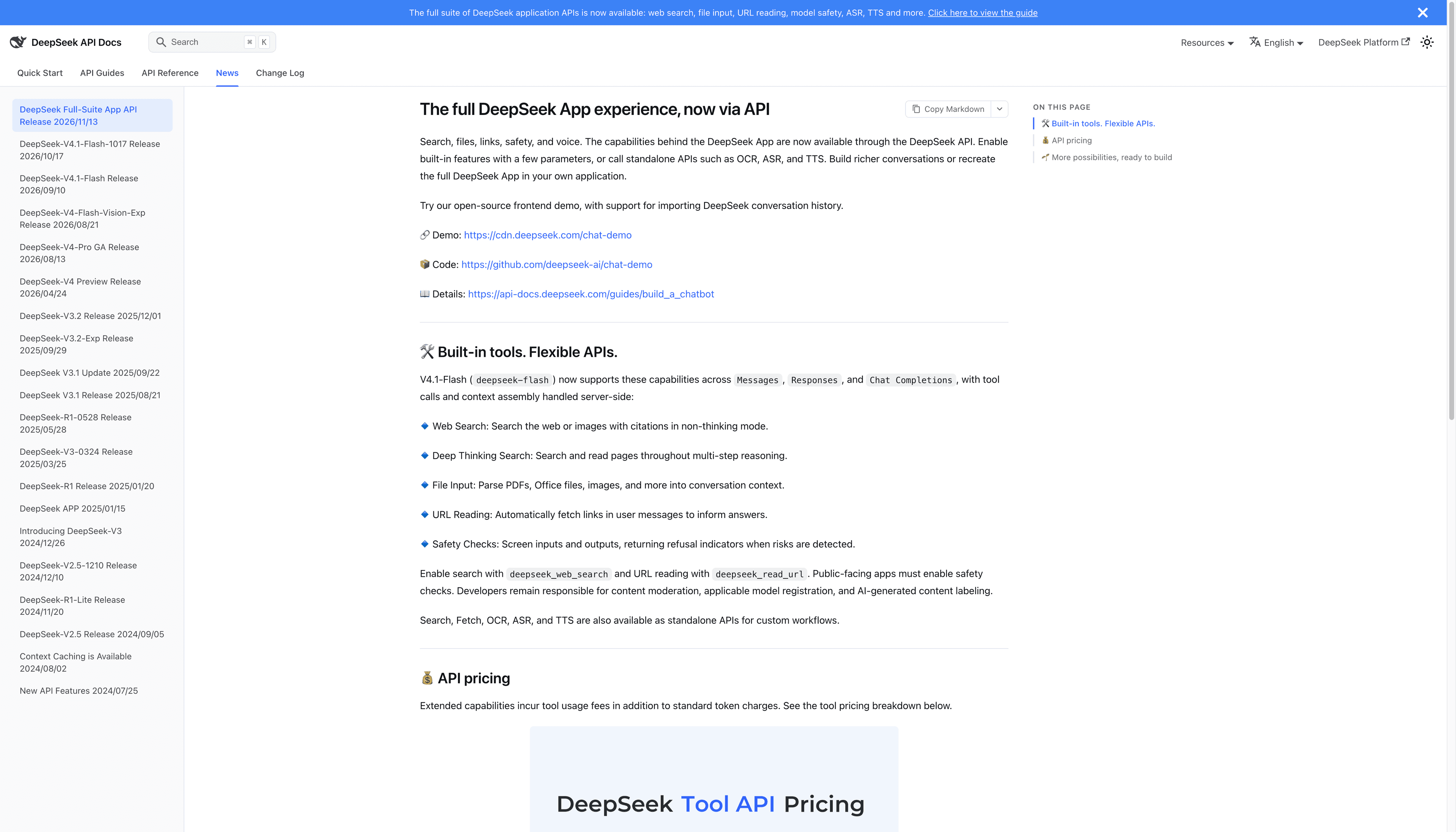
DeepSeek's November 13 announcement links the hosted demo, repository, and Build a Chatbot guide. These are API-facing resources. The API quick start requires an API key; do not assume consumer Chat access includes API quota, or that billing and data handling match the website.
Run the official repository locally
These steps follow the current README's development setup. They are based on documentation; I did not run the commands for this guide.
Install Node.js 22.12 or newer and pnpm. Confirm both commands work in a terminal:
node --version
pnpm --version
Clone the official repository and enter its directory:
git clone https://github.com/deepseek-ai/chat-demo.git
cd chat-demo
Install packages and start the development server:
pnpm install
pnpm dev
Open
http://localhost:8090. These commands serve a static frontend; they do not start an application backend.Open Settings in the demo and enter an API key obtained through DeepSeek's API platform. The README says a key is required before the first chat. Do not paste it into a public issue, shared screen recording, source file, or public client configuration.
Send a harmless prompt and confirm a reply appears. If the request fails, check the API key, endpoint reachability, and account access to the selected model. This guide does not verify account eligibility, current model access, cost, or regional availability.
The README also lists pnpm build, which writes static files to dist/. It documents opening index.html from an extracted release archive without a build. Local-file storage and cross-origin API requests depend on browser and API-service behavior, so the hosted demo or local dev server is a clearer first test. See the DeepSeek API price guide before estimating API spend.
Where the key and conversation data go
The repository README says the API key and settings are stored in localStorage; conversations and original attachments use IndexedDB, isolated by browser profile and site origin. Messages, uploaded attachments, and speech-related content may be sent to the configured API service when those features are used. Deleting all chats clears local chat data after confirmation, but does not delete files already uploaded to that service. Check the current README and API terms before using sensitive material.
Because the browser connects directly to the API, a key entered in the demo is used by the client in that browser profile. That is convenient for a personal test, but it does not protect a secret from someone who can use the same profile or inspect the client. Do not deploy the stock frontend as a shared public service with a private key in client code. A production application needs a server-side credential boundary, access controls, usage limits, and a data-retention plan. DeepSeek's chatbot guide describes API capabilities; it is not a security review of this demo.
Pick a route for your task
| Your goal | Start here | Main trade-off |
|---|---|---|
| Use the hosted consumer product | DeepSeek Chat | Uses the product sign-in flow; it is not the demo repository. |
| See the reference UI quickly | Official hosted demo | Requires API credentials and uses the configured API path. |
| Learn the code or change the UI | Clone and run the repository | You manage local dependencies and protect the browser-side key. |
| Build a public app for multiple people | Start with API docs, then design a server-side boundary | The demo is not a ready-made multi-user service. |
If your project depends on web search or URL reading, check the official API guide for available features and how results are passed back. A model call alone does not define a complete browser-agent workflow; see how agentic reasoning uses tools and how to review research citations. For a browser-first environment, AI browser options and what an agentic browser does cover a different setup from this web app. Developers evaluating DeepSeek Harness can read the separate browser plugin setup.
Common setup problems
pnpmis not found: install pnpm from its official instructions, open a new terminal, and checkpnpm --version.The page opens but chat fails: the frontend loading does not prove API authentication succeeded. Check the key, account access, endpoint, and browser network errors.
You used a Chat-site password: the consumer site and API platform are separate entry points. Manage API credentials through the API platform; a password is not a key.
A deployment asks for a frontend key: stop before publishing it. A value bundled into browser code is not a server secret. Put private credentials behind your server and review local web app validation.
You need to share a reproducible issue: record the repo version, browser, endpoint type, model, and error text with secrets removed. Check the result and source links, as in citation review.
For a separate command-line browser walkthrough, see the agent-browser CLI tutorial.
FAQ
Is DeepSeek Chat Demo the same as DeepSeek Chat?
No. chat.deepseek.com is the consumer product. The chat-demo repo is a frontend that sends requests to a configured API service, and the hosted demo is another way to try it.
Can I use the demo without an API key?
The official README says to enter an API key in Settings before the first chat. The consumer website sign-in is a separate service and does not replace the API key.
Do I need a backend to run it locally?
The development command serves a static frontend and does not need an application backend. The browser connects directly to the configured API service.
Where does the demo store chats and settings?
The README says the key and settings are stored in localStorage, while conversations and original attachments use IndexedDB. Data sent in a request goes to the configured API service.
Can I publish the demo for customers with my API key?
Do not expose a private API key in a public client. Browser-side storage and direct API calls are better suited to personal evaluation; production needs server-side credentials and access controls.
Sources
Verified November 16, 2026: official chat-demo README, package scripts, API-origin configuration, DeepSeek API quick start, Build a Chatbot, and November 13 announcement. Reddit, X, and YouTube community feedback was attempted but no qualifying user feedback was accessible, so this article remains a draft.

FAQ
Is DeepSeek Chat Demo the same as DeepSeek Chat?
No. DeepSeek Chat at chat.deepseek.com is the consumer product. The chat-demo repo is a frontend that sends requests to a configured API service, and its hosted demo is a separate way to try that frontend.
Can I use the demo without an API key?
The official README says to enter an API key in Settings before the first chat. The consumer website sign-in is separate and does not replace the API key expected by the demo.
Do I need a backend to run it locally?
The development command serves a static frontend and does not require an application backend. The browser connects directly to the configured API service.
Where does the demo store chats and API settings?
The README says the key and settings are in browser localStorage and conversations and original attachments are in IndexedDB. Data sent in a request goes to the configured API service.
Can I publish the demo for customers with my API key?
Do not expose a private API key in a public client. Browser-side storage and direct API calls are better suited to personal evaluation; production needs server-side credential management and access controls.