
The short answer: in 2026, pick your AI browser by two dimensions first — agent execution and platform coverage — and the rest follows. For agentic work on a desktop, Tabbit Browser is the strongest free option; Perplexity Comet is the research leader and the only AI-first browser on mobile; Dia is the craft pick for Apple-silicon Macs; and the built-in assistants in Chrome and Edge cover everyone who never wanted an agent in the first place. One name you will see in every older comparison no longer belongs on the list: ChatGPT Atlas stops working on August 9, 2026.
That last point is why this comparison exists. We checked the pages currently ranking for "AI browser comparison," and the top results — published between April and July 2026 — still recommend Atlas as a top pick for productivity. The ground has moved twice since then: Atlas is leaving, and on August 4, 2026, a US appeals court vacated the injunction that had blocked Perplexity's Comet agent from Amazon, the first federal appellate ruling on whether AI agents may access platforms on a user's behalf. Any honest comparison has to start from this week.
One more thing before the table. Comparisons usually obsess over features, but the comment that stayed with us from this research is about trust — the most-liked reply under Stephen Robles' Atlas vs Comet showdown reads: "The level of access people are willing to give to these companies is absolutely mind boggling." Keep that skepticism; it is the right lens for the privacy section below. Full disclosure up front: we build Tabbit Browser, so where Tabbit appears in this comparison we hold it to the same public criteria and say plainly where it loses.
Key takeaways
Atlas is out. OpenAI's browser stops working on August 9, 2026. Every comparison published before August is comparing a ghost — verify dates before trusting any ranking.
Agents decide the category. The real split is not "has AI" but "does the work": Tabbit and Comet execute multi-step tasks; Dia, Chrome, Edge, and Brave assist. Community testing shows agents still fail mid-task, so reliability matters more than demos.
Platform walls are real. Comet is the only AI-first browser on all four major platforms; Tabbit covers macOS and Windows; Dia is Apple-silicon Mac only. On Windows your AI-first choices are Tabbit and Comet, full stop.
The legal ground just shifted. On August 4, 2026, the Ninth Circuit ruled that Comet's user — not Perplexity — "accesses" a website under the CFAA. Agentic browsing won its first appellate precedent, but the case continues and platforms will respond.
Free is the 2026 default, with asterisks. Tabbit's plans are listed at US$0, Comet's core browser is free, and Chrome/Edge AI is built in. The asterisks are usage limits, paid tiers, and a data-policy read you should not skip.
The contenders, and why Atlas is out
Six products earn a place in a 2026 comparison: Tabbit, Perplexity Comet, Dia, Gemini in Chrome, Microsoft Edge Copilot, and Brave Leo. ChatGPT Atlas would have made seven, but according to OpenAI's help center, Atlas is scheduled to stop working on August 9, 2026 — three days after this article's research date — with its agentic capabilities moving into the ChatGPT desktop app. If Atlas was your daily driver, our Atlas shutdown migration guide covers the switch; here, Atlas appears only as context, not as a contender.
The other event reshaping this category happened in court. In November 2025, Amazon sued Perplexity over Comet's shopping agent, and in March 2026 a federal judge blocked the agent from Amazon's logged-in pages. On August 4, 2026, the Ninth Circuit vacated that injunction, holding that it is the user who "accesses" a website with the agent's help — the judge compared a Comet user visiting Amazon to a Safari user visiting Amazon, and noted that pinning "access" on the software vendor could expose users themselves to liability. The case goes back to the district court, and Amazon says it disagrees, so this is a preliminary win, not settled law. But for everyone comparing agentic browsers, the message is that the legal runway just got wider — and that platforms, not courts, will be the next battleground.
AI browser comparison at a glance
| Dimension | Tabbit | Comet | Dia | Chrome + Gemini | Edge Copilot | Brave Leo | Winner |
|---|---|---|---|---|---|---|---|
| Agent execution | Full agent, visible steps | Full agent | Supervised skills | Auto Browse (US, limits) | Limited actions | No | Tabbit / Comet |
| Research & answers | Strong, multi-model | Best-in-class citations | Good page chat | Good with Google apps | Adequate | Adequate | Comet |
| Context handling | @ tabs, groups, files, screenshots | Tab-aware Q&A | Work-context focus | Active tab + Google apps | Active tab | Active page | Tabbit |
| Model choice | GPT, Claude, Gemini, DeepSeek, Kimi, Qwen, more | Perplexity stack | Vendor stack | Gemini only | Microsoft/OpenAI | Mix + BYO | Tabbit |
| Platforms | macOS, Windows | macOS, Windows, iOS, Android | macOS (Apple silicon) | Desktop + mobile | Windows, macOS, mobile | Cross-platform | Comet |
| Privacy posture | User-triggered context, isolated agent tab groups | Cloud assistant; patched CometJacking | Strong restraint (reported SOC 2) | Google's data umbrella | Microsoft's data umbrella | Privacy-first design | Brave / Dia |
| Price (Aug 2026) | US$0 listed for both plans | Free core; paid tiers | Free + Pro ~$20 | Free + AI Pro $19.99 | Free (OS built-in) | Free + premium | Tabbit / Brave / Edge |
This table is a snapshot, not a spec sheet. Every row was checked against official pages or high-authority sources on August 6, 2026, and the sections below show the evidence and the trade-offs behind each winner. Where a fact could not be verified — Comet's current paid tiers, for one, because Perplexity's site sat behind a security wall during our research — we say so instead of guessing.
How we compared them
Every comparison smuggles in its own priorities, so here are ours, in the order we weighted them:
Agent execution — does the browser complete multi-step tasks on real pages, and can you watch it work?
Research and answers — how good is it at finding, reading, and synthesizing?
Context handling — can the AI see your tabs, files, and selections without copy-paste?
Model choice — one vendor's brain, or the right brain per task?
Platforms — does it run where you actually work, phone included?
Everyday browser quality — tabs, workspaces, migration, the unglamorous hourly stuff.
Privacy and safety — prompt-injection posture, data policy, and who carries the legal risk.
Price and limits — what is genuinely free?
Evidence is tiered: official product pages and court records first, high-authority reporting second, community experience for friction and preference only. We did not run lab benchmarks, and we did not test competitors hands-on for this piece — where a claim rests on reporting or community threads, it is labeled that way. If you want the concept layer first, what is an agentic browser defines the category boundaries we use here.
Agent execution: who actually gets work done
This is the dimension that separates the category into two camps. Tabbit and Comet operate pages — they click, scroll, fill forms, and chain steps toward an outcome you describe in natural language. Dia deliberately supervises rather than executes, Chrome's Auto Browse is a limited US-preview feature (per betterwithtechhub's July 2026 comparison), and Edge's agentic actions are rolling out slowly by region. Brave Leo does not act on pages at all.
Raw capability is only half the story, though — reliability is the other half, and community evidence is sobering. One Redditor who rotated Comet, Atlas, and Dia as a daily default for three months found Comet's agent "continually beat ChatGPT Atlas, and it was much faster to complete the task as well." But another user's real CRM-to-spreadsheet task shows the failure mode: Comet copied 22 of 55 contacts, "and then it dies. Tried multiple times. Same error." Their takeaway — "Right now, 'agent features' aren't saving time" — is the honest baseline for every agentic browser in 2026, ours included.
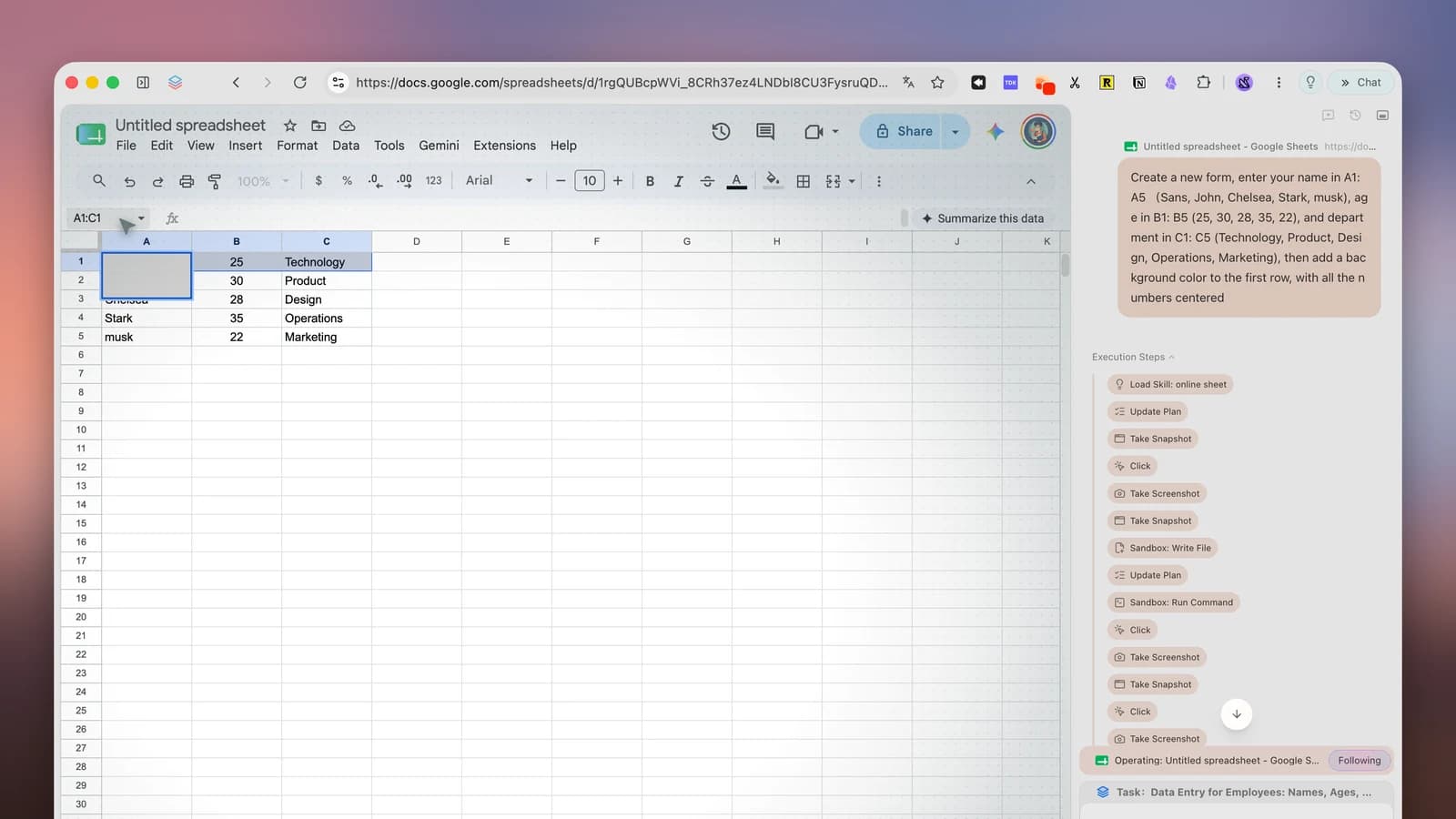
What separates a useful agent from a demo is recoverability: can you see what it is doing, pause it, and take over? Tabbit runs Agent Mode in an isolated tab group with a visible execution-steps trail (the cover image above is a real run), so a hijack or a wrong turn is something you watch happen, not something you discover later. Comet similarly shows its work. Pure autopilots give you less to catch.
Dimension verdict: Tabbit and Comet share the crown, for different working styles — Comet for search-led tasks, Tabbit for bounded, repeatable workflows you want to save and rerun. If your tasks are ambiguous one-offs, no 2026 agent is reliable enough yet; supervise, or do it manually. For a head-to-head on the two research-adjacent contenders, see our Comet vs Dia page.
Research and answers
If your browser work is mostly "find, read, synthesize," this dimension may outrank the first. Comet is built on Perplexity's answer engine, and it shows: answers come with citations back to sources, cross-tab synthesis is a core flow, and slash commands like /tldr and /fact-check are tuned for exactly this work. The three-month Reddit tester above came back to Comet precisely for this: "ChatGPT and Dia just totally fall apart with outdated and sub-par answers. That's where Perplexity shines most."
Tabbit approaches research from the agent side: its Agent Mode can sweep a list of sources and compile a structured report, and multi-model chat lets you fan one question out to several frontier models and compare answers — a different kind of rigor. Dia's page chat is pleasant for single-document work, and Chrome's Gemini has a unique card: Connected Apps that reach into Gmail, Calendar, and Maps, so personal-context queries ("what did that email say?") work better there than anywhere else.
Dimension verdict: Comet, clearly, for source-cited research at scale. Tabbit is the better pick when "research" ends in a deliverable — a table, a report, a saved workflow — rather than an answer.
Context handling
Every AI browser claims context. The question is how much of your screen the AI can reach, and how explicitly you grant it.
Tabbit's Omnibox makes the grant mechanical: type @ and reference the current tab, a whole tab group, bookmarks, a screenshot, or a local file like a PDF or spreadsheet. Nothing is sent until you reference it. Comet's assistant reads open tabs on request and is genuinely good at "compare these three pages" questions. Dia has pivoted hardest toward work context — morning briefs and connections into tools like Slack and Notion — which is powerful if your context lives in SaaS, and irrelevant if it lives in tabs and files. Chrome and Edge mostly see the active tab; Brave sees the page and little else, by design.
Dimension verdict: Tabbit, for the breadth of referenceable context (tabs, groups, files, screenshots) combined with explicit, user-triggered grants. Dia wins the sub-contest for SaaS work context; Chrome wins Google-account context.
Model choice
A browser that locks you to one model bets your work on one lab's release cycle. Tabbit's position is the most open: its homepage commits to shipping new flagship models — GPT, Claude, Gemini, Grok, DeepSeek, Kimi, Qwen and more — within 12 hours of launch, and multi-model mode answers one question with several models side by side:

Comet routes through Perplexity's own stack with some choice on paid tiers. Dia and the incumbents are effectively single-vendor: Gemini in Chrome, Microsoft's models in Edge. Brave Leo is the dark horse — it supports bringing your own model, including local ones, which for some privacy policies beats any cloud option.
Dimension verdict: Tabbit, by a wide margin on desktop. Brave Leo deserves an honorable mention as the only credible local-model path.
If you are weighing Edge specifically as the incumbent to leave, our Edge browser alternative guide works through that decision.
Platforms and mobile
Platform walls eliminate options before features matter, and users feel it: one viewer under the Atlas vs Comet video wrote, "I am on Windows so have to wait for atlas but i think i will stick with comet for now." With Atlas gone, the walls look like this: Comet runs on macOS, Windows, iOS, and Android — the only AI-first browser with a real mobile story (release history). Tabbit runs on macOS (Apple silicon and Intel) and Windows, with no mobile version. Dia requires macOS 14+ on Apple silicon, with Windows on a waitlist for fall 2026. Chrome, Edge, and Brave are everywhere, as incumbents tend to be.
Dimension verdict: Comet, outright — four platforms is four platforms. On Windows desktops, Tabbit and Comet are your only AI-first options; our best AI browser for Windows page tracks that specifically. Tabbit loses this dimension honestly: if your workflow lives on a phone, it is not your browser.
Tab organization and everyday quality
You touch tab management every hour; agent mode maybe once a day. Community threads are blunt about how much this matters — Arc refugees have rejected AI browsers over sidebars alone, and one X post this week celebrated the reverse migration: "Finally switched to Dia browser after getting the spaces back!" Workspaces are a switching trigger, not a nice-to-have.
Tabbit leans into this with vertical tabs and automatic smart grouping by topic, plus one-click import of bookmarks, history, and passwords from Chrome, Edge, or Safari. Dia's craft is well documented, and its tab bar now surfaces "where work is happening." Comet's conventional tab strip is its most-criticized everyday weakness in community threads. Chrome, Edge, and Brave are, of course, mature browsers first — but none of them will organize your tabs for you.
Dimension verdict: a split decision by habit. If you live in 40 tabs, weight Tabbit's vertical tabs and grouping or Dia's workspace craft heavily; if you live in 5, this dimension should not decide anything. Migration cost is the hidden factor — all three AI-first browsers import the basics, and Tabbit imports the fullest set in one pass.
Privacy and safety
This is where that 132-likes YouTube comment belongs: "The level of access people are willing to give to these companies is absolutely mind boggling." An agentic browser needs to see what you see and, sometimes, act where you are logged in. That is the product and the risk.
The documented attack class is prompt injection — a malicious page hiding instructions that hijack the agent. LayerX's 2025 "CometJacking" disclosure demonstrated it against Comet (Perplexity later said it identified and patched the issue, per the Wikipedia summary), and no vendor claims the class is solved. We unpack the attack patterns on our agentic browser security risk page. Postures differ: Brave Leo minimizes what leaves your machine by design; Dia reportedly pulled a fetch feature during beta over exfiltration risk and rebuilt it behind controls, the kind of restraint the security community keeps asking for; Tabbit's agent runs in isolated tab groups with visible steps and only receives context you explicitly @-reference.
Then there is the new legal layer. The Ninth Circuit's August 4 ruling in Amazon v. Perplexity said the user — not the vendor — accesses a site through an agent, which protects the tool-building model. But the same week, reporting noted Amazon "remains confident in our case," the trademark and state-law claims survive, and the court itself wrote that agentic AI law "will doubtless change." Practical translation: expect platforms to tighten bot detection and terms of service even as the CFAA argument weakens.
You cannot eliminate the risk, so price it in:
Separate doing from deciding. Let agents gather, fill, and draft. Keep humans on payments, deletions, and publishing.
Scope the agent's credentials. Agentic browsing happens in a profile without saved cards; banking happens elsewhere.
Prefer visible execution. A step trail you can watch is a hijack you can catch.
Read the data policy, not the landing page. Whether chats train models, and where pages are processed, varies more than marketing suggests.
Dimension verdict: Brave Leo for minimization, Dia for restraint, with Tabbit's explicit-context model close behind. No agentic browser — including ours — has earned unsupervised access to your money.
Price and limits
The 2026 baseline is free, with asterisks. Tabbit's membership page listed both Free and Standard plans at US$0 per month when we checked on August 6, 2026, Agent Mode included — a public-beta-era policy that will evolve. Comet's core browser has been a free download since October 2025, but its paid tiers are inconsistently reported (we could not verify them first-hand — Perplexity's site blocked our research visit), so treat any specific dollar figure as "check the official page." Dia Pro is widely reported at $20 per month. Gemini in Chrome's free US tier comes with Auto Browse limits, with Google AI Pro at $19.99 per month for heavier use, per third-party comparisons. Edge and Brave bundle their assistants into free browsers.
Dimension verdict: Tabbit, Brave, and Edge — genuinely free today. The honest caveat: in this category, "free" is a snapshot, not a promise, and the bill when it comes is usually usage limits rather than a paywall.
A third route worth comparing: Tabbit Browser
Everything above held Tabbit to the same criteria as its rivals. Here is the part we can show rather than cite — because it is our product, treat this section as a demonstration with receipts, not an independent review.
The constraint. A growth team needs yesterday's competitive moves — product launches, pricing changes, notable funding — on one screen before standup. The old way is 45 minutes of scanning and a spreadsheet nobody trusts. Generic news digests miss the niche.
The Tabbit way. Open the Omnibox, switch on Agent Mode, and run a saved Skill:
Visit these sources: Product Hunt leaderboard for yesterday, the pricing
pages of these four competitors (@bookmarks), and one major tech news site.
For each AI-browser-relevant launch, price change, or announcement, record:
product, what changed, one-line why-it-matters, and the source URL.
Deliver a Markdown table, max 12 rows, most relevant first.
Skip promoted listings. Scroll listing pages until no new items appear.
The agent works in its own tab group — your current tabs stay untouched — and the execution trail shows every step as it happens. Because the run is saved as a Skill, tomorrow it is / and Enter. The second half is interrogation: with the report open, Chat with Page and @-references let you ask "which of these overlaps with what @tab-2 covered last week?" without shuttling text between windows, and multi-model mode fans a contentious claim out to several models at once:

The trade-offs, honestly. This shines for bounded, repeatable tasks — digests, dashboard checks, form updates, research sweeps. It is the wrong tool for actions you cannot afford to have fumbled, and vague prompts still produce vague automation. There is no mobile app, and the US$0 pricing is a beta-era fact, not a vow. If your work fits the bounded-task pattern on a desktop, this is the most leverage you can get for free in 2026 — our best practices write-up shows more real workflows, warts included, and the AI browser comparison landing page has the product-side matrix and download links.
Which AI browser should you choose?
Dimensions flatten differently per person, so decide by scenario:
| Your situation | Best pick | Why |
|---|---|---|
| Agentic, repeatable desktop work at $0 | Tabbit | Visible agent, saved Skills, multi-model, Mac + Windows |
| Research all day, or need it on your phone | Comet | Cited answers, four platforms |
| Apple-silicon Mac, work lives in SaaS | Dia | Work-context synthesis, design craft |
| Will not switch browsers | Chrome + Gemini / Edge Copilot | AI help with zero migration |
| Privacy is the first constraint | Brave Leo | Minimal data exposure, local-model option |
| Comet's trade-offs worry you | Tabbit | See our Comet alternatives page for the full map |
Two cross-checks before you commit. Re-verify platform support and pricing on official pages — both moved monthly through 2026. And whatever you choose, run the first agentic tasks in a fresh profile while you calibrate trust.
Final verdict
The 2026 AI browser comparison has a cleaner answer than the cluttered SERP suggests. For agentic desktop work, Tabbit Browser is the strongest free option available — the only contender combining a visible, savable agent with multi-model freedom on both macOS and Windows. Comet is the better answer for research-first users and the only answer for mobile. Dia is the better answer for Mac users whose context lives in their work tools. Chrome and Edge are the right answer for everyone who wanted assistance, not autonomy — and Brave for everyone who wanted neither without privacy. Atlas's exit and the Ninth Circuit's ruling mark the same turning point: agents are now the category's center of gravity, and the question is no longer whether your browser acts, but how visibly, how reliably, and on whose authority.
If Tabbit's trade-offs fit your workflow, the download is free for macOS and Windows — and if you are still mapping the category, our AI browser overview and best AI browsers of 2026 ranking cover the adjacent ground. Whichever browser you pick, the rule of the year stands: let it do the gathering and the typing, and keep the irreversible decisions for yourself.

FAQ
What is the best AI browser in 2026?
There is no single winner, but the field has narrowed. For agentic desktop work with multi-model freedom at no cost, Tabbit Browser is the strongest pick as of August 2026. Perplexity Comet wins for research-first workflows and is the only AI-first browser on phones. Dia is the polished choice for Apple-silicon Mac users, and Chrome's Gemini or Edge Copilot is enough if you never wanted an agent.
Which AI browsers run on Windows?
As of August 2026, Tabbit, Perplexity Comet, Microsoft Edge Copilot, Brave Leo, and Opera One all run on Windows. Dia is macOS-only with a Windows beta waitlist for fall 2026, and ChatGPT Atlas never shipped a Windows version before its shutdown.
Are AI browsers free in 2026?
Mostly yes at the entry level. Tabbit lists both its Free and Standard plans at US$0 per month with Agent Mode included, Comet has been a free download since October 2025, and Gemini in Chrome and Edge Copilot are built into browsers you already have. Paid tiers around US$20 per month unlock heavier usage on several products, so check each official pricing page before committing.
Is ChatGPT Atlas still available?
No. OpenAI scheduled Atlas to stop working on August 9, 2026, and its browser-based agentic capabilities are moving into the ChatGPT desktop app. Bookmarks and open tabs do not transfer automatically, so export anything you need before that date.
Are AI browsers safe from prompt injection?
No AI browser is fully safe from prompt injection, and documented attacks like CometJacking prove the risk is real. You can reduce it by keeping a human approval step for payments and irreversible actions, running agents in a browser profile without saved cards or banking sessions, and preferring agents that show a visible execution trail.
Should I use an AI browser or just Chrome with an AI extension?
An AI extension adds a chatbot to your current browser, which covers summaries and Q&A. An AI browser gives the model page and tab context, and agentic browsers can act on pages to complete multi-step tasks. If you only want to talk about pages, an extension or Chrome's built-in Gemini is enough; if you want the browser to do the work, choose an agentic browser.