TabbitBlog

How to Enable GPT-5.6 Sol 1M Context

Tibo posted the Codex config for GPT-5.6 Sol's 1M-token window. Here is the method, the 272K cost catch, and why Tabbit already includes that model.

In this article
  1. Key takeaways
  2. GPT-5.6 Sol 1M context at a glance
  3. What Tibo posted
  4. How to enable 1M context in Codex
  5. Why the default is shorter than 1.05M
  6. When not to turn 1M on
  7. A practical option: Tabbit already includes GPT-5.6 Sol
  8. Which path fits which job
  9. Verdict

OpenAI's Codex default still runs out of room before GPT-5.6 Sol's documented window does. A developer on r/codex put the failure mode plainly: the model "would spend everything reading the files, get close to solution, aaaand you're out of context. Codex wipes everything out, and the model starts from scratch." That is the complaint Tibo answered on August 16, 2026, with a three-line config.toml that raises the session budget to about one million tokens.

The model itself was never a 272K model. OpenAI's API page for GPT-5.6 Sol lists a 1,050,000-token context window. Codex had been serving a shorter product default. This article walks through Tibo's method, the cost catch above 272K, and a path that does not involve editing Codex config: Tabbit Browser already includes GPT-5.6 Sol as a built-in model.

Key takeaways

  • GPT-5.6 Sol's documented window is 1.05M tokens. Codex's default is shorter because OpenAI tuned it for cost, latency, and auto-compaction, not because the model stops at 272K.

  • The unlock is three lines in ~/.codex/config.toml, or the same flags on one CLI run. Restart Codex and open a new session after you save.

  • Crossing 272K input on the API reprices the whole request at 2x input and 1.5x output. Subscription users also report faster quota drain. Do not make 1M the daily default unless the job needs it.

  • Tabbit already ships GPT-5.6 Sol in the model picker. There is no extra Codex-style 1M switch. Browser tabs, files, and screenshots become context with @.

  • Codex and Tabbit are different runtimes. Codex is for repo-native coding agents. Tabbit is for page-native work. Pick the one that matches where the material already lives.

GPT-5.6 Sol 1M context at a glance

PathOfficial / effective windowHow you get itCost catchBest for
GPT-5.6 Sol API1,050,000 tokens (documented)gpt-5.6-sol or the gpt-5.6 aliasPrompts >272K input bill 2x input and 1.5x output for the full requestApps and agents you meter yourself
Codex defaultShorter product default (recently aligned near 272K)No extra configLower chance of silent long-context surcharge; compaction starts earlierEveryday Codex sessions
Codex 1M opt-in~1,000,000 tokens, compact near 900,000config.toml or CLI -c flagsLarger prompts, more retained history, faster quota burnBig repos, long debug loops, research-heavy coding
Tabbit GPT-5.6 SolSame model family; no Codex config.toml stepChoose GPT-5.6 Sol in the browserTabbit plan limits still apply; this is not a Codex seatPages, tab groups, screenshots, and files as context

The 272K line is a billing and product default boundary, not the model's hard ceiling. An AI Weekly write-up of Codex PR #33972 described the metadata change that pulled the bundled Codex figure back toward 272K after a higher 372K experiment. The raw spec on the model page did not shrink.

What Tibo posted

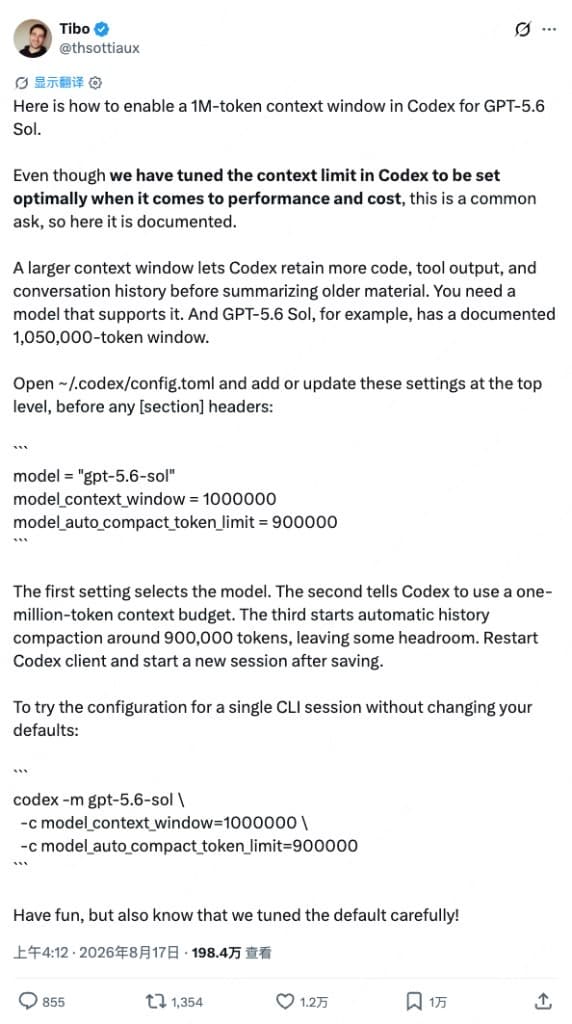
Tibo (Codex and ChatGPT at OpenAI) published a long post, not a one-line tip. The useful parts:

Screenshot of Tibo's X post showing the Codex config.toml and CLI flags for GPT-5.6 Sol 1M context
Tibo's August 2026 post: set model_context_window to 1000000, compact near 900000, then restart.
  1. A larger window lets Codex keep more code, tool output, and conversation before it summarizes older turns.

  2. You still need a model that supports that window. Sol's documented figure is 1,050,000 tokens.

  3. Put the settings at the top level of config.toml, before any [section] headers.

  4. After saving, restart Codex and start a new session. Old threads do not inherit the new budget.

  5. The default exists for a reason. His closing line: "Have fun, but also know that we tuned the default carefully."

A follow-on note in coverage of the same thread is that this 1M path used to work for API keys and was then flipped on for ChatGPT account Codex usage. Treat that as product news from August 16–17, 2026, and re-check your client if a flag is ignored.

ChatGPT Learn's model guide already lists Sol as the flagship GPT-5.6 model for complex coding, computer use, research, and cybersecurity. The missing piece for months was not "does Sol exist in Codex" but "why is my session compacting so early." That gap showed up as GitHub issue #33306: users asking for an explicit opt-in to the full window, with a visible compaction threshold, rather than a silent smaller cap.

How to enable 1M context in Codex

This is Tibo's method, copied as published. It is configuration, not a hidden API.

Option A — keep it in your user config

Open ~/.codex/config.toml and add or update these lines at the top, before any [section]:

model = "gpt-5.6-sol"
model_context_window = 1000000
model_auto_compact_token_limit = 900000

What each line does:

  • model selects GPT-5.6 Sol.

  • model_context_window sets a one-million-token budget (under the 1.05M documented max).

  • model_auto_compact_token_limit starts automatic history compaction around 900K, so the session has headroom instead of slamming into the ceiling.

Restart the Codex client. Open a new session.

Option B — try it once without changing defaults

codex -m gpt-5.6-sol \
  -c model_context_window=1000000 \
  -c model_auto_compact_token_limit=900000

Use A if every session should keep the large window. Use B if you only want it for one messy refactor.

Why the default is shorter than 1.05M

Three pressures sit on top of the same model.

Cost. The Sol model page is explicit: prompts with more than 272K input tokens are priced at 2x input and 1.5x output for the full request. That is not a small surcharge on the overflow. A 273K prompt is a different bill from a 271K prompt. Codex pulling the default toward 272K is a way to keep ordinary sessions off that tripwire.

Quota. The same r/codex thread that celebrated the config also warned about burn rate. The top comment said anything over 272K "would consume usage limits at 2x the rate, so be careful when using this." Another commenter joked about a flood of "burned through my $200 sub in 10 minutes" posts. Those are user reports, not an official ChatGPT price table. They are still the right instinct: a bigger window means more tokens in every subsequent turn.

Quality of the default loop. Auto-compaction is lossy on purpose. It exists so Codex can keep working after a long tool-heavy run. A YouTube recap from Superbash, Did OpenAI nerf GPT 5.6 Sol?, framed the earlier product change as a rollback toward 272K plus quota-drain complaints. That matches the metadata story: OpenAI did not shrink Sol's API spec; it shortened what Codex exposes by default.

So the 1M switch is real, and the default is also real. They answer different jobs.

When not to turn 1M on

Keep the Codex default when:

  • The task fits in a few files and a short transcript.

  • You are on a weekly or monthly allowance you cannot afford to dump in one session.

  • You already rely on Codex's compaction and do not want a 900K transcript of failed attempts sitting in every later turn.

Turn 1M on when:

  • The implementation actually depends on more than ~250K of live context, the failure mode 1filipis described.

  • You are doing architecture work, long debugging, or research that keeps rereading the same tree after every compact.

  • You understand that "more context" can also mean more noise. Several comments in that thread asked for a sweet spot below the maximum, not the max itself.

Tibo's warning is the product policy in one sentence: the default is tuned; you can override it; you own the trade-off.

A practical option: Tabbit already includes GPT-5.6 Sol

If the reason you want 1M is "I am tired of fighting a product cap on a model that already supports a million tokens," Codex config is one fix. It is not the only runtime.

Tabbit Browser is an AI-native browser with GPT-5.6 Sol in the model list. The international FAQ on tabbit.ai names GPT-5.6 among built-in models. In the multi-model view, Sol is a first-class column, not a hidden Codex flag. Tabbit has not wrapped Sol in a shorter Codex-style product cap. You pick the model; there is no extra 1M switch.

Tabbit multi-model chat with GPT-5.6 Sol, Claude Opus 4.8, Kimi K3, Qwen, and GLM answering the same question in columns
Tabbit's multi-model layout includes GPT-5.6 Sol as a selectable model. No config.toml step.

The workflow is the opposite of packing a git repo into one Codex thread:

  1. Open the pages, PDFs, or local files you actually need.

  2. Type @ in the Omnibox or chat to attach a tab, a tab group, a screenshot, or a file. Chat with Page stays next to the source.

  3. Choose GPT-5.6 Sol (or compare it with other families in one grid).

  4. If the job is multi-step on the public web, run it in Agent Mode in a separate tab group so your current browsing does not get hijacked.

That is browser-level context, not a model_context_window integer. For research that lives in tabs, it is usually the more honest fit than stuffing URLs into a coding agent. Our agentic reasoning explainer covers the plan-act-observe loop; Tabbit is where that loop can see the pages you already opened.

Trade-off, said plainly: Tabbit does not replace Codex for patching a large repository, running tests, or applying diffs in an IDE. It also does not magically make every Tabbit plan unlimited. Model access and weekly or Pro allowances still apply; check Tabbit pricing. This article does not claim a measured 1.05M-token Tabbit session. It claims something narrower and verified: Sol is in the picker, and you do not edit ~/.codex/config.toml to use it.

If you have been using Tabbit with earlier GPT-5.x builds, the same browser path is how GPT-5.4 in Tabbit was already framed: the model sits next to the page. Sol is the current flagship in that family, not a Codex-only unlock.

Which path fits which job

JobBetter pathWhyWatch out
Multi-file refactor in a git repoCodex 1M opt-inTool output and file reads stay in the coding agentQuota; start a new session after config
Everyday Codex codingCodex defaultDefault is cheaper and already compactedDo not copy the 1M snippet into every machine
Compare docs across 10 open tabsTabbit + GPT-5.6 Sol@ references pages you can still seeNot a substitute for git and test runners
Long web research with sources visibleTabbit Agent ModeSame class of agentic browser loop, pages stay inspectablePublic web and local files; not Microsoft 365 Graph
Cost-sensitive Plus/Pro weekStay on Codex default, or Tabbit Free/Standard1M plus high reasoning effort is how allowances vanishAPI 272K multiplier if you also call Sol directly
IDE-native Claude/Codex comparisonCodex vs Tabbit vs Claude CodeDifferent products, different context knobsDo not assume every client exposes 1.05M

Researchers who mostly read the public web can also start from the research browser guide rather than from a TOML file. People comparing AI browsers more broadly can use the 2026 comparison. A ChatGPT-in-the-browser setup that is not Codex is covered in browser with ChatGPT built in.

Verdict

Enable GPT-5.6 Sol's ~1M context in Codex when you are in a repository job that keeps dying at the product default. Use Tibo's three lines, restart, and start a new session. Leave the default on for ordinary work. The model's real ceiling is 1.05M; the 272K line is about money and compaction.

If the material is already in the browser, skip the config fight. Tabbit already includes GPT-5.6 Sol. You pick the model and @ the tabs. That is the simpler path for page-native long context, not a claim that Tabbit is Codex.

Use the download CTA below if you want that path on macOS or Windows. Keep Codex installed if your job is still the repo.

FAQ

How do I enable GPT-5.6 Sol 1M context in Codex?

Open ~/.codex/config.toml and set model to gpt-5.6-sol, model_context_window to 1000000, and model_auto_compact_token_limit to 900000 before any section headers. Restart Codex and start a new session. For one run only, pass the same values as CLI flags. This is the method OpenAI engineer Tibo posted on August 16, 2026.

What is GPT-5.6 Sol's official context window?

OpenAI's API model page lists a 1,050,000-token context window and 128,000 max output tokens for GPT-5.6 Sol. The gpt-5.6 alias routes to Sol. Codex's default product window is smaller than that spec, which is why users have been asking for an opt-in.

Does enabling 1M context cost more?

On the API, prompts with more than 272K input tokens are priced at 2x input and 1.5x output for the full request, not only the overflow. Codex subscription users also report faster quota drain with a larger window. OpenAI has not published a one-line rule for every ChatGPT plan in Tibo's post, so treat 1M as an opt-in for jobs that need it.

Does Tabbit Browser include GPT-5.6 Sol?

Yes. Tabbit's international site lists GPT-5.6 among built-in models, and the in-browser multi-model view includes GPT-5.6 Sol as a selectable column. You pick the model in the browser. You do not edit a Codex config.toml to raise a product cap.

Should I always use the full 1M window?

No. Tibo said the default Codex limit is tuned for performance and cost. Community reports say long sessions can burn a weekly or monthly allowance quickly, and auto-compaction exists because dumping everything into context is not always better. Use 1M for large, continuity-sensitive jobs; keep the default for everyday work.

Should I use Codex or Tabbit for long-context work?

Use Codex when the job is a repository, tests, and patches inside the Codex CLI or IDE. Use Tabbit Browser when the context is live pages, tab groups, screenshots, and files, and you want GPT-5.6 Sol without maintaining a local Codex config. They solve different runtimes, not the same task.

Take the next step

Let Tabbit work alongside you.

Research across tabs, automate repetitive browser work, and keep every piece of context within reach.