01 · NATIVE DESKTOP
NOT LISTED
Opera’s Chromebook page is for regular Opera. In the reviewed sources, no official ChromeOS desktop build of Opera GX is listed.
01 / 03CHROMEBOOK COMPATIBILITY NOTE / 01
The short answer is not a simple download link. Opera has an official Chromebook page for regular Opera, while Opera GX arrives through a conditional Android listing or a device-dependent Linux route—not a native ChromeOS desktop build.
THE SHORT ANSWER
You may be able to use Opera GX on a supported Chromebook through Google Play, but that is the Android/mobile app. A Linux container can run a matching desktop package on some devices, yet sandbox, architecture and feature differences remain. For the full desktop GX experience, use supported macOS or Windows.

02 / VERDICT BOARD
“Opera GX for Chromebook” can mean three different products or execution layers. Check which one you are actually choosing before installing anything.
NOT LISTED
Opera’s Chromebook page is for regular Opera. In the reviewed sources, no official ChromeOS desktop build of Opera GX is listed.
01 / 03CONDITIONAL
The Opera GX Android listing can appear on compatible Chromebooks with Play Store access. Its copy and layout describe a mobile browser, not desktop parity.
02 / 03DEVICE-DEPENDENT
ChromeOS can run Linux apps in a sandbox. Opera’s Linux package story is separate from ChromeOS, and the current Flathub listing shows x86_64 only.
03 / 0303 / DEVICE CHECK
A two-minute check tells you whether a route is available. If a control is missing, treat that as a platform or administrator boundary—not a prompt to find a mirror.
Open Settings → Apps and look for Google Play Store. Google says Android apps are available on only some Chromebooks, and work or school administrators can block them.
Open Settings → About ChromeOS → Developers → Linux development environment. Turn it on only if your device and administrator allow it; ChromeOS will create a Linux container.
In Terminal, run the small check below. A package labeled amd64 or x86_64 is not an ARM64 package. Never force a mismatch or rename a file to make it look compatible.
Decide whether a mobile skin and GX Corner are enough, or whether you need desktop controls, extensions, gaming integrations, DRM, GPU behavior and host-level performance.
ARCHITECTURE CHECK · TERMINAL
uname -m
# x86_64 = amd64 · aarch64 = ARM64An APK found through an “unblocked” download page is not proof of Chromebook support. Prefer the signed Play Store listing, Opera’s official Linux page or the verified Flathub application ID. If none matches your device, stop.
04 / SAFE INSTALL ROUTES
The two legitimate routes answer different needs. The third card is deliberately a stop sign for the common Windows-installer and APK-mirror traps.
The Play Store listing is the cleanest Chromebook test. An Install button or “available for your device” message means Google is offering that Android package in the current device/account context.
Good for trying the mobile experience; not a promise of desktop GX Control, extensions or feature parity.
Open the Play listingOpera’s Linux page and the verified Flathub listing describe desktop packages. Flathub currently exposes com.opera.opera-gx for x86_64; that is not evidence of ARM64 support.
Linux apps share a sandbox. Package format, DRM, peripherals, graphics and GX extras can behave differently from a native desktop install.
Open Opera GX LinuxThe `.exe` installer is for Windows. A random APK mirror, renamed package or improvised Wine setup does not turn it into an official ChromeOS release.
A workaround can be technically interesting and still be the wrong answer for a reliable, supportable browser install.
Read Opera GX positioning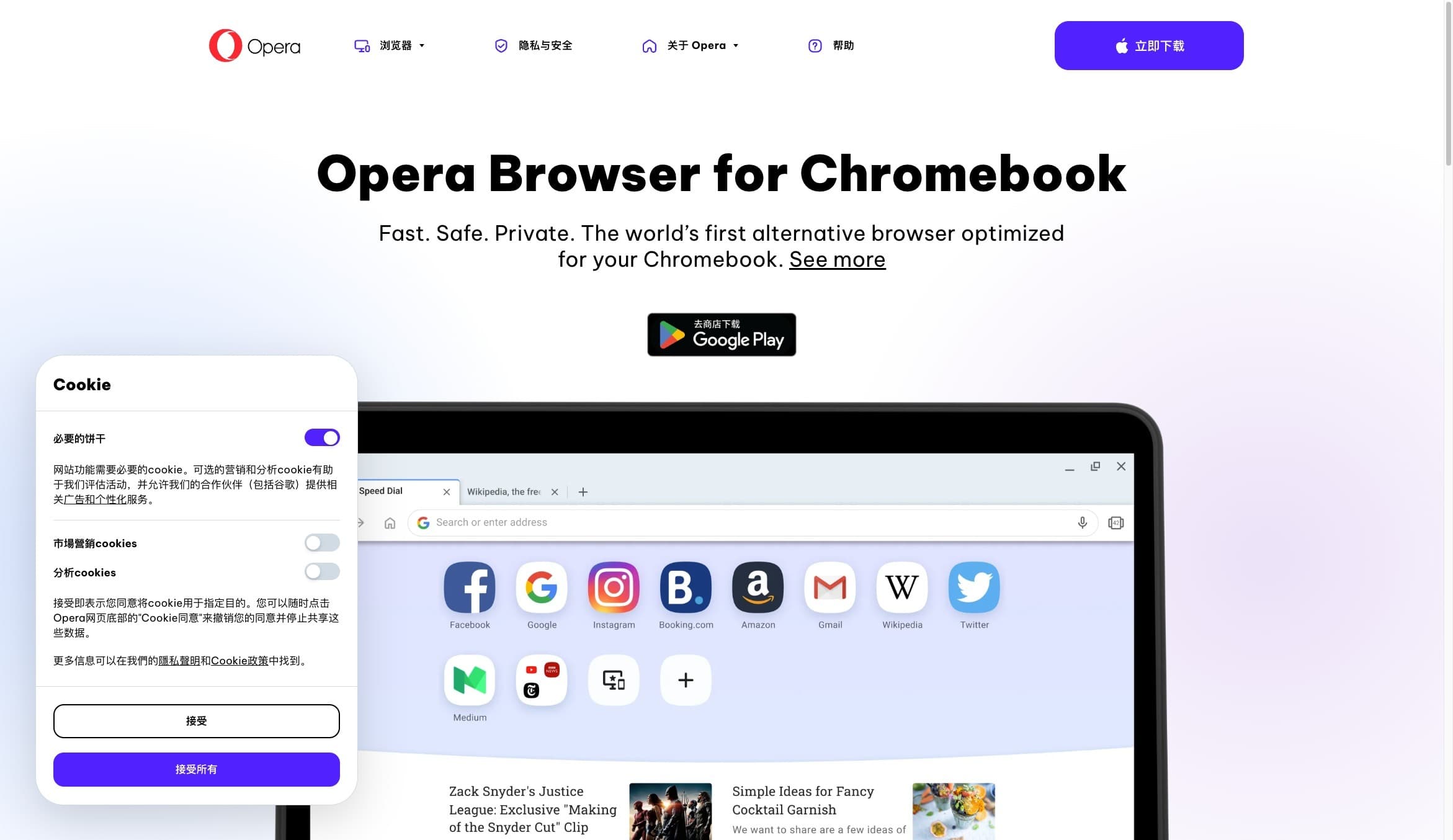
STOP / NOT A DESKTOP INSTALLER
Opera official Chromebook page · regular Opera, not the Opera GX desktop build
Opera’s Chromebook page is for regular Opera. In the reviewed sources, no official ChromeOS desktop build of Opera GX is listed.
05 / PARITY CHECK
Use this matrix to decide whether “installed” means “good enough”. Exact feature coverage can change with a release, package and device.
| Capability | Play Store Android | Linux container | Desktop GX |
|---|---|---|---|
| Install surface | Android app on a supported Chromebook | Desktop package inside ChromeOS Linux | Host OS build for supported desktop systems |
| GX Control | Not the desktop limiter panel | Linux page lists RAM and network controls | Desktop GX feature line |
| GX Corner / Mods | GX Corner and mobile skins are described | Release calendar and design customization; parity varies | Full desktop set varies by release |
| Graphics and sandbox | Android runtime and mobile layout | Shared sandbox; ChromeOS help lists GPU/video decode limits | Host OS integration and graphics stack |
| Architecture / policy | Play Store and administrator gate | Flathub currently lists x86_64; check your host | Supported OS and hardware requirements |
“Available” is not the same as “feature-identical”. Test the site, extensions, controller, video/DRM and workflow that matter to you.
06 / MAKE THE CALL
The right answer depends on the result you need from the Chromebook today.
The Play listing appears for your device and a touch-oriented browser, skins and GX Corner meet the brief.
Your Chromebook exposes Linux, the architecture matches and you accept possible graphics, DRM and peripheral differences.
Opera’s official Chromebook page is the relevant product page when your goal is a Chromebook-optimized general browser.
Use a supported Windows or macOS machine instead of treating Android or Linux as a guaranteed clone.
No matching package, Play Store, Linux toggle or administrator permission means there is no trustworthy local route to invent.
ChromeOS Linux sandbox limits and Android layout differences can matter more than the browser name.
07 / A DIFFERENT NEXT STEP
Tabbit is not a ChromeOS browser and does not replace Opera GX’s gaming identity. It currently supports macOS and Windows, where its AI-native workflow keeps context attached to the page and can move a multi-step web task forward.

UNDERSTAND
01Keep the page open while an AI sidebar surfaces the core message and takeaways. The research context stays visible instead of disappearing into copied text.

ACT
02Agent mode can operate a web app such as Google Sheets, with the instruction and execution steps visible as the workflow progresses. Review the result before you ship it.
08 / QUICK ANSWERS
In the sources reviewed for this page, Opera lists a Chromebook-optimized page for regular Opera, not a native ChromeOS desktop build of Opera GX. The remaining routes are the conditional Android listing or a device-dependent Linux container.
Only if your Chromebook, Google account and administrator policy expose the Play Store and mark the Opera GX listing as available. The Android app is mobile-oriented, so installation does not guarantee Windows or macOS desktop feature parity.
Some devices may run a matching Linux package inside ChromeOS’s Linux development environment. Check the package architecture first; the current Flathub listing shows x86_64. Linux sandbox and ChromeOS hardware limits can affect graphics, video, peripherals and GX features.
Look for Settings → About ChromeOS → Developers → Linux development environment, then use Terminal to run `uname -m`. A missing toggle may indicate device support or administrator policy; an ARM64 result does not match an amd64/x86_64 package.
No. An unknown APK mirror is not a trusted compatibility path and can be modified or unsafe. Use the signed Play Store listing, Opera’s official Linux download or the verified Flathub application ID; otherwise choose a supported alternative.
Use supported Windows or macOS hardware for the full desktop GX experience. If your need is a Chromebook-optimized general browser, review Opera’s regular Chromebook page. If the next step is research or browser automation, Tabbit is available on macOS and Windows, not ChromeOS.
09 / NEXT MOVE
Try Tabbit on a supported Mac or Windows device. Keep the Chromebook verdict honest, then move research and multi-step web work to the environment it supports.
No ChromeOS download is implied · macOS + Windows support