Skip to content
TabbitAgent case 03 / 05
English

Recorded session · one instruction · 6 products · 13m 33s

One instruction. Six products. The back office fills itself in.Codex decides. Tabbit clicks.

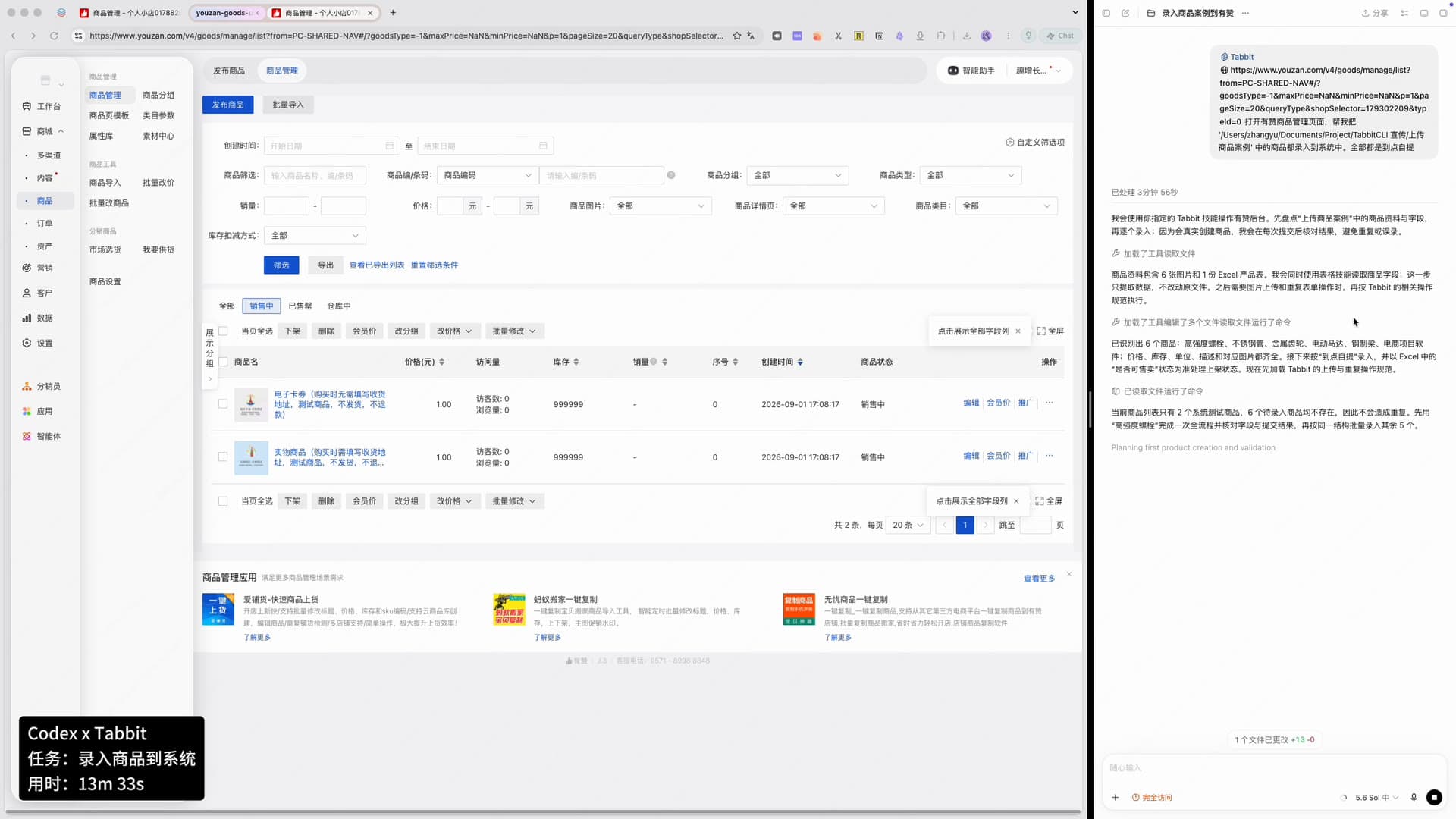
The instruction names a folder and says every product in it goes into the store. Codex reads the spreadsheet and the images, works out that six products are waiting, and hands the browsing to Tabbit. Tabbit opens the merchant back office, creates each listing — image, category, price, stock, SKU, description, shipping — saves it, opens the storefront preview to check it, then goes back to the list to confirm the product is really on sale.

6
products in the source folder
2
listed during the recording
13m 33s
task time on the status capsule
5
recovery notes the agent wrote itself
Codex × TabbitTaskEnter products into the systemElapsed13m 33s
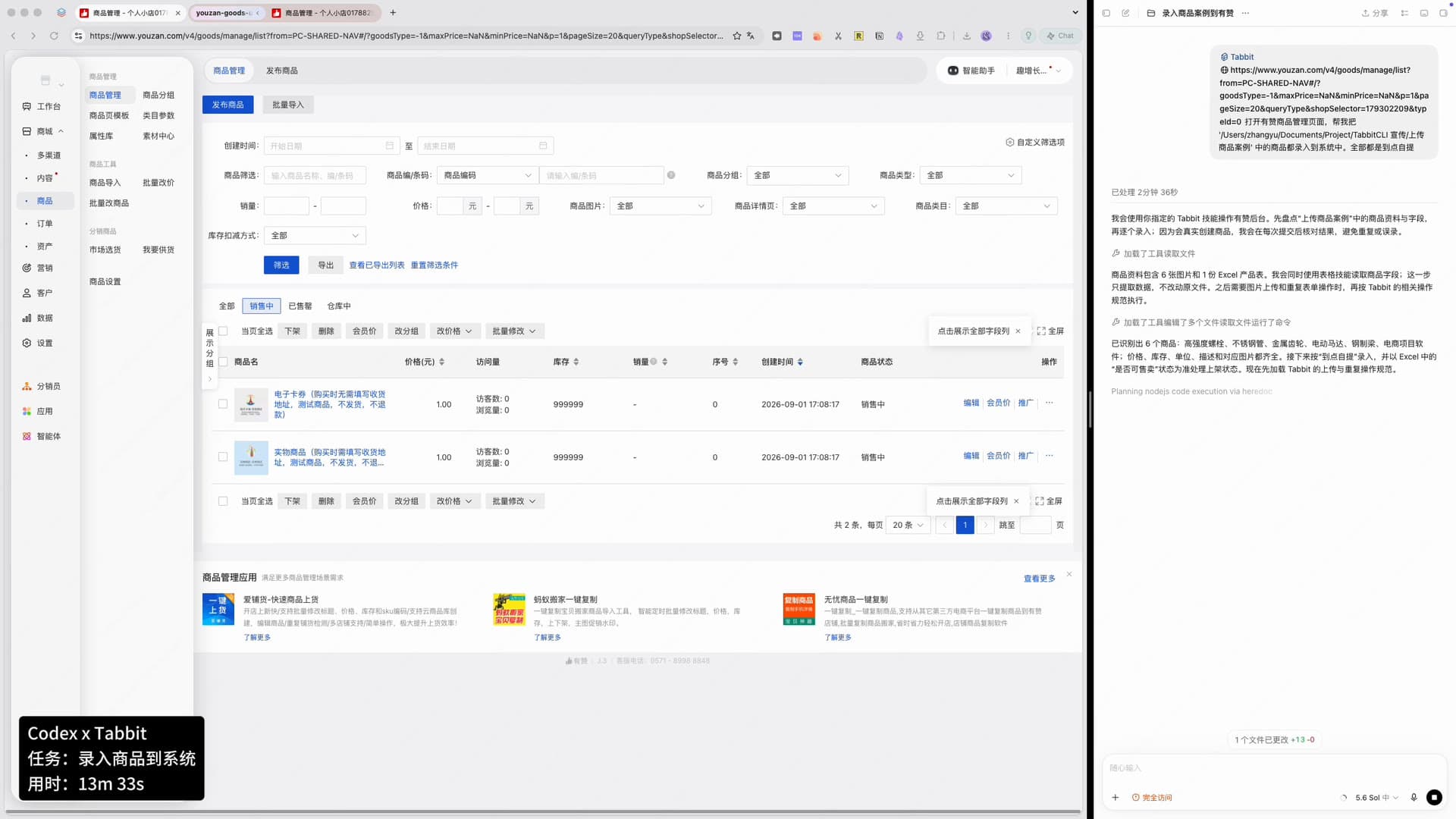
Split screen: on the left the merchant back office product list with two test items; on the right Codex shows the typed instruction, a read-file step and its plan; bottom-left status capsule reads “Codex x Tabbit, task: enter products into the system, elapsed 13m 33s”.
The whole setup: one chat panel, one browser, one status capsule.
The instruction, as typed

打开有赞商品管理页面,帮我把「上传商品案例」文件夹中的商品都录入到系统中。全部都是到点自提

One sentence about the folder, one about the shipping rule. The recording shows a local absolute path; this page keeps only the folder name.

00 · Full recording

Watch the agent fill in a back-office form

62 seconds, unedited — a 13m33s task played back faster. Codex plans on the right, Tabbit operates the merchant console on the left. Every number on this page comes from this one session.

Recorded 2026-09-02. Product fields, log lines and the status capsule are read from the recording itself.

01 — Who decides, who executes

Two roles, one job

Nothing here is a hard-coded script for one store. One side decides what each product needs; the other actually types it into the console.

Decision side · Codex

Reads the source material, plans the order, checks every save

  • Reads the spreadsheet and the image folder, and lists what it found: high-strength bolt, stainless pipe, metal gear, electric motor, steel beam, ecommerce project software.
  • Checks the existing catalogue first and states that only two system test items are there, so the six products will not duplicate anything.
  • After each save it goes back to the list and to the storefront preview to confirm the price, stock, image and description landed correctly.
Execution side · Tabbit

Operates the merchant console like a person would

  • Opens the publish page, uploads the main image, and fills category, price, stock, SKU, description, parameters and shipping rules.
  • Works through a real logged-in session — the store, its settings and its permissions are the ones the operator already has.
  • Runs as a Tabbit CLI task (`--task youzan-goods-upload`), so the same command can be reused for the next batch.

The products the agent listed

6 to be entered2 test items already in the catalogue

  • 高强度螺栓
  • 不锈钢管
  • 金属齿轮
  • 电动马达
  • 钢制梁
  • 电商项目软件
Codex log listing the six recognised products, noting that the catalogue only holds two test items, and showing a tabbit-cli command running with task name youzan-goods-upload.
Before touching the page, the plan, the duplicate check and the command are already in the log.

02 — Execution path

From one sentence to a product on sale, ten beats

Timestamps are the agent panel’s own “elapsed” counter, not video time — the video is a sped-up recording of a 13m33s run.

  1. 011m 33s

    Read the source material

    Six images and one Excel sheet are read. The agent notes that this step only extracts data and leaves the original file untouched.

  2. 022m 46s

    List what has to be entered

    Six products are recognised by name, with price, stock, unit, description and matching image all present. It also loads Tabbit’s upload and duplicate-handling conventions.

  3. 033m 06s

    Check the catalogue for duplicates

    The existing list holds two system test items and none of the six products, so nothing will be created twice.

  4. 044m 06s

    Start the browser task

    A Tabbit CLI task named youzan-goods-upload is launched against the merchant console.

  5. 056m 06s

    Create the first product

    Publish page, real-product type, main image upload, then every required field: name, category, price, stock, SKU, description, parameters, shipping. Two of the five recovery notes happen in this stretch.

  6. 067m 46s

    Save and check the storefront

    Saving jumps straight to the storefront preview, where the agent confirms the price, the remaining stock and the description text.

  7. 079m 06s

    Confirm it in the list

    Back on the management page the agent searches the product by name, finds the row, and reads off the SKU and the “on sale” status.

  8. 0812m 19s

    Repeat for the second product

    The stainless pipe goes through the same structure — its own image, price, stock, SKU and description.

  9. 0913m 18s

    Verify by SKU, not by name

    When the new product does not appear in the list right away, the agent refuses to re-submit and instead searches by SKU across all statuses.

  10. 1013m 33s

    Recover the browser instance and continue

    The run ends with the agent noticing the browser instance changed, reconnecting to the original task, and preparing the third product.

$HOME/.local/bin/tabbit-cli nodejs --task youzan-goods-upload --reque…有赞 · youzan-goods-upload
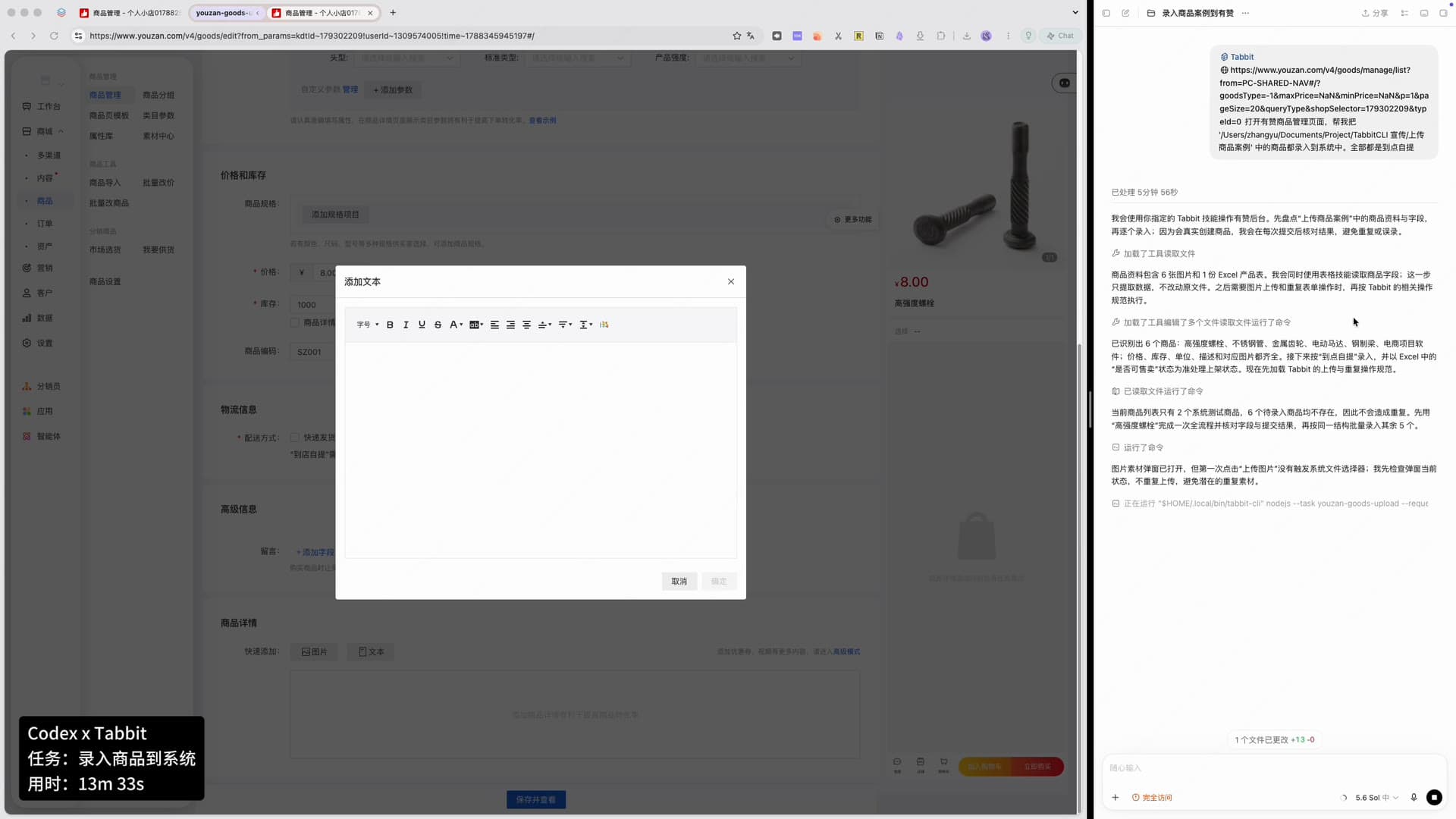
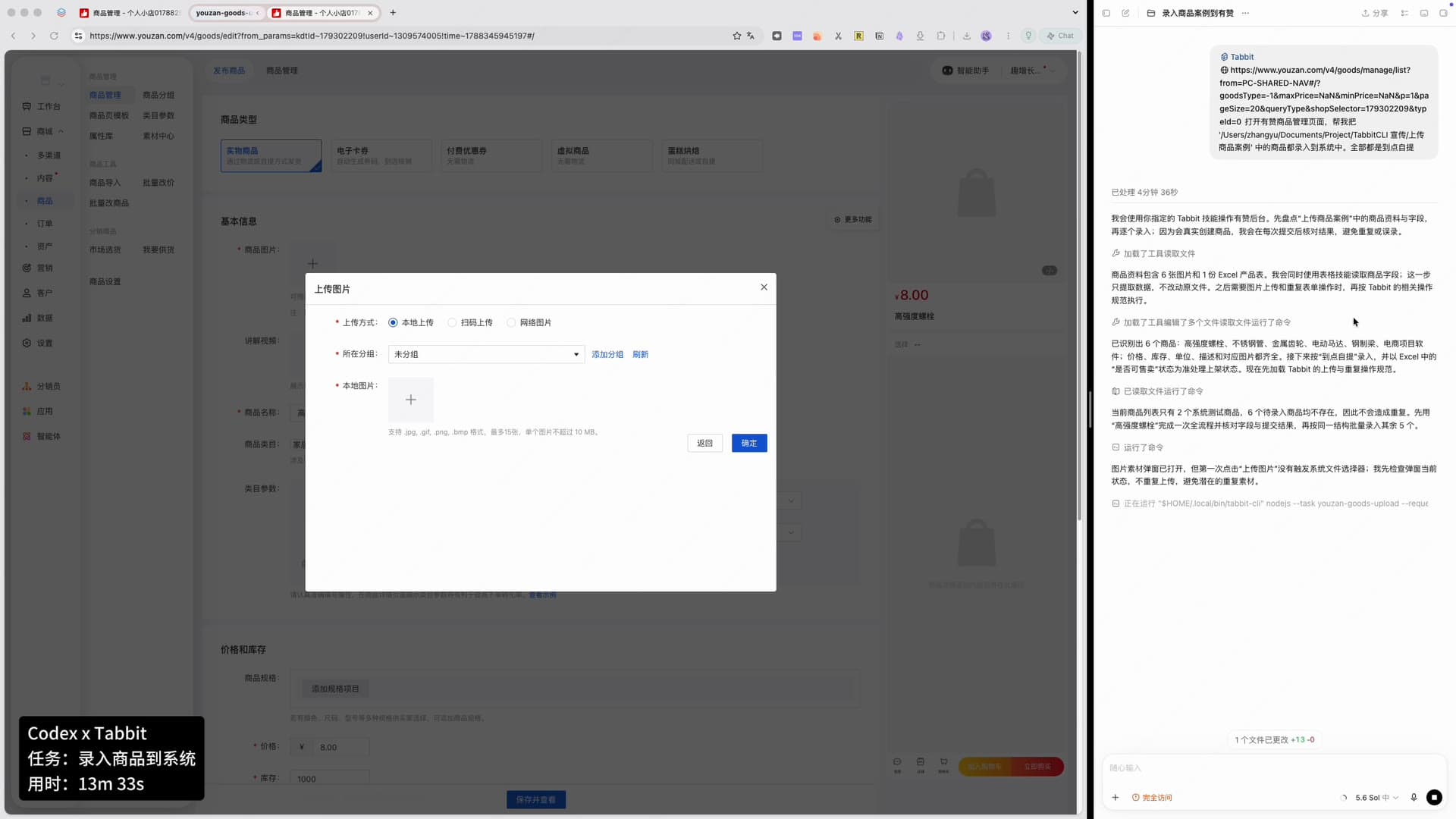
The publish-product form on the left with the image upload area open, and on the right a Codex log line explaining that the first click on “upload image” did not open the file picker so it checks the dialog state instead of uploading twice.
The first form, and the first time the agent stops itself from doing something twice.

03 — What got entered

The fields that actually landed in the system

Read off the recording. Both products were still “on sale” in the list when the video ended.

Every value below was typed by the agent into the merchant console, then read back from the list and the storefront.

ProductPrice (CNY)StockSKUDescription
高强度螺栓High-strength bolt¥8.001,000SZ001用于连接结构件
不锈钢管Stainless steel pipe¥80.00500SZ002用于输送流体

Shipping ruleStore pickup (no courier)

Storefront preview

高强度螺栓

¥8In stock 1,000

Description
用于连接结构件

Category, parameters and shipping fields were also filled by the agent; the recording shows them being completed, but this page only lists the values that are legible enough to quote exactly.

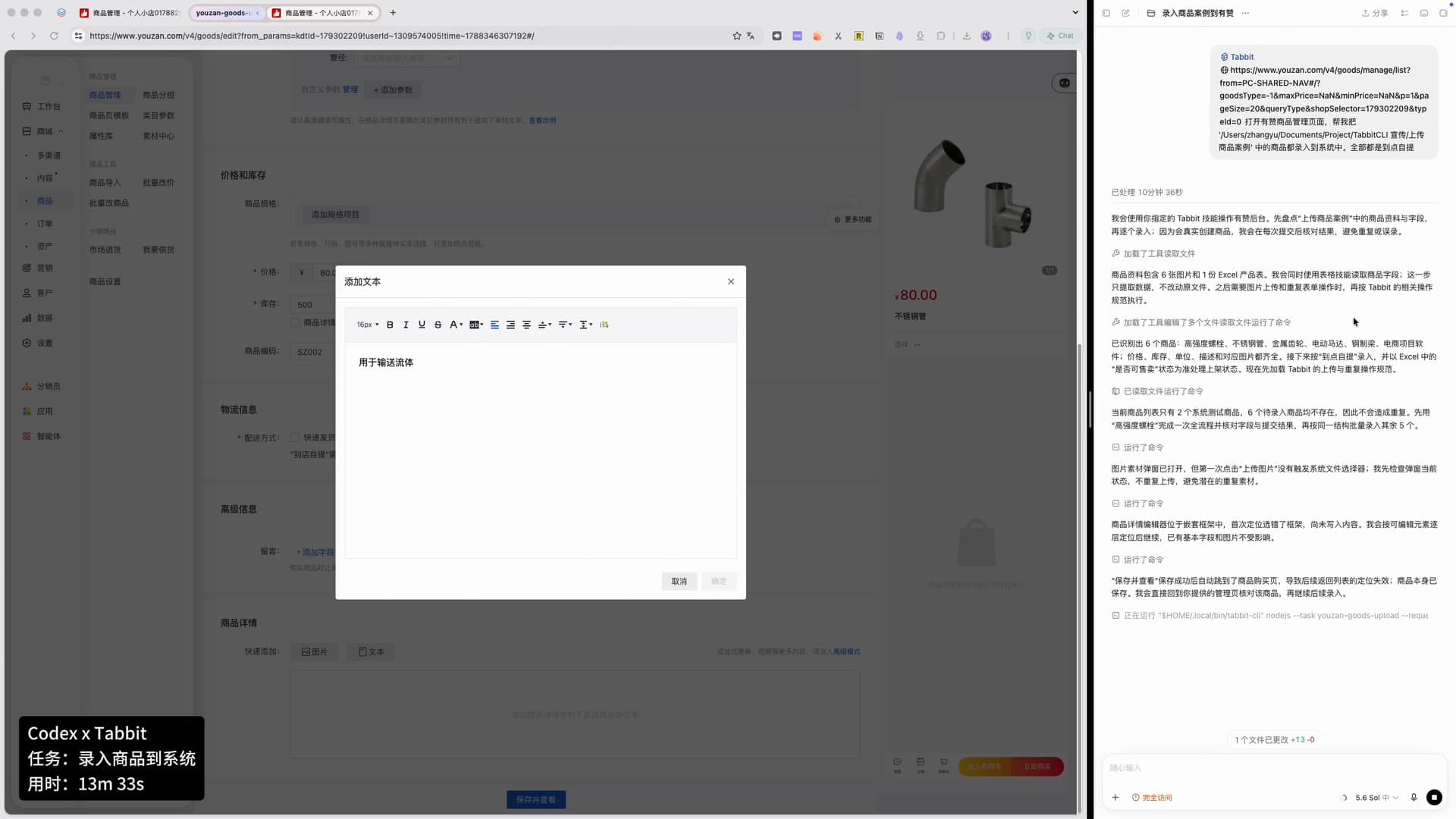
Publish-product form showing price 8.00, stock 1000, product SKU SZ001, the product detail editor and the shipping section with store pickup selected.
Price, stock and SKU are typed in the same form the operator would use by hand.

04 — When it went wrong

Five times it got stuck, and what it did instead

These are the agent’s own log lines, quoted as written. This is the part most demos cut out — and the part that decides whether you can leave it unattended.

01

The upload click did nothing

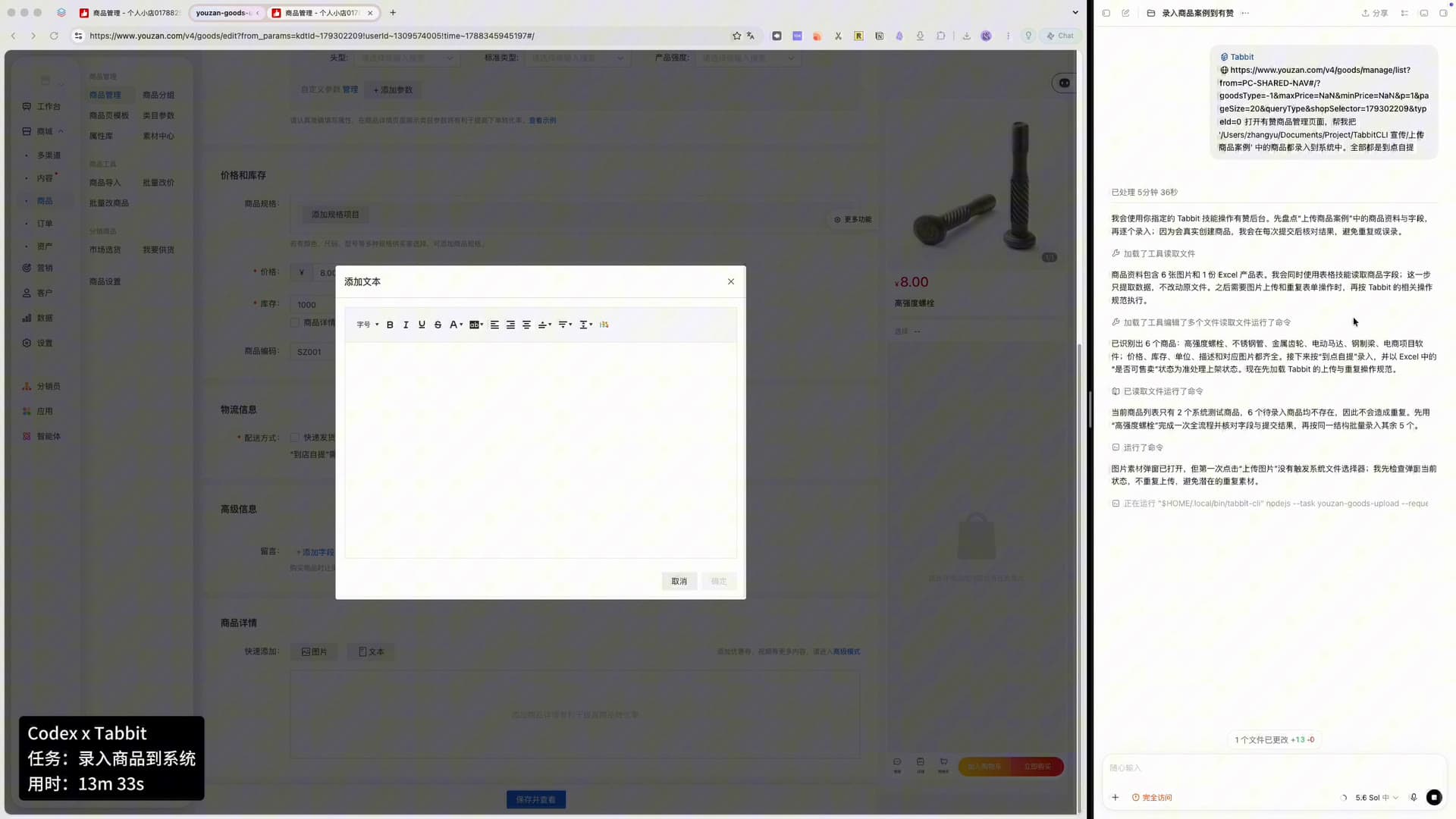
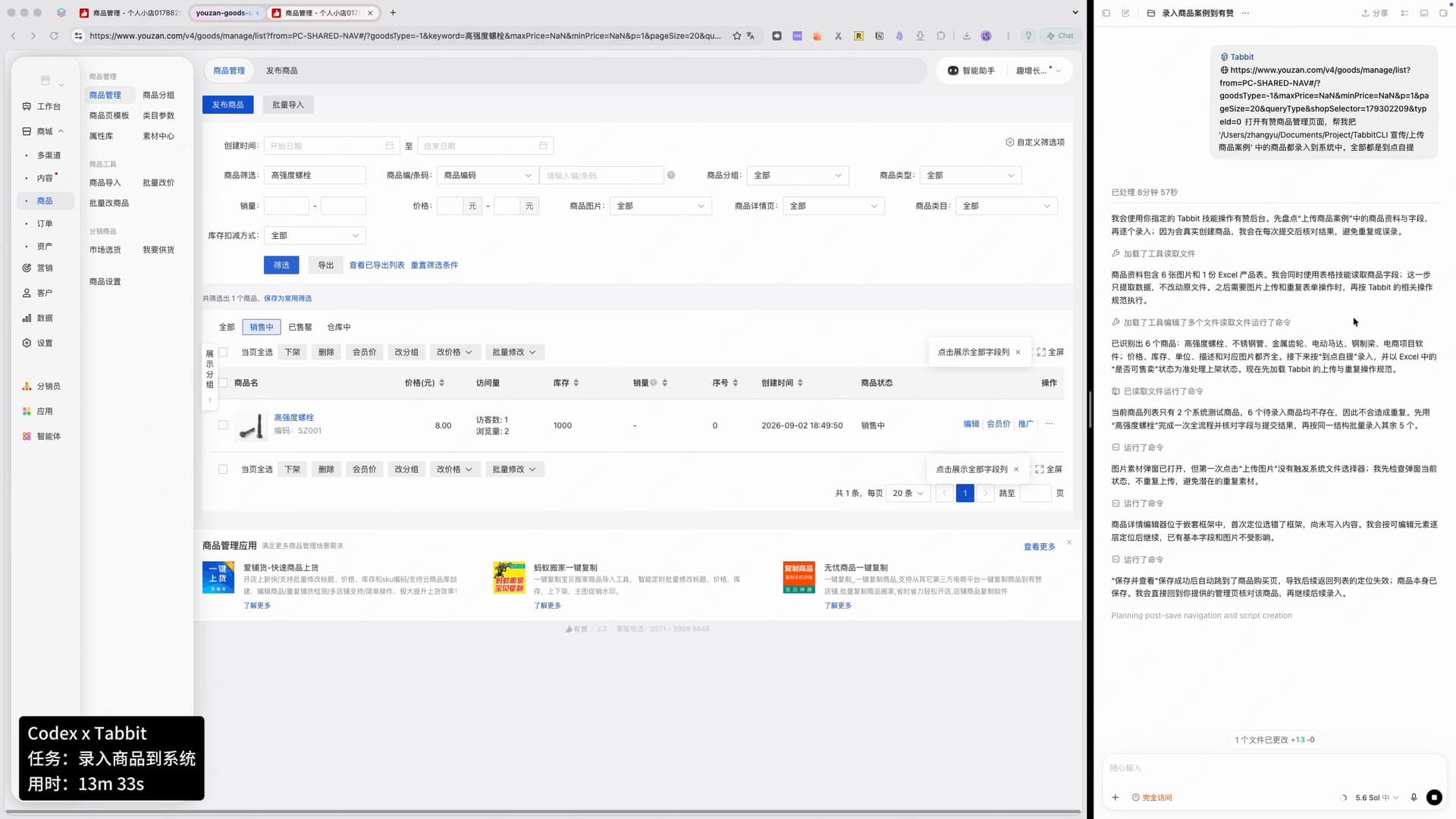
From the run log图片素材弹窗已打开,但第一次点击“上传图片”没有触发系统文件选择器;我先检查弹窗当前状态,不重复上传,避免潜在的重复素材。

02

The description editor was in a nested frame

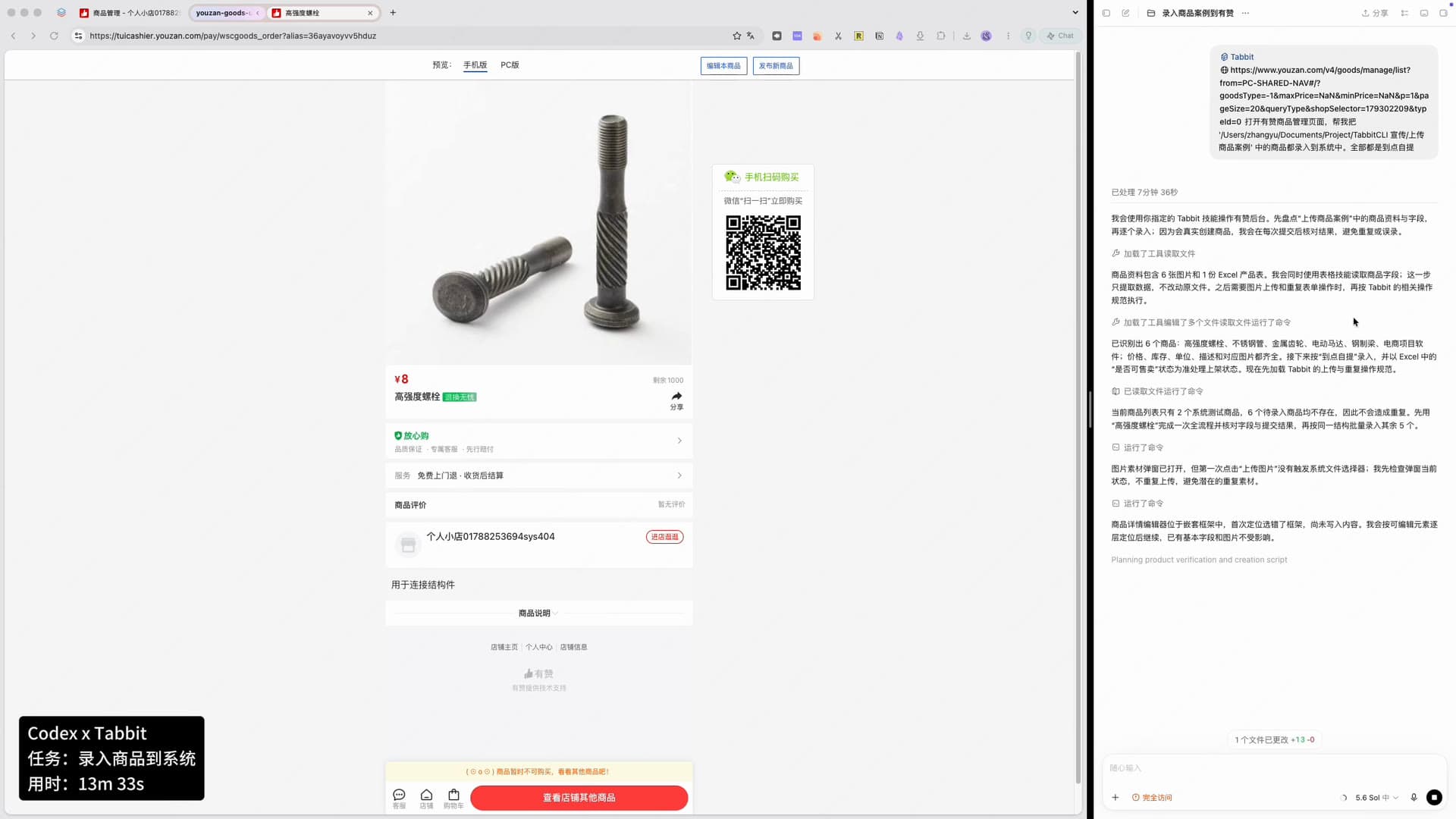
From the run log商品详情编辑器位于嵌套框架中,首次定位选错了框架,尚未写入内容。我会按可编辑元素逐层定位后继续,已有基本字段和图片不受影响。

03

Saving threw away the page it came from

From the run log“保存并查看”保存成功后自动跳到了商品购买页,导致后续返回列表的定位失效;商品本身已保存。我会直接回到你提供的管理页核对该商品,再继续后续录入。

04

The saved product was not in the list yet

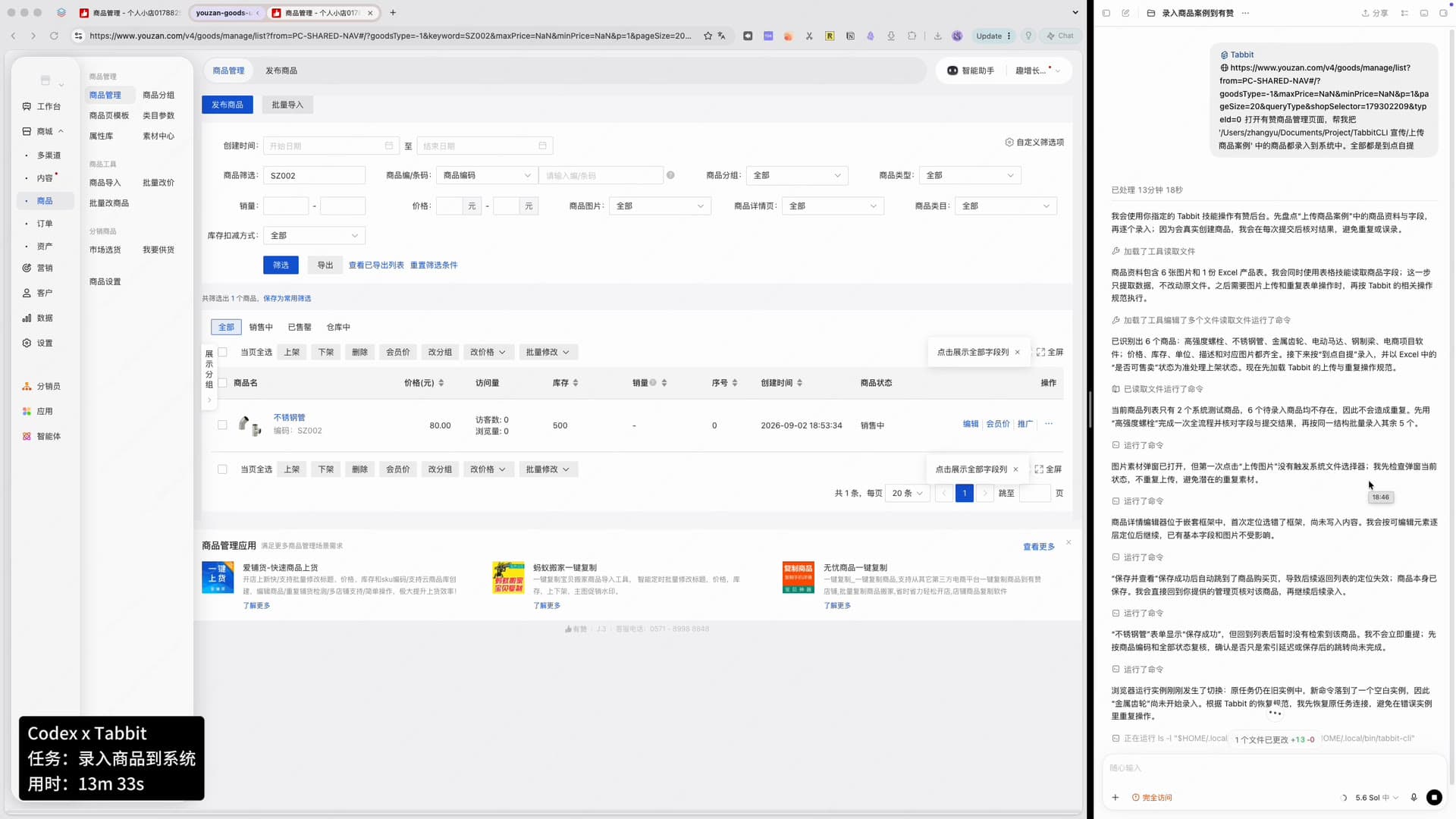
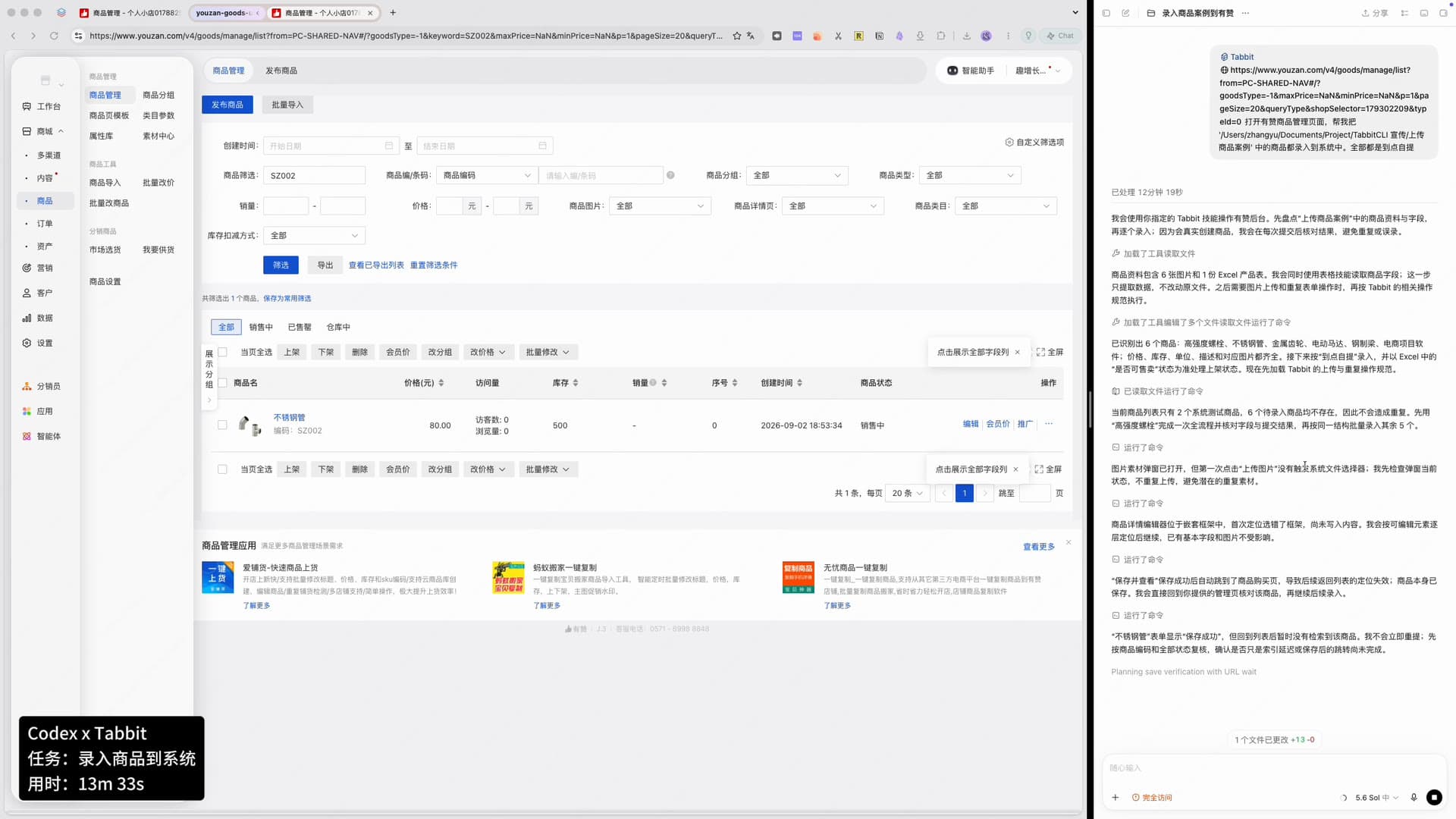
From the run log“不锈钢管”表单显示“保存成功”,但回到列表后暂时没有检索到该商品。我不会立即重提;先按商品编码和全部状态复核,确认是否只是索引延迟或保存后的跳转尚未完成。

05

The browser instance changed under it

From the run log浏览器运行实例刚刚发生了切换:原任务仍在旧实例中,新命令落到了一个空白实例,因此“金属齿轮”尚未开始录入。根据 Tabbit 的恢复规范,我先恢复原任务连接,避免在错误实例里重复操作。

Codex log with two recovery notes visible: one about the upload dialog not opening the file picker, one about the product detail editor sitting in a nested frame.
Two of the five recovery notes sit on screen at the same time.
Codex log with the last three recovery notes: the saved product missing from the list, a re-check by SKU, and the browser instance switching mid-task.
The final seconds: it refuses to re-submit and reconnects the original task instead.

05 — Did it actually work

Three ways it checked its own work

A save confirmation is not proof. The agent goes and looks.

01

Read the row back from the management list

The product is searched by name and the SKU, price, stock and “on sale” status are read from the row.

02

Open the storefront preview

The customer-facing page is opened to confirm the price, the remaining stock and the description text are what was entered.

03

Search by SKU across all statuses

When the second product did not show up immediately, the agent searched by its SKU and by every status rather than saving it again.

The recording ends mid-run: the second product is verified in the list, and the agent is reconnecting to the original browser instance to start the third product. The page does not claim the whole batch was finished on camera.

Storefront preview page for the first product, showing price ¥8, 1000 remaining in stock and the description text.
The customer-facing page, opened by the agent to confirm the values it had just saved.
Merchant product list filtered by the first product name, showing one row with SKU SZ001, price 8.00, stock 1000 and “on sale” status.
Product one, found again in the list and read back field by field.
Publish-product form for the second product: price 80.00, SKU SZ002, description “used to transport fluids”.
The second product goes through the same structure with its own data.
Merchant product list filtered by SKU SZ002, showing the stainless pipe row with stock 500 and “on sale” status.
Verified by SKU, not by name — after the first list search came back empty.

06 — Why this holds up

Three things make the combination work

None of them depend on how large the model is.

01

The back office is the interface

No API key, no integration project, no vendor approval. If an operator can do it in the browser, the agent can do it — including the parts that only work after a click.

02

The source material stays where it is

The spreadsheet and images are read from the folder you already keep them in. Nothing has to be reformatted or uploaded to a third-party service first.

03

It checks its own output

Saving is not the end. The agent opens the storefront and the list, reads the fields back, and only then moves on — which is the difference between a demo and something you can run weekly.

07 — Replicate it

Four sentences that make a batch upload run smoothly

Paste these into any agent that can call Tabbit.

01

Say where the data is and where it goes

Name the folder and the admin page. The agent reads the source itself instead of asking you to paste rows in.

Prompt

Open the product management page in [store]. Read the folder [path] and enter every product in it into the system. Use store pickup for all of them.

02

Ask for a duplicate check before the first write

Real back offices already hold test items. Asking for a check first is what stops the batch from creating junk.

Prompt

Before creating anything, list the products you found and check the existing catalogue. If a product already exists, skip it and say so.

03

Require a read-back after every save

A “saved” toast proves nothing. Ask for the storefront and the list to be checked, with the values quoted.

Prompt

After each save, open the storefront preview and then the product list, and report the price, stock, SKU and status you read back.

04

Tell it never to re-submit on a slow list

Indexing lag looks like failure. Saying “verify by SKU across all statuses before retrying” avoids duplicate listings.

Prompt

If a saved product does not appear in the list, do not submit it again. Search by SKU across all statuses first and report what you find.

08 — Keep reading

Agent + Tabbit case series

Same pattern, five different jobs: a general agent does the thinking, Tabbit does the browsing.

Benchmark report

How fast is a browser agent, and what does it cost?

The same tasks run across Tabbit, Codex Chrome and Agent Browser, scored on answers, median time and input tokens per correct answer.

Read the benchmark

FAQ

Questions people ask before trying this

Do I have to write an API integration for my store?

No. The agent works the same console you use by hand — the logged-in session, the real publish form, the real save button. There is no plugin to install on the store side.

Where does the product data come from?

From the folder you already keep it in: one spreadsheet plus the product images. In this run the agent read six images and one sheet, and explicitly left the original file unchanged.

What if a product already exists?

It checks first. The log states that the catalogue held only two system test items and none of the six products, so nothing would be duplicated — then it verifies each save by SKU afterwards.

What happens when the page fights back?

It changes strategy instead of stopping. Five times in this run: a click that did not open the file picker, a description editor inside a nested frame, a save that redirected away, a list that had not indexed yet, and a browser instance that switched mid-task.

Was the whole batch finished on camera?

No. The recording covers the first two products end to end and ends while the agent is reconnecting to the browser to start the third. The status capsule shows 13m 33s for the run.

Get started

Let the agent do the data entry

Download Tabbit, hand it to the agent you already use, and point it at the back office you would otherwise open forty times a week.

Free. macOS and Windows.

© 2026 Tabbit Browser. The AI-native browser that understands your context.