Skip to content
TabbitAgent case 02 / 05
English

Recorded session · one instruction · 5 posts · 6m 19s

One instruction. Five top posts. One script ready to publish.Qwen Work decides. Tabbit browses.

Qwen Work reads one sentence and hands the browsing to Tabbit. Tabbit opens the explore page, searches the keyword, ranks the results by likes, opens the top five one by one, and reads the copy and images. The agent then works out what those posts have in common and writes a file: sample breakdown, three title options, full body copy and a six-image storyboard.

5
posts read end to end
1
instruction
6m 19s
task time on screen
6
storyboard frames drafted
Qwen Work × TabbitTaskViral post collectionElapsed6m 19s
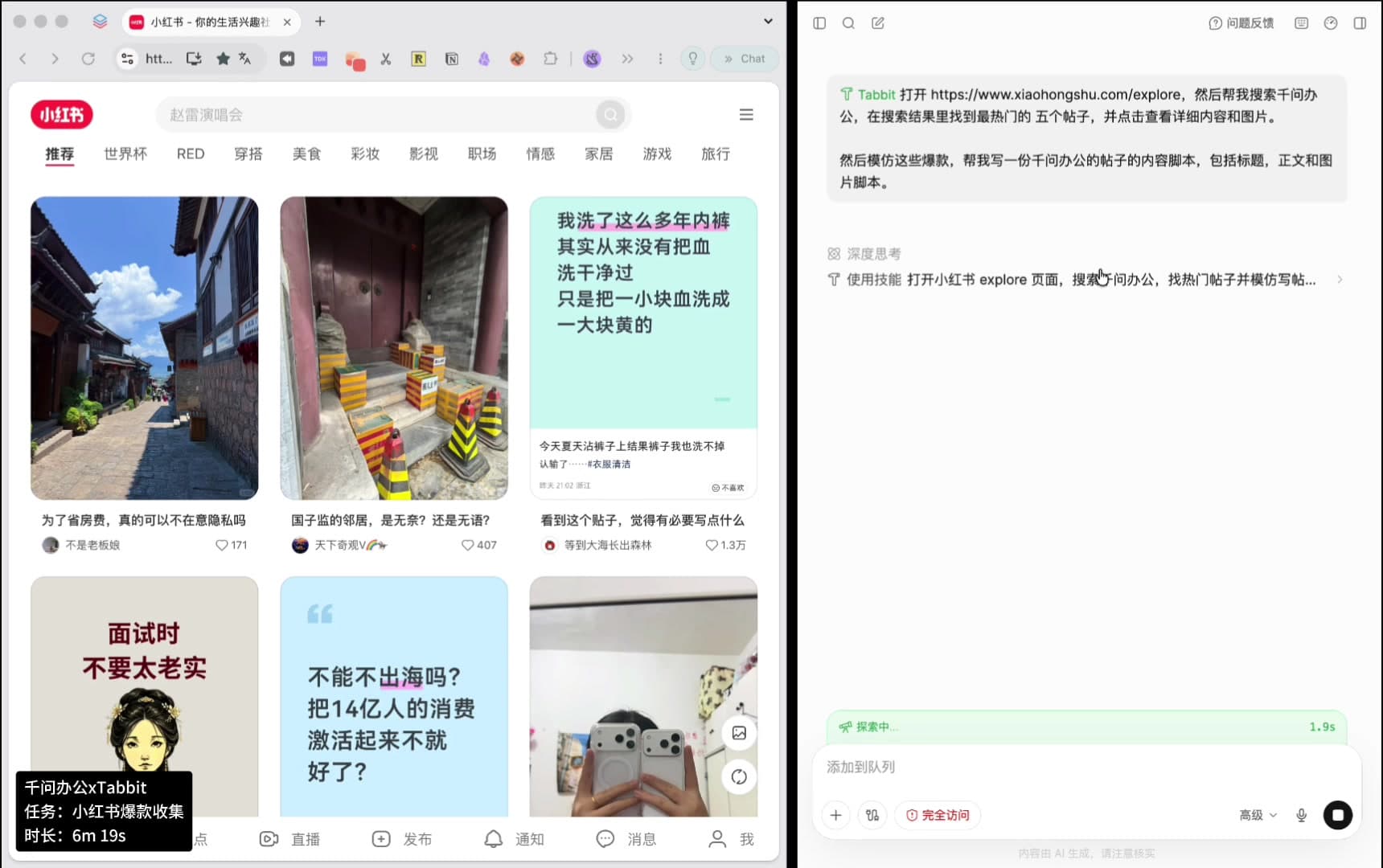
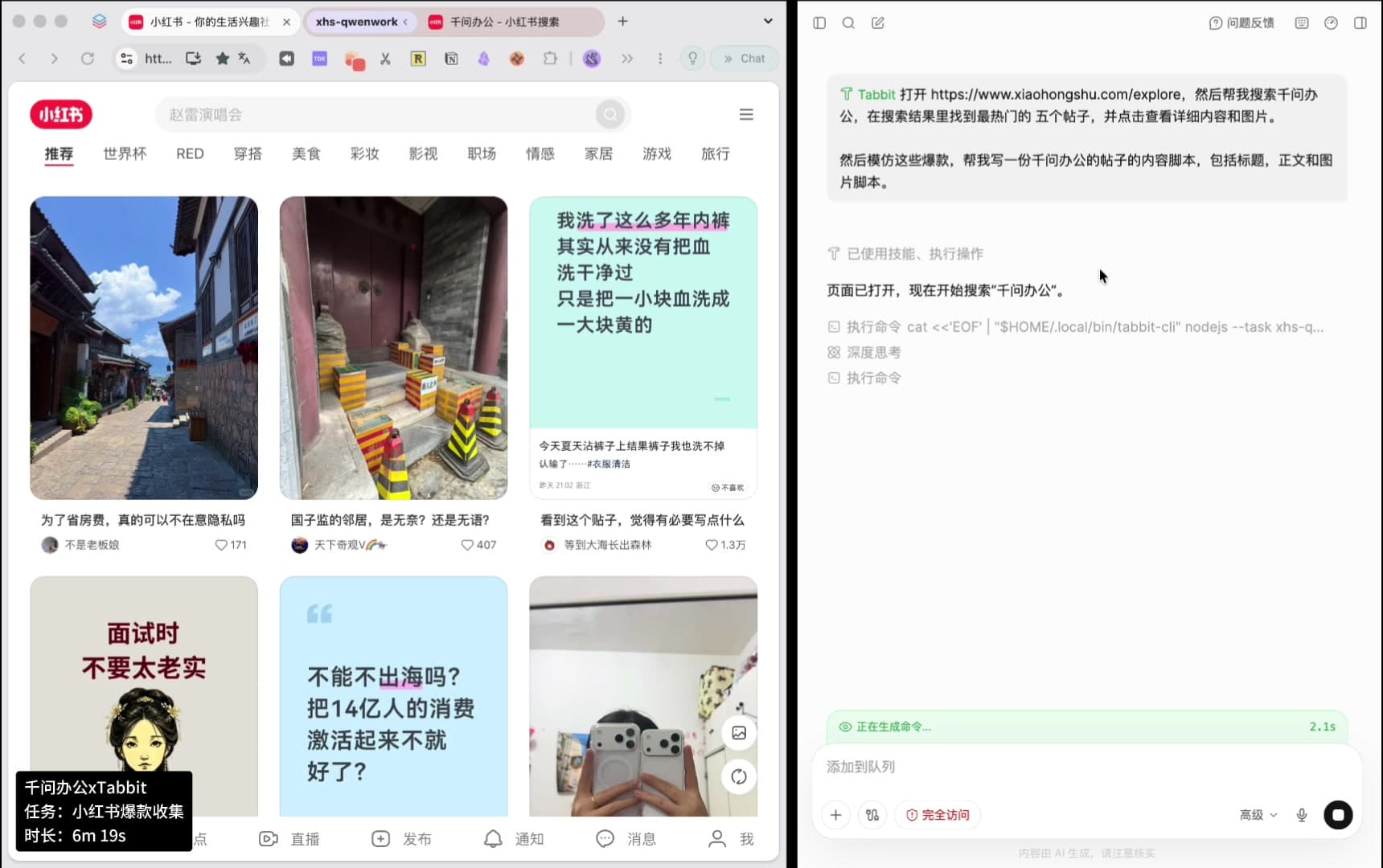
Split screen: on the left Tabbit has the Xiaohongshu explore page open; on the right Qwen Work shows the typed instruction with deep-thinking and skill steps; bottom-left status capsule reads “Qwen Work x Tabbit, task: viral post collection, elapsed 6m 19s”.
The whole setup: one chat window, one browser, one status capsule.
The instruction, as typed

使用 Tabbit 打开 https://www.xiaohongshu.com/explore,然后帮我搜索千问办公,在搜索结果里找到最热门的五个帖子,并点击查看详细内容和图片。然后模仿这些爆款,帮我写一份千问办公的帖子的内容脚本,包括标题,正文和图片脚本。

One paragraph, no code. Everything after the first clause is plain language.

00 · Full recording

Watch the agent hand the work to the browser

67 seconds, unedited. Qwen Work plans on the right, Tabbit browses on the left. Every number on this page comes from this one session.

Recorded 2026-09-03. Post titles, like counts and log lines are read from the recording itself.

01 — Who decides, who executes

Two roles, one job

Nothing here is a hard-coded scraper. One side decides what to do; the other actually does it in a real browser.

Decision side · Qwen Work

Plans the steps, ranks the results, writes the file

  • Turns one sentence into an ordered plan: open the page, search, rank by likes, read the top five, then write.
  • Keeps a visible log of every action, so you can see what it decided and when.
  • Summarises what the five posts share and writes the script as a Markdown file you can hand to an editor.
Execution side · Tabbit

Drives a real browser session, not a headless script

  • Opens the explore page and the search results the way a person would, including pages that only render after a click.
  • Works through a status capsule that keeps showing the task name and elapsed time — 6m 19s here.
  • When a selector grabs the wrong title, and later when the card order changes, the agent recovers instead of stopping.
Qwen Work log showing “page opened, now searching for Qwen Work” and an executed command line starting with tabbit-cli nodejs --task xhs-q.
Before touching the page, the plan and the command are already in the log.

02 — Execution path

From one sentence to a script file, six steps

Timestamps come from the recording.

  1. 0100:00

    Instruction typed

    One paragraph carries the site, the keyword, the “top five by likes” rule, the request to read copy and images, and the output format.

  2. 0200:00 – 00:09

    Open, then search

    Tabbit opens the explore page and searches the keyword. The log reports each action as it happens.

  3. 0300:09 – 00:12

    Rank and shortlist

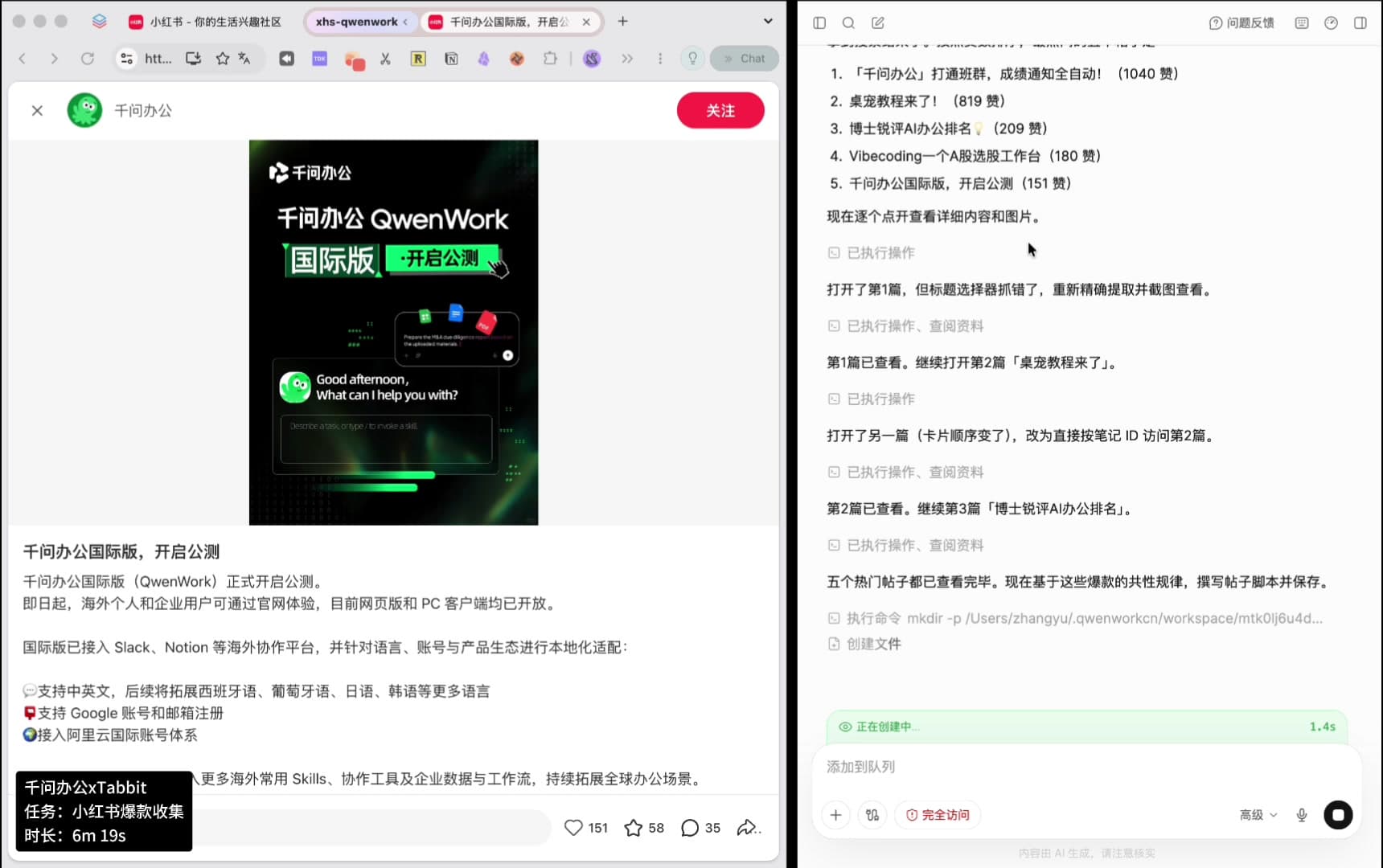
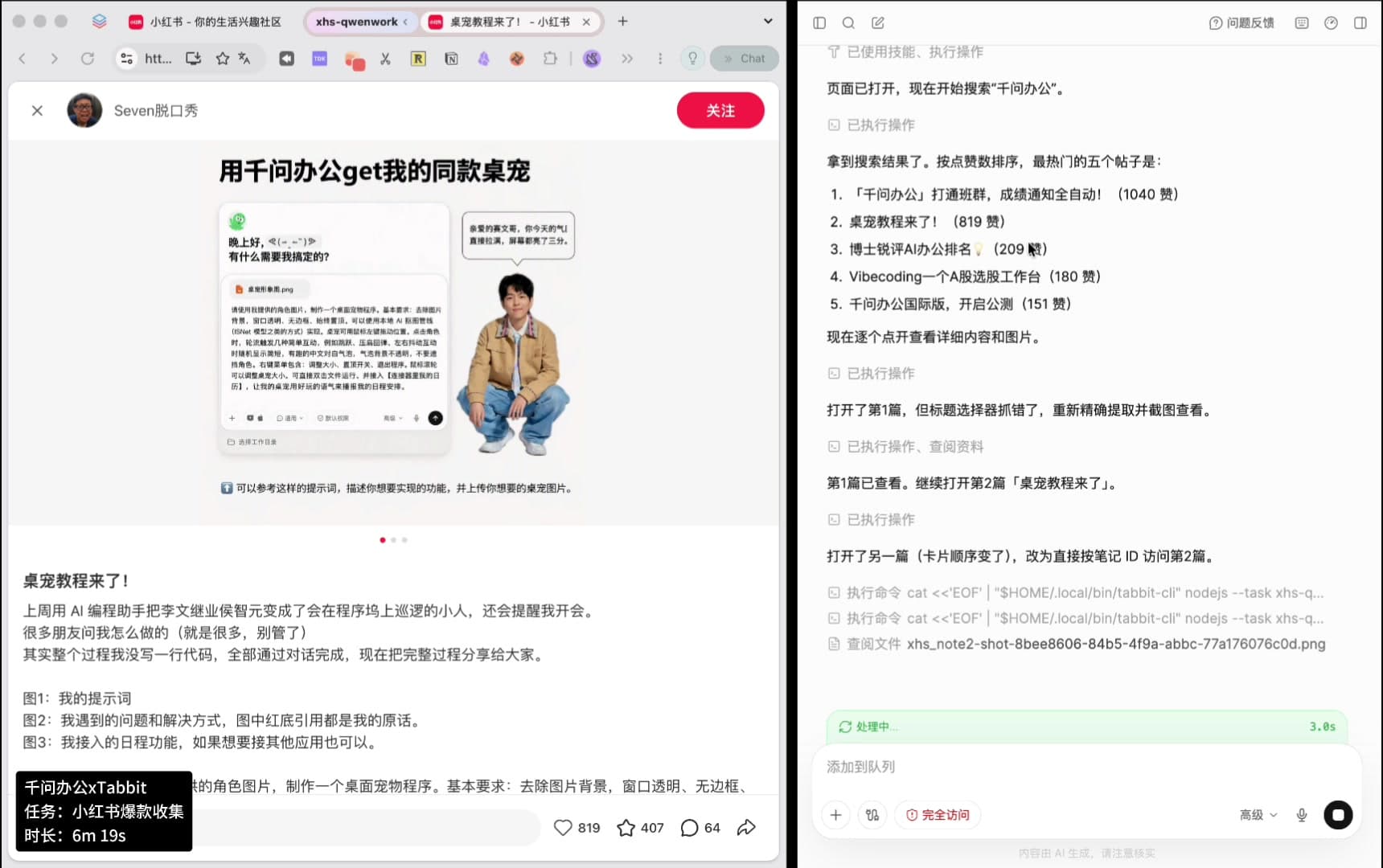
    The agent sorts the results by likes and lists the top five with their counts: 1040, 819, 209, 180, 151.

  4. 0400:12 – 00:56

    Read all five, copy and images

    Each post is opened in turn — copy, tags and images are collected, one post every 6–10 seconds.

  5. 0500:12 – 00:56

    Two self-corrections

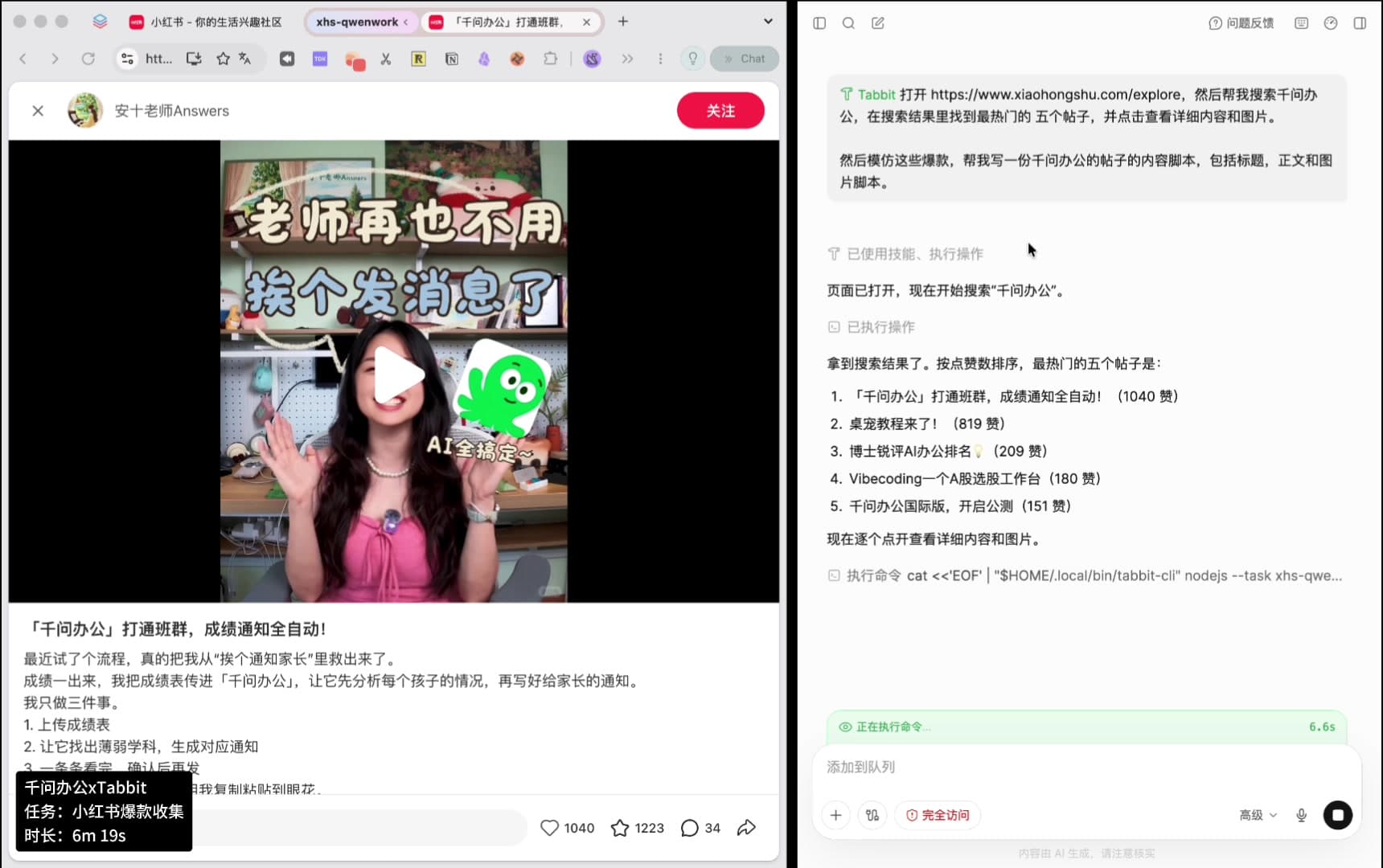
    The first post came back with the wrong title because the selector matched the wrong node, so the agent re-extracted it precisely. Later the card order shifted, so it switched to opening a post by its note ID.

  6. 0600:56 – 01:06

    Write the script file

    The agent states that all five posts have been read, then writes the script file: sample table, shared pattern, three titles, body copy, six-image storyboard, publishing notes.

Xiaohongshu post detail page on the left, and on the right a log line saying the card order changed so the agent switched to opening post two directly by note ID.
The recording keeps the failure and the recovery, not just the happy path.

03 — What it collected

Five posts, ranked by likes

The ranking rule was “most liked”. The counts below are the ones visible on screen during the run, not live values.

  1. 01

    「千问办公」打通班群,成绩通知全自动!

    Video post
  2. 02

    桌宠教程来了!

    Video post
  3. 03

    博士锐评AI办公排名?

    Image post
  4. 04

    Vibecoding一个A股选股工作台

    Video post
  5. 05

    千问办公国际版,开启公测

    Image post

Top five by likes

Same five posts, with the title text as it appeared in the search results.

RankPost titleLikesFormat
1「千问办公」打通班群,成绩通知全自动!Video post
2桌宠教程来了!Video post
3博士锐评AI办公排名?Image post
4Vibecoding一个A股选股工作台Video post
5千问办公国际版,开启公测Image post

Titles, counts and log lines are read from the recording and are shown here only to explain the workflow. This page does not host or republish any third-party post.

Qwen Work log listing the top five posts with like counts, next to the Xiaohongshu detail page of the first post.
The shortlist and the execution log sit on the same screen — the numbers can be checked.

04 — What it worked out

Six things the five posts have in common

These lines are from the agent’s own analysis, written before it drafted anything.

标题=身份/场景+惊叹式成果+标点收尾

Title = identity or scene + a result worth exclaiming about + punctuation

开头第一句先讲“我被什么折磨过”

The first line says what was making the author miserable

正文只讲3步,强调“我没写一行代码”

The body lists three steps and stresses “I did not write a single line of code”

结尾有彩蛋:存成 Skill 下次一键复用

The ending has a payoff: save it as a skill and reuse it next time

标签=身份标签+场景标签+工具标签

Tags = identity + scene + tool

封面图大字标题,内页图=步骤截图+成果展示

The cover carries the headline in large type; inner images are step screenshots plus the result

The formula it wrote down

真实人设 + 具体痛点 + 三步极简流程 + 成果对比 + 提示词放送 + 场景化标签

05 — What it delivered

A script file, not a folder of raw text

The output of the run is one Markdown file with four sections. Below is what is in it, quoted from the recording.

Generated file

千问办公-小红书帖子脚本.md

Four sections in the file

  • 一、爆款样本拆解(选题前先看懂为什么火)
  • 二、帖子正文脚本(可直接发布)
  • 三、图片脚本(6 图轮播)
  • 四、发布建议

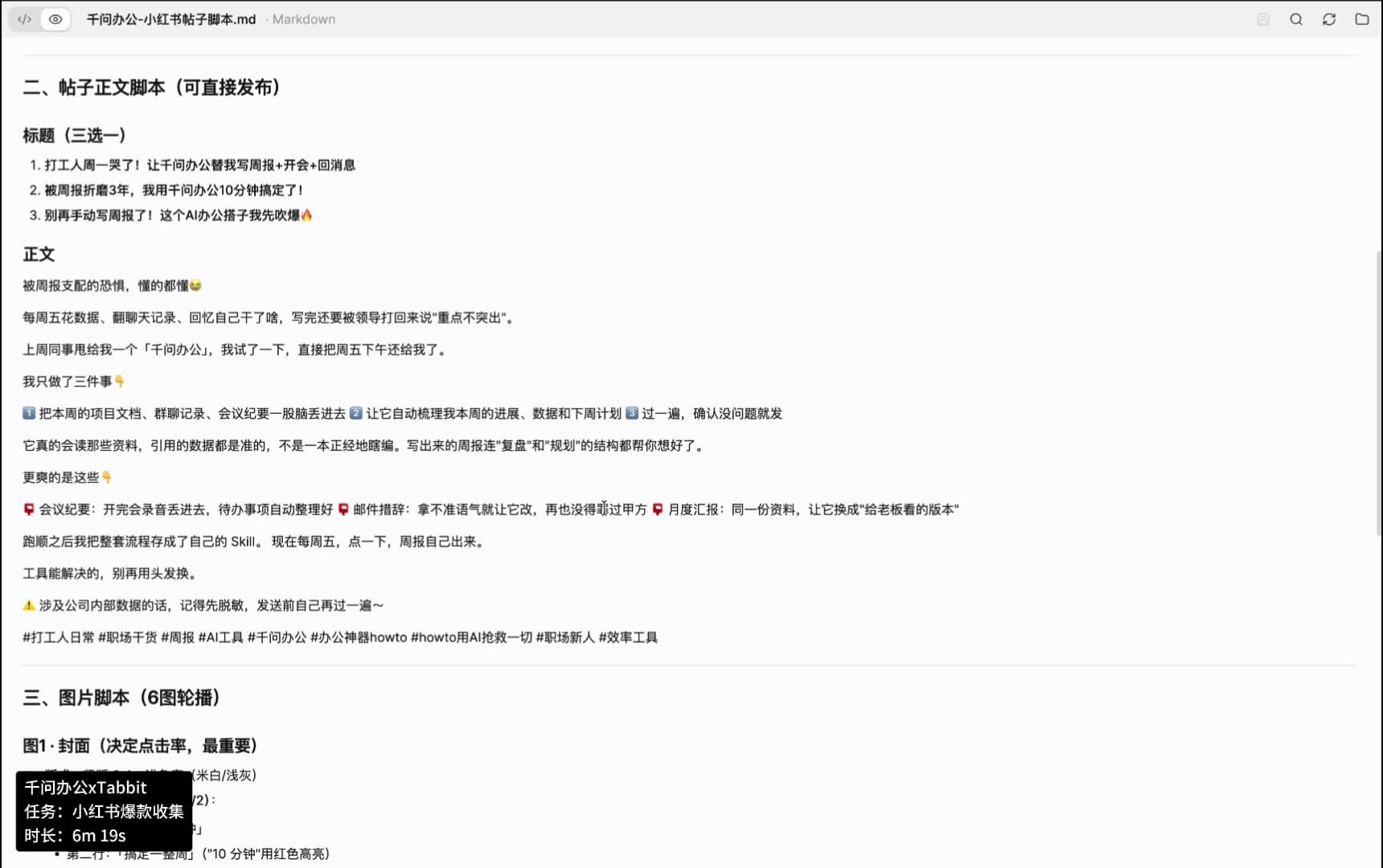
Three title options it wrote

  • 打工人周一哭了!让千问办公替我写周报+开会+回消息
  • 被周报折磨3年,我用千问办公10分钟搞定了!
  • 别再手动写周报了!这个AI办公搭子我先吹爆

Body copy structure

  • Opens with the specific pain: rewriting a weekly report every Friday, then being told the highlights are missing.
  • Then the three steps: upload the material, let it sort progress and next week’s plan, read it once and send.
  • Adds the extra uses — meeting notes into to-dos, email tone rewrites, the same material re-cut for a manager.
  • Closes with the reusable part: save the flow as a skill, then one click every Friday.
  • Keeps a data-hygiene reminder before sending, and ends with a tag set.

The body above is the copy the agent wrote in the recording. It is the example output of the run, not a template you have to reuse.

Qwen Work log saying all five posts have been read, followed by a create-file step for the script.
The moment the run stops collecting and starts writing.
Preview of the generated Markdown file: three title options, the full body copy with tags, and the start of the six-image storyboard section.
The generated file, as previewed on the right of the screen.

06 — The six-image storyboard

The part most tools skip: what each image shows

The file does not stop at copy. It specifies six frames — what is on each one and how it is laid out. The composition notes below are quoted from the generated file.

1

Cover: the frame that decides click-through

From the file米白/浅灰底,第一行身份、第二行“搞定一件事”,“10 分钟”用红色高亮

2

Pain comparison: how it used to go versus now

From the file左“以前的我”凌乱桌面拼贴配“翻记录翻到眼花”,右“现在的我”一句指令,底部横条“从 3 小时 → 10 分钟”

3

Three-step flow: upload, instruct, confirm

From the file三张横向步骤卡 1/2/3:上传资料 → 输入指令 → 确认发送,配截图与红框标注

4

Result: the generated output with annotations

From the file生成结果全文截图(脱敏),红笔旁注“这段数据它自己从文档里抓的”

5

Extra uses: the list that earns saves

From the file清单式卡片“它还能替你干这些”:会议纪要 / 邮件措辞 / 月度汇报 / 存成 Skill

6

Closing frame: the question that pulls comments

From the file“你每周写周报要多久?评论区报个数”+ Skill 保存入口截图

Publishing notes in the file

  • Post at 22:00 or Friday noon — when weekly-report anxiety peaks
  • Pin the full prompt in the top comment to drive saves
  • Keep the data-hygiene line in the copy: it reads honest and stays safe

07 — Why this holds up

Three things make the combination work

None of them depend on how large the model is.

01

The browser is the interface

No API key, no SDK, no scraper to maintain. If a person can read it on the page, the agent can read it — including content that only appears after a click.

02

Collection and writing stay in one session

Most setups stop at saving JSON or Excel and leave the analysis to you. Here the same session that read the posts also wrote the breakdown and the draft.

03

The output is the deliverable

What comes back is a file an editor can act on: a comparison table, a formula, three titles, body copy and six frames with composition notes.

08 — Replicate it

Four sentences that make the run smoother

Paste these into any agent that can call Tabbit.

01

State the site and the ranking rule

Naming the page and the sort order is what keeps the shortlist stable from run to run.

Prompt

Use Tabbit to open https://www.xiaohongshu.com/explore, search for [keyword], and take the five most-liked posts.

02

Ask for a comparison table, not just a rewrite

A rewrite alone loses the research. A table forces the agent to say why each post worked.

Prompt

Open the file with a table comparing the five posts: title pattern, core pain, audience, and the point that drives interaction.

03

Demand frame-level image direction

On image-heavy platforms the cover and the first three images carry most of the weight. Ask for composition, not “some pictures”.

Prompt

For the image script, plan six frames: frame 1 cover composition and headline; frames 2–5 steps and result comparisons; frame 6 the closing question and where to get the material.

04

Constrain the output format

Say what the file must contain up front and you skip the follow-up round trip.

Prompt

Save the result as a Markdown file with: sample breakdown table, shared pattern, three title options, full body copy, six-image storyboard, and publishing notes.

09 — Keep reading

Agent + Tabbit case series

Same pattern, five different jobs: a general agent does the thinking, Tabbit does the browsing.

Benchmark report

How fast is a browser agent, and what does it cost?

The same tasks run across Tabbit, Codex Chrome and Agent Browser, scored on answers, median time and input tokens per correct answer.

Read the benchmark

FAQ

Questions people ask before trying this

Do I need to write a scraper?

No. The whole run is one paragraph of plain language. There is no script, no SDK and no API key — the agent drives a browser the way you would.

Can it read images, not just text?

Yes. In the recording the agent reads the copy and the tags, and opens the images of each post. The image script it writes afterwards is based on what those posts actually did.

What happens when the page structure changes?

It recovers instead of stopping. Twice in this run: a title selector matched the wrong node, so the agent re-extracted the title precisely; later the card order shifted, so it opened the post by its note ID instead.

Is the output usable as it is?

It is a draft you can edit, not a finished post. The value is that the research, the pattern and the structure are already in one file, so editing is the only step left.

How long did it take?

The status capsule in the recording reads 6m 19s for five posts, including two corrections and the final write. The 67-second video is a speed-up of that session.

Get started

Let the agent do the reading

Download Tabbit, hand it to the agent you already use, and point it at the page you would otherwise open twenty times.

Free. macOS and Windows.

© 2026 Tabbit Browser. The AI-native browser that understands your context.