Skip to content
TabbitAgent case 04 / 05
English

Recorded session · one instruction · 200 orders · 26 fields

One instruction. 200 orders. Zero differences.DeepSeek designs. Tabbit does the browser work.

DeepSeek (V4 Flash High) reads one sentence and parses a local CSV: 200 rows, 26 fields. When the official API route fails, it switches to Tabbit, which reuses the logged-in Feishu session in a real browser to build the table, write the records and run the checks. Final tally: 200 records × 26 fields, zero differences from the source file.

200
order records
26
fields, typed by the agent
0
field differences
4m 15s
task time on screen
DeepSeek × TabbitTaskCSV → Feishu BaseElapsed4m 15s
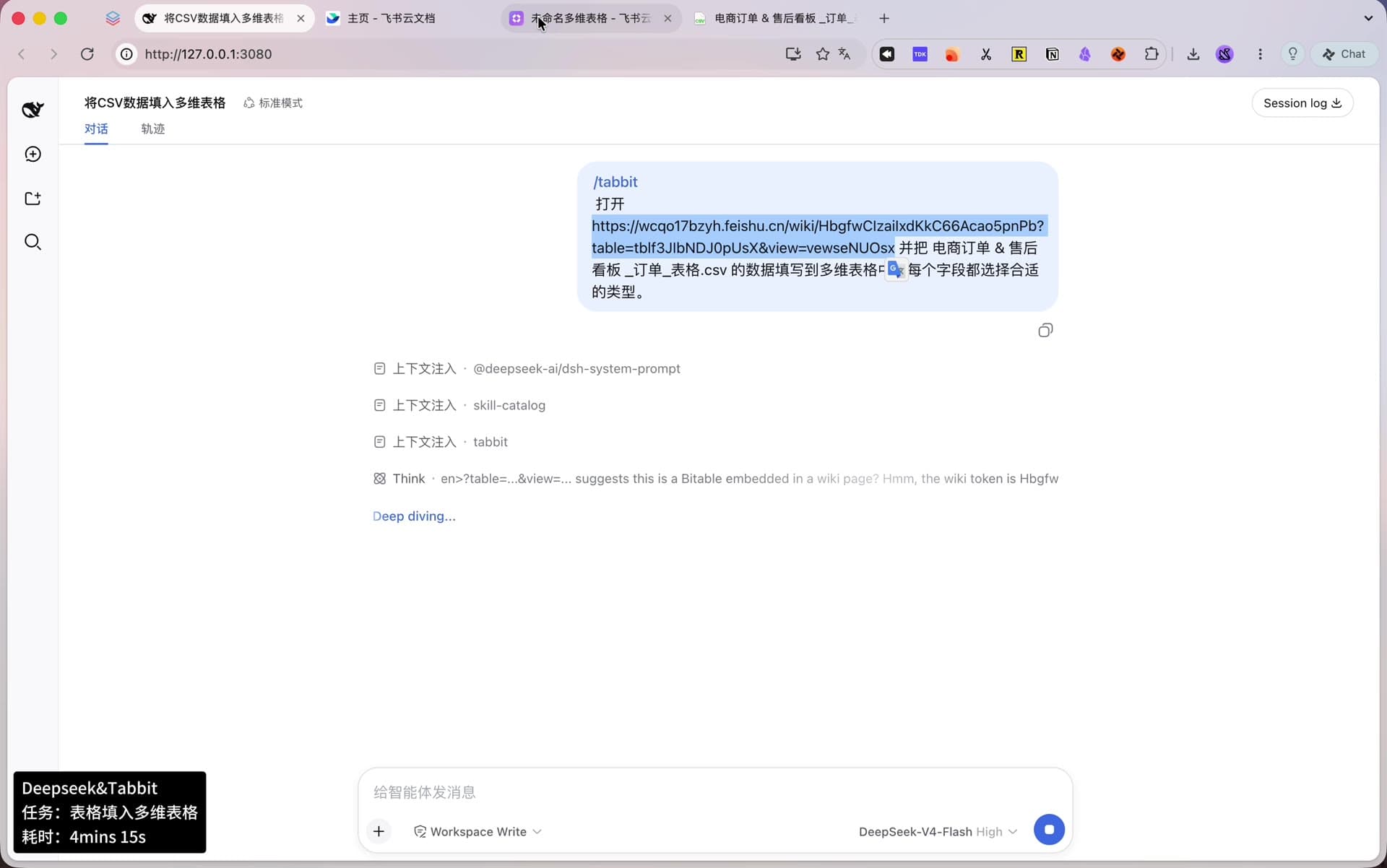
Agent chat window showing the /tabbit instruction that asks to open a blank Feishu Base and fill it from a local CSV; the model badge reads DeepSeek-V4-Flash High and a status capsule marks the task with 4m 15s elapsed.
The whole setup: one chat window, one real browser, one status capsule.
The instruction, as typed

/tabbit 打开 https://wcqo17bzyh.feishu.cn/wiki/Hbgf…pUsX 并把 电商订单 & 售后看板_订单_表格.csv 的数据填写到多维表格中,每个字段都选择合适的类型。

/tabbit open <Feishu Base link> and fill in the data from 电商订单 & 售后看板_订单_表格.csv, choosing a suitable type for every field.

/tabbit hands the browser work to Tabbit. The Base link is redacted here.

00 · The recording

The full automation run in 58 seconds

No cuts, sped up from the real session. DeepSeek plans and calls tools on one side while Tabbit drives the Feishu page in a real browser on the other. Every step below comes out of this session.

Recorded 2026-09-03. The task took 4m 15s in real time; the recording plays it back in 58 seconds.

01 — Who decides, who acts

Two roles, one job

Nothing here is a hard-coded script. One side analyses the data and designs the plan; the other carries it out in the browser.

Decision side · DeepSeek

Parses the CSV, designs the schema, writes the checks

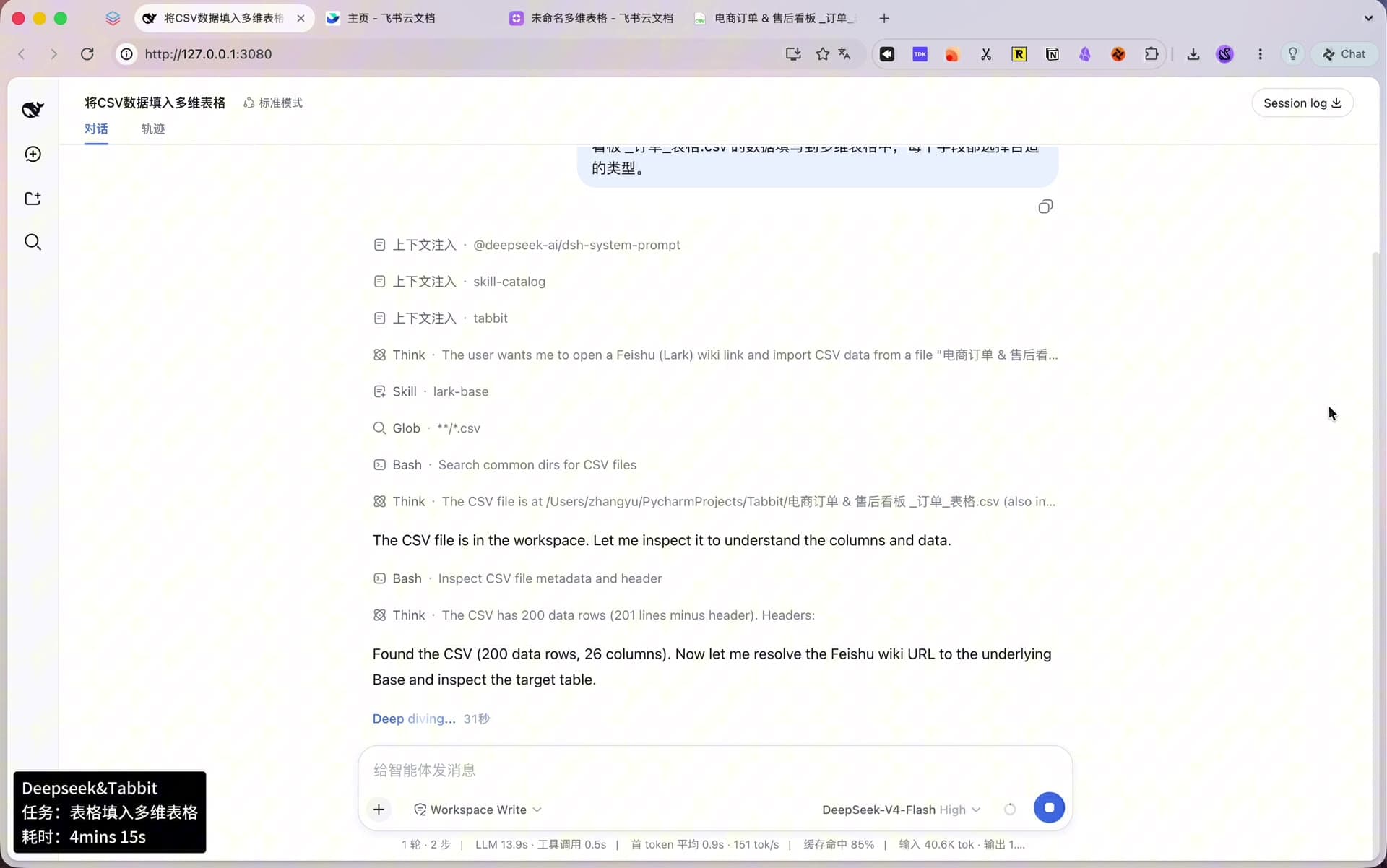
  • Locates the CSV in the workspace and profiles it: 200 rows, 26 fields, with value distribution, empty cells and enum cardinality per field.
  • Tries the official lark-cli API first; when the sandbox cannot read the keychain credentials, it switches to the browser route on its own — no human step-in.
  • Assigns a type to each of the 26 fields and sets the import procedure: test write first, then full load, then verification.
Execution side · Tabbit

Drives a real browser with the logged-in Feishu session

  • Reuses the Feishu session already signed in on the user’s machine — no API key or app credential to configure.
  • Builds fields and writes records through 21 feishu_base_* WebMCP structured tools exposed by the page, not simulated mouse clicks.
  • The only human action in the whole run is one click on “allow once”.
DeepSeek execution trace: loading the lark-base skill, locating the CSV with a file glob, profiling it as 200 data rows and 26 columns, then resolving the Feishu wiki link to the target Base.
Think first: the CSV profiling happens before the browser is touched.

02 — The run

Seven steps from one sentence to a usable table

Phases from the recording and the task trace.

  1. 01Profile

    Locate and parse the CSV

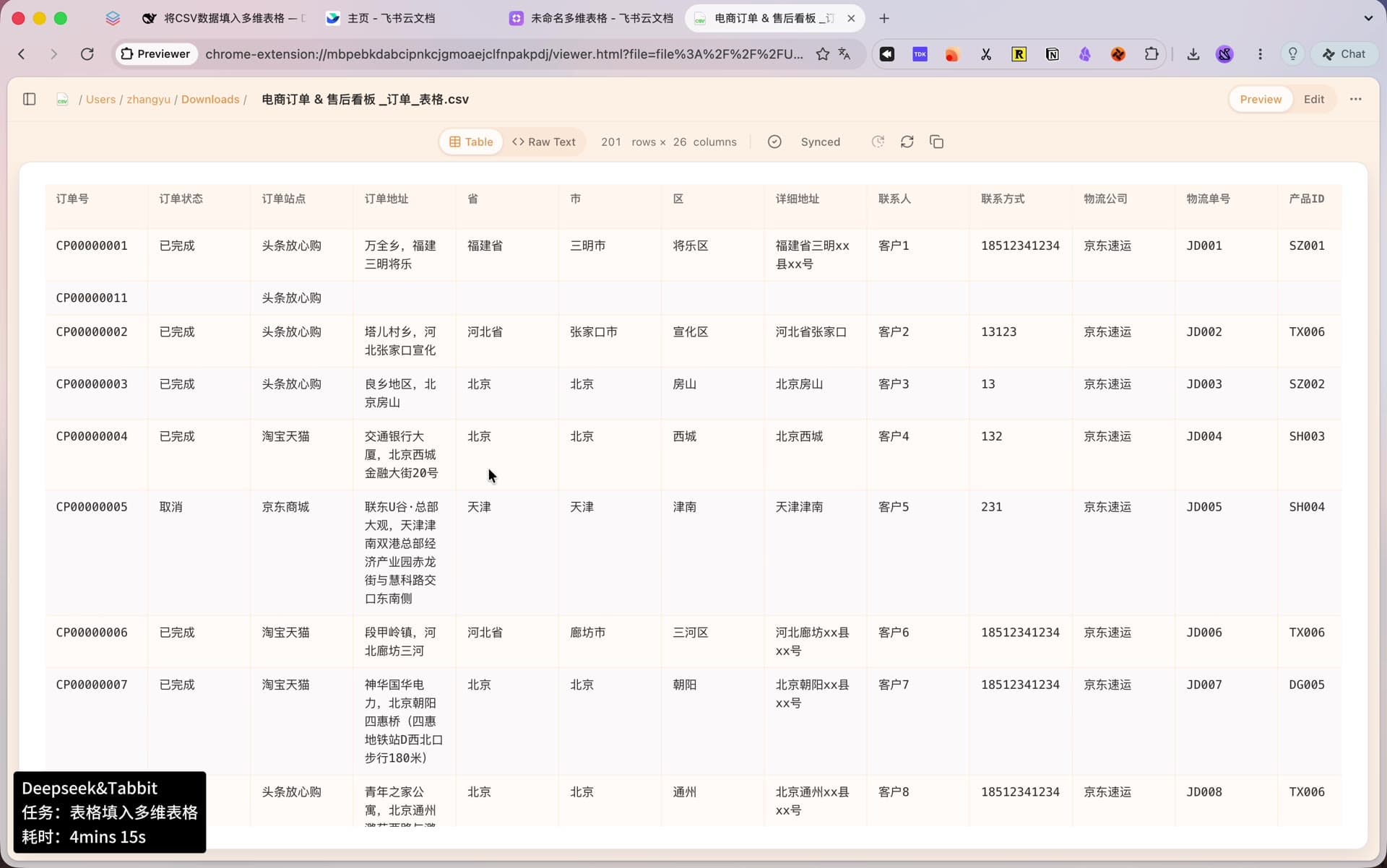
    The agent searches the workspace and finds 电商订单 & 售后看板_订单_表格.csv: 200 rows × 26 fields covering order, address, logistics, product, amount and time data.

  2. 02Reroute

    API blocked, switch plans

    The first try goes through the official lark-cli interface, but the sandbox cannot read the system keychain. Instead of stopping, the agent switches to Tabbit and reuses the signed-in Feishu session in the browser.

  3. 03Authorize

    One click opens the target Base

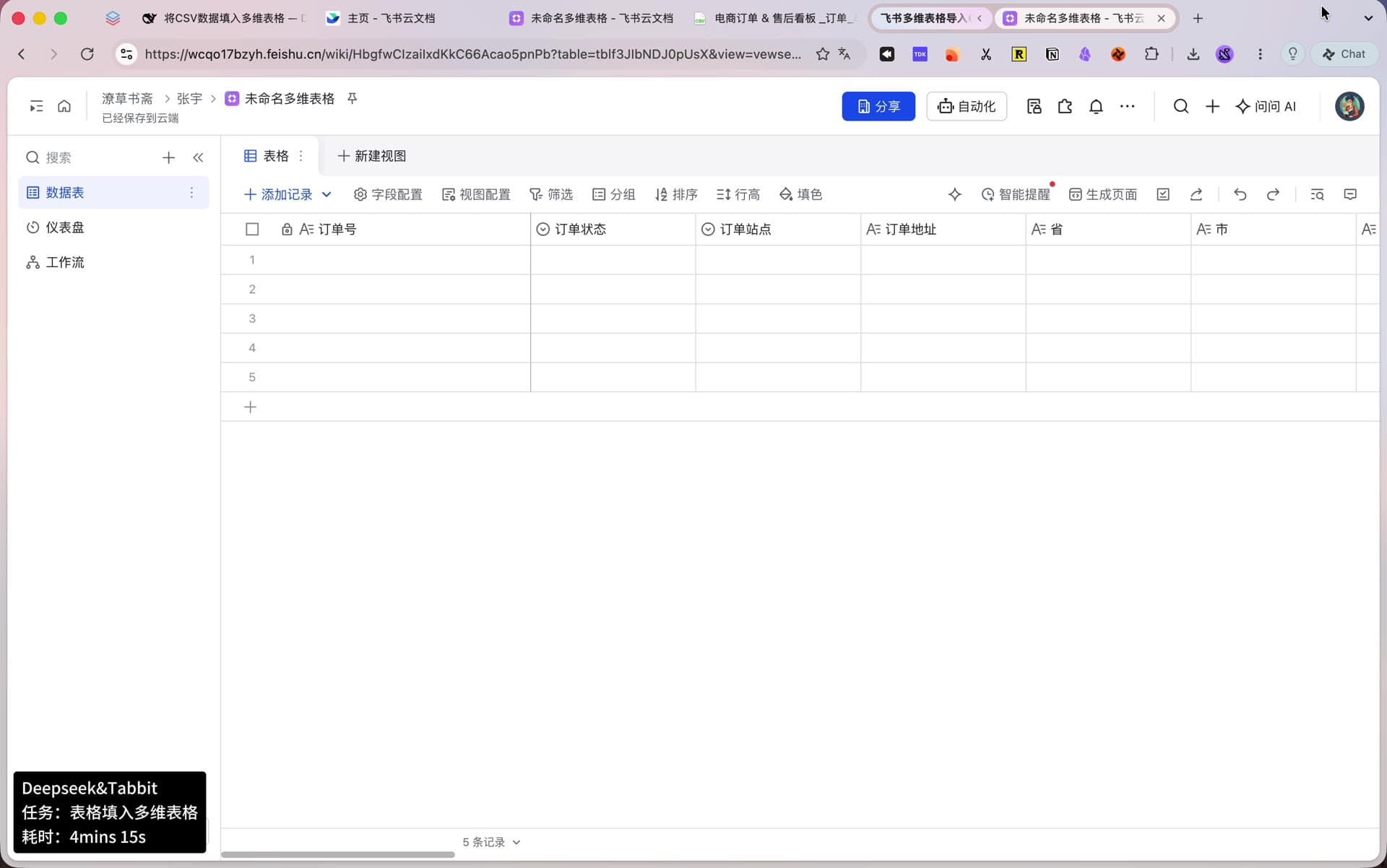
    Tabbit requests browser access; the user clicks “allow once” and the blank Base in the wiki opens: one default text field, five empty placeholder rows.

  4. 04Design

    Type all 26 fields

    The default primary field is renamed and the remaining 25 fields are created in bulk: order ID as the text primary key, low-cardinality enums as single-select, amounts and quantities as numbers, timestamps as date-time.

  5. 05Test write

    Write 5 rows, read them back

    The five placeholder rows are updated with the first five CSV records and read back: single-select options map correctly, numbers store correctly, and the millisecond timestamps match the displayed times.

  6. 06Full load

    Write the remaining 195 in two batches

    After the test write passes, the rest goes in as 100 + 95 records. The table ends at exactly 200 rows — no deletions, no duplicates.

  7. 07Verify

    Field-by-field diff: zero

    All records are pulled back and compared against the source CSV. The first pass flags the time fields — a display-format mismatch, ISO string versus millisecond timestamp — so the agent fixes the comparison logic and re-runs it: 200 × 26, zero differences.

Preview of the source file 电商订单 & 售后看板_订单_表格.csv in the browser: 201 rows × 26 columns with order ID, status, site, province, city, district, address, contact and logistics columns.
The source: a local CSV with 200 orders and 26 fields.

03 — Schema design

Not everything into text columns — types chosen by data shape

The 26 fields fall into five groups. This is the blueprint the agent hands to Feishu, and what makes filtering, grouping and formulas possible afterwards.

Field typeCountFieldsWhy this type
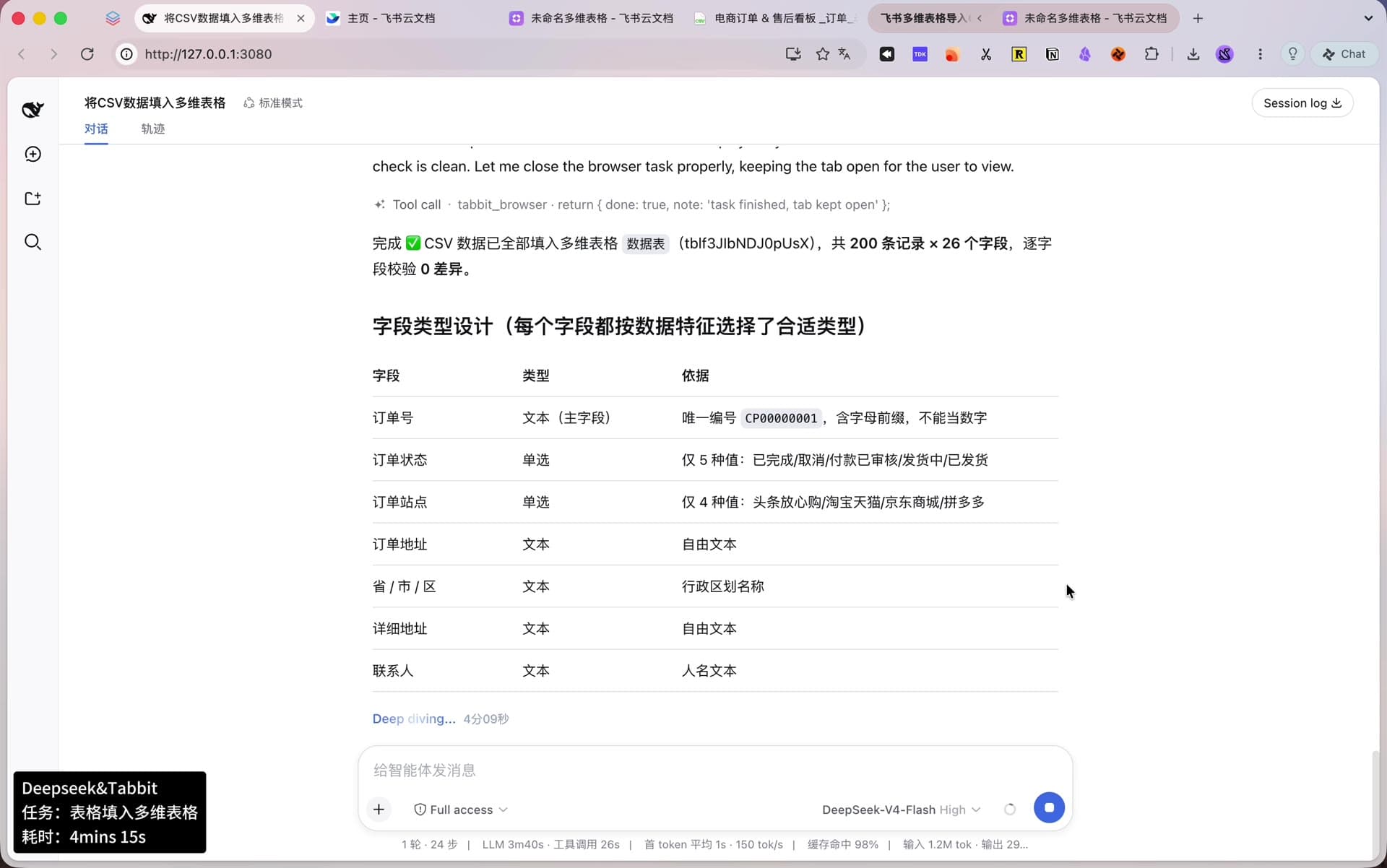
Text (primary)1订单号Unique ID with a letter prefix — not a number, so it becomes the table’s primary text field.
Single select3订单状态、订单站点、物流公司Low-cardinality enums (5 / 4 / 5 values); coloured tags make one-click filters.
Text10省/市/区、详细地址、联系人、联系方式、物流单号、产品ID、产品名称、父记录Free text and codes; an 11-digit phone number stays text so no precision or leading digit is lost.
Number9购买数量、各类单价/总价/优惠金额、发货耗时、价格折扣率Integers, decimals, durations and rates that sums and averages can run on.
Date & time3下单日期、快递下单时间、发货时间Full timestamps, auto-matched to UTC+8, ready for date filters.
Header row of the Feishu Base right after creation: order ID as the locked text primary field, order status and site as single-select fields, followed by address, province and city text fields.
The moment the schema lands: primary key, selects, text, numbers, dates.

04 — Results and verification

200 records × 26 fields, zero differences

Writing the data is not the finish line. The agent pulls the whole table back and diffs it against the source CSV before calling it done.

01

Exactly 200 records

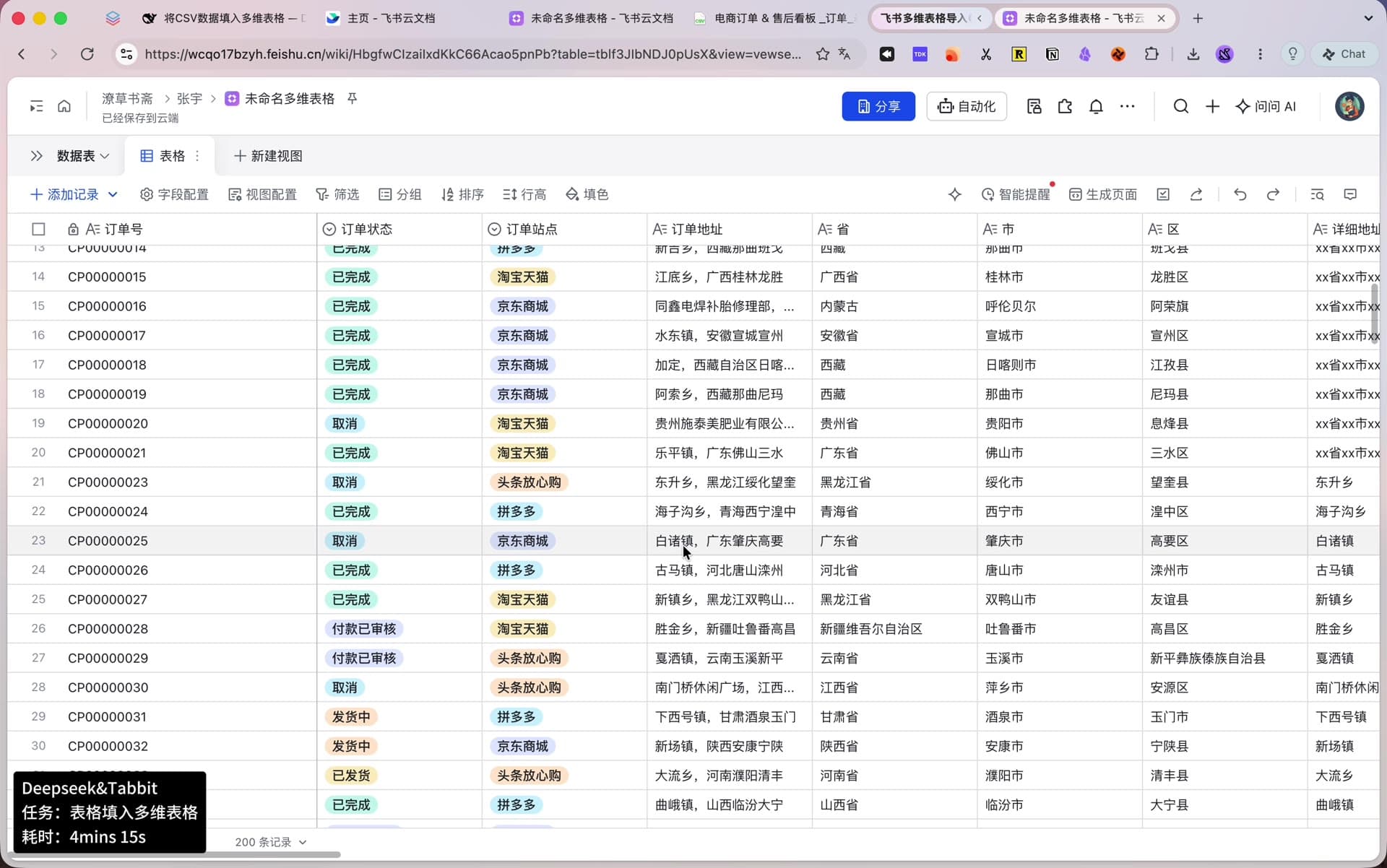
The 5 placeholder rows take the first 5 records; the remaining 195 go in as 100 + 95. The table lands on exactly 200 — no deletions, no duplicates.

02

Every type works

Single-select fields show coloured tags, numbers are ready for formulas, and date fields support date filtering out of the box.

03

Zero-diff verification

All 200 × 26 cells are compared field by field against the source CSV. Final result: zero differences.

The Feishu Base after the full import: 200 order records with coloured single-select tags for status and site, and complete text columns for address, province, city and district.
After the full load: 200 records, tags already coloured.
DeepSeek’s completion report: the CSV has been fully written into the Base — 200 records × 26 fields, field-by-field verification shows zero differences — followed by the type rationale for each field.
The agent’s delivery note: 200 × 26, zero differences.

One footnote from the verification: the first diff flagged the time fields, because the API returns ISO display strings while the table stores millisecond timestamps. The agent fixed the comparison logic and re-ran the check before declaring zero differences. Orders and addresses in this demo are sample data.

05 — Why it works

Four things make this import hold up

None of them are about model size.

01

A second route when the first fails

When the official API cannot provide credentials, the agent falls back to the logged-in browser session. Resilience here is not retrying — it is having plan B ready.

02

Typing is the soul of the job

Dumping every column into text turns a Base into a flat spreadsheet. Typing by data shape is what makes filters, groups and statistics actually work.

03

Test write, full load, then verify

A five-row test write catches format problems early; a field-by-field diff after the load catches everything else. Dirty data never gets a chance.

04

Structured tools, not fake clicks

Everything goes through the 21 feishu_base_* WebMCP tools the page exposes natively — accurate writes, and immune to UI redesigns.

06 — Reproduce it

Four lines that make the import smoother

Copy these into any agent that can call Tabbit.

01

Name the exact Base link and file name

Give the full URL of the target Base and the exact file name, so the agent never has to guess which table or which file you mean. The instruction at the top of this page is the template.

02

Ask for types chosen by data shape

Without this sentence, many agents default every column to text.

Prompt

Choose a suitable type for every field based on the actual data (text / single-select / number / date-time). Do not make everything text.

03

Ask for a test write before the full load

A small-batch check stops most format accidents before they happen.

Prompt

Write the first 5 records and read them back to verify the format before loading the rest in batches.

04

Put verification in the task itself

Imported is not the same as imported correctly. Make the agent prove it.

Prompt

After the import, pull all records back, compare them field by field against the source CSV, and report the number of differences.

07 — Keep reading

The Agent + Tabbit case series

Same pattern, five different jobs: a general agent does the thinking, Tabbit does the browsing.

Related reading

How fast is a browser agent, really?

We benchmarked Tabbit CLI against the Codex Chrome takeover and Vercel Labs Agent Browser: 25 tasks, 225 runs, blind-judged.

Read the benchmark report

FAQ

Questions this demo usually raises

Do I need to write code or configure an API?

No. The whole task is one natural-language instruction. When the official API route fails, the agent switches to Tabbit and reuses the browser session on its own — no API key to apply for, no app credentials to configure.

How does Tabbit operate the Feishu Base?

Through 21 feishu_base_* WebMCP structured tools exposed natively by the page. Creating fields, writing records and reading the full table are function calls, not simulated mouse and keyboard input — so UI changes do not break them, and writes stay accurate.

Why store phone numbers as text?

An 11-digit phone number stored as a number risks precision loss and dropped leading digits, and phone numbers never take part in arithmetic anyway. Text keeps them exactly as written.

What was the “time mismatch” during verification?

The API returns ISO-formatted display strings while the table stores standard millisecond timestamps — same value, different format. The agent recognised it as a presentation-layer difference, fixed the comparison logic and re-ran the check: zero differences.

What does a person actually do in this run?

Click “allow once”. Schema design, typing, test write, full load and verification are all done by the agent, in 4 minutes 15 seconds.

Try it

Hand that table to your agent

Install Tabbit, type /tabbit in the agent you already use, and give it the CSV you have been putting off.

macOS and Windows. Free to download.

© 2026 Tabbit Browser. The AI-native browser that understands your context.