TabbitBlog

Tab Sleeping vs Active Work: Keep Music and Forms Alive

Sleep idle tabs to save memory without killing music, forms, or long tasks. Use keep-alive rules, then let Tabbit separate live work from leftover pages.

In this article
  1. Key takeaways
  2. What should stay awake at a glance
  3. Sleeping, discarding, and keeping a tab awake
  4. What Chrome and Edge already protect
  5. Keep music playing without waking the whole browser
  6. Protect forms and long tasks, then sleep the rest
  7. Save memory after the live tabs are marked
  8. A practical option: separate live work from leftover tabs in Tabbit
  9. Which setup fits the work?
  10. Final verdict

A Zen Browser user put the conflict in one report: tabs went "out of memory" after a while, then reloaded when opened again. The same workload in Firefox and LibreWolf had not done that. In the same thread, another person said the only real problem was that "youtube stops playing music while im gaming." Unchecking the tab unloader did not fix it.

Sleeping, unloading, or discarding idle tabs is how browsers give RAM back. The cost lands on pages you still need: a playlist, a half-written form, a dashboard that must keep updating. An X user wrote that Sleeping Tabs still left a page blank on return, "losing whatever content I had on that page when I left it, eg. half entered form."

Keep live work awake with the browser's own rules, then sleep or close the leftover pile. Tabbit Browser shows up later as one way to split those two groups, so you are not guessing from a strip of unreadable titles.

Key takeaways

  • An idle article that reloads means sleeping did its job. Music stopping or a form going blank means the wrong tab paid for it.

  • Chrome Memory Saver and Edge Sleeping Tabs both try to protect live media. They do not treat a paused video, a finished download, or a stale research tab as live work.

  • Edge's docs separate a sleeping tab from a discarded tab. Chrome reloads an inactive tab, which is closer to discard.

  • Pinning and site exceptions keep a page awake. Use the narrowest host or path, then remove the exception when the task ends.

  • Tabbit helps when the window mixes a live playlist with 40 leftover pages. It organizes the session. It does not replace the sleep setting.

What should stay awake at a glance

Page typeSafe to sleep?WhyFirst action
Static article, old search, finished docsYesNo live media or unsaved inputLet native sleep run, or close it
YouTube or music that is actually playingNoChrome lists active audio or video as a reason to skip deactivationKeep playback going, pin the tab, or add a narrow exception
Paused video used as a later playlistUsually yes, unless you need the exact timestampA paused player may not count as active mediaSave the timestamp or exception the one tab you will resume
Form, checkout, or unsaved draftNoGoogle currently lists partially filled forms as protected activityFinish, copy the text, or add a temporary exception
Upload, download, call, or screen shareNoOfficial Chrome help also lists downloads, calls, and screen shareLeave it active until the job ends
Support chat, remote console, or other long connectionNo, for that hostVendor docs such as Olark warn that sleeping the console can drop the sessionAdd that host to Always keep these sites active
Dashboard you are not watchingMaybeLive updates cost RAM; a stale board often does not need to keep pollingSleep it unless a filter or query exists only in the page

If Memory Saver looks broken because idle tabs never go inactive, that is a different problem. Use the Chrome Memory Saver troubleshooting guide. This article assumes you want idle tabs to sleep, and you need the live ones left alone.

Sleeping, discarding, and keeping a tab awake

People use "sleeping tabs" for three different outcomes.

A kept-awake tab still has a live page. Music can continue. A form field can still hold text. A websocket can stay open. That tab also keeps using memory.

A sleeping tab, in Microsoft's current Edge Sleeping Tabs page, is a paused page. Edge says this cuts CPU and can return quickly because the page is not thrown away.

A discarded or inactive tab is closer to "this page is gone from memory." Edge says a discarded tab must fully reload. Google's Chrome performance help says Memory Saver deactivates tabs you are not using, and the inactive tab automatically reloads when you come back.

That last sentence is the one people miss. Chrome is not promising a frozen screenshot of your draft. It is promising a URL that will load again. A well-built site may restore a session. A form that lived only in the page, a scroll position, or a paused player may not.

Zen's tab unloader, Firefox's auto tab discard, and various "tab suspender" extensions sit on the same spectrum. The brand name changes. The trade-off does not: RAM comes back when the page is no longer fully resident.

What Chrome and Edge already protect

You do not start by installing another suspender. You start with the rules the browser already publishes.

Chrome Memory Saver currently has three levels: Moderate waits longer, Balanced is the recommended middle, Maximum deactivates eligible tabs sooner. "Sooner" still does not override protected activity. Google's help says settings and activities may prevent deactivation, including:

  • active audio or video, including playback or calls

  • screen share

  • page notifications

  • active downloads

  • partially filled forms

  • pinned tabs

  • connected USB or Bluetooth devices

You can also add hosts to Always keep these sites active. The same help page shows path-level examples, including youtube.com/watch?v=* for YouTube videos. That is more precise than adding all of youtube.com, which would also keep idle channel pages and leftover search results awake.

Edge's published list is similar on media and capture, with extras such as DevTools inspection, intranet sites, and WebUSB. Default sleep is one hour of inactivity, and the timer can be set from 30 seconds to 12 hours. Sites you never want to sleep go on the same kind of exception list.

A music tab that is actually playing is supposed to stay awake in Chrome. If it still dies, the page may have paused, the site may stop in the background on its own, or another unloader (Zen, an extension, OS memory pressure) is doing the work. Do not turn off Memory Saver for the whole browser until you have tested one playing tab.

A form is protected only while Chrome still sees it as partially filled. Saving, navigating away, or a site that stores nothing until submit can still lose the draft after a reload. Treat the protection as a safety net, not as version control.

Keep music playing without waking the whole browser

The Zen comment about YouTube stopping during a game is the usual mixed window: one live tab, everything else ballast. A global unloader cannot see the difference.

Do this in order:

  1. Confirm the music tab is actually playing, not paused or muted in a way that drops the media session.

  2. Pin that tab, or add the narrowest exception (music.youtube.com or a watch-path rule, not every Google property).

  3. Leave Memory Saver or Sleeping Tabs on for the other pages.

  4. If playback still stops, the cause may not be tab sleep. Full-screen games, OS energy saver, and the site's own background policy can interrupt audio even when the tab is eligible to stay active.

A Chrome user in r/chrome liked Memory Saver for smoothness, then hit the other half of the trade-off: "it also loses my last position in Youtube videos, which I often have as music playing in the background." The reply in that thread was the exception list. The same user still wanted unused YouTube tabs to sleep. Protect the playing tab. Do not whitelist the entire site because one video matters.

If RAM is still high after idle articles go inactive, the music tab may simply be expensive. Diagnose the process with the Chrome RAM guide instead of disabling sleep for every leftover doc.

Protect forms and long tasks, then sleep the rest

Forms fail in a quieter way than music. You only notice when you return.

Before you raise the sleep level, scan for:

  • text in a form that has not been submitted

  • a file that is still uploading or downloading

  • a call, screen share, or remote desktop

  • a support inbox or live-chat agent view

  • a console whose session dies if the page is frozen

Olark's help for agents is blunt: browsers sleep tabs they consider inactive, and that "can cause agents to be disconnected from the chat interface." Their fix is the same exception list Chrome and Edge already ship. A long task is not "a tab you might need later." It is a connection the page is still using.

For a one-off checkout or application form, finishing or copying the text is safer than a permanent exception. For a host you use every day as a live console, add the site, then check a month later whether the exception is still needed.

Pinning is the short lever. Chrome currently treats pinned tabs as a reason they may stay active. Unpin the page when the task ends, or it will keep paying the memory cost.

None of this requires a new browser. Native Chrome tab groups already help you see the live set. Vertical tabs in Chrome make titles readable enough to notice which one is the form. The sleep setting still needs a human decision about what "idle" means.

Save memory after the live tabs are marked

Once music, forms, and long tasks are marked, the remaining pile is eligible. That is where sleeping earns its keep.

Close duplicates and finished work first. A sleeping tab still occupies a slot in the tab strip and still has to reload later. If you will not return, closing is cheaper than sleeping. The tab organization system is the fuller version of that cleanup.

Then let native sleep handle static reading. Moderate or Balanced is enough for mixed work. Maximum is for sessions that are mostly articles and search results, after you have excepted the live hosts.

Avoid stacking a third-party tab suspender on top of Memory Saver "just in case." Extra extensions add their own processes and permissions. Test one change at a time with a plain article as the control tab and the playlist as the protected tab.

If the machine is still tight after idle pages go inactive, you are looking at live work, an extension, or GPU cost. A lightweight browser comparison can help later. Switching brands will not make one live call plus a huge spreadsheet free.

An AI tab manager is useful when you cannot tell which of 60 titles is the live form. It should not be the thing that discards that form.

A practical option: separate live work from leftover tabs in Tabbit

Suppose the window looks like this: one YouTube mix, a half-finished vendor form, two docs, and 50 research tabs from last week. Chrome can protect the mix and the form. It cannot tell you which of the 50 pages are duplicates. That review step is where people either sleep nothing or sleep the wrong tab.

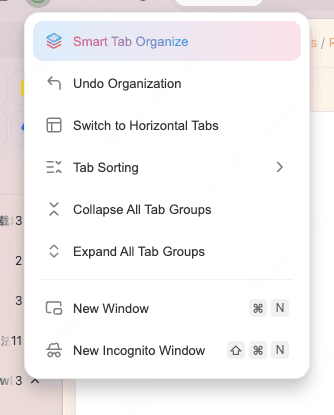
Tabbit Browser's Smart Tab Organization groups open pages by topic so the live cluster is visible as a group, not as a tiny favicon. There is no promised RAM number. What you get is a working set that still contains the music and the form, while expired groups are easier to close.

Tabbit Smart Tab Organize menu with undo, layout switching, sorting, and group collapse controls
Smart Tab Organization turns a mixed window into groups you can review before anything sleeps or closes.

Use this sequence:

  1. In your current browser, save or copy anything a URL cannot restore: form text, upload progress, the track that must keep playing.

  2. Install Tabbit and import a test profile. Do not replace the main profile on the first try.

  3. Run Smart Tab Organization on the crowded window.

  4. Keep the live-work group open. Review reference groups. Close obvious leftovers.

  5. Leave Chrome Memory Saver or Edge Sleeping Tabs to handle eligible idle pages in whichever browser you keep using for everyday sites.

Tabbit Browser window with a vertical tab sidebar and a desktop-style workspace
Vertical tabs and separate desktops keep a live playlist or form in its own workspace instead of mixing it with last week's research.

This pairs well with a productivity-focused browser setup and with Arc-style workspaces: one space for the call or the form, another for reading. Workspaces do not freeze a page by themselves. They stop you from hunting the live tab across three windows.

Tabbit is Chromium-based, so the same heavy web app can stay heavy. Smart Tab Organization can mis-group mixed tools. The current marketing site does not publish a user-facing sleep timer, and this article does not claim one. Compare the migration cost in Tabbit vs Chrome before moving a primary profile.

Which setup fits the work?

WorkloadKeep awake withSleep or closeWhere Tabbit helps
Reading and search, no mediaFew or no exceptions; Maximum or Balanced is fineAlmost everything idleGroups leftover sources so you can close duplicates
Background music plus researchPin the playing tab or a narrow music hostResearch and old articlesMakes the playlist group obvious next to the reading pile
Forms, checkouts, applicationsFinish the form, or a temporary host exceptionEverything else after saveKeeps the risky live group visible before bulk cleanup
Calls, uploads, remote consolesOfficial protection plus a host exception if the vendor requires itUnrelated browsingSeparates the console workspace from casual tabs
Game plus YouTubeConfirm the music tab is still a live media session; exception if the unloader ignores thatOther browser windowsUseful only if the browser window itself is overcrowded
One page or extension that grows while activeSleep settings will not fix itIsolate that taskNot the primary fix; diagnose the process first

Final verdict

If idle tabs reload, the sleep feature is doing the job it was written for. One switch cannot both reclaim RAM from leftover pages and keep a playlist or form intact.

Start with the official keep-alive list. Protect playing audio, unfinished forms, downloads, and calls. Add the narrowest site exception you can live with. Then sleep or close the rest.

When the blocker is that you cannot see which tab is the live one, install Tabbit Browser, import a test profile, and run Smart Tab Organization on one mixed window. Keep the live group. Close yesterday's pile. Measure the same necessary work again. That is safer than turning off sleeping for the entire browser.

FAQ

Why does tab sleeping stop YouTube or other music?

A tab can keep playing only while the browser still treats it as live media. Chrome's Memory Saver is supposed to skip tabs with active audio or video, but a paused track, a site that stops in the background, or a separate tab unloader can still cut playback. Pin the playing tab or add a narrow site exception, then test with one track before changing the global sleep setting.

Will a sleeping tab erase an unfinished form?

Not always. Google currently lists partially filled forms among the activities that may prevent Chrome from deactivating a tab. If the page is discarded anyway, unsaved field text can disappear on reload. Finish or copy the draft first, or add a temporary exception for that host.

What is the difference between sleeping tabs and discarded tabs?

Microsoft Edge describes a sleeping tab as a paused page that can return quickly, and a discarded tab as a page removed from memory that must reload. Chrome Memory Saver deactivates unused tabs and reloads them when you come back, which is closer to discard than to a freeze. If return speed or form state matters, do not treat those two outcomes as the same.

Should I pin a tab or add a site exception?

Pin a tab when only that one page must stay awake for a short time. Add a site exception when the same host must keep running across sessions, such as a music site or a support console. Prefer the narrowest host or path. A whole-domain exception keeps more pages resident than the task needs.

How do I save memory if several tasks must stay live?

Keep only the current music, form, upload, or call awake. Close or sleep reference tabs, duplicate searches, and finished projects. Native sleep settings reclaim memory from eligible idle pages; they cannot make a live video, spreadsheet, and call cheap. If the leftover pile is the real cost, organize it before adding more exceptions.

Can Tabbit keep music playing while other tabs sleep?

Tabbit does not replace Chrome Memory Saver or Edge Sleeping Tabs, and it does not promise that the same heavy page will use less RAM. Smart Tab Organization can group a mixed window so the live music or form stays visible while leftover research is easier to close. You still decide which group stays open.

Take the next step

Let Tabbit work alongside you.

Research across tabs, automate repetitive browser work, and keep every piece of context within reach.